
Java读写资源文件类Properties
Java中读写资源文件最重要的类是Properties
1) 资源文件要求如下:
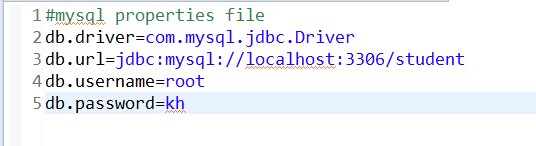
2) 功能大致如下:

 package com.ifly.myhome.test;

 import java.io.File;

 import java.io.FileInputStream;

 import java.io.FileOutputStream;

 import java.io.IOException;

 import java.io.InputStream;

 import java.io.OutputStream;

 import java.io.UnsupportedEncodingException;

 import java.util.Properties;

 public class PropertiesMyTest

 {

     public static void main(String[] args)

     {

         String readfile = "e:" + File.separator + "readfile.properties";

         String writefile = "e:" + File.separator + "writefile.properties";

         String readxmlfile = "e:" + File.separator + "readxmlfile.xml";

         String writexmlfile = "e:" + File.separator + "writexmlfile.xml";

         String readtxtfile = "e:" + File.separator + "readtxtfile.txt";

         String writetxtfile = "e:" + File.separator + "writetxtfile.txt";

         readPropertiesFile(readfile); //读取properties文件

         writePropertiesFile(writefile); //写properties文件

         readPropertiesFileFromXML(readxmlfile); //读取XML文件

         writePropertiesFileToXML(writexmlfile); //写XML文件

         readPropertiesFile(readtxtfile); //读取txt文件

         writePropertiesFile(writetxtfile); //写txt文件

     }

     //读取资源文件,并处理中文乱码

     public static void readPropertiesFile(String filename)

     {

         Properties properties = new Properties();

         try

         {

             InputStream inputStream = new FileInputStream(filename);

             properties.load(inputStream);

             inputStream.close(); //关闭流

         }

         catch (IOException e)

         {

             e.printStackTrace();

         }

         String username = properties.getProperty("username");

         String passsword = properties.getProperty("password");

         String chinese = properties.getProperty("chinese");

         try

         {

             chinese = new String(chinese.getBytes("ISO-8859-1"), "GBK"); // 处理中文乱码

         }

         catch (UnsupportedEncodingException e)

         {

             e.printStackTrace();

         }

         System.out.println(username);

         System.out.println(passsword);

         System.out.println(chinese);

     }

     //读取XML文件,并处理中文乱码

     public static void readPropertiesFileFromXML(String filename)

     {

         Properties properties = new Properties();

         try

         {

             InputStream inputStream = new FileInputStream(filename);

             properties.loadFromXML(inputStream);

             inputStream.close();

         }

         catch (IOException e)

         {

             e.printStackTrace();

         }

         String username = properties.getProperty("username");

         String passsword = properties.getProperty("password");

         String chinese = properties.getProperty("chinese"); //XML中的中文不用处理乱码,正常显示

         System.out.println(username);

         System.out.println(passsword);

         System.out.println(chinese);

     }

     //写资源文件,含中文

     public static void writePropertiesFile(String filename)

     {

         Properties properties = new Properties();

         try

         {

             OutputStream outputStream = new FileOutputStream(filename);

             properties.setProperty("username", "myname");

             properties.setProperty("password", "mypassword");

             properties.setProperty("chinese", "中文");

             properties.store(outputStream, "author: shixing_11@sina.com");

             outputStream.close();

         }

         catch (IOException e)

         {

             e.printStackTrace();

         }

     }

     //写资源文件到XML文件,含中文

     public static void writePropertiesFileToXML(String filename)

     {

         Properties properties = new Properties();

         try

         {

             OutputStream outputStream = new FileOutputStream(filename);

             properties.setProperty("username", "myname");

             properties.setProperty("password", "mypassword");

             properties.setProperty("chinese", "中文");

             properties.storeToXML(outputStream, "author: shixing_11@sina.com");

             outputStream.close();

         }

         catch (IOException e)

         {

             e.printStackTrace();

         }

     }

 }
username=khpassword=khchinese=谓语
#author: shixing_11@sina.com#Fri May 28 22:19:44 CST 2010password=khchinese=\u8C13\u8BEDusername=kh
3. readxmlfile.xml
<?xml version="1.0" encoding="UTF-8" standalone="no"?><!DOCTYPE properties SYSTEM "http://java.sun.com/dtd/properties.dtd">
<properties>
<entry key="password">mypassword</entry>
<entry key="chinese">中文</entry>
<entry key="username">myname</entry>
</properties>
<?xml version="1.0" encoding="UTF-8" standalone="no"?><!DOCTYPE properties SYSTEM "http://java.sun.com/dtd/properties.dtd">
<properties>
<entry key="password">kh</entry>
<entry key="chinese">中文</entry>
<entry key="username">kh</entry>
</properties>
5. readtxtfile.txt
1.原因
Properties调用load(InputStream)时,读取文件时使用的默认编码为ISO-8859-1;当我们讲中文放入到properties文件中,通过getProperty(key)获取值时,取到得数据是ISO-8859-1格式的,但是ISO-8859-1是不能识别中文的。
2.解决方法
通过getProperty()获取的数据data既然是ISO-8859-1编码的,就通过data.getByte(“iso-8859-1”)获取获取,使用new String(data.getByte(“iso-8859-1”),”UTF-8”)进行转换。当然properties文件的编码类型需要和new String(Byte[],charst)中的第二个参数的编码类型相同
Java读写资源文件类Properties的更多相关文章
- Java 从资源文件(.properties)中读取数据
在Java工程目录src下,创建一个后缀为.properties的文件,例如db.properties 文件中的内容如下(键=值): name=mk age=123 address=China 在程序 ...
- Properties读写资源文件
Java中读写资源文件最重要的类是Properties,功能大致如下: 1. 读写Properties文件 2. 读写XML文件 3. 不仅可以读写上述两类文件,还可以读写其它格式文件如txt等,只要 ...
- Eclipse中建立Maven项目后,Java Resources资源文件下没有src/main/java文件夹
当建立好一个Maven项目后,在Java Resources资源文件夹下没有看到src/main/java文件夹,然后手动去创建Source Folder时,提示该文件已存在,如图: 有一个解决办法: ...
- java读取资源文件(Properties)
四步: java代码 //new一个读取配置文件 Properties properties=new Properties(); //获取文件路径 String path=request.getSer ...
- java读写excel文件( POI解析Excel)
package com.zhx.base.utils; import org.apache.poi.hssf.usermodel.HSSFWorkbook; import org.apache.poi ...
- java web 资源文件读取
前提:假设web应用test(工程名) webapps下面有一资源文件test.html 规则:在获取资源时一般使用的是相对路径,以符号/开头,而 / 代表什么取决于这个地址给谁使用.服务器使用时,/ ...
- Android 资源文件local.properties使用以及Gradle文件中的值、Manifests文件中的值
这篇也是因为Gradle存储密钥问题一路填坑总结的,期初连.properties创建都有疑问 因为当时是在Android下查看新建的properties一直没法看到 因为Gradle Scripts是 ...
- 《Java知识应用》Java读写DBF文件
1. 准备: Jar包下载:链接: https://pan.baidu.com/s/1Ikxx-vkw5vSDf9SBUQHBCw 提取码: 7h58 复制这段内容后打开百度网盘手机App,操作更方便 ...
- 【转】利用Eclipse编辑中文资源文件(application_zh_CN.properties )
既然生为中国人,就没有什么好抱怨的了,遇到编码的问题,那只有解决它了. 如果经常使用Struts,并做过国际化操作的人来说,对于中文资源文件的处理应该不会感到陌生的.比如下面两个文件,一个是英文的,一 ...
随机推荐
- PHP 基础(赋值及函数)
开端<?php>结尾</php> 弱类型语言 定义变量的时候 不需要 声明 但是 每一个变量前 都必须 加$ 符号 储存文件按 统一放到 安装文件夹下面的 WA ...
- October 17th 2016 Week 43rd Monday
You only live once, but if you do it right, once is enough. 人生只有一次,但如果活对了,一次也就够了. Whether you do it ...
- Mac eclipse 导入文件夹
貌似发现了个bug: Eclipse IDE for C/C++ Developers Version: Mars.1 Release (4.5.1)Build id: 20150924-1200 M ...
- SVM实现邮件分类
首先学习一下svm分类的使用. 主要有以下步骤: Loading and Visualizing Dataj Training Linear SVM Implementing Gaussian Ker ...
- UML大战需求分析——阅读笔记02
类图是理解面向对象思想的强有力工具,也是业务概念模型分析中最常用的一种UML图.对开发人员来说,并不是对每一个业务流程都很熟练,在客户那里传达过来的需求资料中,有很多术语会把思绪搞晕,他们之间错综复杂 ...
- VS2015 自动添加头部注释
让VS自动生成类的头部注释,只需修改两个文集即可,一下两个路径下个有一个 Class.cs文件 D:\Program Files (x86)\Microsoft Visual Studio 14.0\ ...
- ubuntu下配置jdk
1.首先下载jdk-7u51-linux-i586.tar.gz.并将它放在例如/home目录. 2.解压安装 sudo tar zxvf ./jdk-7u51-linux-i586.tar.gz ...
- java单例模式详解
饿汉法 饿汉法就是在第一次引用该类的时候就创建对象实例,而不管实际是否需要创建.代码如下: public class Singleton { private static Singleton = ne ...
- GeoJSON格式规范说明
GeoJSON格式规范说明 1.简介 GeoJSON是一种对各种地理数据结构进行编码的格式.GeoJSON对象可以表示几何.特征或者特征集合.GeoJSON支持下面几何类型:点.线.面.多点.多线.多 ...
- Leetcode N-Queens
The n-queens puzzle is the problem of placing n queens on an n×n chessboard such that no two queens ...