
Apache多虚拟主机多版本PHP(5.3+5.6+N)共存运行配置全过程
常规的PHP配置方式有很多种,例如CGI、fast-cgi、apache module handle、cli、isapi这些。
- CGI (通用网关接口 / Common Gateway Interface)
- Fast CGI (常驻型CGI / Long-Live CGI)
- CLI (命令行运行 / Command Line Interface)
- Module handle (Apache等Web服务器运行的模式,php5_module)
- ISAPI (专门用于IIS 上面加载PHP dll的一种方式 Internet Server Application Program Interface)
由于各种配置方式的不同,会表现出各自不同的优劣。经常在web开发上用到的也就是FastCGI和Module handle这种模块加载的方式,还有一些其他的配置方式细节本文不再提及,请在文末寻找相关文章进行查阅。
为需要实现在同一台Linux服务器上面,同时运行多个不同版本的PHP程序,本文我们将使用FastCGI方式加载,并把过程详细记录下来方便大家参考,另外关于Window上面配置同样多版本的请参考之前发布的文章 Apache多虚拟主机多版本PHP(5.2+5.3+5.4)共存运行配置全过程。
准备
Centos7.1(其他版本大同小异)、mod_fcgid2.3.6、httpd-2.2.31
注:本文涉及的工具包软件都会在文末提供。
安装服务基础组件
1.安装编译相关依赖
yum install httpd-devel apr apr-devel libtool2.pr:
tar xf apr-1.5.2.tar.bz2

cd apr-1.5.2

./configure --prefix=/usr/local/apr

make && make install
3.apr-util:
tar xf apr-util-1.5.4.tar.bz2

cd apr-util-1.5.4

./configure --prefix=/usr/local/apr-util --with-apr=/usr/local/apr/ --with-apr=/usr/local/apr/

make && make install
4.安装pcre-devel
yum -y install pcre-develchecking for pcre-config... false
configure: error: pcre-config for libpcre not found. PCRE is required and available from http://pcre.org/ ——解决httpd编译过程中出现的错误,没有安装的需要预先安装。
5.安装SSL
yum install openssl-devel

yum update openssl
checking whether to enable mod_ssl... configure: error: mod_ssl has been requested but can not be built due to prerequisite failures ——解决httpd编译过程中出现的错误,没有安装的需要预先安装。
编译安装httpd
./configure --prefix=/usr/local/apache \

 --sysconfdir=/etc/httpd \

--enable-so \

--enable-ssl \

--enable-cgi \

--enable-rewrite \

--with-zlib \

--with-pcre \

--with-apr=/usr/local/apr \

--with-apr-util=/usr/local/apr-util \

--enable-modules=all \

--enable-mpms-shared=all \

--with-mpm=event

make && make install
编译安装mod_fcgid.so-2.3.6
[root@localhost mod_fcgid-2.3.6]# APXS=/usr/local/apache/bin/apxs ./configure.apxs

[root@localhost mod_fcgid-2.3.6]# make && make install
APXS="赋值的路径为你的httpd目录下apxs文件位置"
编译安装完成之后会自动将其编入httpd目录下的modules里面
在这里需要说明下,使用apxs -i -a -c mod_fcgid.so 去安装的话会出现一些问题,导致httpd加载conf的时候终止进行。
使用mod_fcgid高于2.3.6版本以上,如2.3.9(官网提供的版本)经测试,在httpd2.4.23、httpd2.2.31都会出现一个未定义符号错误,内容如下:
undefined symbol: set_access_info
另外错误说明:
[root@localhost mod_fcgid-2.3.6]# make && make install
Makefile:29: /rules.mk: No such file or directory
make: *** No rule to make target `/rules.mk'. Stop.
出现类似错误,最快捷的是删除当前文件夹,重新解压mod_fcgid或者httpd 后进行编译。
配置虚拟主机
1.配置主httpd.conf
vi /etc/httpd/httpd.conf

#在DSO下增加以下内容

LoadModule fcgid_module modules/mod_fcgid.so

#在文件尾部增加

Include "vhost/*.conf"
如:
#

# Dynamic Shared Object (DSO) Support

#

# To be able to use the functionality of a module which was built as a DSO you

# have to place corresponding `LoadModule' lines at this location so the

# directives contained in it are actually available _before_ they are used.

# Statically compiled modules (those listed by `httpd -l') do not need

# to be loaded here.

#

# Example:

# LoadModule foo_module modules/mod_foo.so

#

LoadModule fcgid_module modules/mod_fcgid.so

AddHandler fcgid-script .fcgi .php #映射fcgi执行脚本

# 设置PHP_FCGI_MAX_REQUESTS大于或等于FcgidMaxRequestsPerProcess,防止php-cgi进程在处理完所有请求前退出

FcgidInitialEnv PHP_FCGI_MAX_REQUESTS 1000

#php-cgi每个进程的最大请求数

FcgidMaxRequestsPerProcess 1000

#php-cgi最大的进程数

FcgidMaxProcesses 3

#最大执行时间

FcgidIOTimeout 120

FcgidIdleTimeout 120

#限制最大请求字节 (单位b)

FcgidMaxRequestLen 2097152

<IfModule !mpm_netware_module>

<IfModule !mpm_winnt_module>

... 省略内容 ....

NameVirtualHost *:80

Include "vhost/*.conf"
2.配置虚拟主机conf
创建虚拟主机配置目录
mkdir /usr/local/apache/vhost/

vi /usr/local/apache/vhost/default.conf

vi /usr/local/apache/vhost/php534.conf
~vhost/default.conf
<VirtualHost *:80>

    ServerName default

    DocumentRoot "/mnt/web/default/wwwroot"

    ServerAlias php5629.hk.explame.com

    ErrorLog "/mnt/web/default/log/error.log"

    CustomLog "/mnt/web/default/log/access.log" common

    FcgidInitialEnv PHPRC "/usr/local/php/php5.6.29/"

    FcgidWrapper "/usr/local/php/php5.6.29/bin/php-cgi" .php

    #采用fcgid将不再支持 php_admin_value open_basedir .:/tmp/ 设置方式。

    #设置目录访问权限,如出现上传写入问题,请设置php.ini中 upload_tmp_dir = /tmp/

</VirtualHost>
~vhost/php534.conf
<VirtualHost *:80>

    ServerName php534

    DocumentRoot "/mnt/web/php534/wwwroot"

    ServerAlias php534.hk.explame.com

    ErrorLog "/mnt/web/php534/log/error.log"

    CustomLog "/mnt/web/php534/log/access.log" common

    FcgidInitialEnv PHPRC "/usr/local/php/php5.3.4/"

    FcgidWrapper "/usr/local/php/php5.3.4/bin/php-cgi" .php

</VirtualHost>
编译安装PHP
1.准备依赖
# c和c++编译器

yum install -y gcc gcc-c++

# PHP扩展依赖

yum install -y libxml2-devel openssl-devel libcurl-devel libjpeg-devel libpng-devel libicu-devel openldap-devel
1.安装PHP5.6.29
wget -O php-5.6.29.tar.bz2 http://cn2.php.net/get/php-5.6.29.tar.bz2/from/this/mirror

tar -xvjf php-5.6.29.tar.bz2

cd php-5.6.29

./configure --prefix=/usr/local/php/php5.6.29/\

 --with-libdir=lib64\

 --enable-fpm\

 --with-fpm-user=php-fpm\

 --with-fpm-group=www\

 --enable-mysqlnd\

 --with-mysql=mysqlnd\

 --with-mysqli=mysqlnd\

 --with-pdo-mysql=mysqlnd\

 --enable-opcache\

 --enable-pcntl\

 --enable-mbstring\

 --enable-soap\

 --enable-zip\

 --enable-calendar\

 --enable-bcmath\

 --enable-exif\

 --enable-ftp\

 --enable-intl\

 --with-openssl\

 --with-zlib\

 --with-curl\

 --with-gd\

 --with-zlib-dir=/usr/lib\

 --with-png-dir=/usr/lib\

 --with-jpeg-dir=/usr/lib\

 --with-gettext\

 --with-mhash\

 --with-ldap

make && make install
2.安装PHP5.3.3
wget http://museum.php.net/php5/php-5.3.4.tar.bz2

tar -xvjf php-5.3.4.tar.bz2

cd php-5.3.4

#php5.3 额外安装

yum -y install libevent libevent-dev libevent-devel

./configure \

--prefix=/usr/local/php/php5.3.4/  \

--with-openssl  \

--enable-mbstring \

--with-freetype-dir \

--with-jpeg-dir \

--with-png-dir \

--with-zlib \

--with-libxml-dir \

--enable-xml

make && make install
其他版本配置及编译方式类同,至少安装完2个PHP版本进行配置多虚拟主机多PHP版本配置。
PHP低版本在安装的过程中会遇到很多问题,本文忽略掉一些常见的,请查阅网络解决。
后续扩充5.3编译参数
./configure \

--prefix=/usr/local/php/php5.3.28/  \

--with-freetype-dir \

--with-png-dir \

--with-libxml-dir \

--with-iconv=/usr/local\

--enable-xml \

 --enable-mysqlnd\

 --with-mysql=mysqlnd\

 --with-mysqli=mysqlnd\

 --with-pdo-mysql=mysqlnd\

 --enable-pcntl\

 --enable-mbstring\

 --enable-soap\

 --enable-zip\

 --enable-calendar\

 --enable-bcmath\

 --enable-exif\

 --enable-ftp\

 --enable-intl\

 --with-openssl\

 --with-zlib\

 --with-curl\

 --with-gd\

 --with-zlib-dir=/usr/lib\

 --with-png-dir=/usr/lib\

 --with-jpeg-dir=/usr/lib\

 --with-gettext\

 --with-mhash\

 --with-ldap
编译时遇到的错误解决方式:
undefined reference to symbol '__gxx_personality_v0@@CXXABI_1.3'
https://www.cnblogs.com/ttiandeng/p/7867226.html
测试结果
php5.6.29
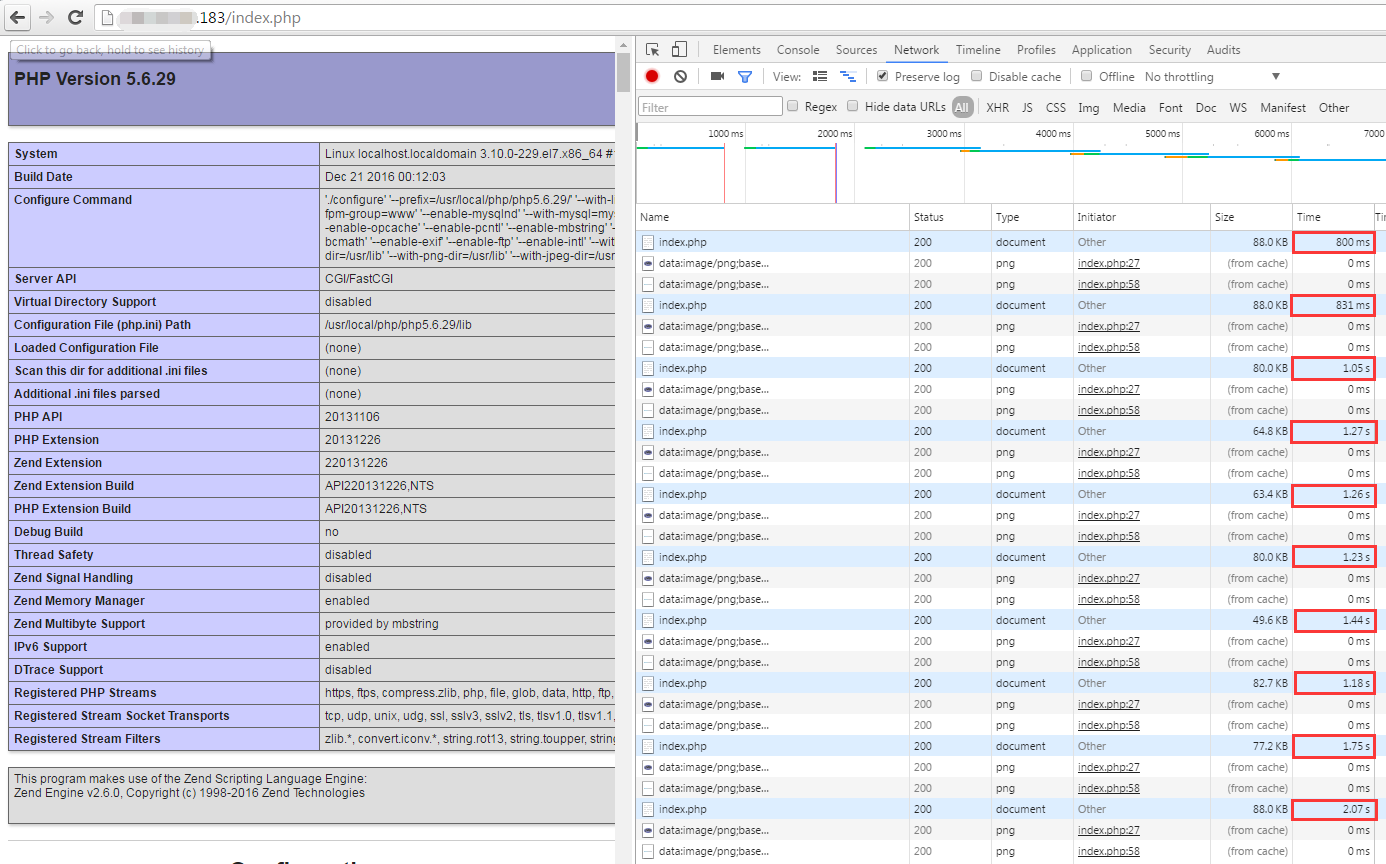
加载默认的phpinfo,平均速度在1s左右。
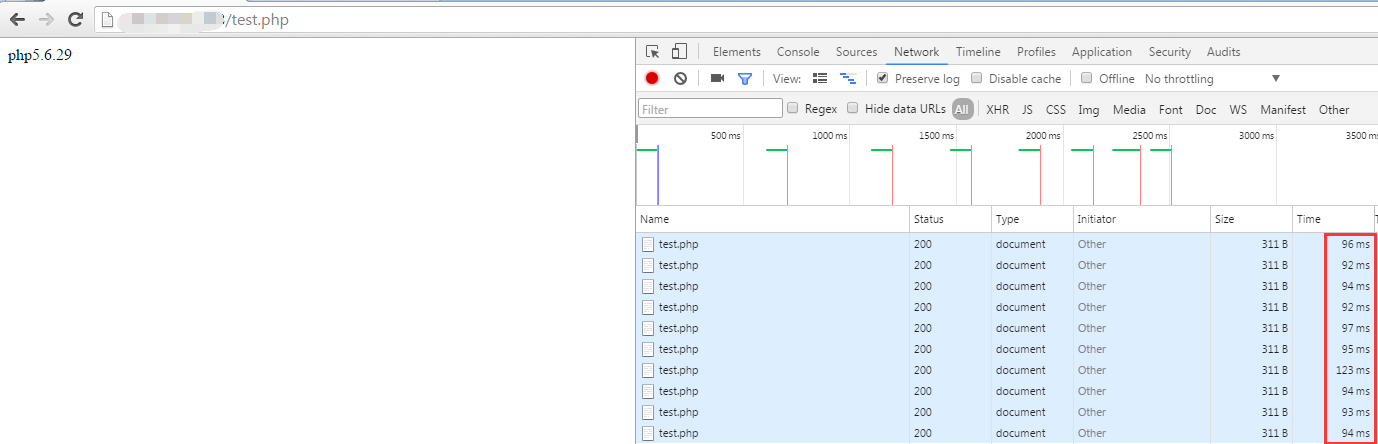
输出普通字符,平均速度在95ms左右。
php5.3.4
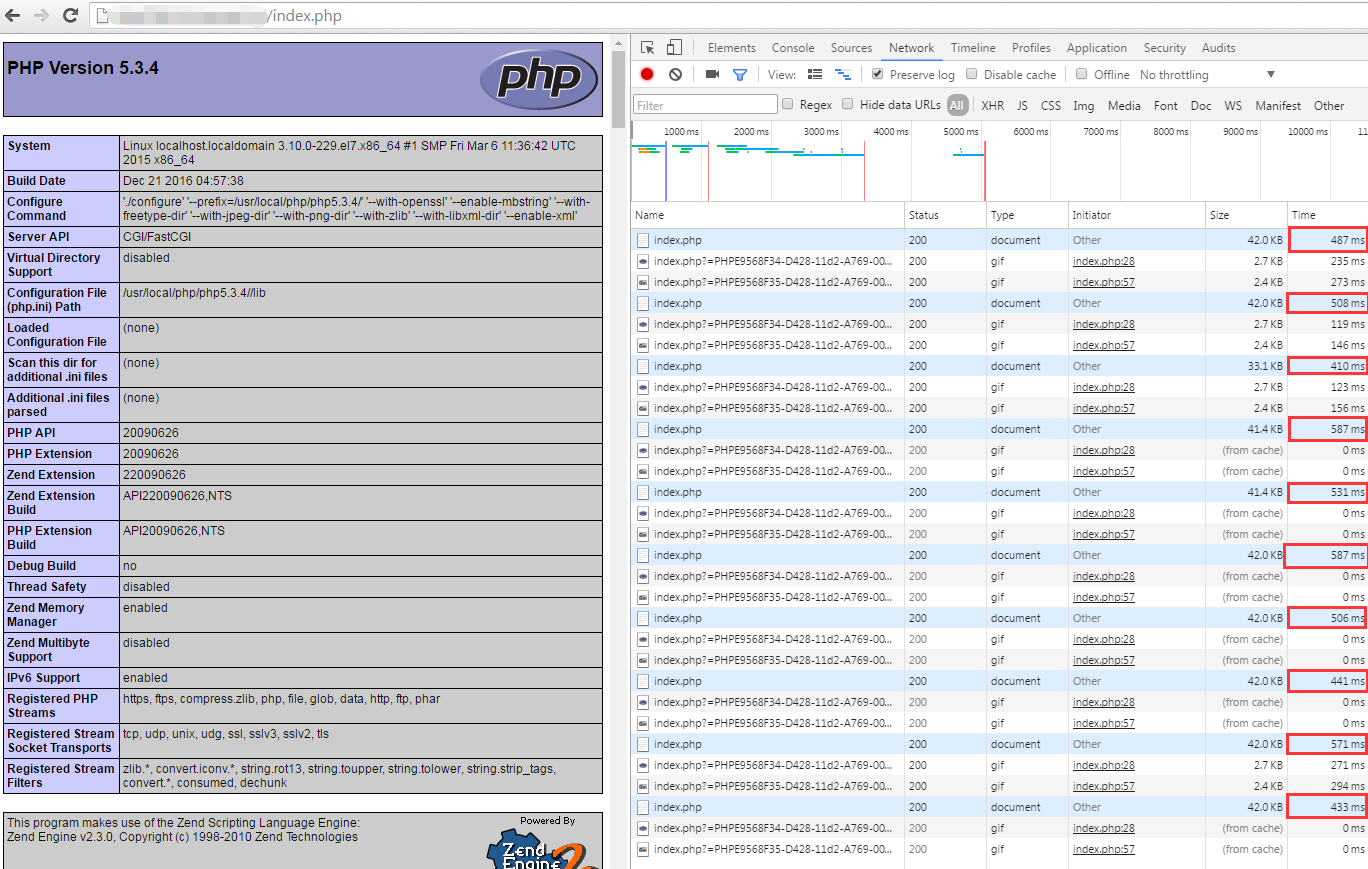
加载默认的phpinfo,平均速度在500ms左右,相对5.6快了一倍。
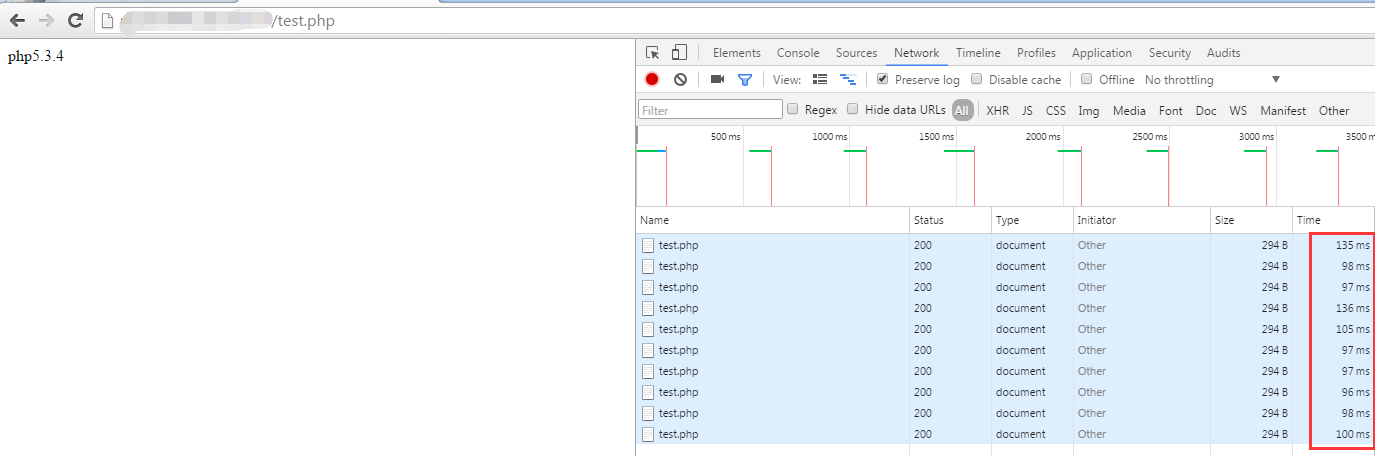
输出普通字符,平均速度在100ms左右。
PHP5.6在此过程中加载了比PHP5.3更多的模块,而在速度上面整体来说还是提升了不少,实际项目测试,请自行研究。
结
经实测最终可用的版本为
Centos7.1 + mod_fcgid-2.3.6 + httpd-2.2.31 + PHP*
本文为实测内容,仅个人观点,如有疑问,请在文末下方留言。谢谢!
相关文章:
PHP运行模式 http://blog.csdn.net/hguisu/article/details/7386882
Apache 镜像站 http://mirrors.cnnic.cn/apache/httpd/
PHP历史版本 http://php.net/releases/
mod_fcgid-2.3.6 ftp://ftp.ucsb.edu/pub/mirrors/apache/httpd/mod_fcgid/mod_fcgid-2.3.6.tar.bz2
https://my.oschina.net/u/2366984/blog/809833
Apache多虚拟主机多版本PHP(5.3+5.6+N)共存运行配置全过程的更多相关文章
- Apache多虚拟主机多版本PHP(5.2+5.3+5.4)共存运行配置全过程
因为某种需求,可能是因为早期的项目需要低版本的php,和目前开发所用的版本不太一致,我们需要给不同的虚拟主机配置不同版本的PHP.避免去额外配置多个Apache,等iis和apache共存的麻烦. 下 ...
- apache开启虚拟主机localhost无法访问
今天在集成环境下配虚拟主机,没想到虚拟主机开启后,localhost竟然无法访问了,解决办法是这样的: 实例一,Apache 配置localhost虚拟主机步骤 1,用记事本打开apache目录下ht ...
- Apache和PHP结合、Apache默认虚拟主机
5月28日任务 课程内容: 11.14/11.15 Apache和PHP结合11.16/11.17 Apache默认虚拟主机 11.14/11.15 Apache和PHP结合 到目前为止虽然安装好了A ...
- Apache 创建虚拟主机目录和设置默认访问页面
虚拟主机 (Virtual Host) 是在同一台机器搭建属于不同域名或者基于不同 IP 的多个网站服务的技术. 可以为运行在同一物理机器上的各个网站指配不同的 IP 和端口, 也可让多个网站拥有不同 ...
- php配置虚拟主机的配置步骤(hosts、httpd.conf、vhosts.conf)1.配置本地的dns文件2.配置apache的主配置文件3.配置Apache的虚拟主机
1.域名解析(DNS) 找到C:\Windows\System32\drivers\etc目录下的hosts文件,在里面进行添加对应的内容
- windows下Apache的虚拟主机配置
1.Apache虚拟主机: 在Apache上有关于虚拟主机的具体说明,具体可以参考Apache手册,这里简单的说一下虚拟主机主要分为两种: 1.基于主机名的虚拟主机(一个IP地址,多个网站) 2.基于 ...
- Apache+php+mysql的安装与配置 - 之三(Apache的虚拟主机配置)
Apache+php+mysql的安装与配置 - 之三(Apache的虚拟主机配置) Apache核心(Core)配置 VirtualHost 语法 <VirtualHost addr[:por ...
- Apache的虚拟主机功能
Apache的虚拟主机功能 (Virtual Host) 是可以让一台服务器基于IP.主机名或端口号实现提供多个网站服务的技术. 第一种情况:基于IP地址 这种情况很常见:一台服务器拥有多个IP地址, ...
- Centos7下配置Apache的虚拟主机
一.虚拟主机 虚拟主机是Apache提供的一个功能,通过虚拟主机拉雅在一台服务器上部署多个网站.虽然服务器的IP地址是相同的,但用户当用户使用不同的域名访问时,访问到的是不同的网站. 下面讲解Apac ...
随机推荐
- JavaScript--数据结构与算法之图
图和图的算法:图的定义:由边的集合及顶点的集合组成. 例如地图,每个城镇是顶点,道路是边,由顶点对来定义(城镇1,城镇2)简称(v1,v2)顶点也有权重——成本.基本概念: 有向图:图的顶点对是有序的 ...
- JavaScript笔记(2)
-->变量的定义 1.取得并使用值是所有程序设计中的要点 2.JS中的变量是没有类型的,在JS中只有值才持有类型,变量所持有的是其对应值的类型. 3.变量的取名要符合标识符的规则: (1)一个J ...
- C#学习第一课
C#和Java存在很多相似之处,但是也存在一些差异.今天下午刚去图书馆借了C#的入门书籍,进过简单的入门,我了解了几点不同之处: 1. Java中的基本数据类型只有8种,数据类型不存在无符号和有符号的 ...
- [RxJS] Marbles Testings
Install: npm install — save-dev jasmine-marbles Basic example: import {cold, getTestScheduler} from ...
- 【LeetCode-面试算法经典-Java实现】【144-Binary Tree Preorder Traversal(二叉树非递归前序遍历)】
[144-Binary Tree Preorder Traversal(二叉树非递归前序遍历)] [LeetCode-面试算法经典-Java实现][全部题目文件夹索引] 原题 Given a bina ...
- apache activemq Failed to bind to server socket 61616
windows环境上: 首先 nestat -ano | findstr "61616" 查看是否有进程,有的话kill掉, 若没有发现,查看windows Internet Co ...
- bug 7715339 登录失败触发 ‘row cache lock’ 等待
Bug 7715339 - Logon failures causes "row cache lock" waits - Allow disable of logon delay ...
- 43.c++指针类型转换
数据类型转换(static_cast) //数据类型转换 printf("%d\n", static_cast<int>(10.2)); 指针类型转换(reinterp ...
- Win8.1恢复这台电脑里的6个文件夹
平台:win8.1 问题:网络下载的ghost版8.1,装好后“这台电脑”里没有6个常用的文件夹. 解决:导入下列注册表项即可 Windows Registry Editor Version 5.00 ...
- NOI2005维修数列(splay)
题目描述: Description 请写一个程序,要求维护一个数列,支持以下 6 种操作: 请注意,格式栏 中的下划线‘ _ ’表示实际输入文件中的空格 Input 输入的第1 行包含两个数N 和M( ...