
Huawei-R&S-网络工程师实验笔记20190524-VRP的系统、接口视图下基本操作
》Huawei-R&S-网络工程师实验笔记20190524-VRP的系统、接口视图下基本操作(重命名、配置IP、VLAN接口、双工模式、console口)
》》实验开始,先上拓扑图参考:
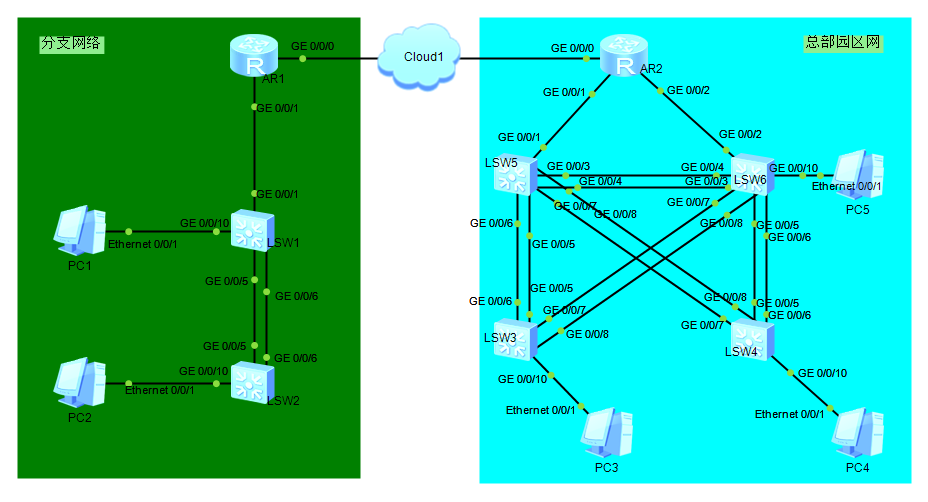
本次实验使用 Huawei eNSP、Wireshark、Oracle VM VirtualBox 等工具,并开启了左侧分支网络的设备。以下将全部使用代码展示实验过程和理解:
The device is running!     //设备已启动

<Huawei>sy

<Huawei>system-view    //进入系统视图管理

Enter system view return user view with Ctrl+Z.

[Huawei]dis

[Huawei]display version    //查看设备版本信息

Huawei Versatile Routing Platform Software

VRP (R) software Version 5.110 (S5700 V200R001C00)

Copyright (c) - HUAWEI TECH CO. LTD

Quidway S5700-28C-HI Routing Switch uptime is  week  day  hour  minutes

[Huawei]sy

[Huawei]sysname SW1     //设备改名为SW1

May   ::-: SW1 DS//DATASYNC_CFGCHANGE:OID 1.3.6.1.4.1.2011.5.

.191.3. configurations have been changed. The current change number is  the change

 loop count is  and the maximum number of records is .
[SW1]int

[SW1]interface g0//    //进入接口视图管理,本次选用GigabitEthernet0/0/1接口

[SW1-GigabitEthernet0//]shutdown     //关闭GigabitEthernet0/0/1接口

May   ::-: SW1 %%01PHY//PHY(l)[]:

GigabitEthernet0//: change status to down     //G0/0/1接口已成功关闭

May   ::-: SW1 DS//DATASYNC_CFGCHANGE:OID 1.3.6.1.4.1.2011.5.

.191.3. configurations have been changed. The current change number is  the change

 loop count is  and the maximum number of records is .

[SW1-GigabitEthernet0//]undo shut

[SW1-GigabitEthernet0//]undo shutdown      //重新开启(取消关闭)GigabitEthernet0/0/1接口

[SW1-GigabitEthernet0//]

May   ::-: SW1 %%01PHY//PHY(l)[]: GigabitEthernet0//: change status to up

May   ::-: SW1 DS//DATASYNC_CFGCHANGE:OID 1.3.6.1.4.1.2011.5.

.191.3. configurations have been changed. The current change number is  the change loop count

 is  and the maximum number of records is .

[SW1-GigabitEthernet0//]ip address 10.1.1.1     //为GigabitEthernet0/0/1接口配置IP地址

                             ^

Error: Unrecognized command found at '^' position.    //提示IP地址配置失败,因为这是一个二层接口。虽然可以通过以下命令

                                          interface GigabitEthernet0/0/1

                                             undo portswitch

把2层接口变成3层接口,但只能在真机上支持该命令,模拟器执行命令后没有效果,配置IP地址还是会报错的。尽管在物理接口上我们不能配置IP地址,
可以考虑使用vlan接口。非常不推荐 把2层接口变为3层接口,那样会让广播域增加太多。

[SW1-GigabitEthernet0//]quit    //回退到系统视图[SW1]
[SW1]int

[SW1]interface vlanif     //进入vlan1接口配置

[SW1-Vlanif1]ip address 10.1.1.1     //为vlan1接口配置IP地址

[SW1-Vlanif1]

May   ::-: SW1 %%01IFNET//lixxxxnk_STATE(l)[]:The line protocol IP

 on the interface Vlanif1 has entered the UP state.    //vlan1接口配置IP地址成功,该命令也侧面验证了设备支持3层功能

May   ::-: SW1 DS//DATASYNC_CFGCHANGE:OID 1.3.6.1.4.1.2011.5.

.191.3. configurations have been changed. The current change number is  the change

 loop count is  and the maximum number of records is .

[SW1]vlan     //新配置vlan10接口

May   ::-: SW1 DS//DATASYNC_CFGCHANGE:OID 1.3.6.1.4.1.2011.5.

.191.3. configurations have been changed. The current change number is  the c

hange loop count is  and the maximum number of records is .

[SW1-vlan10]int

[SW1-vlan10]interface vlanif     //进入vlan10接口配置

[SW1-Vlanif10]ip add

[SW1-Vlanif10]ip address 10.1.10.1     //为vlan10接口配置IP地址

May   ::-: SW1 DS//DATASYNC_CFGCHANGE:OID 1.3.6.1.4.1.2011.5.

.191.3. configurations have been changed. The current change number is  the change loop

 count is  and the maximum number of records is .

[SW1-Vlanif10]q    //回退到系统视图[SW1]
[SW1]display ip interface brief     //查看所有接口的配置情况

*down: administratively down      //该指示符表示“已被管理员关闭”

^down: standby

(l): loopback     //环回

(s): spoofing     //欺骗

The number of interface that is UP in Physical is

The number of interface that is DOWN in Physical is

The number of interface that is UP in Protocol is

The number of interface that is DOWN in Protocol is

Interface                         IP Address/Mask      Physical   Protocol

MEth0//                         unassigned           down       down

NULL0                              unassigned           up            up(s)

Vlanif1                             10.1.1.1/            up            up             //up表示“已开启”

Vlanif10                           10.1.10.1/          down        down        //down表示“已关闭”

[SW1]

[SW1]display interface g0//     //查看GigabitEthernet0/0/1接口配置情况

GigabitEthernet0// current state : UP

Line protocol current state : UP

Descxxxxription:

Switch Port PVID :     TPID : (Hex) The Maximum frxxxxame Length is

IP Sending frxxxxames' Format is PKTFMT_ETHNT_2 Hardware address is 4c1f-cc00-4dd0

Last physical up time   : -- :: UTC-:

Last physical down time : -- :: UTC-:

Current system time: -- ::-:

Hardware address is 4c1f-cc00-4dd0     //设备MAC地址

    Last  seconds input rate  bytes/sec  packets/sec

    Last  seconds output rate  bytes/sec  packets/sec

    Input:  bytes  packets

    Output:  bytes  packets

    Input:

      Unicast:  packets Multicast:  packets

      Broadcast:  packets

    Output:

      Unicast:  packets Multicast:  packets

      Broadcast:  packets

    Input bandwidth utilization  :    %

    Output bandwidth utilization :    %

[SW1]
[SW1]int g0//     //进入G0/0/1接口管理

[SW1-GigabitEthernet0//]duplex full     //将G0/0/1接口配置为“全双工”模式,避免因异品牌异型号设备“自协商”而无法连接相通的情况

  Error: Please undo negotiation auto first.      //提示错误,一般默认“自动协商”模式

[SW1-GigabitEthernet0//]undo negotiation auto      //取消“自动协商”模式(先取消,再修改双工模式)

[SW1-GigabitEthernet0//]

May   ::-: SW1 DS//DATASYNC_CFGCHANGE:OID 1.3.6.1.4.1.2011.5.

.191.3. configurations have been changed. The current change number is  the

change loop count is  and the maximum number of records is .

[SW1-GigabitEthernet0//]duplex ?   //?查询接口工作模式(单工、半双工、全双工)

   full  Full-Duplex mode

   half  Half-Duplex mode

[SW1-GigabitEthernet0//]duplex full      //重新配置“全双工”模式

[SW1-GigabitEthernet0//]

May   ::-: SW1 DS//DATASYNC_CFGCHANGE:OID 1.3.6.1.4.1.2011.5.

.191.3. configurations have been changed. The current change number is  the

change loop count is  and the maximum number of records is .

[SW1-GigabitEthernet0//]q    //回退到系统视图[SW1]

[SW1]q    //回退到用户视图<SW1>

<SW1>q User interface con0 is available     //退出console管理
Huawei-R&S-网络工程师实验笔记20190524-VRP的系统、接口视图下基本操作的更多相关文章
- Huawei-R&S-网络工程师实验笔记20190525-设备登录、VRP基本配置、文件系统
>Huawei-R&S-网络工程师实验笔记20190525-设备登录.VRP基本配置.文件系统(环回接口.telnet远程.AAA登录.命令行.时钟.banner.文件目录) >& ...
- Huawei-R&S-网络工程师实验笔记20190530-FTP上传下载、STelnet登录、SFTP登录
>Huawei-R&S-网络工程师实验笔记20190530-FTP上传下载.STelnet登录.SFTP登录 >>实验开始,参考<Huawei-R&S-网络工程 ...
- Huawei-R&S-网络工程师实验笔记20190527-华为设备密码重置、设置web管理
>Huawei-R&S-网络工程师实验笔记20190527-华为设备密码重置.设置web管理 >>实验开始(使用SecureCRT 等工具软件): 一.华为设备密码重置,通过 ...
- Huawei-R&S-网络工程师实验笔记20190607-STP生成树协议(基本配置、桥优先级、根桥选举、根端口、路径开销、边缘端口)
>Huawei-R&S-网络工程师实验笔记20190607-STP生成树协议(基本配置.桥优先级.根桥选举.根端口.路径开销.边缘端口) >>实验开始,先上拓扑图参考: &l ...
- Huawei-R&S-网络工程师实验笔记20190615-IP基础(AR201上配置IP)
>Huawei-R&S-网络工程师实验笔记20190615-IP基础(AR201上配置IP) >>实验开始,先上拓扑图参考: >>>一般正常配置IP操作如下 ...
- Huawei-R&S-网络工程师实验笔记20190609-VLAN划分综合(Hybrid端口)
>Huawei-R&S-网络工程师实验笔记20190609-VLAN划分综合(Hybrid端口) >>实验开始,先上拓扑图参考: >>>实验目标:分别实现主 ...
- Huawei-R&S-网络工程师实验笔记20190609-VLAN划分综合(Access和Trunk端口)
>Huawei-R&S-网络工程师实验笔记20190609-VLAN划分综合(Access和Trunk端口) >>实验开始,先上拓扑图参考: >>>实验目标 ...
- Huawei-R&S-网络工程师实验笔记20190608-VLAN划分基础(基于端口、MAC地址、子网地址、协议)
>Huawei-R&S-网络工程师实验笔记20190608-VLAN划分基础(基于端口.MAC地址.子网地址.协议) >>实验开始,先上拓扑图参考: 一.基于端口划分VLAN ...
- 【Android 应用开发】Android 网络编程 API笔记 - java.net 包相关 接口 api
Android 网络编程相关的包 : 9 包, 20 接口, 103 类, 6 枚举, 14异常; -- Java包 : java.net 包 (6接口, 34类, 2枚举, 12异常); -- An ...
随机推荐
- Codeforces Round #313 A. Currency System in Geraldion(简单题)
A. Currency System in Geraldion time limit per test 2 seconds memory limit per test 256 megabytes in ...
- 让DIV在屏幕上下左右居中
转自:http://blog.sina.com.cn/s/blog_65d41dff0100v0iz.html 其实解决的思路是这样的:首们需要position:absolute;绝对定位.而层的定位 ...
- git 命令 —— checkout
git checkout 会重写工作区.check in 常常表示酒店入住,则 check out 就表示结账(检查)离开. 1. 基本用法 Git学习笔记04–git checkout git ch ...
- [Supervisor]supervisor监管gunicorn启动DjangoWeb时异常退出
一开始配置 [program:django_web] command=gunicorn -w 4 -b 0.0.0.0:8080 superadmin.wsgi:application directo ...
- javascript的鼠标事件---基础
- [Swift通天遁地]七、数据与安全-(6)管理文件夹和创建并操作文件
★★★★★★★★★★★★★★★★★★★★★★★★★★★★★★★★★★★★★★★★➤微信公众号:山青咏芝(shanqingyongzhi)➤博客园地址:山青咏芝(https://www.cnblogs. ...
- 基于docker的tomcat服务化
tomcat作为web容器被广泛应用,但作者所在的公司restful接口特别多,每个接口都需要一个tomcat来启动,为了配置隔离,一般都会把tomcat安装文件复制多遍,分别把war包部署在对应的w ...
- knockjs
用VS2012建立Web站点有个新惊喜,默认加了KnockoutJS这个Javascript的MVVM模式的实现库,方便Web前端的开发 官方站点 √主页: http://www.knockoutj ...
- MySQL简明教程---级联约束
- C#模拟百度登录并到指定网站评论回帖(二)
序言: 回归正题:前面讲到的抓包分析的数据,是模拟登录要获得得必要信息(当然有些也不是必要的...我只是都列举出来这样有个对比)如果说,有哪个英文字母不知道什么意思的,可以问一下度娘,有不少前辈都发过 ...