
学习nginx从入门到实践(四) 基础知识之nginx基本配置语法
nginx基本配置语法
1.http相关
展示每次请求的请求头: curl -v http://www.baidu.com
2.nginx日志类型
- error.log、 access.log
- log_format
*格式*
syntax: log_format name [escape=default | json] string...;
default: log_format combined "...";
context:http
3.nginx变量
nginx配置的内容:
worker_processes 1;
pid /var/run/nginx.pid;
worker_connections 1024;
}
include /etc/nginx/mime.types;
default_type application/octet-stream;
log_format main '$remote_addr - $remote_user [$time_local] "$request" '
'$status $body_bytes_sent "$http_referer" '
'"$http_user_agent" "$http_x_forwarded_for"';
access_log /var/log/nginx/access.log main;
sendfile on;
#tcp_nopush on;
keepalive_timeout 65;
#gzip on;
include /etc/nginx/conf.d/*.conf;
}
- http请求变量:arg_PARAMETER,http_header,sent_http_header
- 内置变量:nginx内置的
- 自定义变量: 自己定义
4.nginx模块
- nginx官方模块
- 第三方模块
nginx开启的模块:
5.安装编译模块
| 编译选项 | 作用 |
|---|---|
| --with-http_stub_status_module | nginx的客户端状态 |
| --with-http_random_index_module | 目录中选择一个随机主页 |
| --with-http_sub_module | http内容替换 |
| --limit_conn_module | 连接频率限制 |
| --limit_req_module | 请求频率限制 |
| http_access_module | 基于ip的访问控制 |
| http_auth_basic_module | 基于用户的信任登录 |
5.1 http_stub_status_module 配置(nginx的客户端状态)
配置语法:
syntax: stub_status;
default:-
context:server, location
在default.conf中添加:
# my config
location /mystatus {
stub_status;
}
检查和重新启动配置:
nginx -tc /etc/nginx/nginx.conf
重启服务:
nginx -s reload -c /etc/nginx/nginx.conf
5.2 http_random_index_module(目录中选择一个随机主页)
default:random_index off;
context:location
root /usr/share/nginx/html;
index index.html index.htm;
}
root /usr/share/nginx/html;
random_index on;
#index index.html index.htm;
}
5.3 http_sub_module (http内容替换)
配置语法:
 syntax: sub_filter string replacement;
 default:-
 context:http,server,location
 syntax: sub_filter_last_modified on | off (重要用户缓存)
 default: sub_filter_last_modified off;
 context: http,server,location
 syntax:   sub_filter_once on | off
 default:  sub_filter_once on;
 context:  http,server,location
5.4 limit_conn_module(连接频率限制)
配置语法:syntax: limit_conn_zone key zone=name:size;
default:-
context:http syntax:limit_conn zone number;
default:-
context:http, server, location
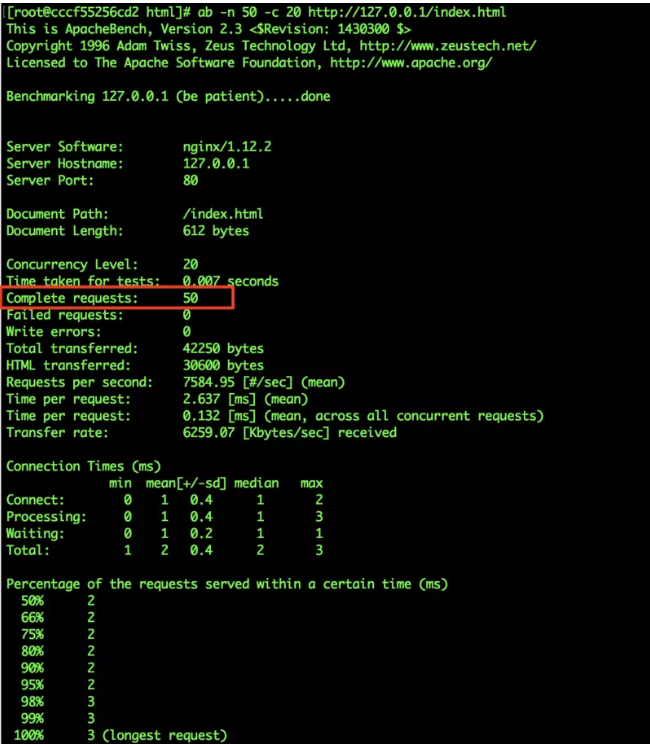
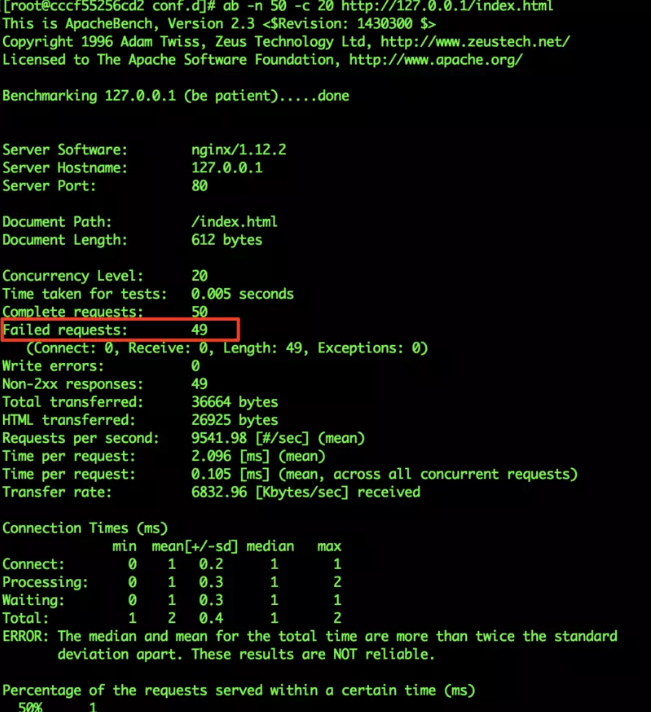
5.5 limit_req_module (请求频率限制)
 配置语法:

 syntax: limit_req_zone key zone=name:size rate=rate;
 default: -
 context: http
limit_req_zone $binary_remote_addr zone=req_zone:1m rate=1r/s;
5.6 http_access_module(基于ip的访问控制)
配置语法:
syntax: allow address | CIDR | unix: | all
default:-
context:http,server,location,limit_except
syntax:deny address | CIDR | unix: | all
default:-
context:http, server, location ,limit_except
测试 配置如下:
location ~ ^/admin.html {
root /opt/app/code;
deny all;
index index.html index.htm;
}
5.7
http_auth_basic_module(基于用户的信任登录)
配置语法:
syntax: auth_basic string | off;
default: -
context: http,server,location,limit_except
syntax: auth_basic_user_file file;
default: -
context: http, server, location ,limit_except
 生成password文件:
 htpasswd -c ./auth_conf feixia

 修改conf文件:
root /opt/app/code;
auth_basic "please input you user name and passwd";
auth_basic_user_file /etc/nginx/auth_conf;
index index.html index.htm;
}
局限性
- 用户信息依赖文件方式
- 操作管理机械、效率低下
解决方案
- nginx 结合LUA实现高效验证
- nginx和LDAP打通,利用nginx-auth-ldap模块
学习nginx从入门到实践(四) 基础知识之nginx基本配置语法的更多相关文章
- 《Python编程:从入门到实践》基础知识部分学习笔记整理
简介 此笔记为<Python编程:从入门到实践>中前 11 章的基础知识部分的学习笔记,不包含后面的项目部分. 书籍评价 从系统学习 Python 的角度,不推荐此书,个人更推荐使用< ...
- Nginx从入门到实践(四)
Nginx常见问题和排错经验,实践应用场景中的方法处理Nginx安全,常见的应用层安全隐患,复杂访问控制,Nignx的sql防注入安全策略,Nginx的整体配置,搭建合理Nginx中间件架构配置步骤. ...
- 使用Code First建模自引用关系笔记 asp.net core上使用redis探索(1) asp.net mvc控制器激活全分析 语言入门必学的基础知识你还记得么? 反射
使用Code First建模自引用关系笔记 原文链接 一.Has方法: A.HasRequired(a => a.B); HasOptional:前者包含后者一个实例或者为null HasR ...
- Ant学习-001-ant 基础知识及windows环境配置
一.Ant 概要基础知识 Apache Ant 是一个将软件编译.测试.部署等步骤联系在一起加以自动化的一个工具,大多用于Java环境中的软件开发,用以构建应用,或结合其他开源测试工具例如 git.T ...
- 学习nginx从入门到实践(五) 场景实践之静态资源web服务
一.静态资源web服务 1.1 静态资源 静态资源定义:非服务器动态生成的文件. 1.2 静态资源服务场景-CDN 1.3 文件读取配置 1.3.1 sendfile 配置语法: syntax: se ...
- Nginx从入门到实践(一)
结合实践.收集各种场景.常见问题,讲解Nginx中最实用的Webserver场景,提供一套整体的搭建配置方式 Nginx中间件,不局限于业务逻辑,有效独立于后台开发框架(不论后端是Java开发.PHP ...
- Nginx从入门到实践(二)
静态资源web服务 静态资源类型 CDN CDN的基本原理是广泛采用各种缓存服务器,将这些缓存服务器分布到用户访问相对集中的地区或网络中,在用户访问网站时,利用全局负载技术将用户的访问指向距离最近的工 ...
- Nginx详解四:Nginx基础篇之目录和配置语法
一.安装目录 命令:rpm -ql nginx 二.编译参数 命令:nginx -V 三.Nginx基本配置语法 修改主配置文件 当Nginx读配置文件读到include /etc/nginx/con ...
- APP测试入门篇之APP基础知识(001)
前言 最近两月比较多的事情混杂在一起,静不下心来写点东西,月初想发表一遍接口测试的总结,或者APP测试相关的内容,一晃就月底了,总结提炼一时半会也整不完.放几个早年总结内部培训PPT出来 ...
随机推荐
- PAT-1079 Total Sales of Supply Chain (树的遍历)
1079. Total Sales of Supply A supply chain is a network of retailers(零售商), distributors(经销商), and su ...
- Gym100548F Color
题目链接:https://vjudge.net/problem/Gym-100548F 题目大意: n 朵花,按顺序排成一排.从 m 种颜色中选出 k 种颜色,给这 n 朵花染色,要求相邻的花颜色不同 ...
- PHP 面向对象的数据库操作
一.面向对象 fetch_all() 抓取所有的结果行并且以关联数据,数值索引数组,或者两者皆有的方式返回结果集. fetch_array() 以一个关联数组,数值索引数组,或者两者皆有的方式抓取一行 ...
- iOS开发MD5、SHA1
MD5: + (NSString *)md5:(NSString *)input { const char *cStr = [input UTF8String]; unsigned char dige ...
- 配置单机Kafka
配置单机kafka 关闭selinux,开启防火墙9092端口 1.关闭selinux vi /etc/selinux/config #SELINUX=enforcing #注释掉 #SELINUXT ...
- 用python编写测试脚本
def f(n): """ >>>f(1) 1用例 >>>f(2) 2用例 ...... >>>f(n) n用例 & ...
- jQuery——选择器效率
N1:$('#box').find('p'):最快,直接了当的找到对应的节点jQuery对象: N2:$('p','#box'):注意不是$('p,#box')!!!,jQuery会按照从右往左的顺序 ...
- Cocos Creator 通用框架设计 —— 资源管理优化
接着<Cocos Creator 通用框架设计 -- 资源管理>聊聊资源管理框架后续的一些优化: 通过论坛和github的issue,收到了很多优化或bug的反馈,基本上抽空全部处理了,大 ...
- 01 . Tomcat简介及部署
Tomcat简介 Tomcat背景 tomcat就是常用的的中间件之一,tomcat本身是一个容器,专门用来运行java程序,java语言开发的网页.jsp就应该运行于tomcat中.而tomcat本 ...
- Rocket - debug - TLDebugModuleInner - DMI Register Control and Status
https://mp.weixin.qq.com/s/tI41wu0xaIQ5PRq6F82tNw 简单介绍TLDebugModuleInner中生成DMI控制和状态寄存器使用到的状态. 1. abs ...