
springboot整合Mybatis(无xml)
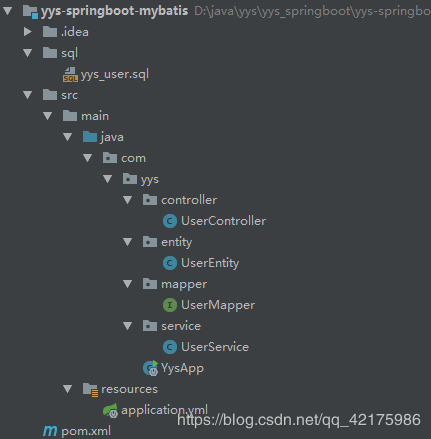
1、pom文件 依赖引入
<parent>

        <groupId>org.springframework.boot</groupId>

        <artifactId>spring-boot-starter-parent</artifactId>

        <version>2.1.8.RELEASE</version>

        <relativePath />

    </parent>

    <dependencies>

        <!-- SpringBoot 测试 -->

        <dependency>

            <groupId>org.springframework.boot</groupId>

            <artifactId>spring-boot-starter-test</artifactId>

            <scope>test</scope>

        </dependency>

        <!-- mybatis 支持 SpringBoot -->

        <dependency>

            <groupId>org.mybatis.spring.boot</groupId>

            <artifactId>mybatis-spring-boot-starter</artifactId>

            <version>1.1.1</version>

        </dependency>

        <!-- mysql 驱动 -->

        <dependency>

            <groupId>mysql</groupId>

            <artifactId>mysql-connector-java</artifactId>

            <version>5.1.38</version>

        </dependency>

        <!-- SpringBoot web组件 -->

        <dependency>

            <groupId>org.springframework.boot</groupId>

            <artifactId>spring-boot-starter-web</artifactId>

        </dependency>

    </dependencies>
2、 application.yml 新增配置
spring:

  datasource:

    url: jdbc:mysql://localhost:3306/yys_springboot_mybatis?useUnicode=true&characterEncoding=utf-8&serverTimezone=Asia/Shanghai

    username: root

    password: 123456

    driver-class-name: com.mysql.cj.jdbc.Driver
3、UserEntity.java
/**

 * 用户管理

 *      Entity

 * @author yys

 */

import com.fasterxml.jackson.annotation.JsonFormat;

import java.io.Serializable;

import java.sql.Date;

public class UserEntity implements Serializable {

    private Long id;

    private String name;

    private Integer age;

    private Byte status;

    @JsonFormat(pattern="yyyy-MM-dd HH:mm:ss", timezone="GMT+8")

    private Date createTime;

    @JsonFormat(pattern="yyyy-MM-dd HH:mm:ss", timezone="GMT+8")

    private Date updateTime;

    public Long getId() {

        return id;

    }

    public void setId(Long id) {

        this.id = id;

    }

    public String getName() {

        return name;

    }

    public void setName(String name) {

        this.name = name;

    }

    public Integer getAge() {

        return age;

    }

    public void setAge(Integer age) {

        this.age = age;

    }

    public Byte getStatus() {

        return status;

    }

    public void setStatus(Byte status) {

        this.status = status;

    }

    public Date getCreateTime() {

        return createTime;

    }

    public void setCreateTime(Date createTime) {

        this.createTime = createTime;

    }

    public Date getUpdateTime() {

        return updateTime;

    }

    public void setUpdateTime(Date updateTime) {

        this.updateTime = updateTime;

    }

}
4、UserController.java
/**

 * 用户管理

 *      Controller

 * @author yys

 */

@RestController

@RequestMapping("/user")

public class UserController {

    @Autowired

    private UserService userService;

    @RequestMapping("/add")

    public String addUser(String userName, Integer age) {

        return userService.addUser(userName, age) ? "success" : "fail";

    }

    @RequestMapping("/get")

    public UserEntity getUserByName(String userName) {

        return userService.getUserByName(userName);

    }

}
5、UserService.java
/**

 * 用户管理

 *      Service

 * @author yys

 */

@Service

public class UserService {

    @Autowired

    private UserMapper userMapper;

    public boolean addUser(String userName, Integer age) {

        return userMapper.insert(userName, age) > 0 ? true : false;

    }

    public UserEntity getUserByName(String userName) {

        return userMapper.findByName(userName);

    }

}
6、UserMapper.java
/**

 * 用户管理

 *      Mapper

 * @author yys

 */

public interface UserMapper {

    @Select("SELECT id, user_name AS name, age, status, create_time AS createTime, update_time AS updateTime FROM yys_user WHERE user_name = #{name}")

    UserEntity findByName(@Param("name") String name);

    @Insert("INSERT INTO yys_user VALUES (NULL, #{name}, #{age}, 1, NOW(), NOW())")

    int insert(@Param("name") String name, @Param("age") Integer age);

}
7、启动类
@SpringBootApplication

@MapperScan("com.yys.mapper")

public class YysApp {

    public static void main(String[] args) {

        SpringApplication.run(YysApp.class, args);

    }

}
8、初始化sql文件
CREATE TABLE `yys_user` (

  `id` bigint(11) NOT NULL AUTO_INCREMENT COMMENT 'ID,自增列',

  `user_name` varchar(32) NOT NULL COMMENT '用户名',

  `age` int(11) NOT NULL COMMENT '用户年龄',

  `status` tinyint(2) NOT NULL DEFAULT '' COMMENT '状态:-1-删除;1-正常;',

  `create_time` datetime NOT NULL COMMENT '创建时间',

  `update_time` timestamp NOT NULL DEFAULT CURRENT_TIMESTAMP ON UPDATE CURRENT_TIMESTAMP COMMENT '更新时间',

  PRIMARY KEY (`id`)

) ENGINE=InnoDB DEFAULT CHARSET=utf8mb4;
9、测试
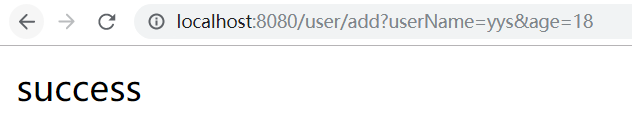
http://localhost:8080/user/add?userName=yys&age=18
a、页面结果 - 如下图所示 :
_b、数据库结果 - 如下图所示 :_

http://localhost:8080/user/get?userName=yys
a、页面结果 - 如下图所示 :


springboot整合Mybatis(无xml)的更多相关文章
- SpringBoot整合Mybatis之xml
SpringBoot整合Mybatis mybatis ORM框架.几个重要的概念: Mapper配置 : 可以使用基于XML的Mapper配置文件来实现,也可以使用基于Java注解的Mybatis注 ...
- SpringBoot 整合 Mybatis + Mysql——XML配置方式
一.介绍 SpringBoot有两种方法与数据库建立连接,一种是集成Mybatis,另一种用JdbcTemplate,本文主要讨论集成Mybatis方式. SpringBoot整合Mybatis也有两 ...
- SpringBoot整合MyBatis之xml配置
现在业界比较流行的数据操作层框架 MyBatis,下面就讲解下 Springboot 如何整合 MyBatis,这里使用的是xml配置SQL而不是用注解.主要是 SQL 和业务代码应该隔离,方便和 D ...
- SpringBoot系列-整合Mybatis(XML配置方式)
目录 一.什么是 MyBatis? 二.整合方式 三.实战 四.测试 本文介绍下SpringBoot整合Mybatis(XML配置方式)的过程. 一.什么是 MyBatis? MyBatis 是一款优 ...
- SpringBoot从入门到精通二(SpringBoot整合myBatis的两种方式)
前言 通过上一章的学习,我们已经对SpringBoot有简单的入门,接下来我们深入学习一下SpringBoot,我们知道任何一个网站的数据大多数都是动态的,也就是说数据是从数据库提取出来的,而非静态数 ...
- springboot整合mybatis时无法读取xml文件解决方法(必读)
转 http://baijiahao.baidu.com/s?id=1588136004120071836&wfr=spider&for=pc 在springboot整合myba ...
- SpringBoot整合MyBatis,HiKari、Druid连接池的使用
SpringBoot整合MyBatis 1.创建项目时勾选mybatis.数据库驱动. mysql驱动默认是8.x的版本,如果要使用5.x的版本,创建后到pom.xml中改. 也可以手动添加依赖 ...
- SpringBoot整合Mybatis之项目结构、数据源
已经有好些日子没有总结了,不是变懒了,而是我一直在奋力学习springboot的路上,现在也算是完成了第一阶段的学习,今天给各位总结总结. 之前在网上找过不少关于springboot的教程,都是一些比 ...
- SpringBoot整合Mybatis【非注解版】
接上文:SpringBoot整合Mybatis[注解版] 一.项目创建 新建一个工程 选择Spring Initializr,配置JDK版本 输入项目名 选择构建web项目所需的state ...
- springboot学习随笔(四):Springboot整合mybatis(含generator自动生成代码)
这章我们将通过springboot整合mybatis来操作数据库 以下内容分为两部分,一部分主要介绍generator自动生成代码,生成model.dao层接口.dao接口对应的sql配置文件 第一部 ...
随机推荐
- BZOJ1021
转载:http://www.cnblogs.com/Asm-Definer/p/4372749.html 1021: [SHOI2008]Debt 循环的债务 Time Limit: 1 Sec M ...
- vscode环境配置(三)——解决控制台终端中文输出乱码
由于系统终端默认编码为GBK,所以需要修改为UTF-8 方法一 打开cmd输入chcp查看编码格式,查看以及修改如下图所示: 方法二
- 求平均成绩(hdu2023)
注意:要心细,不要错在小细节上.如int c[6];double agve; c[j]=agve:这是错误的. #include<stdio.h> #include<cmath> ...
- Ajax用法查询
1)$.get(url, [data], [callback], [type]) 2)$.post(url, [data], [callback], [type]) 其中: url:代表请求的服务器端 ...
- html5学习之路_004
HTML表单 表单用于获取不同类型的用户输入 常用表单标签 下面为一个简单的表单: <!DOCTYPE html> <html> <head lang="en& ...
- bootstrap table Showing 1 to 5 of 5 rows 页码显示英文
注意导包先后顺序bootstrap-table-zh-CN.js链接:https://cdn.bootcdn.net/ajax/libs/bootstrap-table/1.16.0/locale/b ...
- python调用大漠插件教程03窗口绑定实例
怎样利用注册好的大漠对象来绑定窗口? 直接上代码,根据代码分析 from win32com.client import Dispatch import os from win32gui import ...
- 伪静态%{REQUEST_FILENAME} !-f 和!-d用法
%{REQUEST_FILENAME} !-f 和!-d只对下一条RewriteRule起作用.再往下的RewriteRule不管用. -f 表示为文件 -d 表示为目录 ! 表示非,取反的意思 R ...
- python argparse总结
python2.7废除optparse,原因:http://code.google.com/p/argparse/ 说了半天好像是重开了个小号练级 抓紧写下来一会又得忘了 用法: import arg ...
- windows核心编程课程实践---多线程文件搜索器(MFC界面)
课上完了连老师见都没见一面QAQ....记录一下该小项目 效果如下: 1.实现文件搜索功能,并封装为类 1)首先是文件搜索类Rapidfinder的构造函数和析构函数和文件信息初始化函数和文件路径规格 ...