
从前端到后端实现弹幕的过程(jsp/Jquery.barrager.js)
Jquery.barrager.js插件,可以去网上下载!下载完后,就把下载文件中的js文件、css文件、图片文件、等等等文件全部拷贝到你们自己的项目中去,千万别拷贝漏了,如果你怕拷贝漏了什么,那就把所有的文件夹都拷贝到你自己的项目中去!
先看我们要做成什么样的效果:如下图
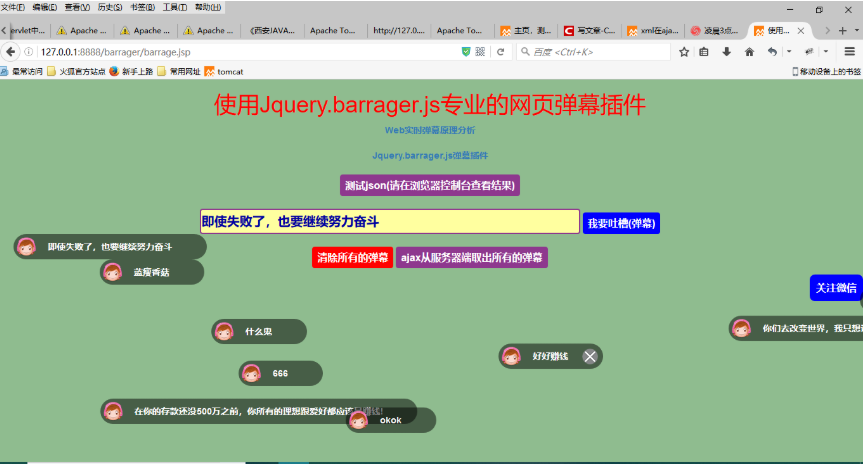
barrage.jsp页面
<%@ page language="java" contentType="text/html; charset=utf-8"

    pageEncoding="utf-8"%>

<!DOCTYPE html PUBLIC "-//W3C//DTD HTML 4.01 Transitional//EN" "http://www.w3.org/TR/html4/loose.dtd">

<html>

<head>

<meta http-equiv="Content-Type" content="text/html; charset=utf-8">

<title>使用Jquery.barrager.js专业的网页弹幕插件</title>

<!--

<link rel="shortcut icon" href="favicon.ico" type="image/x-icon" />

 -->

    <link rel="stylesheet" type="text/css" href="static/css/bootstrap.min.css" media="screen" />

    <link rel="stylesheet" type="text/css" href="static/css/style.css" />

    <link rel="stylesheet" type="text/css" href="dist/css/barrager.css">

    <link rel="stylesheet" type="text/css" href="static/pick-a-color/css/pick-a-color-1.2.3.min.css">

    <link type="text/css" rel="stylesheet" href="static/syntaxhighlighter/styles/shCoreDefault.css"/>

<link rel="stylesheet" type="text/css" href="${pageContext.request.contextPath}/css/body.css">

<link rel="stylesheet" type="text/css" href="${pageContext.request.contextPath}/css/mark.css">

<link rel="stylesheet" type="text/css" href="${pageContext.request.contextPath}/css/console.css">

<script type="text/javascript" src="${pageContext.request.contextPath}/js/console.js"></script>

<script type="text/javascript" src="${pageContext.request.contextPath}/js/weChatQRCode.js"></script>

</head>

<body style="background-color: #8FBC8F;">

<center>

<h1>使用Jquery.barrager.js专业的网页弹幕插件</h1>

<a href="https://www.jianshu.com/p/24d84b207d29" target="_blank">

Web实时弹幕原理分析

</a><br><br>

<a href="http://yaseng.org/jquery.barrager.js/" target="_blank">

Jquery.barrager.js弹幕插件

</a><br><br>

<input type="button" value="测试json(请在浏览器控制台查看结果)" οnclick="testJson()"><br><br>

<input id="text" type="text" style="height: 40px;">

<input type="button" value="我要吐槽(弹幕)" style="background-color: blue;" οnclick="testBarrager()">

<br><br>

<input type="button" value="清除所有的弹幕" style="background-color: red;" οnclick="cleanBarrager()">

<input type="button" value="ajax从服务器端取出所有的弹幕" οnclick="showBarrage()">

<br><br>

</center>

</body>

<script type="text/javascript" src="static/js/jquery-1.9.1.min.js"></script>

    <script type="text/javascript" src="static/js/bootstrap.min.js"></script>

    <script type="text/javascript" src="static/js/tinycolor-0.9.15.min.js"></script>

    <script type="text/javascript" src="dist/js/jquery.barrager.js"></script>

    <script type="text/javascript" src="static/syntaxhighlighter/scripts/shCore.js"></script>

    <script type="text/javascript" src="static/syntaxhighlighter/scripts/shBrushJScript.js"></script>

    <script type="text/javascript" src="static/syntaxhighlighter/scripts/shBrushPhp.js"></script>

    <script type="text/javascript" src="static/pick-a-color/js/pick-a-color-1.2.3.min.js"></script>

<script type="text/javascript">

    var projectPath = '${pageContext.request.contextPath}';

    var item1 = {

        img : 'static/img/cute.png', //图片

        info : '在你的存款还没500万之前,你所有的理想跟爱好都应该是赚钱!', //文字

        href : '', //链接

        close : true, //显示关闭按钮

        speed : , //延迟,单位秒,默认6

        color : '#ffffff', //颜色,默认白色

        old_ie_color : '#ffffff', //ie低版兼容色,不能与网页背景相同,默认黑色

    }

    $('body').barrager(item1);

    //弹幕

    function testBarrager(){

        var item2 = {

                img : 'static/img/cute.png', //图片

                info : '' + document.getElementById("text").value + '', //文字

                href : '', //链接

                close : true, //显示关闭按钮

                speed : , //延迟,单位秒,默认6

                color : '#ffffff', //颜色,默认白色

                old_ie_color : '#ffffff', //ie低版兼容色,不能与网页背景相同,默认黑色

            }

        $('body').barrager(item2);

    }

    //清除所有的弹幕

    function cleanBarrager(){

        $.fn.barrager.removeAll();

    }

    function testJson(){

        var testText = document.getElementById("text").value;

        var jsonData = '{"message":testText, "age":"12"}';

        var json = eval('(' + jsonData + ')');

        console.log(json.message);

    }

    //从服务器端获取弹幕信息并显示所有的弹幕信息

    function showBarrage() {

        $.ajaxSettings.async = false;

        $.getJSON(projectPath + '/JsonData', function(data) {

            //每条弹幕发送间隔

            var looper_time =  * ;

            var items = data;

            //弹幕总数

            var total = data.length;

            //是否首次执行

            var run_once = true;

            //弹幕索引

            var index = ;

            //先执行一次

            barrager();

            function barrager() {

                if (run_once) {

                    //如果是首次执行,则设置一个定时器,并且把首次执行置为false

                    looper = setInterval(barrager, looper_time);

                    run_once = false;

                }

                //发布一个弹幕

                $('body').barrager(items[index]);

                //索引自增

                index++;

                //所有弹幕发布完毕,清除计时器。

                if (index == total) {

                    clearInterval(looper);

                    return false;

                }

            }

        });

    }

</script>

</html>
名字叫JsonData的servlet
package com.jiongmeng.servlet;

import java.io.IOException;

import java.util.ArrayList;

import java.util.List;

import javax.servlet.ServletException;

import javax.servlet.annotation.WebServlet;

import javax.servlet.http.HttpServlet;

import javax.servlet.http.HttpServletRequest;

import javax.servlet.http.HttpServletResponse;

import com.jiongmeng.entity.Barrage;

import net.sf.json.JSONArray;

/**

 * 处理弹幕请求

 */

@WebServlet("/JsonData")

public class JsonData extends HttpServlet {

    private static final long serialVersionUID = 1L;

    protected void doGet(HttpServletRequest request, HttpServletResponse response) throws ServletException, IOException {

        response.setContentType("text/html;charset=utf-8");

        //弹幕数据的集合,为了做测试方便和偷懒(懒得去数据库中取数据),在这里随便造了一些弹幕实体对象数据

        List<Barrage> list = new ArrayList<Barrage>();

        Barrage barrage1 = new Barrage("static/img/cute.png", "", "", true, , "#ffffff", "#ffffff");

        Barrage barrage2 = new Barrage("static/img/cute.png", "okok", "", true, , "#ffffff", "#ffffff");

        Barrage barrage3 = new Barrage("static/img/cute.png", "什么鬼", "", true, , "#ffffff", "#ffffff");

        Barrage barrage4 = new Barrage("static/img/cute.png", "蓝瘦香菇", "", true, , "#ffffff", "#ffffff");

        Barrage barrage5 = new Barrage("static/img/cute.png", "好好赚钱", "", true, , "#ffffff", "#ffffff");

        Barrage barrage6 = new Barrage("static/img/cute.png", "你们去改变世界,我只想认真赚钱", "", true, , "#ffffff", "#ffffff");

        Barrage barrage7 = new Barrage("static/img/cute.png", "我还没赚到500万", "", true, , "#ffffff", "#ffffff");

        list.add(barrage1);

        list.add(barrage2);

        list.add(barrage3);

        list.add(barrage4);

        list.add(barrage5);

        list.add(barrage6);

        list.add(barrage7);

        JSONArray json = JSONArray.fromObject(list);

                //生成符合json规范的字符串

        String jsonStr = json.toString();

        System.out.println(jsonStr);

        response.getWriter().println(jsonStr);

    }

    protected void doPost(HttpServletRequest request, HttpServletResponse response) throws ServletException, IOException {

        doGet(request, response);

    }

}
Barrage类(实体类)
package com.jiongmeng.entity;

/**

 * 弹幕实体类

 *

 */

public class Barrage {

    private String img;

    private String info;

    private String href;

    private boolean close;

    private int speed;

    private String color;

    private String old_ie_color;

    public Barrage() {

        super();

    }

    public Barrage(String img, String info, String href, boolean close, int speed, String color,

            String old_ie_color) {

        super();

        this.img = img;

        this.info = info;

        this.href = href;

        this.close = close;

        this.speed = speed;

        this.color = color;

        this.old_ie_color = old_ie_color;

    }

    /**

     * @return the img

     */

    public String getImg() {

        return img;

    }

    /**

     * @param img the img to set

     */

    public void setImg(String img) {

        this.img = img;

    }

    /**

     * @return the info

     */

    public String getInfo() {

        return info;

    }

    /**

     * @param info the info to set

     */

    public void setInfo(String info) {

        this.info = info;

    }

    /**

     * @return the href

     */

    public String getHref() {

        return href;

    }

    /**

     * @param href the href to set

     */

    public void setHref(String href) {

        this.href = href;

    }

    /**

     * @return the close

     */

    public boolean getClose() {

        return close;

    }

    /**

     * @param close the close to set

     */

    public void setClose(boolean close) {

        this.close = close;

    }

    /**

     * @return the speed

     */

    public int getSpeed() {

        return speed;

    }

    /**

     * @param speed the speed to set

     */

    public void setSpeed(int speed) {

        this.speed = speed;

    }

    /**

     * @return the color

     */

    public String getColor() {

        return color;

    }

    /**

     * @param color the color to set

     */

    public void setColor(String color) {

        this.color = color;

    }

    /**

     * @return the old_ie_color

     */

    public String getOld_ie_color() {

        return old_ie_color;

    }

    /**

     * @param old_ie_color the old_ie_color to set

     */

    public void setOld_ie_color(String old_ie_color) {

        this.old_ie_color = old_ie_color;

    }
从前端到后端实现弹幕的过程(jsp/Jquery.barrager.js)的更多相关文章
- [转载]Web前端和后端之区分,以及面临的挑战
原文地址:Web前端和后端之区分,以及面临的挑战[转]作者:joyostyle 在我们实际的开发过程中,我们当前这样定位前端.后端开发人员. 1)前端开发人员:精通JS,能熟练应用JQuery,懂CS ...
- Web前端和后端之区分,以及…
原文地址:Web前端和后端之区分,以及面临的挑战[转]作者:joyostyle 在我们实际的开发过程中,我们当前这样定位前端.后端开发人员. 1)前端开发人员:精通JS,能熟练应用JQuery,懂CS ...
- [转载]Web前端和后端之区分,以及面临的挑战【转】
原文地址:Web前端和后端之区分,以及面临的挑战[转]作者:joyostyle 在我们实际的开发过程中,我们当前这样定位前端.后端开发人员. 1)前端开发人员:精通JS,能熟练应用JQuery,懂CS ...
- Spring MVC之中前端向后端传数据
Spring MVC之中前端向后端传数据和后端向前端传数据是数据流动的两个方向, 在此先介绍前端向后端传数据的情况. 一般而言, 前端向后端传数据的场景, 大多是出现了表单的提交,form表单的内容在 ...
- bug 查找 (二) 从前端找到后端
bug 查找 (二) 从前端找到后端 几天来,组长说我们系统的 apm 数据不正确,最体表现就是前端项目这几天错误统计为 0. 这不正常(没有办法,我们代码写的很烂),因为前端环境很复杂,网络,浏览器 ...
- centos7部署前后端分离项目的过程
概述 本文主要讲解在安装了centos7的Linux主机中部署前后端分离项目的过程. 前端项目名为:vue_project:后端项目名为:django_project. 将这两个项目放在/opt/wh ...
- 前端与后端数据交互的方式之ajax
前端与后端数据交互的方式之Ajax 对于前端学习而言,CSS+HTML+JavaScript的学习在自我学习的情况下掌握也不是很难,但是想要实现前后端的数据交互在没有指导的情况下学习会是一头雾水.接下 ...
- 在web开发中,为什么前端比后端更得到转行程序员的青睐?必看!
1.Web开发分类与区别 人们通常将Web分为前端和后端,前端相关的职位有前端设计师(UI/UE),前端开发工程师,后端相关的有后端开发工程师. 2.技术栈区别 看各大招聘网站上,公司对前端开发工程师 ...
- 抽取一部分服务端做BFF(Backend For Frontend服务于前端的后端)
Flutter+Serverless端到端研发架构实践 · 语雀 https://www.yuque.com/xytech/flutter/kdk9xc 2019-12-19 13:14 作者:闲鱼技 ...
随机推荐
- django中基于python3.6使用容联发送短信
一. Django基于python3.6使用容联发送短信流程 容联官方的python支持2.7版本,当我们python解释器采用3版本时,需要修改容联接口中的一些参数及方法. 首先去容联官网注册账号, ...
- ORM常用字段及方式
创建小型数据库 模型层 ORM常用字段 AutoField int自增列,必须填入参数 primary_key=True.当model中如果没有自增列,则自动会创建一个列名为id的列. Integer ...
- dom&JavaScript&Jquery
目录 dom&JavaScript&Jquery 建节点 添加节点 删除节点: 替换节点: 属性节点 获取值操作 class的操作 指定CSS操作 操作节点 获取input用户输入 操 ...
- 贪心-谷歌-857. 雇佣 K 名工人的最低成本
2020-03-15 22:00:39 问题描述: 有 N 名工人. 第 i 名工人的工作质量为 quality[i] ,其最低期望工资为 wage[i] . 现在我们想雇佣 K 名工人组成一个工资组 ...
- Java并发包下锁学习第一篇:介绍及学习安排
Java并发包下锁学习第一篇:介绍及学习安排 在Java并发编程中,实现锁的方式有两种,分别是:可以使用同步锁(synchronized关键字的锁),还有lock接口下的锁.从今天起,凯哥将带领大家一 ...
- CodeForces 196B Infinite Maze
Infinite Maze time limit per test 2 seconds memory limit per test 256 megabytes input standard input ...
- linux-aapt文件调用问题
使用管理后台上传移动app安装包到服务器,出现异常问题,解决方案如下: 本地环境说明: 系统:linux(centos 64位) 远程工具:xshell 数据库:oracle 中间件:weblogic ...
- iOS 内存分配与分区
RAM ROM RAM:运行内存,不能掉电存储. ROM:存储性内存,可以掉电存储,例如内存卡.Flash. 由于 RAM 类型不具备掉电存储能力(即一掉电数据消失),所以 app 程序一般存放于 R ...
- mabatis入门五 高级结果映射
一.创建测试的表和数据 1.创建表 1CREATE TABLE items ( 2 id INT NOT NULL AUTO_INCREMENT, 3 itemsname VARCHAR(32) NO ...
- VS2015 远程调试:Remote Debugger
一.关于Remote Debugger 使用VS远程调试器Remote Debugger,我们可以调试部署在不同机器上的应用程序,如桌面应用程序和Asp.Net应用程序. 二.Remote Debug ...