
three.js obj转js的详细步骤 convert_obj_three.py的用法
three.js是最近非常流行的一个前端webgl库。
js格式的模型文件是three.js中可以直接加载的文件。使用THREE.JSONLoader()直接加载,而不需要引用其它的loader插件。
obj格式转js格式使用的是threejs.org官方提供的一个convert_obj_three.py的工具,这个工具的使用需要安装python环境。
文件准备:
convert_obj_three.py 在官网的下载的包中./utils/converters/obj/目录下可以找到。打开 three.js官网 ,点击如下图所示download链接,即可下载。下载好后解压,然后进入utils/converters/obj/下的文件夹即可找到。
也可以在github上面 https://github.com/mrdoob/three.js/tree/master/utils/converters/obj 这里可以找到,点击conver_obj_three.py打开编辑页面,然后你在自己电脑上新建一个convert_obj_three.py的文本文件,把github上面那个内容拷贝进去保存就可以使用,
提示:convert_obj_three_for_python3.py 这个也是同样的转换工具,只不过是给python 3.X版本的环境使用的。convert_obj_three.py 这个是给python2.X 的版本使用的,建议使用python2.6以上的环境。
- 准备python环境
进 https://www.python.org/ 的官网
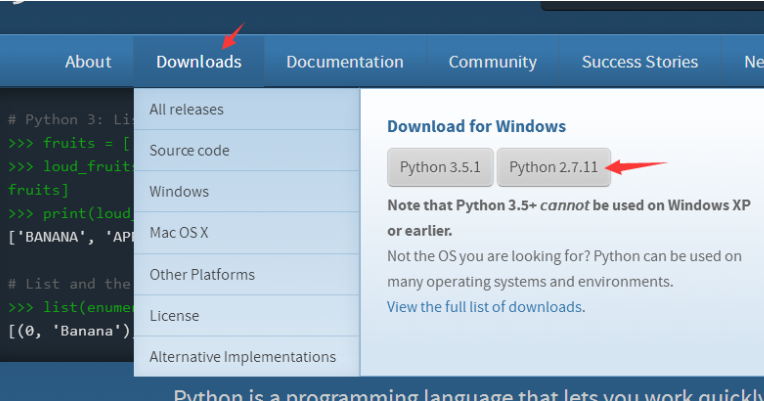
点击如图所示,下载python-2.7.11.msi文件(我是windows系统)。然后按提示安装。
安装过程中有一项记得勾选,那就是把python目录添加到环境变量中。如果没添加那就自己手动添加。
转换过程
将convert_obj_three.py和要转换的obj格式的文件拷贝到一个目录下。如果有mtl文件的话也要带上。
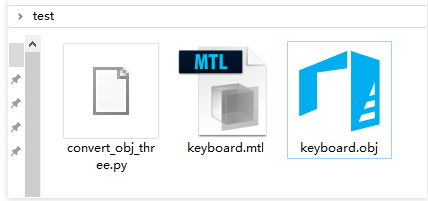
打开命令行工具,把目录切换到刚刚所建的文件夹,我建的文件夹是test
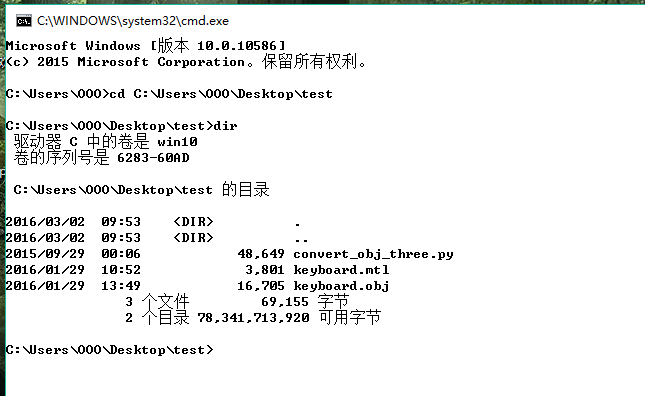
敲入命令dir可以列出当前文件夹中所包含的内容
执行命令
用文本编辑工具打开convert_obj_three.py,可在文件顶部发现这样的注释。这个是教我们怎么使用这个工具。我们可以参照它
"""Convert Wavefront OBJ / MTL files into Three.js (JSON model version, to be used with ascii / binary loader)

-------------------------

How to use this converter

-------------------------

python convert_obj_three.py -i infile.obj -o outfile.js [-m "morphfiles*.obj"] [-c "morphcolors*.obj"] [-a center|centerxz|top|bottom|none] [-s smooth|flat] [-t ascii|binary] [-d invert|normal] [-b] [-e]

Notes:

    - flags

        -i infile.obj            input OBJ file

        -o outfile.js            output JS file

        -m "morphfiles*.obj"    morph OBJ files (can use wildcards, enclosed in quotes multiple patterns separate by space)

        -c "morphcolors*.obj"    morph colors OBJ files (can use wildcards, enclosed in quotes multiple patterns separate by space)

        -a center|centerxz|top|bottom|none model alignment

        -s smooth|flat            smooth = export vertex normals, flat = no normals (face normals computed in loader)

        -t ascii|binary            export ascii or binary format (ascii has more features, binary just supports vertices, faces, normals, uvs and materials)

        -d invert|normal        invert transparency

        -b                        bake material colors into face colors

        -x 10.0                 scale and truncate

        -f                     morph frame sampling step

    - by default:

        use smooth shading (if there were vertex normals in the original model)

        will be in ASCII format

        original model is assumed to use non-inverted transparency / dissolve (0.0 fully transparent, 1.0 fully opaque)

        no face colors baking

        no scale and truncate

        morph frame step =  (all files will be processed)

    - binary conversion will create two files:

        outfile.js  (materials)

        outfile.bin (binary buffers)
参考上面的注释,我们可以使用命令
python convert_obj_three.py -i keyboard.obj -o keyboard.js
来处理我们的obj文件。我们敲入命令

回车:

如图所示,我们的模型已经转换成功了。
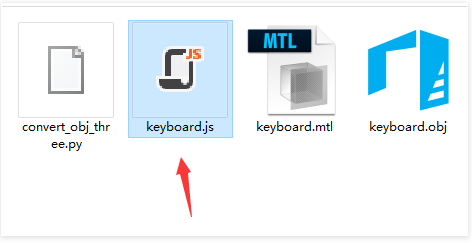
我们在刚刚所建的文件夹中找到这个keyboard.js文件。
使用js格式文件:
在刚刚的convert_obj_three.py文件中,我们还会发现如下的注释:
--------------------------------------------------

How to use generated JS file in your HTML document

--------------------------------------------------

    <script type="text/javascript" src="Three.js"></script>

    ...

    <script type="text/javascript">

        ...

        // load ascii model

        var jsonLoader = new THREE.JSONLoader();

        jsonLoader.load( "Model_ascii.js", createScene );

        // load binary model

        var binLoader = new THREE.BinaryLoader();

        binLoader.load( "Model_bin.js", createScene );

        function createScene( geometry, materials ) {

            var mesh = new THREE.Mesh( geometry, new THREE.MeshFaceMaterial( materials ) );

        }

        ...

    </script>
我们就参照这注释里边的方式在网页中加载这个模型吧。
three.js obj转js的详细步骤 convert_obj_three.py的用法的更多相关文章
- 如何发布一个自定义Node.js模块到NPM(详细步骤)
咱们闲话不多说,直接开始! 由于我从没有使用过MAC,所以我不保证本文中介绍的操作与MAC一致. 文章开始我先假定各位已经在window全局安装了Node.js,下面开始进行详细步骤介绍: 本文本着, ...
- 如何发布一个自定义Node.js模块到NPM(详细步骤,附Git使用方法)
咱们闲话不多说,直接开始! 由于我从没有使用过MAC,所以我不保证本文中介绍的操作与MAC一致. 文章开始我先假定各位已经在window全局安装了Node.js,下面开始进行详细步骤介绍: 本文本着, ...
- three.js obj转js
js格式的模型文件是three.js中可以直接加载的文件.使用THREE.JSONLoader()直接加载,而不需要引用其它的loader插件. obj格式转js格式使用的是threejs.org官方 ...
- JS执行上下文(执行环境)详细图解
JS执行上下文(执行环境)详细图解 先随便放张图 我们在JS学习初期或者面试的时候常常会遇到考核变量提升的思考题.比如先来一个简单一点的. console.log(a); // 这里会打印出什么? v ...
- jquery jtemplates.js模板渲染引擎的详细用法第三篇
jquery jtemplates.js模板渲染引擎的详细用法第三篇 <span style="font-family:Microsoft YaHei;font-size:14px;& ...
- jquery jtemplates.js模板渲染引擎的详细用法第二篇
jquery jtemplates.js模板渲染引擎的详细用法第二篇 关于jtemplates.js的用法在第一篇中已经讲过了,这里就直接上代码,不同之处是绑定模板的方式,这里讲模板的数据专门写一个t ...
- jquery jtemplates.js模板渲染引擎的详细用法第一篇
jquery jtemplates.js模板渲染引擎的详细用法第一篇 Author:ching Date:2016-06-29 jTemplates是一个基于JQuery的模板引擎插件,功能强大,有了 ...
- 记录一次用宝塔部署微信小程序Node.js后端接口代码的详细过程
一直忙着写毕设,上一次写博客还是元旦,大半年过去了.... 后面会不断分享各种新项目的源码与技术.欢迎关注一起学习哈! 记录一次部署微信小程序Node.js后端接口代码的详细过程,使用宝塔来部署. 我 ...
- node.js和express.js安装和使用步骤 [windows]
PS: NODEJS:https://nodejs.org NPM:https://www.npmjs.com/ 一.node.js安装与配置 到https://nodejs.org/en/downl ...
随机推荐
- JavaScript----DOM和事件的简单学习
##DOM简单学习 * 功能:控制html文档的内容 * 代码:获取页面标签(元素)对象:Element * document.getElementById("id值"):通 ...
- Leetcode——二叉树常考算法整理
二叉树常考算法整理 希望通过写下来自己学习历程的方式帮助自己加深对知识的理解,也帮助其他人更好地学习,少走弯路.也欢迎大家来给我的Github的Leetcode算法项目点star呀~~ 二叉树常考算法 ...
- python之序列化、OS、SYS、hashlib模块
一.序列化模块 1.序列化模块的用途 将一种数据结构转换成特殊的序列(特殊字符串,bytes),并且还可以转换回去 凡是数据通过网络传出去最终的格式必须bytes 2.json模块 json 是一种轻 ...
- vscode vue 模版生成,vue 一键生成
vscode vue 模版 继上篇文章(vue 格式化),顺便记录下 vue 模版生成.图片就不在贴了,如果有找不到 vscode 插件商店的可以访问上篇文章. 一.安装 VueHelper 在 vs ...
- Oracle 和SQL Server 中的SQL语句使用区别
最近开始接触Oracle,想要了解下同SQL Server使用时的区别.搜寻网上信息找到具体区别分类如下: 一.数据类型比较 类型名称 Oracle SQLServer 比较 字符数据类型 CHA ...
- -bash: syntax error near unexpected token `newline'问题解决
原因:bash语法错误,例如, 仔细查看发现语句中不能有'<'和'>',删除这两个符号即可: 问题解决!
- 使用nginx访问FastDFS
文中所有~~~均为同一个自定义文件夹名字,一般使用项目名称 2.1.为什么需要用Nginx访问? FastDFS通过Tracker服务器,将文件放在Storage服务器存储,但是同组存储服务器之间需要 ...
- JavaScipt创建函数的方法
JavaScipt的函数的定义有三种方式: 一.命名函数定义 1.JavaScript 函数通过 function 关键词进行定义,其后是函数名和括号 (). 2.函数名可包含字母.数字.下划线和美 ...
- Django之环境安装
什么是Django Python下有许多款不同的 Web 框架.Django是重量级选手中最有代表性的一位.许多成功的网站和APP都基于Django. Django是一个开放源代码的Web应用框架,由 ...
- eclipse导入项目乱码问题及快键键收集
1.eclipse导入的项目出现乱码,选择该项目,右键选择最下方的Properties,第一个出现的Resource页面: 在Text file encoding项中,选择other. 目前中文编码主 ...