
Winform GDI+ 绘图一:绘制2D电池
winform桌面软件开发,在工业控制领域的使用还是很广泛的,打算好好学习一下GDI+绘图。以前都是用别人的轮子,自己也打算封装一些工业控制领域常用的控件。
今天要将的是,利用缓动函数动态绘制电池。
首先在网上搜索了一些常用的缓动函数,并用Animation类做了二次封装。(引用自:http://dsqiu.iteye.com ,感谢)
    public enum AnimationType

    {

        Linear,

        EaseIn,

        EaseOut,

        EaseInOut,

        BounceIn,

        BounceOut,

        QuadEaseOut,

        QuadEaseIn,

        QuadEaseInOut,

        QuadEaseOutIn,    //新增40种动画效果

        ExpoEaseOut,

        ExpoEaseIn,

        ExpoEaseInOut,

        ExpoEaseOutIn,

        CubicEaseOut,

        CubicEaseIn,

        CubicEaseInOut,

        CubicEaseOutIn,

        QuartEaseOut,

        QuartEaseIn,

        QuartEaseInOut,

        QuartEaseOutIn,

        QuintEaseOut,

        QuintEaseIn,

        QuintEaseInOut,

        QuintEaseOutIn,

        CircEaseOut,

        CircEaseIn,

        CircEaseInOut,

        CircEaseOutIn,

        SineEaseOut,

        SineEaseIn,

        SineEaseInOut,

        SineEaseOutIn,

        ElasticEaseOut,

        ElasticEaseIn,

        ElasticEaseInOut,

        ElasticEaseOutIn,

        BounceEaseOut,

        BounceEaseIn,

        BounceEaseInOut,

        BounceEaseOutIn,

        BackEaseOut,

        BackEaseIn,

        BackEaseInOut,

        BackEaseOutIn

    }
自己二次封装Animation的类,对外公开一个缓动函数值改变的事件,以及动画开始、结束的方法。
封装的逻辑是,调用AnimationStart方法后,会在线程池中加入一个定时生产缓动函数对应值的方法,通过调用对外公开的事件。
外部不停调用AnimationStart方法时,会自动扔弃上一次未完成的定时生产缓动函数值的任务。
public class Animation

    {

        private AnimationType animationType = AnimationType.EaseInOut;

        /// <summary>

        /// 设置动画类型

        /// </summary>

        public AnimationType AnimationType { get => animationType; set => animationType = value; }

        /// <summary>

        /// 设置动画持续时间

        /// </summary>

        public int Duration

        {

            get => duration;

            set => duration = value;

        }

        private int duration = 200;

        private int span = 10;

        private int version = 0;

        public event EventHandler<AnimationEventArgs> AnimationComing;

        public float GetEaseProgress(AnimationType ease_type, float linear_progress)

        {

            switch (ease_type)

            {

                case AnimationType.Linear:

                    return linear_progress;

                case AnimationType.BackEaseIn:

                    return AnimationMethod.BackEaseIn(linear_progress, 0, 1, duration);

                case AnimationType.BackEaseInOut:

                    return AnimationMethod.BackEaseInOut(linear_progress, 0, 1, duration);

                case AnimationType.BackEaseOut:

                    return AnimationMethod.BackEaseOut(linear_progress, 0, 1, duration);

                case AnimationType.BackEaseOutIn:

                    return AnimationMethod.BackEaseOutIn(linear_progress, 0, 1, duration);

                case AnimationType.BounceEaseIn:

                    return AnimationMethod.BounceEaseIn(linear_progress, 0, 1, duration);

                case AnimationType.BounceEaseInOut:

                    return AnimationMethod.BounceEaseInOut(linear_progress, 0, 1, duration);

                case AnimationType.BounceEaseOut:

                    return AnimationMethod.BounceEaseOut(linear_progress, 0, 1, duration);

                case AnimationType.BounceEaseOutIn:

                    return AnimationMethod.BounceEaseOutIn(linear_progress, 0, 1, duration);

                case AnimationType.CircEaseIn:

                    return AnimationMethod.CircEaseIn(linear_progress, 0, 1, duration);

                case AnimationType.CircEaseInOut:

                    return AnimationMethod.CircEaseInOut(linear_progress, 0, 1, duration);

                case AnimationType.CircEaseOut:

                    return AnimationMethod.CircEaseOut(linear_progress, 0, 1, duration);

                case AnimationType.CircEaseOutIn:

                    return AnimationMethod.CircEaseOutIn(linear_progress, 0, 1, duration);

                case AnimationType.CubicEaseIn:

                    return AnimationMethod.CubicEaseIn(linear_progress, 0, 1, duration);

                case AnimationType.CubicEaseInOut:

                    return AnimationMethod.CubicEaseInOut(linear_progress, 0, 1, duration);

                case AnimationType.CubicEaseOut:

                    return AnimationMethod.CubicEaseOut(linear_progress, 0, 1, duration);

                case AnimationType.CubicEaseOutIn:

                    return AnimationMethod.CubicEaseOutIn(linear_progress, 0, 1, duration);

                case AnimationType.ElasticEaseIn:

                    return AnimationMethod.ElasticEaseIn(linear_progress, 0, 1, duration);

                case AnimationType.ElasticEaseInOut:

                    return AnimationMethod.ElasticEaseInOut(linear_progress, 0, 1, duration);

                case AnimationType.ElasticEaseOut:

                    return AnimationMethod.ElasticEaseOut(linear_progress, 0, 1, duration);

                case AnimationType.ElasticEaseOutIn:

                    return AnimationMethod.ElasticEaseOutIn(linear_progress, 0, 1, duration);

                case AnimationType.ExpoEaseIn:

                    return AnimationMethod.ExpoEaseIn(linear_progress, 0, 1, duration);

                case AnimationType.ExpoEaseInOut:

                    return AnimationMethod.ExpoEaseInOut(linear_progress, 0, 1, duration);

                case AnimationType.ExpoEaseOut:

                    return AnimationMethod.ExpoEaseOut(linear_progress, 0, 1, duration);

                case AnimationType.ExpoEaseOutIn:

                    return AnimationMethod.ExpoEaseOutIn(linear_progress, 0, 1, duration);

                case AnimationType.QuadEaseIn:

                    return AnimationMethod.QuadEaseIn(linear_progress, 0, 1, duration);

                case AnimationType.QuadEaseInOut:

                    return AnimationMethod.QuadEaseInOut(linear_progress, 0, 1, duration);

                case AnimationType.QuadEaseOut:

                    return AnimationMethod.QuadEaseOut(linear_progress, 0, 1, duration);

                case AnimationType.QuadEaseOutIn:

                    return AnimationMethod.QuadEaseOutIn(linear_progress, 0, 1, duration);

                case AnimationType.QuartEaseIn:

                    return AnimationMethod.QuartEaseIn(linear_progress, 0, 1, duration);

                case AnimationType.QuartEaseInOut:

                    return AnimationMethod.QuartEaseInOut(linear_progress, 0, 1, duration);

                case AnimationType.QuartEaseOut:

                    return AnimationMethod.QuartEaseOut(linear_progress, 0, 1, duration);

                case AnimationType.QuartEaseOutIn:

                    return AnimationMethod.QuartEaseOutIn(linear_progress, 0, 1, duration);

                case AnimationType.QuintEaseIn:

                    return AnimationMethod.QuintEaseIn(linear_progress, 0, 1, duration);

                case AnimationType.QuintEaseInOut:

                    return AnimationMethod.QuintEaseInOut(linear_progress, 0, 1, duration);

                case AnimationType.QuintEaseOut:

                    return AnimationMethod.QuintEaseOut(linear_progress, 0, 1, duration);

                case AnimationType.QuintEaseOutIn:

                    return AnimationMethod.QuintEaseOutIn(linear_progress, 0, 1, duration);

                case AnimationType.SineEaseIn:

                    return AnimationMethod.SineEaseIn(linear_progress, 0, 1, duration);

                case AnimationType.SineEaseInOut:

                    return AnimationMethod.SineEaseInOut(linear_progress, 0, 1, duration);

                case AnimationType.SineEaseOut:

                    return AnimationMethod.SineEaseOut(linear_progress, 0, 1, duration);

                case AnimationType.SineEaseOutIn:

                    return AnimationMethod.SineEaseOutIn(linear_progress, 0, 1, duration);

                default:

                    return linear_progress;

            }

        }

        /// <summary>

        /// 动画开始

        /// </summary>

        public void AnimationStart()

        {

            int number = Interlocked.Increment(ref version);

            ThreadPool.QueueUserWorkItem(Start, number);

        }

        /// <summary>

        /// 动画结束

        /// </summary>

        public void AnimationStop()

        {

            Interlocked.Increment(ref version);

        }

        private void Start(object state)

        {

            try

            {

                int number = Convert.ToInt32(state);

                float timespan = duration / span;

                float currentTime = timespan;

                while (currentTime < duration)

                {

                    if (number != version)

                        break;

                    Thread.Sleep((int)timespan);

                    AnimationComing.Invoke(this, new AnimationEventArgs() { NowValue = GetEaseProgress(AnimationType, currentTime) });

                    currentTime += timespan;

                    if (currentTime >= duration)

                    {

                        Thread.Sleep((int)(duration-currentTime));

                        AnimationComing.Invoke(this, new AnimationEventArgs() { NowValue = GetEaseProgress(AnimationType, currentTime) });

                    }

                }

                Interlocked.Decrement(ref version);

            }

            catch

            {

            }

        }

    }

    public class AnimationEventArgs : EventArgs

    {

        public float NowValue;

    }
自绘控件时,只需要注册AnimationComing事件的处理方法,进行控件重绘。如下:
        animation.AnimationComing += Animation_AnimationComing;

     private void Animation_AnimationComing(object sender, AnimationEventArgs e)

        {

            easeFunctionValue = e.NowValue;

            Invalidate();

        }
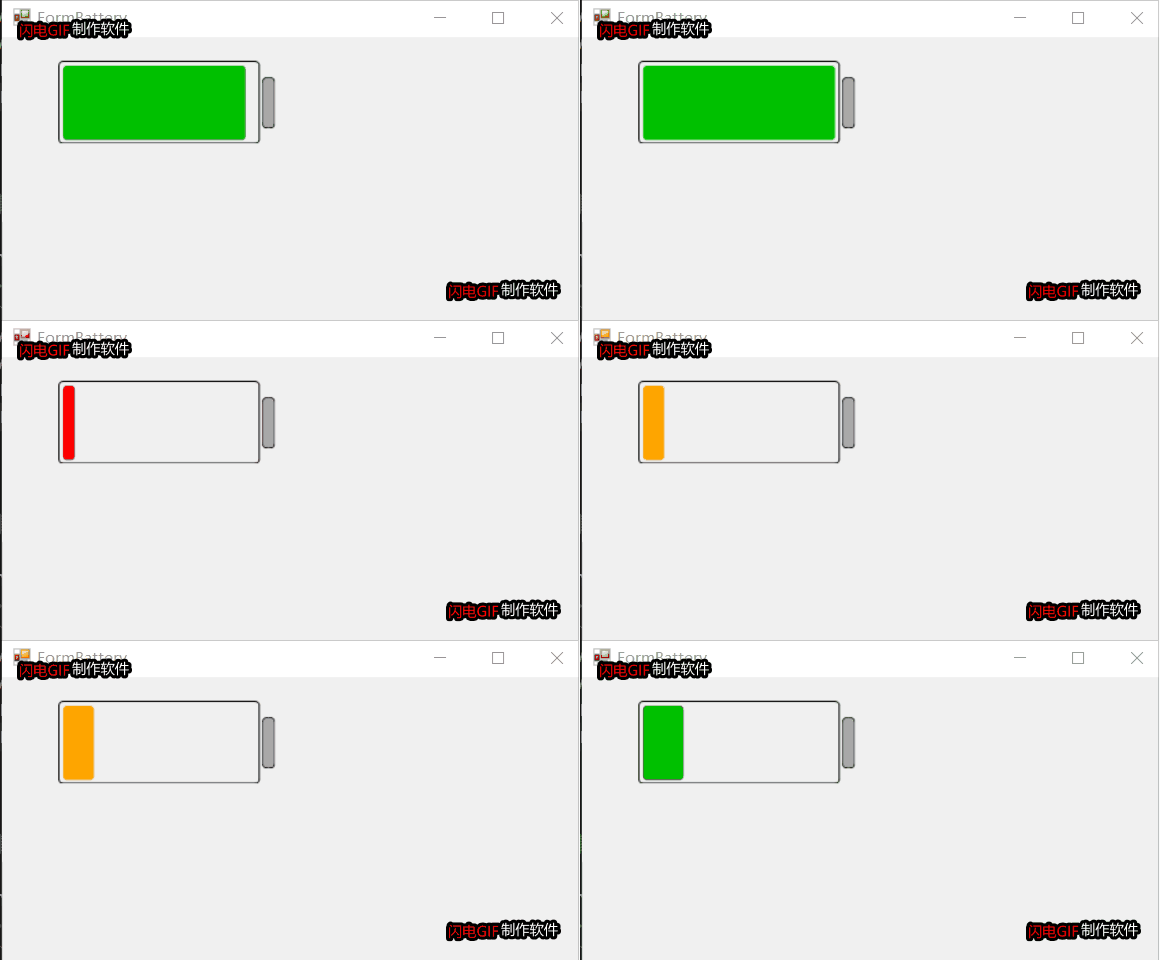
2D电池控件自绘部分就不贴代码,代码已开源,见文章尾部。总体效果如下:
项目开源地址:https://gitee.com/james_happy/IndustryControls
Winform GDI+ 绘图一:绘制2D电池的更多相关文章
- Winform GDI+绘图二:绘制旋转太极图
大家好,今天有时间给大家带来Winform自绘控件的第二部分,也是比较有意思的一个控件:旋转太极图. 大家可以停下思考一下,如果让你来绘制旋转的太极图,大家有什么样的思路呢?我今天跟大家展示一下,我平 ...
- WinForm GDI+ 资料收集
UI(User Interface)编程在整个项目开发过程中是个颇为重要的环节,任何好的解决方案若没有良好的用户界面呈现给最终用户,那么就算包含了最先进的技术也不能算是好程序.UI编程体现在两个方面, ...
- Winform GDI+
什么是GDI+ GDI (Graphics Device Interface), 是属于绘图方面的 API (Application Programming Interface). 因为应用程序不能直 ...
- MFC GDI绘图基础
一.关于GDI的基本概念 什么是GDI? Windows绘图的实质就是利用Windows提供的图形设备接口GDI(Graphics Device Interface)将图形绘制在显示器上. 在Wind ...
- C#-gdi绘图,双缓冲绘图,Paint事件的触发
一. 画面闪烁问题与双缓冲技术 1.1 导致画面闪烁的关键原因分析: 1 绘制窗口由于大小位置状态改变进行重绘操作时 绘图窗口内容或大小每改变一次,都要调用Paint事件进行重绘操作,该操作会使画面 ...
- GDI+ 绘图闪烁解决方法
闲着没事,准备做一个类似于TeeChart的自定义控件,结果第一步的绘图就把我给难倒了,虽然早就知道GDI绘图的闪烁问题很坑,但是却没有想到如此之坑,折腾了两天,才找到解决方法. 首先在窗体加载的时候 ...
- GDI+(一):GDI+ 绘图基础
一.GDI+绘图基础 编写图形程序时需要使用GDI(Graphics Device Interface,图形设备接口),从程序设计的角度看,GDI包括两部分:一部分是GDI对象,另一部分是GDI函数. ...
- Windows GDI绘图基础知识
一.Windows可以画直线.椭圆线(椭圆圆周上的曲线)和贝塞尔曲线.////////////7 个画线函式是:(1)画直线LineTo BOOL LineTo(HDC hdc,int nXEn ...
- WinForm GDI编程:Graphics画布类
命名空间: using System.Drawing;//提供对GDI+基本图形功能的访问 using System.Drawing.Drawing2D;//提供高级的二维和矢量图像功能 using ...
随机推荐
- orcale 树形结构查询
接到需求是要在一个表中(表结构为主键id和父id)循环显示数据,类似于省市县++这种情况 也可能不只有三级子菜单 id name parentid 1 a 0 2 ...
- JDBC 工具类封装
每次使用jdbc 我们都要 加载驱动类 创建链接 创建Statement 接口对象执行sql 关闭资源 按照这样的套路可以封装一些重用代码方便在其他方法中调用 package com.xzlf.jdb ...
- PHP中的11个魔术方法
1.__get.__set 这两个方法是为在类和他们的父类中没有声明的属性而设计的 __get( $property ) 当调用一个未定义的属性时访问此方法__set( $property ...
- (转)对 Linux 新手非常有用的 20 个命令
你打算从Windows换到Linux上来,还是你刚好换到Linux上来?哎哟!!!我说什么呢,是什么原因你就出现在我的世界里了.从我以往的经验来说,当我刚使用Linux,命令,终端啊什么的,吓了我一跳 ...
- 2 个案例带你迅速入门 Python Flask 框架
Flask 是 python 中非常流行的一个 web 框架,容易学习.这篇文章主要通过 2 个实际案例讲解 Flask 如何使用.第一个例子是实现一个调用公交车到站信息的接口服务:第二个例子是通过接 ...
- uniq 只能相邻行去重
uniq只可以将相邻行重复数据进行去重处理: [root@localhost /data/mysql/mysql3306]#last | cut -d ' ' -f 1 | tail -15 > ...
- 华为设备RIP实施和理论详解
1.路由协议基础 共同的目的:更新.维护和控制3层的路由 工作机制: RIP,封装在UDP这个协议上,端口号520(优先级100) OSPF,封装在IP层,协议号89(优先级,内部10,外部是150- ...
- C语言入门经典题目及其答案
写在开始: 我叫风骨散人,名字的意思是我多想可以不低头的自由生活,可现实却不是这样.家境贫寒,总得向这个世界低头,所以我一直在奋斗,想改变我的命运给亲人好的生活,希望同样被生活绑架的你可以通过自己的努 ...
- postman(断言)
一.断言 1.Code is 200 断言状态码是200 2.contains string 断言respoonse body中包含string 3.json value check (检查JSON值 ...
- Java实现功能简单的学生管理系统(附带源代码)
这几天Java学了点新的知识,打算要用这些知识做一个比较简单的管理系统,实战一下子,代码中的功能简洁,可能不多,但是作为一个练手来了解一个项目是怎么样一点一点思考的还是不错的 一.代码中要实现的功能 ...