
ASP.NET HttpWebRequest和HttpWebResponse
HttpWebRequest和HttpWebResponse类是用于发送和接收HTTP数据的最好选择。它们支持一系列有用的属性。
模拟艺龙旅游网登录
想模拟登录,首先整理一下流程
1.通过360浏览器(IE,火狐等等)F12开发人员工具抓到相关数据
2.获取验证码(拿到cookie),登录时也需要使用
3.登录
-------------------------------
F12调出开发人员工具,输入用户名,密码登录,看我们抓到了什么信息。 (此处为360浏览器)
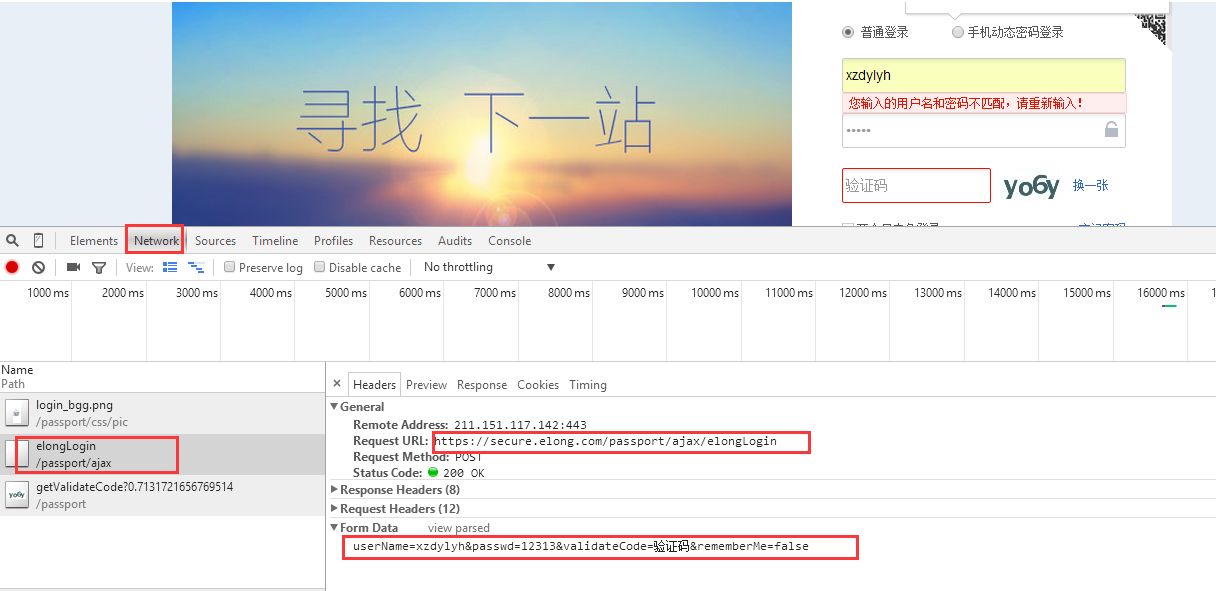
Form Data:这个是我们要POST传输的数据:
userName=xzdylyh&passwd=12313&validateCode=验证码&rememberMe=false (注意此处可能每个人略有不同)
其它一些重要信息在Request Headers中
*****************************************************************
我使用C# 设计的winform界面

using System;

using System.Collections.Generic;

using System.Linq;

using System.Text;

using System.Threading.Tasks;

using System.Web;

using System.Net;

using System.IO;

using System.Data;

namespace HTTPHELPER

{

    public  class ELOGN_LOGIN

    {

       public static CookieContainer container = null; //存储验证码cookie

        #region 登录

        public string  requestM(string uName,string passwd,string vaildate)

        {

            HttpWebRequest request = null;

            HttpWebResponse response = null;

            try

            {

                request = (HttpWebRequest)HttpWebRequest.Create("https://secure.elong.com/passport/ajax/elongLogin");

                request.Method = "Post";

                request.ContentType = "application/x-www-form-urlencoded; charset=UTF-8";

                request.UserAgent = "Mozilla/5.0 (Windows NT 10.0; WOW64) AppleWebKit/537.36 (KHTML, like Gecko) Chrome/45.0.2454.101 Safari/537.36";

                request.AllowAutoRedirect = true;

                request.CookieContainer = container;//获取验证码时候获取到的cookie会附加在这个容器里面

                request.KeepAlive = true;//建立持久性连接

                //整数据

                string postData = string.Format("userName={0}&passwd={1}&validateCode={2}&rememberMe=true", uName, passwd, vaildate);

                ASCIIEncoding encoding = new ASCIIEncoding();

                byte[] bytepostData = encoding.GetBytes(postData);

                request.ContentLength = bytepostData.Length;

                //发送数据  using结束代码段释放

                using (Stream requestStm = request.GetRequestStream())

                {

                    requestStm.Write(bytepostData, , bytepostData.Length);

                }

                //响应

                response = (HttpWebResponse)request.GetResponse();

                string text = string.Empty;

                using (Stream responseStm = response.GetResponseStream())

                {

                    StreamReader redStm = new StreamReader(responseStm, Encoding.UTF8);

                    text = redStm.ReadToEnd();

                }

               return text;

            }

            catch (Exception ex)

            {

                var msg = ex.Message;

                return msg;

            }

        }

        #endregion

        #region 获取验证码

        public Stream getCodeStream(string codeUrl)

        {

            //验证码请求

           HttpWebRequest request = (HttpWebRequest)WebRequest.Create(codeUrl);

            request.Method = "GET";

            request.ContentType = "application/x-www-form-urlencoded";

            request.UserAgent = "Mozilla/5.0 (Windows NT 6.1; WOW64; rv:5.0.1) Gecko/20100101 Firefox/5.0.1";

            request.Accept = "image/webp,*/*;q=0.8";

            request.CookieContainer = new CookieContainer();//!Very Important.!!!

            container = request.CookieContainer;

            var c = request.CookieContainer.GetCookies(request.RequestUri);

            HttpWebResponse  response = (HttpWebResponse)request.GetResponse();

            response.Cookies = container.GetCookies(request.RequestUri);

          Stream stream = response.GetResponseStream();

          return stream;

        }

    }

        #endregion

}
using System;

using System.Collections.Generic;

using System.ComponentModel;

using System.Data;

using System.Drawing;

using System.Linq;

using System.Text;

using System.Threading.Tasks;

using System.Windows.Forms;

using System.IO;

using HTTPHELPER;

namespace WindowsFormsApplication8

{

    public partial class ELONG_LOGIN_FORM : Form

    {

        public ELONG_LOGIN_FORM()

        {

            InitializeComponent();

        }

        private void button1_Click(object sender, EventArgs e)

        {

            ELOGN_LOGIN elongLogin = new ELOGN_LOGIN();

            var rmsg = elongLogin.requestM(txtuserName.Text,txtPassword.Text,txtVaildata.Text);

            MessageBox.Show(rmsg);

        }

        private void ELONG_LOGIN_FORM_Load(object sender, EventArgs e)

        {

            ReflshPicImage();//更新验证码

        }

        //更新验证码

        public void ReflshPicImage()

        {

            string codeUrl = "https://secure.elong.com/passport/getValidateCode";

            ELOGN_LOGIN agent = new ELOGN_LOGIN();

            Stream stmImage = agent.getCodeStream(codeUrl);

            picValidate.Image = Image.FromStream(stmImage);

        }

        private void btnReValidate_Click(object sender, EventArgs e)

        {

            ReflshPicImage();//更新验证码

        }

        private void picValidate_Click(object sender, EventArgs e)

        {

            ReflshPicImage();//更新验证码

        }

    }

}
最后执行效果,登录的session已经成功返回。

原文链接:https://www.cnblogs.com/yhleng/p/6728864.html
ASP.NET HttpWebRequest和HttpWebResponse的更多相关文章
- Asp.net HttpWebRequest和HttpWebResponse发送和接受任何类型数据
发送字符串数据发送数据 string strId = "guest"; "; string postData = "userid=" + strId; ...
- C# -- HttpWebRequest 和 HttpWebResponse 的使用 C#编写扫雷游戏 使用IIS调试ASP.NET网站程序 WCF入门教程 ASP.Net Core开发(踩坑)指南 ASP.Net Core Razor+AdminLTE 小试牛刀 webservice创建、部署和调用 .net接收post请求并把数据转为字典格式
C# -- HttpWebRequest 和 HttpWebResponse 的使用 C# -- HttpWebRequest 和 HttpWebResponse 的使用 结合使用HttpWebReq ...
- 利用HttpWebRequest和HttpWebResponse获取Cookie
之前看过某个同学的一篇有关与使用JSoup解析学校图书馆的文章,仔细一看,发现竟然是同校!!既然对方用的是java,那么我也就来个C#好了,虽然我的入门语言是java. C#没有JSoup这样方便的东 ...
- c# HttpWebRequest与HttpWebResponse 绝技(转载)
c# HttpWebRequest与HttpWebResponse 绝技 如果你想做一些,抓取,或者是自动获取的功能,那么就跟我一起来学习一下Http请求吧.本文章会对Http请求时的Get和P ...
- C# 利用 HttpWebRequest 和 HttpWebResponse 模拟登录有验证码的网站
原文:C# 利用 HttpWebRequest 和 HttpWebResponse 模拟登录有验证码的网站 我们经常会碰到需要程序模拟登录一个网站,那如果网站需要填写验证码的要怎样模拟登录呢?这篇文章 ...
- 利用HttpWebRequest和HttpWebResponse获取Cookie并实现模拟登录
利用HttpWebRequest和HttpWebResponse获取Cookie并实现模拟登录 tring cookie = response.Headers.Get("Set-Cookie ...
- C#使用HttpWebRequest和HttpWebResponse上传文件示例
C#使用HttpWebRequest和HttpWebResponse上传文件示例 1.HttpHelper类: 复制内容到剪贴板程序代码 using System;using System.Colle ...
- c# HttpWebRequest与HttpWebResponse
[转]c# HttpWebRequest与HttpWebResponse 绝技 如果你想做一些,抓取,或者是自动获取的功能,那么就跟我一起来学习一下Http请求吧. 本文章会对Http请求时的Get和 ...
- C# HttpWebRequest与HttpWebResponse详解
C# HttpWebRequest与HttpWebResponse详解 http://www.codeproject.com/Articles/6554/How-to-use-HttpWebRequ ...
随机推荐
- 当前安卓App加固到底该如何做到防篡改?
安卓dalvik虚拟机要求dex文件在内存中以明文形式存在,那么任何加壳方法到头来到了内存还是明文存在,各种dump方法终究是可以获得它的.App究竟应该如何加固才能防止被篡改? 加固和 dump ...
- Robolectric 单元测试中使用 Ressource
单元测试类中: @RunWith(RobolectricGradleTestRunner.class) @Config(constants=BuildConfig.class, sdk = 21) 获 ...
- GO学习笔记 - 变量在定义时没有明确的初始化时会赋值为“零值 ”。
官方教程:https://tour.go-zh.org/basics/12 变量在定义时没有明确的初始化时会赋值为 零值 . 零值是: 数值类型为 0 , 布尔类型为 false , 字符串为 &qu ...
- Sublime Text几款常用插件及用法(前端)
一.Sublime3下载 百度搜索sublime text3,出现如图: 2.然后点击进去下载: 或者https://pc.qq.com/detail/0/detail_10140.html这里下载 ...
- mxonline实战13,授课讲师列表页,详情页,index页面全局导航
对应github地址:第13天 把teacher-list.html和teacher-detail.html拷贝过来 一. 授课讲师列表页 1. 修改html文件 把org-list.ht ...
- 浅谈Android选项卡(四)
前面几篇介绍的选项的用法,基本上使用TabActivity.ViewPager.已经基本上满足开发需求了.但是这里再介绍一种小技巧,在有的时候,感觉使用前面的ViewPager和Fragment时候, ...
- java简单工厂设计模式
一.基本定义 /* *简单工厂设计模式: *文字描述理解: * 简单工厂模式属于类的创建型模式,又叫做静态工厂方法模式. * 通过专门定义一个类来负责创建其它类的实例,被创建的实例通常 * 都具有共同 ...
- 一次完整的http请求全程
当我们在打开浏览器的时候,在地址栏输入诸如 http://www.baidu.com时,几秒后浏览器打开百度页面,几秒钟内到底发生了哪些事情. 一.解析URL: 浏览器首先会对输入的URL进行检查,如 ...
- 【算法笔记】A1060 Are They Equal
1060 Are They Equal (25 分) If a machine can save only 3 significant digits, the float numbers 1230 ...
- E - Guess the Root 拉格朗日差值法+交互
题目传送门 题意:告诉你存在一个未知项系数最高为10的$f(x)$,你最多可以有50次询问,每次询问给出一个$x'$,系统会返回你$f(x')$的值,你需要猜一个$x''$,使得$f(x'')=0$, ...