
android LinearLayout
Android的布局方式共有6种,分别是LinearLayout(线性布局)、TableLayout(表格布局)、FrameLayout(帧布局)、RelativeLayout(相对布局)、GridLayout(网格布局)以及AbsoluteLayout(绝对布局)。
LinearLayout 常用属性介绍
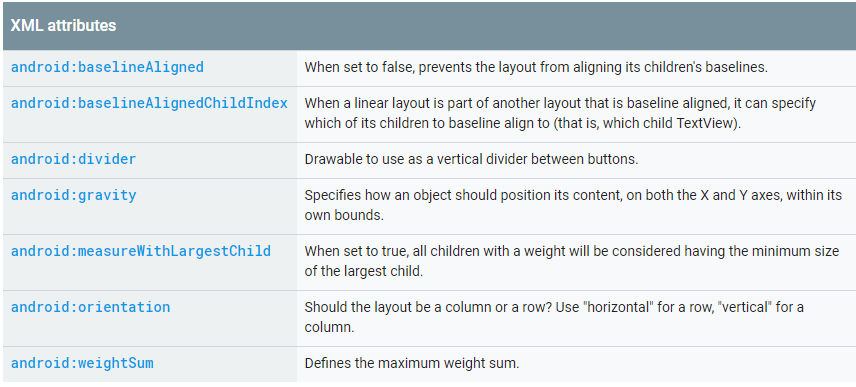
android:baselineAligned: 基准线对齐,默认为true.当设置为false时,布局文件和它的孩子的基准线不对齐。
android:baselineAlignedChildIndex:当作为layout的子控件时,设置自己的第几(0开始)个子文本(必须是文本),和外面layout内元素的基准线对其
android:measureWithLargestChild:
android:divider:分割线
android:weightSum:总权重和,即页面剩余的划分。和子控件的weight配合实现页面效果
android:orientation:horizontal(水平:0),vertical(垂直分布:1)
注意:水平不会换行,超出屏幕被隐藏
android:gravity
设置布局管理器内组件的对齐方式,该属性值可设为 top(顶部对齐) 、bottom(底部对齐) 、left(左对齐) 、right(右对齐) 、center_vertical(垂直方向居中) 、 fill_vertical(垂直方向填充) 、 center_horizontal(水平方向居中) 、 fill_horizontal(水平方向填充) 、center(垂直与水平方向都居中) 、 fill (填充)、 clip_vertical(垂直方向裁剪) 、 clip_horizontal(水平方向裁剪) 。
可同时指定多种对其方式的组合,中间用“|”连接,如下方代码设置对齐方式为 left|center_vertical 表示出现在屏幕左边且垂直居中,
<!--

    第一个线性布局, 我们可以视为html中的div,用于对于整个界面进行布局

    这里面 xmlns:android和xmlns:tools指定的是xml文件的命名空间,不是对布局的主要设置

    但是要有

    android:layout_width="match_parent"指的是当前的线性布局宽度占整个父元素,这里相对于

    当前的线性布局父元素为当前的窗体,所以宽度占满窗体

    android:layout_height="match_parent"指的是当前的线性布局高度占整个父元素,这里相对于

    当前的线性布局父元素为当前的窗体,所以高度占满窗体

    tools:context="com.example.activitylife.MainActivity":用于指定渲染上下文

    android:orientation="vertical":指的是当前控件为垂直摆放

-->

<LinearLayout xmlns:android="http://schemas.android.com/apk/res/android"

    xmlns:tools="http://schemas.android.com/tools"

    android:layout_width="match_parent"

    android:layout_height="match_parent"

    tools:context="com.example.activitylife.MainActivity"

    android:orientation="vertical">

</LinearLayout>
1.android:baselineAligned 属性
baselineAligned:基准线对齐。
首先要解释什么是基准线,这个在中文中不常见,但在以字母为书写语言的其他国家非常常见,尤其是英文
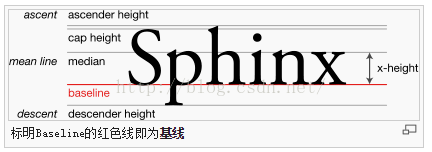
如上图所示,红线就是基线(baseline),是不是很熟悉,这不就是我们经常写英文的四条线中的第三条吗。

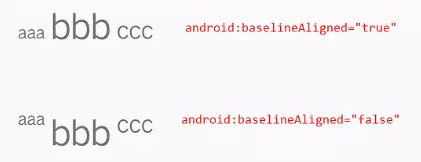
那baselineAligned是做什么用的呢?根据官方文档,baselineAligned默认设置为true,当设置为false时,
布局文件和它的孩子的基准线不对齐。
举个栗子:
这是将baselineAligned值设置为false时,也就是不对齐。把baselineAligned值改为true,就是对齐。
2、android:baselineAlignedChildIndex属性:
线性布局(LinearLayout)中使用,设置LinearLayout中第几个(从0开始计数)子组件作为基线对齐的控件,来和LinearLayout外的基线对齐。
android:baselineAlignedChildIndex对应的view必须是可以显示文字的View
测试代码
    <LinearLayout xmlns:android="http://schemas.android.com/apk/res/android"

                  android:layout_width="match_parent"

                  android:layout_height="match_parent"

                  android:orientation="horizontal">

        <TextView

            android:layout_width="wrap_content"

            android:layout_height="wrap_content"

            android:text="aaa"

            android:textSize="20sp"/>

        <!--测试LinearLayout-->

        <LinearLayout

            android:layout_width="wrap_content"

            android:layout_height="wrap_content"

            android:layout_marginLeft="10dp"

            android:orientation="vertical">

            <TextView

                android:layout_width="wrap_content"

                android:layout_height="wrap_content"

                android:text="fdfdfdf"/>

            <ImageView

                android:layout_width="wrap_content"

                android:layout_height="wrap_content"

                android:src="@mipmap/ic_launcher"/>

            <TextView

                android:layout_width="wrap_content"

                android:layout_height="wrap_content"

                android:text="rgtgtgtgt"/>

        </LinearLayout>

        <TextView

            android:layout_width="wrap_content"

            android:layout_height="wrap_content"

            android:layout_marginLeft="10dp"

            android:text="ffsdfr"

            android:textSize="40sp"/>

    </LinearLayout>
1 、测试LinearLayout不设置android:baselineAlignedChildIndex时,只
![Uploading 1489473079(1)_583231.jpg . . .]
有前后TextView基线对其

2、测试LinearLayout设置android:baselineAlignedChildIndex=0,对应view为TextVIew时

3、测试LinearLayout设置android:baselineAlignedChildIndex=1,对应view为ImageView时,崩溃了,异常现象如下,不能对不是文本的进行设置基准线的对齐

4、测试LinearLayout设置android:baselineAlignedChildIndex=2,对应view为TextView时

3、weightSum 属性
weightSum属性与weight属性有很大关系,通过weightSum控制weight的最大占比。比如我们这样设置 :
<LinearLayout xmlns:android="http://schemas.android.com/apk/res/android"

    android:layout_width="match_parent"

    android:layout_height="match_parent"

    android:weightSum=""

    android:orientation="horizontal">

    <TextView

        android:layout_width="wrap_content"

        android:layout_height="wrap_content"

        android:gravity="center"

        android:layout_weight=""

        android:background="#FF0000"

        android:text="text1" />

    <TextView

        android:layout_width="wrap_content"

        android:layout_height="wrap_content"

        android:gravity="center"

        android:layout_weight=""

        android:background="#00FF00"

        android:text="text2" />

</LinearLayout>

text1与text2本来是一样的weight,可是结果它们都没有撑满屏幕。因为weightSum="3",也就是说text1、text2占用的宽度是 (text1文本宽度)120 + (1080-240两个文本)840 / 3 = 400px ,右边还有剩余280px。如果text1与text2的weight超过了weightSum会怎样,我们设置如下看看效果 :
<LinearLayout xmlns:android="http://schemas.android.com/apk/res/android"

    android:layout_width="match_parent"

    android:layout_height="match_parent"

    android:weightSum=""

    android:orientation="horizontal">

    <TextView

        android:layout_width="wrap_content"

        android:layout_height="wrap_content"

        android:gravity="center"

        android:layout_weight=""

        android:background="#FF0000"

        android:text="text1" />

    <TextView

        android:layout_width="wrap_content"

        android:layout_height="wrap_content"

        android:gravity="center"

        android:layout_weight=""

        android:background="#00FF00"

        android:text="text2" />

</LinearLayout>

结果发现text2的文字快到屏幕外了,说明text2的宽度超出了屏幕。其实计算方式还是一样的,它们各占剩余空间的 2/3。我们上面说过text1与text2的宽度都是120px,剩余840,那么此时text1的宽度为 120 + 840 * 2 / 3 = 680px ,两个都是 680px,那text2当然被挤到屏幕外去了。
weightSum属性可以用来控制weight属性占用剩余空间的比例。比如我们要做一个布局,一个按钮居中,它宽度是屏幕的一半,还要自适应屏幕,效果如下:

我们可以利用weightSum属性,代码如下:
<LinearLayout xmlns:android="http://schemas.android.com/apk/res/android"

    android:layout_width="match_parent"

    android:layout_height="wrap_content"

    android:gravity="center"

    android:orientation="horizontal"

    android:weightSum="">

    <Button

        android:layout_width="wrap_content"

        android:layout_height="wrap_content"

        android:layout_weight=""

        android:text="按钮" />

</LinearLayout>
运行代码看到按钮半宽居中,自适应所有分辨率的屏幕,符合要求。注意LinearLayout中设置的android:gravity="center",它让子View居中放置。
4、divider 、showDividers 属性
以往我在设置分割线时,都是新增一个View,用来显示分割线,直到我发现在LinearLayout中添加分割线的新方法。LinearLayout显示分割线主要涉及divider 、showDividers 属性 : android:divider用于设置分割线的样式,可以是xml的drawable也可以是图片。android:showDividers = "middle|end|beginning|none" 其每个选项的作用:
- middle 在每一项中间添加分割线
- end 在整体的最后一项添加分割线
- beginning 在整体的最上方添加分割线
- none 不显示分割线
我们先创建一个custom.xml的drawable ,注意设置了宽高,不然是显示不出来的:
<?xml version="1.0" encoding="utf-8"?>

<shape xmlns:android="http://schemas.android.com/apk/res/android">

    <solid android:color="@android:color/holo_red_light" />

    <size android:height="12dp" android:width="2dp"/>

</shape>
设置成android:showDividers = "beginning"时:

设置成android:showDividers = "end"时:

设置成android:showDividers = "middle"时:

还可以组合设置 ,android:showDividers="beginning|end|middle" ,显示结果:

最后如果大家发现了什么的重要的属性或巧妙的用法,也可以一起交流哈。
参考转自以下文档:
https://blog.csdn.net/chenbengang/article/details/48154057
https://www.jianshu.com/p/ae0762d2f922
https://www.jianshu.com/p/21db6618baa0
android LinearLayout的更多相关文章
- 关于android LinearLayout的比例布局(转载)
关于android LinearLayout的比例布局,主要有以下三个属性需要设置: 1,android:layout_width,android:layout_height,android:layo ...
- Android LinearLayout的android:layout_weight属性
本文主要介绍Android LinearLayout的android:layout_weight属性意义 android:layout_weight为大小权重,相当于在页面上显示的百分比,它的计算是根 ...
- Android linearlayout常用布局
用linearlayout完成这样的布局效果,这样的布局还是比较常用的,具体的xml代码如下: <LinearLayout xmlns:android="http://schemas. ...
- android LinearLayout 实现两端对齐
<?xml version="1.0″ encoding="utf-8″?> <LinearLayout xmlns:android="http://s ...
- 关于Android LinearLayout添加分隔线的方法
目前了解的办法有两个:1.自定义一个view当作分隔线:2.使用高版本的分隔线属性 一.在需要添加分隔线的地方,添加一个view,比如ImageView,TextView等都可以,如代码,关键是设置高 ...
- android LinearLayout android:layout_weight 作用,固定比例
android 中的 LinearLayout 是线性布局有水平布局horizontal 垂直布局vertical .本文针对 水平布局horizontal 布局的weight属性做一个标记,以免 ...
- android LinearLayout和RelativeLayout实现精确布局
先明确几个概念的区别: padding margin:都是边距的含义,关键问题得明白是什么相对什么的边距padding:是控件的内容相对控件的边缘的边距. margin :是控件边缘相对父空间的边距 ...
- android linearlayout 把控件view置底部(放在页面最下方)
<LinearLayout android:id="@+id/recLayout" android:layout_width="fill_parent" ...
- android linearlayout imageview置顶摆放
在练习android时,想在Linearlayout内放一图片,使其图片置顶,预期效果是这样的: 但xml代码imageview写成这样后, <ImageView android:layout_ ...
- android LinearLayout等view如何获取button效果
我们可以给LinearLayout以及一切继承自View的控件,设置View.onClickListener监听,例如LInearLayout. 但是我们发现LinearLayout可以执行监听方法体 ...
随机推荐
- Java50道经典习题-程序11 求不重复数字
题目:有1.2.3.4个数字,能组成多少个互不相同且无重复数字的三位数?都是多少?分析:可填在百位.十位.个位的数字都是1.2.3.4.组成所有的排列后再去 掉不满足条件的排列. public cla ...
- [转载] 解决gns3 for mac模拟器三层交换机无法成功创建vlan的问题
1.删除之前导入的ios: 2.选择GNS3--Edit--Preferences--IOS routers--New--导入ios-- 勾选This is an EtherSwitch router ...
- 安装vuecli和使用elememtUi
首先需要下载node.js,这里只需要一步步的安装就可以,无需要做其他的事, 第二步:安装vue 第三步:安装脚手架 第四步: 由于国内访问npm比较慢,可以按照cnpm npm install -g ...
- Objective-C语法之类和对象
https://blog.csdn.net/totogo2010/article/details/7708731 Objective-C语法之类和对象 2012年07月02日 17:19:42 知行合 ...
- 教你制作自己logo专属的图片
说明:以下教程仅适合对图片分辨率要求不高的情况. 第一步:使用Windows自带的画图工具新建一个250像素*250像素的空白图片. 第二步:使用形状中的三角形,按住Shift键,将三角形拖拉至合适的 ...
- Hibernate查询方式&抓取策略
Hibernate的查询方式 1.OID查询 hibernate根据对象的OID(主键)进行检索 使用get方法 Customer customer=session.get(Customer.clas ...
- scp 一次拷贝多个文件
用正则表达式去匹配即可, scp *.tar root@11.11.11.12:/root/ 拷贝当前目录下的所有tar类型的文件到服务器上
- 第十篇---javascript函数this关键字
<script type="text/javascript" charset="utf-8"> //this:this对象是指运行时期基于执行环境所 ...
- 《LeetBook》leetcode题解(7): Reverse Integer[E]——处理溢出的技巧
我现在在做一个叫<leetbook>的开源书项目,把解题思路都同步更新到github上了,需要的同学可以去看看 书的地址:https://hk029.gitbooks.io/leetboo ...
- Paths
Paths 在javax.tools.StandardLocation 枚举类下定义了几个枚举变量,如下: public enum StandardLocation implements Locati ...