
Randcher 2.0部署K8s集群(一)
环境准备
1、系统版本
CentOS7.5 + docker ee
2、配置阿里云yum源
wget -O /etc/yum.repos.d/CentOS-Base.repo http://mirrors.aliyun.com/repo/Centos-7.repo
wget -O /etc/yum.repos.d/epel.repo http://mirrors.aliyun.com/repo/epel-7.repo
cat /etc/yum.repos.d/docker-main.repo
[docker-main-repo]
name=Docker main Repository
baseurl=http://mirrors.aliyun.com/docker-engine/yum/repo/main/centos/7
enabled=1
gpgcheck=1
gpgkey=http://mirrors.aliyun.com/docker-engine/yum/gpg
yum clean all && yum makecache
3、安装常用软件
yum install -y vim wget openssl openssl-devel openssl pcre pcre-devel telnet setuptool ntsysv git python-urllib3 sqlite sqlite-devel bzip2 bzip2-devel gcc gcc-c++ cmake lsof sysstat bind-utils ntp iftop iotop tree screen iftop ntpdate nettools
4、配置主机名及hosts
# cat /etc/hosts
127.0.0.1 localhost localhost.localdomain localhost4 localhost4.localdomain4
::1 localhost localhost.localdomain localhost6 localhost6.localdomain6
192.168.10.101 linux-reancher1.exmaple.com linux-reancher1
192.168.10.102 linux-k8s-master1.exmaple.com linux-k8s-master1
192.168.10.103 linux-k8s-node1.exmaple.com linux-k8s-node1
# cat /etc/hostname
linux-reancher1
....
5、停止防火墙
systemctl stop firewalld
systemctl disable firewalld
6、关闭selinux
# cat /etc/selinux/config
# This file controls the state of SELinux on the system.
# SELINUX= can take one of these three values:
# enforcing - SELinux security policy is enforced.
# permissive - SELinux prints warnings instead of enforcing.
# disabled - No SELinux policy is loaded.
SELINUX=disabled
# SELINUXTYPE= can take one of three two values:
# targeted - Targeted processes are protected,
# minimum - Modification of targeted policy. Only selected processes are protected.
# mls - Multi Level Security protection.
SELINUXTYPE=targeted
7、开启ipv4转发
# cat /etc/sysctl.conf
net.ipv4.ip_forward = 1
8、下载rancher的docker安装脚本,并修改docker的yum源为aliyun
curl -O 1.13.sh https://releases.rancher.com/install-docker/1.13.sh
#!/bin/sh

set -e

docker_version=1.13.1

#

# This script is meant for quick & easy install via:

#   'curl -sSL https://get.docker.com/ | sh'

# or:

#   'wget -qO- https://get.docker.com/ | sh'

#

# For test builds (ie. release candidates):

#   'curl -fsSL https://test.docker.com/ | sh'

# or:

#   'wget -qO- https://test.docker.com/ | sh'

#

# For experimental builds:

#   'curl -fsSL https://experimental.docker.com/ | sh'

# or:

#   'wget -qO- https://experimental.docker.com/ | sh'

#

# Docker Maintainers:

#   To update this script on https://get.docker.com,

#   use hack/release.sh during a normal release,

#   or the following one-liner for script hotfixes:

#     aws s3 cp --acl public-read hack/install.sh s3://get.docker.com/index

#

url="https://get.docker.com/"

apt_url="https://apt.dockerproject.org"

yum_url="http://mirrors.aliyun.com/docker-engine/yum"

gpg_fingerprint="58118E89F3A912897C070ADBF76221572C52609D"

key_servers="

ha.pool.sks-keyservers.net

pgp.mit.edu

keyserver.ubuntu.com

"

command_exists() {

	command -v "$@" > /dev/null 2>&1

}

echo_docker_as_nonroot() {

	if command_exists docker && [ -e /var/run/docker.sock ]; then

		(

			set -x

			$sh_c 'docker version'

		) || true

	fi

	your_user=your-user

	[ "$user" != 'root' ] && your_user="$user"

	# intentionally mixed spaces and tabs here -- tabs are stripped by "<<-EOF", spaces are kept in the output

	cat <<-EOF

	If you would like to use Docker as a non-root user, you should now consider

	adding your user to the "docker" group with something like:

	  sudo usermod -aG docker $your_user

	Remember that you will have to log out and back in for this to take effect!

	EOF

}

# Check if this is a forked Linux distro

check_forked() {

	# Check for lsb_release command existence, it usually exists in forked distros

	if command_exists lsb_release; then

		# Check if the `-u` option is supported

		set +e

		lsb_release -a -u > /dev/null 2>&1

		lsb_release_exit_code=$?

		set -e

		# Check if the command has exited successfully, it means we're in a forked distro

		if [ "$lsb_release_exit_code" = "0" ]; then

			# Print info about current distro

			cat <<-EOF

			You're using '$lsb_dist' version '$dist_version'.

			EOF

			# Get the upstream release info

			lsb_dist=$(lsb_release -a -u 2>&1 | tr '[:upper:]' '[:lower:]' | grep -E 'id' | cut -d ':' -f 2 | tr -d '[[:space:]]')

			dist_version=$(lsb_release -a -u 2>&1 | tr '[:upper:]' '[:lower:]' | grep -E 'codename' | cut -d ':' -f 2 | tr -d '[[:space:]]')

			# Print info about upstream distro

			cat <<-EOF

			Upstream release is '$lsb_dist' version '$dist_version'.

			EOF

		else

			if [ -r /etc/debian_version ] && [ "$lsb_dist" != "ubuntu" ] && [ "$lsb_dist" != "raspbian" ]; then

				# We're Debian and don't even know it!

				lsb_dist=debian

				dist_version="$(cat /etc/debian_version | sed 's/\/.*//' | sed 's/\..*//')"

				case "$dist_version" in

                                       9)

                                               dist_version="stretch"

                                       ;;

					8|'Kali Linux 2')

						dist_version="jessie"

					;;

					7)

						dist_version="wheezy"

					;;

				esac

			fi

		fi

	fi

}

rpm_import_repository_key() {

	local key=$1; shift

	local tmpdir=$(mktemp -d)

	chmod 600 "$tmpdir"

	for key_server in $key_servers ; do

		gpg --homedir "$tmpdir" --keyserver "$key_server" --recv-keys "$key" && break

	done

	gpg --homedir "$tmpdir" -k "$key" >/dev/null

	gpg --homedir "$tmpdir" --export --armor "$key" > "$tmpdir"/repo.key

	rpm --import "$tmpdir"/repo.key

	rm -rf "$tmpdir"

}

semverParse() {

	major="${1%%.*}"

	minor="${1#$major.}"

	minor="${minor%%.*}"

	patch="${1#$major.$minor.}"

	patch="${patch%%[-.]*}"

}

do_install() {

	case "$(uname -m)" in

		*64)

			;;

		armv6l|armv7l)

			;;

		*)

			cat >&2 <<-'EOF'

			Error: you are not using a 64bit platform or a Raspberry Pi (armv6l/armv7l).

			Docker currently only supports 64bit platforms or a Raspberry Pi (armv6l/armv7l).

			EOF

			exit 1

			;;

	esac

	if command_exists docker; then

		version="$(docker -v | awk -F '[ ,]+' '{ print $3 }')"

		MAJOR_W=1

		MINOR_W=10

		semverParse $version

		shouldWarn=0

		if [ $major -lt $MAJOR_W ]; then

			shouldWarn=1

		fi

		if [ $major -le $MAJOR_W ] && [ $minor -lt $MINOR_W ]; then

			shouldWarn=1

		fi

		cat >&2 <<-'EOF'

			Warning: the "docker" command appears to already exist on this system.

			If you already have Docker installed, this script can cause trouble, which is

			why we're displaying this warning and provide the opportunity to cancel the

			installation.

			If you installed the current Docker package using this script and are using it

		EOF

		if [ $shouldWarn -eq 1 ]; then

			cat >&2 <<-'EOF'

			again to update Docker, we urge you to migrate your image store before upgrading

			to v1.10+.

			You can find instructions for this here:

			https://github.com/docker/docker/wiki/Engine-v1.10.0-content-addressability-migration

			EOF

		else

			cat >&2 <<-'EOF'

			again to update Docker, you can safely ignore this message.

			EOF

		fi

		cat >&2 <<-'EOF'

			You may press Ctrl+C now to abort this script.

		EOF

		( set -x; sleep 20 )

	fi

	user="$(id -un 2>/dev/null || true)"

	sh_c='sh -c'

	if [ "$user" != 'root' ]; then

		if command_exists sudo; then

			sh_c='sudo -E sh -c'

		elif command_exists su; then

			sh_c='su -c'

		else

			cat >&2 <<-'EOF'

			Error: this installer needs the ability to run commands as root.

			We are unable to find either "sudo" or "su" available to make this happen.

			EOF

			exit 1

		fi

	fi

	curl=''

	if command_exists curl; then

		curl='curl -sSL'

	elif command_exists wget; then

		curl='wget -qO-'

	elif command_exists busybox && busybox --list-modules | grep -q wget; then

		curl='busybox wget -qO-'

	fi

	# check to see which repo they are trying to install from

	if [ -z "$repo" ]; then

		repo='main'

		if [ "https://test.docker.com/" = "$url" ]; then

			repo='testing'

		elif [ "https://experimental.docker.com/" = "$url" ]; then

			repo='experimental'

		fi

	fi

	# perform some very rudimentary platform detection

	lsb_dist=''

	dist_version=''

	if command_exists lsb_release; then

		lsb_dist="$(lsb_release -si)"

	fi

	if [ -z "$lsb_dist" ] && [ -r /etc/lsb-release ]; then

		lsb_dist="$(. /etc/lsb-release && echo "$DISTRIB_ID")"

	fi

	if [ -z "$lsb_dist" ] && [ -r /etc/debian_version ]; then

		lsb_dist='debian'

	fi

	if [ -z "$lsb_dist" ] && [ -r /etc/fedora-release ]; then

		lsb_dist='fedora'

	fi

	if [ -z "$lsb_dist" ] && [ -r /etc/oracle-release ]; then

		lsb_dist='oracleserver'

	fi

	if [ -z "$lsb_dist" ] && [ -r /etc/centos-release ]; then

		lsb_dist='centos'

	fi

	if [ -z "$lsb_dist" ] && [ -r /etc/redhat-release ]; then

		lsb_dist='redhat'

	fi

	if [ -z "$lsb_dist" ] && [ -r /etc/os-release ]; then

		lsb_dist="$(. /etc/os-release && echo "$ID")"

	fi

	lsb_dist="$(echo "$lsb_dist" | tr '[:upper:]' '[:lower:]')"

	# Special case redhatenterpriseserver

	if [ "${lsb_dist}" = "redhatenterpriseserver" ]; then

        	# Set it to redhat, it will be changed to centos below anyways

        	lsb_dist='redhat'

	fi

	case "$lsb_dist" in

		ubuntu)

			if command_exists lsb_release; then

				dist_version="$(lsb_release --codename | cut -f2)"

			fi

			if [ -z "$dist_version" ] && [ -r /etc/lsb-release ]; then

				dist_version="$(. /etc/lsb-release && echo "$DISTRIB_CODENAME")"

			fi

		;;

		debian|raspbian)

			dist_version="$(cat /etc/debian_version | sed 's/\/.*//' | sed 's/\..*//')"

			case "$dist_version" in

				8)

					dist_version="jessie"

				;;

				7)

					dist_version="wheezy"

				;;

			esac

		;;

		oracleserver)

			# need to switch lsb_dist to match yum repo URL

			lsb_dist="oraclelinux"

			dist_version="$(rpm -q --whatprovides redhat-release --queryformat "%{VERSION}\n" | sed 's/\/.*//' | sed 's/\..*//' | sed 's/Server*//')"

		;;

		fedora|centos|redhat)

			dist_version="$(rpm -q --whatprovides ${lsb_dist}-release --queryformat "%{VERSION}\n" | sed 's/\/.*//' | sed 's/\..*//' | sed 's/Server*//' | sort | tail -1)"

		;;

		*)

			if command_exists lsb_release; then

				dist_version="$(lsb_release --codename | cut -f2)"

			fi

			if [ -z "$dist_version" ] && [ -r /etc/os-release ]; then

				dist_version="$(. /etc/os-release && echo "$VERSION_ID")"

			fi

		;;

	esac

	# Check if this is a forked Linux distro

	check_forked

	# Run setup for each distro accordingly

	case "$lsb_dist" in

		amzn)

			(

			set -x

			$sh_c 'sleep 3; yum -y -q install docker'

			)

			echo_docker_as_nonroot

			exit 0

			;;

		'opensuse project'|opensuse)

			echo 'Going to perform the following operations:'

			if [ "$repo" != 'main' ]; then

				echo '  * add repository obs://Virtualization:containers'

			fi

			echo '  * install Docker'

			$sh_c 'echo "Press CTRL-C to abort"; sleep 3'

			if [ "$repo" != 'main' ]; then

				# install experimental packages from OBS://Virtualization:containers

				(

					set -x

					zypper -n ar -f obs://Virtualization:containers Virtualization:containers

					rpm_import_repository_key 55A0B34D49501BB7CA474F5AA193FBB572174FC2

				)

			fi

			(

				set -x

				zypper -n install docker

			)

			echo_docker_as_nonroot

			exit 0

			;;

		'suse linux'|sle[sd])

			echo 'Going to perform the following operations:'

			if [ "$repo" != 'main' ]; then

				echo '  * add repository obs://Virtualization:containers'

				echo '  * install experimental Docker using packages NOT supported by SUSE'

			else

				echo '  * add the "Containers" module'

				echo '  * install Docker using packages supported by SUSE'

			fi

			$sh_c 'echo "Press CTRL-C to abort"; sleep 3'

			if [ "$repo" != 'main' ]; then

				# install experimental packages from OBS://Virtualization:containers

				echo >&2 'Warning: installing experimental packages from OBS, these packages are NOT supported by SUSE'

				(

					set -x

					zypper -n ar -f obs://Virtualization:containers/SLE_12 Virtualization:containers

					rpm_import_repository_key 55A0B34D49501BB7CA474F5AA193FBB572174FC2

				)

			else

				# Add the containers module

				# Note well-1: the SLE machine must already be registered against SUSE Customer Center

				# Note well-2: the `-r ""` is required to workaround a known issue of SUSEConnect

				(

					set -x

					SUSEConnect -p sle-module-containers/12/x86_64 -r ""

				)

			fi

			(

				set -x

				zypper -n install docker

			)

			echo_docker_as_nonroot

			exit 0

			;;

		ubuntu|debian|raspbian)

			export DEBIAN_FRONTEND=noninteractive

			did_apt_get_update=

			apt_get_update() {

				if [ -z "$did_apt_get_update" ]; then

					( set -x; $sh_c 'sleep 3; apt-get update' )

					did_apt_get_update=1

				fi

			}

			if [ "$lsb_dist" = "raspbian" ]; then

				# Create Raspbian specific systemd drop-in file, use overlay by default

				( set -x; $sh_c "mkdir -p /etc/systemd/system/docker.service.d" )

				( set -x; $sh_c "echo '[Service]\nExecStart=\nExecStart=/usr/bin/dockerd --storage-driver overlay -H fd://' > /etc/systemd/system/docker.service.d/overlay.conf" )

			else

				# aufs is preferred over devicemapper; try to ensure the driver is available.

				if ! grep -q aufs /proc/filesystems && ! $sh_c 'modprobe aufs'; then

					if uname -r | grep -q -- '-generic' && dpkg -l 'linux-image-*-generic' | grep -qE '^ii|^hi' 2>/dev/null; then

						kern_extras="linux-image-extra-$(uname -r) linux-image-extra-virtual"

						apt_get_update

						( set -x; $sh_c 'sleep 3; apt-get install -y -q '"$kern_extras" ) || true

						if ! grep -q aufs /proc/filesystems && ! $sh_c 'modprobe aufs'; then

							echo >&2 'Warning: tried to install '"$kern_extras"' (for AUFS)'

							echo >&2 ' but we still have no AUFS.  Docker may not work. Proceeding anyways!'

							( set -x; sleep 10 )

						fi

					else

						echo >&2 'Warning: current kernel is not supported by the linux-image-extra-virtual'

						echo >&2 ' package.  We have no AUFS support.  Consider installing the packages'

						echo >&2 ' linux-image-virtual kernel and linux-image-extra-virtual for AUFS support.'

						( set -x; sleep 10 )

					fi

				fi

			fi

			# install apparmor utils if they're missing and apparmor is enabled in the kernel

			# otherwise Docker will fail to start

			if [ "$(cat /sys/module/apparmor/parameters/enabled 2>/dev/null)" = 'Y' ]; then

				if command -v apparmor_parser >/dev/null 2>&1; then

					echo 'apparmor is enabled in the kernel and apparmor utils were already installed'

				else

					echo 'apparmor is enabled in the kernel, but apparmor_parser is missing. Trying to install it..'

					apt_get_update

					( set -x; $sh_c 'sleep 3; apt-get install -y -q apparmor' )

				fi

			fi

			if [ ! -e /usr/lib/apt/methods/https ]; then

				apt_get_update

				( set -x; $sh_c 'sleep 3; apt-get install -y -q apt-transport-https ca-certificates' )

			fi

			if [ -z "$curl" ]; then

				apt_get_update

				( set -x; $sh_c 'sleep 3; apt-get install -y -q curl ca-certificates' )

				curl='curl -sSL'

			fi

			if [ ! -e /usr/bin/gpg ]; then

				apt_get_update

				( set -x; $sh_c 'sleep 3; apt-get install -y -q gnupg2 || apt-get install -y -q gnupg' )

			fi

                       if ! command -v gpg > /dev/null; then

                               apt_get_update

                               ( set -x; $sh_c 'sleep 3; apt-get install -y -q gnupg2 || apt-get install -y -q gnupg' )

                       fi

                       # dirmngr is a separate package in ubuntu yakkety; see https://bugs.launchpad.net/ubuntu/+source/apt/+bug/1634464

                       if ! command -v dirmngr > /dev/null; then

                               apt_get_update

                               ( set -x; $sh_c 'sleep 3; apt-get install -y -q dirmngr' )

                       fi

			(

			set -x

			for key_server in $key_servers ; do

				$sh_c "apt-key adv --keyserver hkp://${key_server}:80 --recv-keys ${gpg_fingerprint}" && break

			done

			$sh_c "apt-key adv -k ${gpg_fingerprint} >/dev/null"

			$sh_c "mkdir -p /etc/apt/sources.list.d"

			$sh_c "echo deb \[arch=$(dpkg --print-architecture)\] ${apt_url}/repo ${lsb_dist}-${dist_version} ${repo} > /etc/apt/sources.list.d/docker.list"

			$sh_c "sleep 3; apt-get update"

			$sh_c "apt-get install -y -q docker-engine=$(apt-cache madison docker-engine | grep ${docker_version} | head -n 1 | cut -d ' ' -f 3)"

			)

			echo_docker_as_nonroot

			exit 0

			;;

		fedora|centos|redhat|oraclelinux)

			if [ "${lsb_dist}" = "redhat" ]; then

				# we use the centos repository for both redhat and centos releases

				lsb_dist='centos'

			fi

			$sh_c "cat >/etc/yum.repos.d/docker-${repo}.repo" <<-EOF

			[docker-${repo}-repo]

			name=Docker ${repo} Repository

			baseurl=${yum_url}/repo/${repo}/${lsb_dist}/${dist_version}

			enabled=1

			gpgcheck=1

			gpgkey=${yum_url}/gpg

			EOF

			if [ "$lsb_dist" = "fedora" ] && [ "$dist_version" -ge "22" ]; then

				(

					set -x

					$sh_c "sleep 3; dnf -y -q install docker-engine-${docker_version}"

				)

			else

				(

					set -x

					$sh_c "sleep 3; yum -y -q install docker-engine-${docker_version}"

				)

			fi

			echo_docker_as_nonroot

			exit 0

			;;

		gentoo)

			if [ "$url" = "https://test.docker.com/" ]; then

				# intentionally mixed spaces and tabs here -- tabs are stripped by "<<-'EOF'", spaces are kept in the output

				cat >&2 <<-'EOF'

				  You appear to be trying to install the latest nightly build in Gentoo.'

				  The portage tree should contain the latest stable release of Docker, but'

				  if you want something more recent, you can always use the live ebuild'

				  provided in the "docker" overlay available via layman.  For more'

				  instructions, please see the following URL:'

				    https://github.com/tianon/docker-overlay#using-this-overlay'

				  After adding the "docker" overlay, you should be able to:'

				    emerge -av =app-emulation/docker-9999'

				EOF

				exit 1

			fi

			(

				set -x

				$sh_c 'sleep 3; emerge app-emulation/docker'

			)

			exit 0

			;;

		rancheros)

			(

			set -x

			$sh_c "sleep 3; ros engine switch -f $(sudo ros engine list | grep ${docker_version} | head -n 1 | cut -d ' ' -f 2)"

			)

			exit 0

			;;

	esac

	# intentionally mixed spaces and tabs here -- tabs are stripped by "<<-'EOF'", spaces are kept in the output

	cat >&2 <<-'EOF'

	  Either your platform is not easily detectable, is not supported by this

	  installer script (yet - PRs welcome! [hack/install.sh]), or does not yet have

	  a package for Docker.  Please visit the following URL for more detailed

	  installation instructions:

	    https://docs.docker.com/engine/installation/

	EOF

	exit 1

}

# wrapped up in a function so that we have some protection against only getting

# half the file during "curl | sh"

do_install
安装randcher
1、执行命令
sudo docker run -d --restart=unless-stopped -p 8080:8080 rancher/server
2、登陆验证,用户名,密码admin,admin
http://<ip>:8080
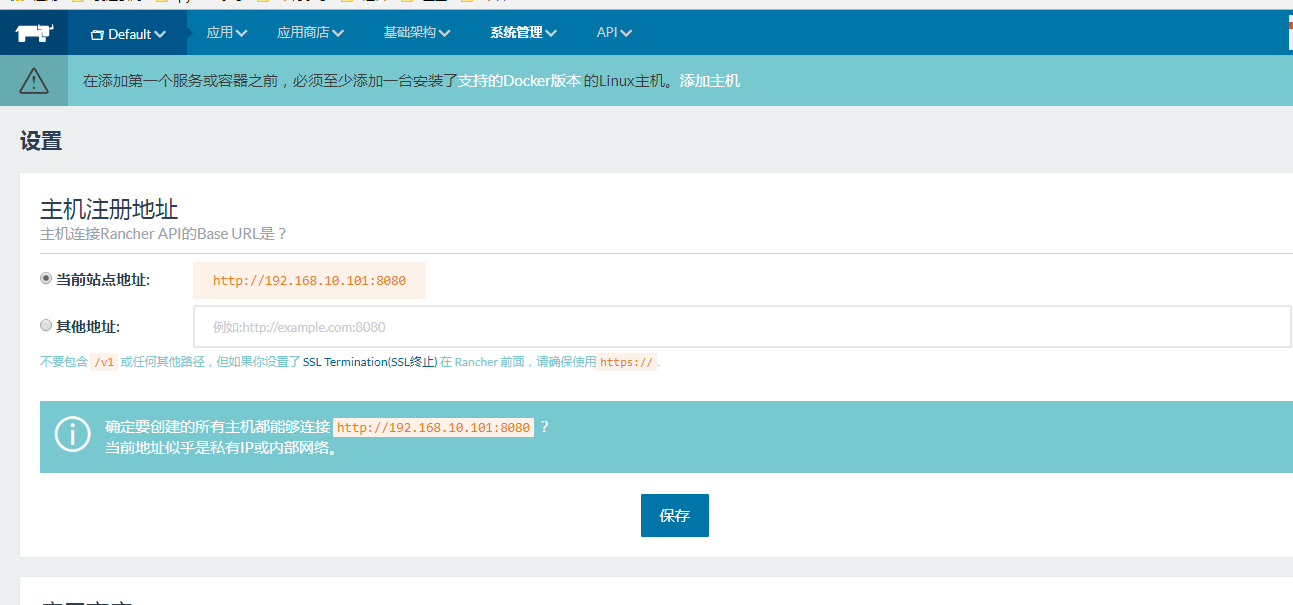
3、配置系统管理

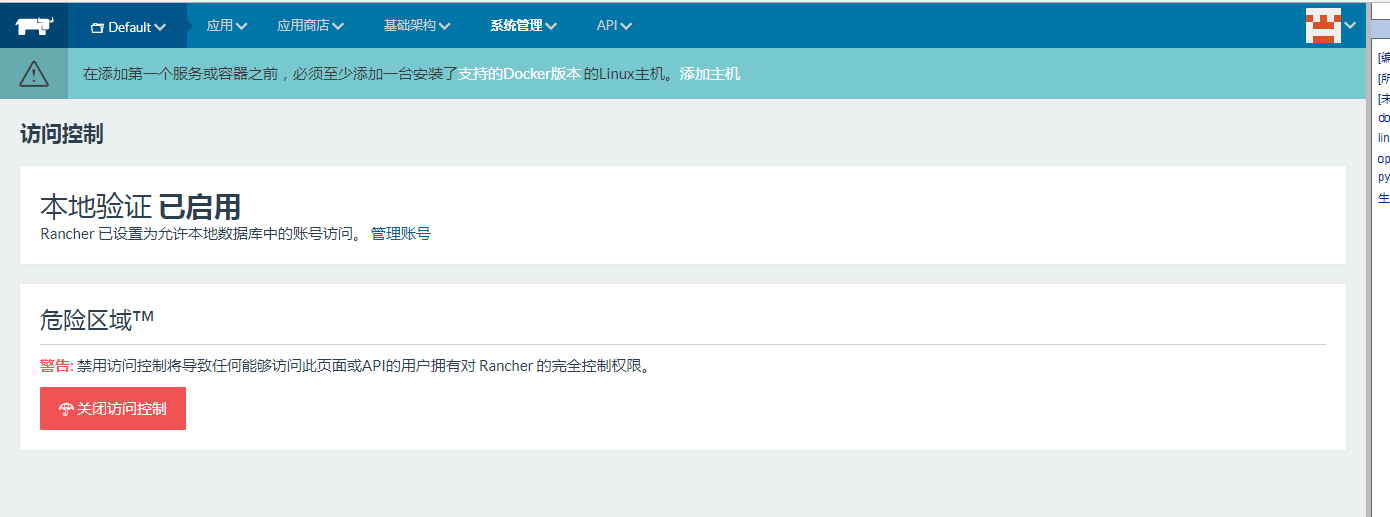
4、配置访问控制启用
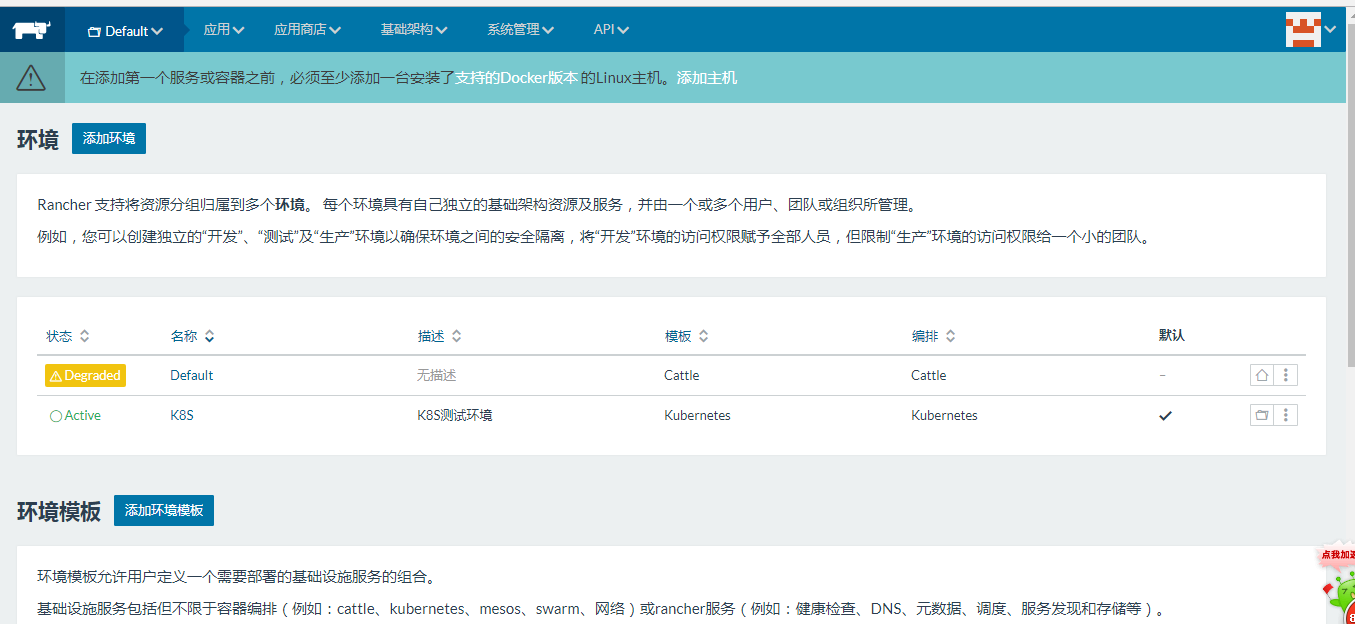
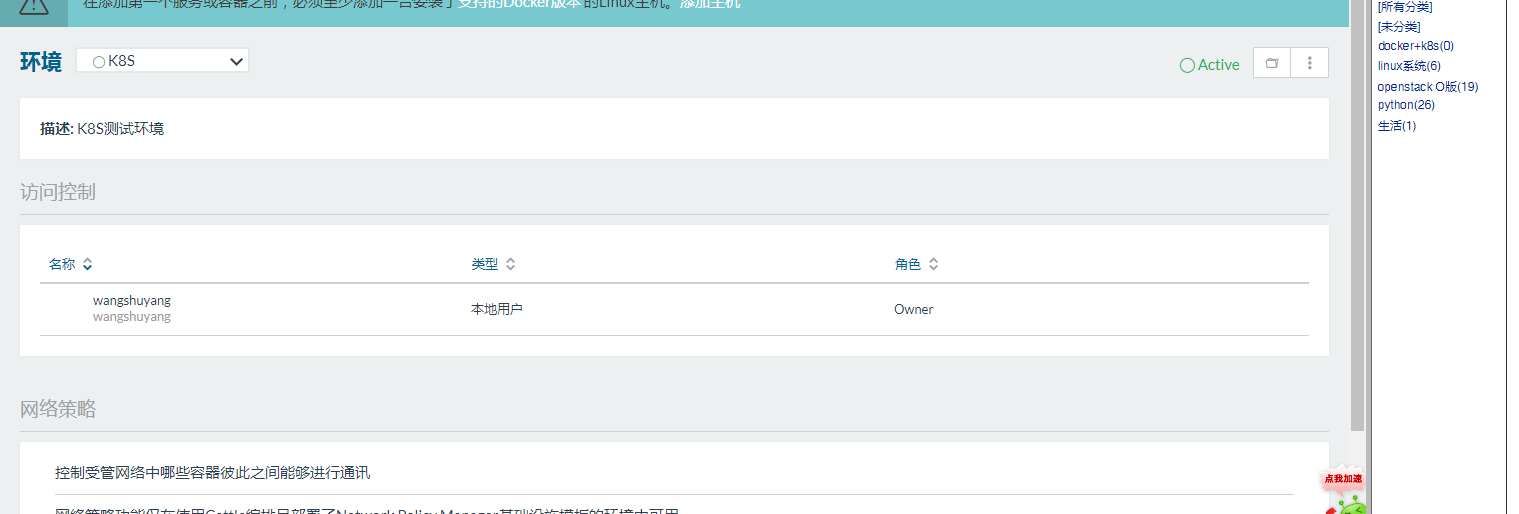
5、添加环境配置
k8s集群创建
1、添加主机
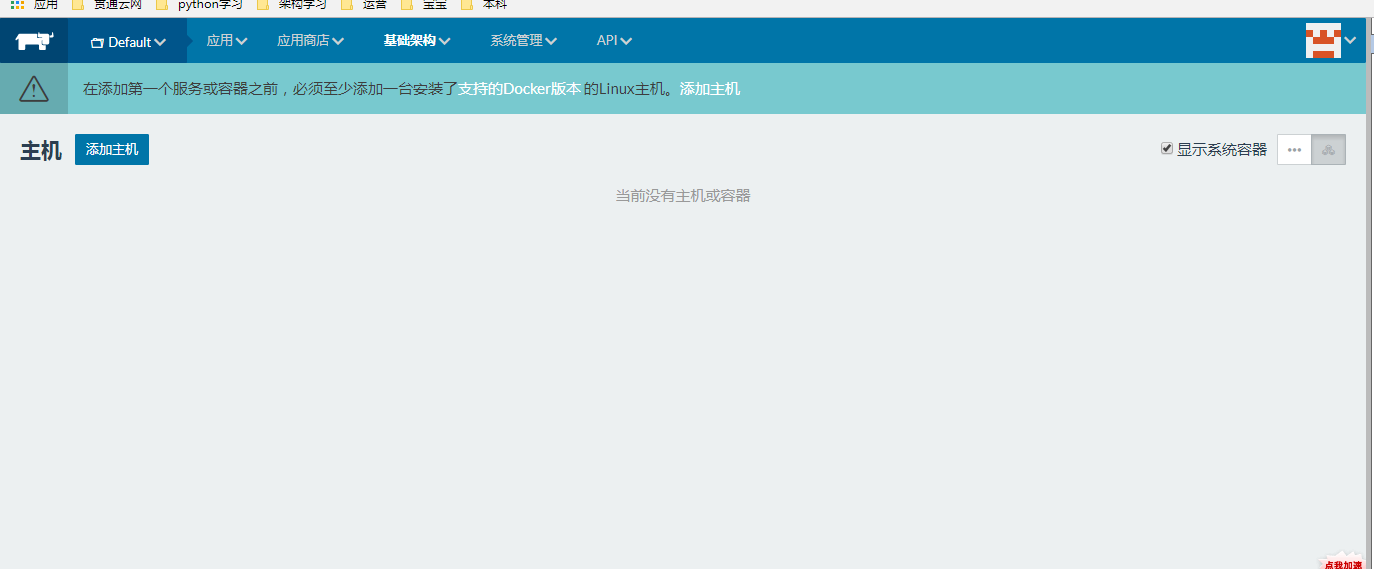
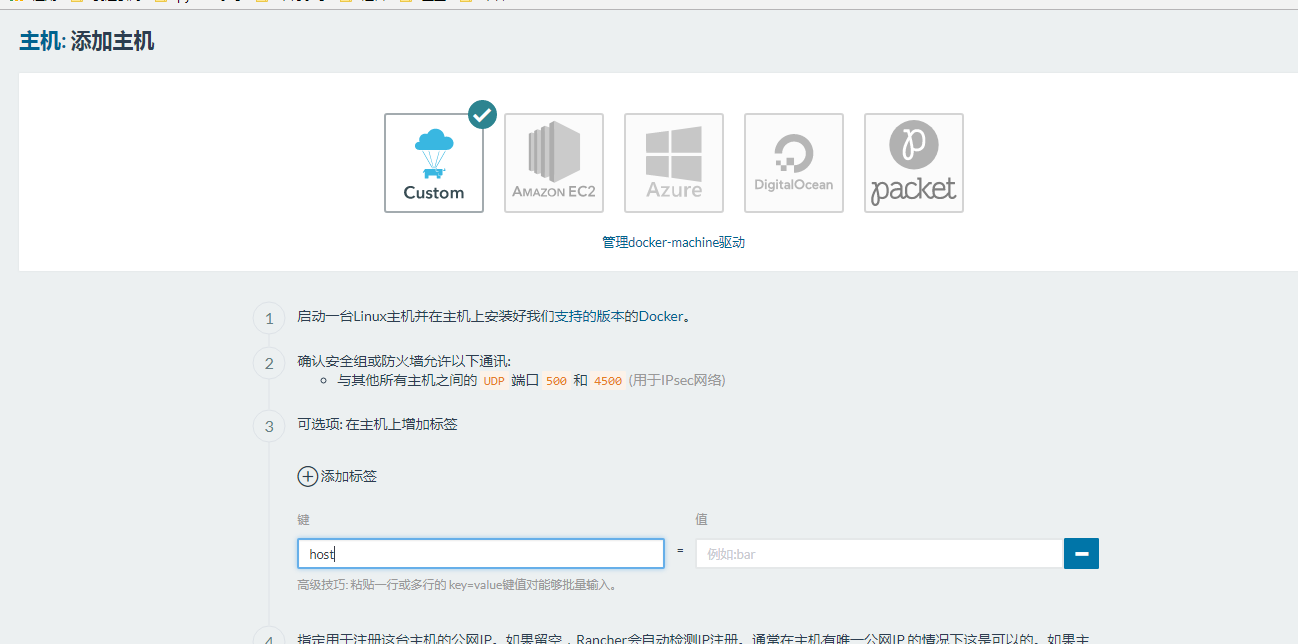
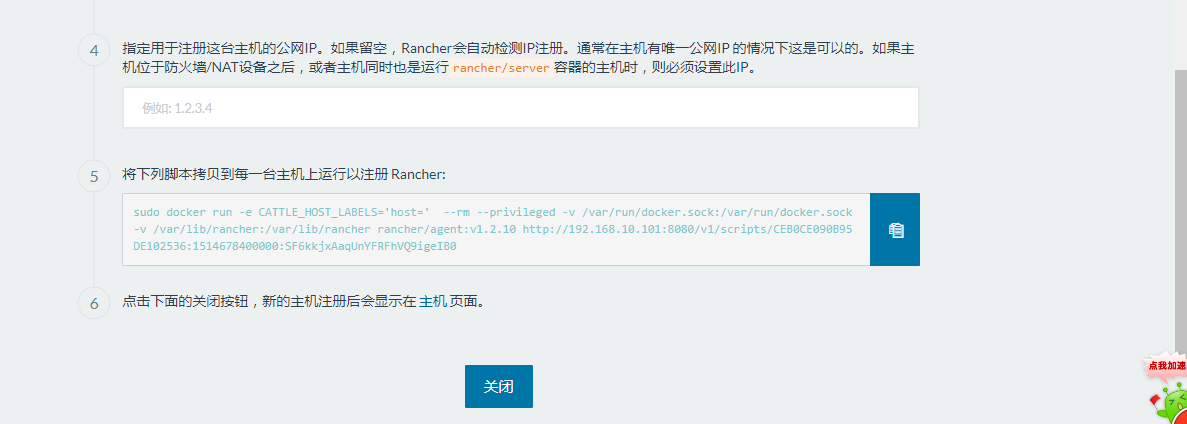
2、等待完成。
3、环境切换为K8s
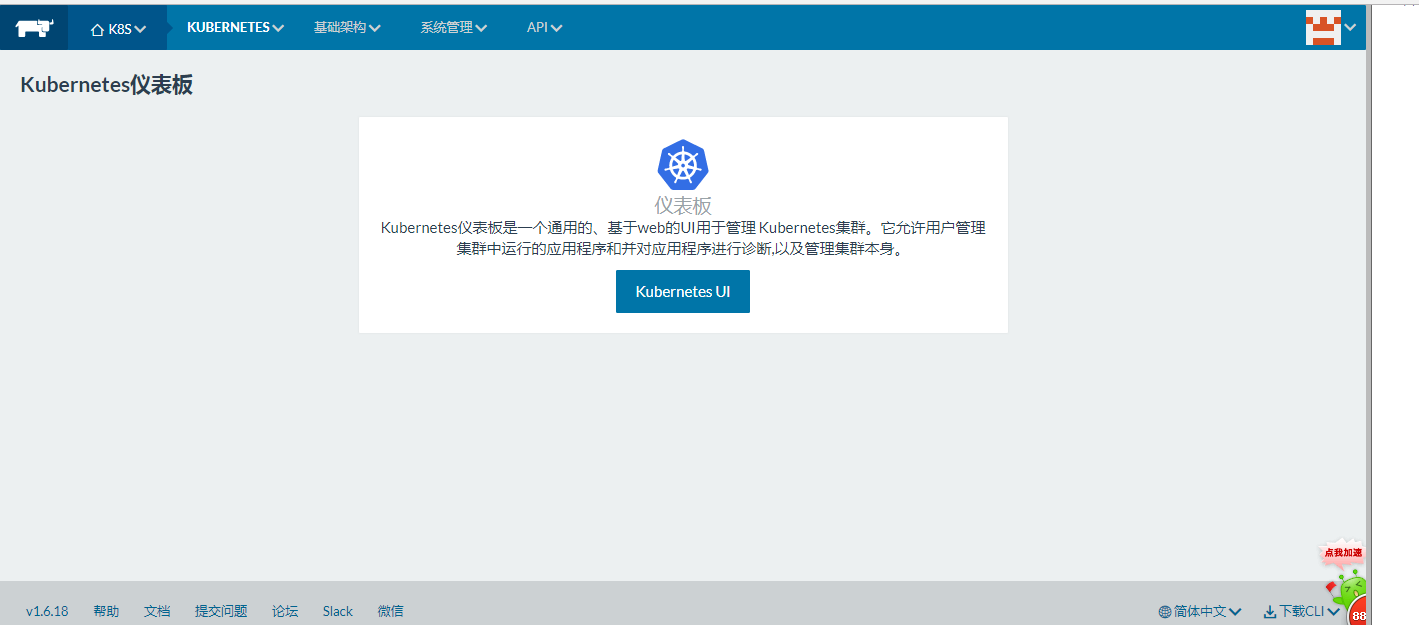
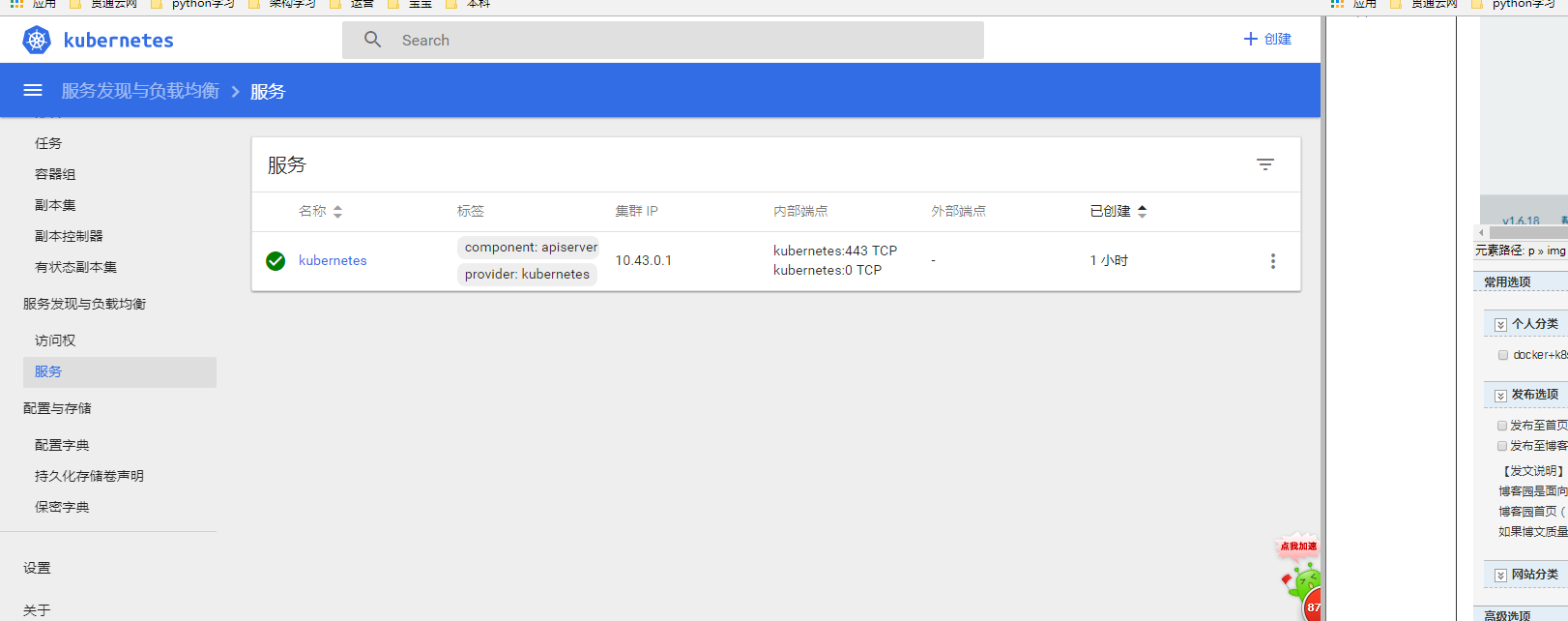
4、k8s服务
Randcher 2.0部署K8s集群(一)的更多相关文章
- 使用kubeadm部署k8s集群[v1.18.0]
使用kubeadm部署k8s集群 环境 IP地址 主机名 节点 10.0.0.63 k8s-master1 master1 10.0.0.63 k8s-master2 master2 10.0.0.6 ...
- 【02】Kubernets:使用 kubeadm 部署 K8S 集群
写在前面的话 通过上一节,知道了 K8S 有 Master / Node 组成,但是具体怎么个组成法,就是这一节具体谈的内容.概念性的东西我们会尽量以实验的形式将其复现. 部署 K8S 集群 互联网常 ...
- 部署K8S集群
1.Kubernetes 1.1.概念 kubernetes(通常称为k8s)用于自动部署.扩展和管理容器化应用程序的开源系统.它旨在提供“跨主机集群的自动部署.扩展以及运行应用程序容器的平台”.支持 ...
- 菜鸟系列k8s——快速部署k8s集群
快速部署k8s集群 1. 安装Rancher Rancher是业界唯一完全开源的企业级容器管理平台,为企业用户提供在生产环境中落地使用容器所需的一切功能与组件. Rancher2.0基于Kuberne ...
- Ansible自动化部署K8S集群
Ansible自动化部署K8S集群 1.1 Ansible介绍 Ansible是一种IT自动化工具.它可以配置系统,部署软件以及协调更高级的IT任务,例如持续部署,滚动更新.Ansible适用于管理企 ...
- centos7.8 安装部署 k8s 集群
centos7.8 安装部署 k8s 集群 目录 centos7.8 安装部署 k8s 集群 环境说明 Docker 安装 k8s 安装准备工作 Master 节点安装 k8s 版本查看 安装 kub ...
- 二进制方法-部署k8s集群部署1.18版本
二进制方法-部署k8s集群部署1.18版本 1. 前置知识点 1.1 生产环境可部署kubernetes集群的两种方式 目前生产部署Kubernetes集群主要有两种方式 kuberadm Kubea ...
- 通过kubeadm工具部署k8s集群
1.概述 kubeadm是一工具箱,通过kubeadm工具,可以快速的创建一个最小的.可用的,并且符合最佳实践的k8s集群. 本文档介绍如何通过kubeadm工具快速部署一个k8s集群. 2.主机规划 ...
- 使用RKE快速部署k8s集群
一.环境准备 1.1环境信息 IP地址 角色 部署软件 10.10.100.5 K8s Master Etcd.Control 10.10.100.17 K8s Worker1 Worker 10.1 ...
随机推荐
- Ubuntu 使用文件 casper-rw 镜像文件 保存变更内容
yumi工具本可以制作基于u盘的persistent启动盘 casper-rw是ubuntu特有的一种功能,支持liveCD启动的ubuntu系统保存用户的变更内容 那我们想同iso光盘从硬盘上启动, ...
- 各大IT公司 技术博客汇总
来自:http://www.cnblogs.com/IT-Bear/p/3191423.html 腾讯系列(13) 阿里系列(18) 百度系列(3) 搜狐系列(3) 新浪系列(2) 360系 ...
- linux中,ssh实现免密自动登录到远程主机,ssh信任的实现
需求描述: 平时使用ssh的时候,一般使用ssh都是通过用户名和密码登录到远程主机上, 然后执行一些命令,远程登录过程中,需要手动的输入密码(提示输入密码之后), 但是,在实际的应用过程中,涉及到让脚 ...
- React 生态系统:从小白到大神
http://mp.weixin.qq.com/s/Epx46lznpnvgrIsbmAIZBA
- tiny6410的linux操作系统实验开发
---恢复内容开始--- 1.前期由于2440 的4.3寸屏太小.后来修改程序准备在tiny6410增强版的S70屏上用.但是前期移植再用yaffs的文件系统,但是6410是(MLC)的磁盘,根本就不 ...
- Java精选笔记_多线程(创建、生命周期及状态转换、调度、同步、通信)
线程概述 在应用程序中,不同的程序块是可以同时运行的,这种多个程序块同时运行的现象被称作并发执行. 多线程可以使程序在同一时间内完成很多操作. 多线程就是指一个应用程序中有多条并发执行的线索,每条线索 ...
- echo\awk\sed\tee\curl的使用-shell
echo的使用:http://man.linuxde.net/echo awk的使用:http://man.linuxde.net/awk sed的使用:http://man.linuxde.net/ ...
- Qt5的cmake文件位置
D:\APICenter\Qt\Qt5.8.0\5.8\msvc2015\lib\cmake\Qt5\Qt5Config.cmake
- 第七篇:几个经典的TCP通信函数
前言 在TCP通信中要使用到几个非常经典的函数,本文将对这几个函数进行一个简短的使用说明. socket()函数 函数作用:创建一个网际字节流套接字 包含头文件:sys/socket.h ( 后面几个 ...
- js如何判断不同的操作系统
<html> <head> <title>判断操作系统</title> <script type="text/javascript&qu ...