
操作ini配置文件设计一个最基本的可视化数据库系统
对于很多小项目来说,不需要搭建专门的数据库系统(例如用SQLite搭建本地数据库),这时可以用ini配置文件实现一个最基本的数据库,实现数据库最基本的增删改查功能。
ini配置文件的用法参考我以前写的文章:http://www.cnblogs.com/xh6300/p/5895759.html
这种配置文件的结构如下:
[section1]
key1=value1
key2=value2
[section2]
key3=value3
key4=value4
……
具体配置文件如下:
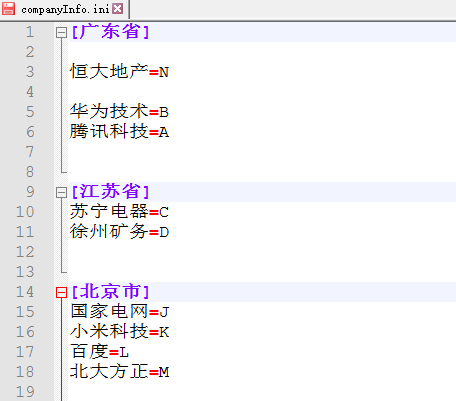
如果要想让这个数据库可视化,在winform中用若干个ComboBox控件是合适的选择。简略界面如下:
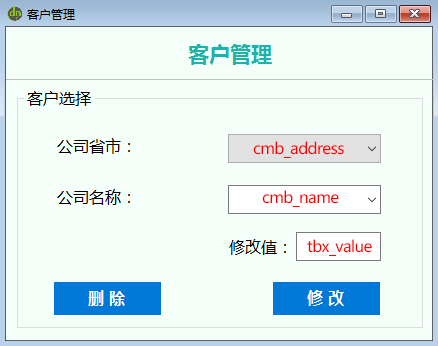
要达到这一目的需要实现的功能如下:
① 需要将广东省、江苏省、北京市这3个section添加到cmb_address控件的Items中。
② 当选择不同的section时,需将该section名下所有条目的key值添加到cmb_name控件的Items中;当切换cmb_address的选项时,cmb_name的内容也会随之切换。
③ 当点击“删除”时,将删除当前section名下选定的那条“key=value”记录。
④ 当点击“修改”时,将使用tbx_value的值修改当前选中的section和key所对应的value值。
至于数据库的“增”和“查”功能,那是ini配置文件的最基本的操作,用对应的SetValue()和GetValue()方法就能轻易实现,在此不再赘述。
1、将所有section添加到一个List列表中的代码实现:
 public void GetAllSections(string iniFileName, out List<string> SectionsList)

         {

             SectionsList = new List<string>();

             string fileText = "";

             try

             {

                 StreamReader sr = new StreamReader(iniFileName, Encoding.Default);

                 fileText = sr.ReadToEnd();

                 sr.Close();//这一句一定要加

             }

             catch (Exception)

             {

                 MessageBox.Show("文件" + iniFileName + "不存在或错误!");

                 return;

             }

             try

             {

                 string[] _split = fileText.Split(new Char[] { '[' });

                 //由于上面是用“[”分割的,因此下面的i从1开始

                 for (int i = ; i < _split.Count(); i++)

                 {

                     string[] split_temp = _split[i].Split(new Char[] { ']' });

                     if (split_temp[].Trim() != "")

                     {

                         SectionsList.Add(split_temp[].Trim());

                     }

                 }

             }

             catch (Exception)

             {

                 //这里我就什么也不做,这是坠吼的!

             }

         }
2、获得指定section下的所有key值,并将它们添加到List列表中的代码实现:
 public void GetAllKeys(string iniFileName, out List<string> keysList, int Section_index)

         {

             keysList = new List<string>();

             string fileText = "";

             try

             {

                 StreamReader sr = new StreamReader(iniFileName, Encoding.Default);

                 fileText = sr.ReadToEnd();

                 sr.Close();//这一句一定要加

             }

             catch (Exception)

             {

                 MessageBox.Show("文件" + iniFileName + "不存在或错误!");

                 return;

             }

             try

             {

                 //先把所有的[section]去掉

                 string[] _split = fileText.Split(new Char[] { '[' });

                 string[] split_temp = _split[Section_index + ].Split(new Char[] { ']' });

                 string text_key_value = split_temp[];//获得section索引为Section_index下的key和value的文本

                 text_key_value = text_key_value.Replace("\r\n", "?");//将换行符换成?,便于后面进一步分割

                 string[] KeyLists_temp = text_key_value.Split(new char[] { '?' });//按‘?’分割,注意可能会有空字符串数组元素

                 //将分割出来的每一个非空key加入到keysList里面去

                 for (int i = ; i < KeyLists_temp.Count(); i++)

                 {

                     if (KeyLists_temp[i].Trim() != "")

                     {

                         string _key = KeyLists_temp[i].Split(new char[] { '=' })[];

                         if (_key.Trim() != "")

                         {

                             keysList.Add(_key.Trim());

                         }

                     }

                 }

             }

             catch (Exception)

             {

                 MessageBox.Show("文件" + iniFileName + "不存在或错误!");

             }

         }
3、将List中的值添加到ComboBox控件的Item中的代码实现:
 public void AddList_ToCmb(List<string> _infoList, ComboBox _cmbBox)

         {

             for (int i = ; i < _infoList.Count; i++)

             {

                 _cmbBox.Items.Add(_infoList[i]);

             }

         }
整个程序完整代码如下:
 using System;

 using System.Collections.Generic;

 using System.IO;

 using System.Linq;

 using System.Runtime.InteropServices;

 using System.Text;

 using System.Windows.Forms;

 using System.Windows.Forms.VisualStyles;

 namespace test1

 {

     public partial class CustomManage : Form

     {

         public CustomManage()

         {

             InitializeComponent();

             this.StartPosition = FormStartPosition.CenterScreen;

         }

         private void customManage_Load(object sender, EventArgs e)

         {

             List<string> _listSections = new List<string>();

             List<string> _listKeys = new List<string>();

             GetAllSections("companyInfo.ini", out _listSections);

             AddList_ToCmb(_listSections, cmb_address);

             GetAllKeys("companyInfo.ini", out _listKeys, );

             AddList_ToCmb(_listKeys, cmb_name);

         }

         private void comboBox1_SelectedIndexChanged(object sender, EventArgs e)

         {

             //清空原有数据

             int index = cmb_address.SelectedIndex;

             cmb_name.Items.Clear();

             cmb_name.Text = "";

             //重新获得对应section下的key值的列表,并添加到cmb_Name中

             List<string> _nameList = new List<string>();

             GetAllKeys("companyInfo.ini", out _nameList, index);

             AddList_ToCmb(_nameList, cmb_name);

         }

         //删除条目

         private void button4_Click(object sender, EventArgs e)

         {

             string _fileName = "companyInfo.ini";

             try

             {

                 StreamReader sr = new StreamReader(_fileName, Encoding.Default);

                 string str = sr.ReadToEnd();

                 sr.Close();

                 //该删除方式有缺陷,要求“=”两侧不能有空格,否则会删除失败(以后可以考虑用正则匹配一下)

                 string _deleteItem = cmb_name.Text + "=" + GetValue(_fileName, cmb_address.Text, cmb_name.Text);

                 str = str.Replace(_deleteItem, "");

                 StreamWriter sw = new StreamWriter(_fileName, false, Encoding.Default);

                 sw.Write(str);

                 sw.Flush();

                 sw.Close();

                 MessageBox.Show("删除成功!");

             }

             catch (Exception)

             {

                 MessageBox.Show("文件" + _fileName + "不存在或错误!");

             }

         }

         //修改条目

         private void button1_Click(object sender, EventArgs e)

         {

             string _fileName = "companyInfo.ini";

             SetValue(_fileName, cmb_address.Text.Trim(), cmb_name.Text.Trim(), tbx_value.Text.Trim());

             MessageBox.Show("修改成功!");

         }

         /// <summary>  获得所有的section

         ///

         /// </summary>

         /// <param name="iniFileName"></param>

         /// <param name="SectionsList"></param>

         public void GetAllSections(string iniFileName, out List<string> SectionsList)

         {

             SectionsList = new List<string>();

             string fileText = "";

             try

             {

                 StreamReader sr = new StreamReader(iniFileName, Encoding.Default);

                 fileText = sr.ReadToEnd();

                 sr.Close();//这一句一定要加

             }

             catch (Exception)

             {

                 MessageBox.Show("文件" + iniFileName + "不存在或错误!");

                 return;

             }

             try

             {

                 string[] _split = fileText.Split(new Char[] { '[' });

                 //由于上面是用“[”分割的,因此下面的i从1开始

                 for (int i = ; i < _split.Count(); i++)

                 {

                     string[] split_temp = _split[i].Split(new Char[] { ']' });

                     if (split_temp[].Trim() != "")

                     {

                         SectionsList.Add(split_temp[].Trim());

                     }

                 }

             }

             catch (Exception)

             {

                 //这里我就什么也不做,这是坠吼的!

             }

         }

         /// <summary> 获得指定section下的所有key值

         ///

         /// </summary>

         /// <param name="iniFileName"></param>

         /// <param name="keysList"></param>

         /// <param name="Section_index"></param>

         public void GetAllKeys(string iniFileName, out List<string> keysList, int Section_index)

         {

             keysList = new List<string>();

             string fileText = "";

             try

             {

                 StreamReader sr = new StreamReader(iniFileName, Encoding.Default);

                 fileText = sr.ReadToEnd();

                 sr.Close();//这一句一定要加

             }

             catch (Exception)

             {

                 MessageBox.Show("文件" + iniFileName + "不存在或错误!");

                 return;

             }

             try

             {

                 //先把所有的[section]去掉

                 string[] _split = fileText.Split(new Char[] { '[' });

                 string[] split_temp = _split[Section_index + ].Split(new Char[] { ']' });

                 string text_key_value = split_temp[];//获得section索引为Section_index下的key和value的文本

                 text_key_value = text_key_value.Replace("\r\n", "?");//将换行符换成?,便于后面进一步分割

                 string[] KeyLists_temp = text_key_value.Split(new char[] { '?' });//按‘?’分割,注意可能会有空字符串数组元素

                 //将分割出来的每一个非空key加入到keysList里面去

                 for (int i = ; i < KeyLists_temp.Count(); i++)

                 {

                     if (KeyLists_temp[i].Trim() != "")

                     {

                         string _key = KeyLists_temp[i].Split(new char[] { '=' })[];

                         if (_key.Trim() != "")

                         {

                             keysList.Add(_key.Trim());

                         }

                     }

                 }

             }

             catch (Exception)

             {

                 MessageBox.Show("文件" + iniFileName + "不存在或错误!");

             }

         }

         /// <summary> 将字符串List中的值添加到ComboBox控件的Item中。

         ///

         /// </summary>

         /// <param name="_infoList"></param>

         /// <param name="_cmbBox"></param>

         public void AddList_ToCmb(List<string> _infoList, ComboBox _cmbBox)

         {

             for (int i = ; i < _infoList.Count; i++)

             {

                 _cmbBox.Items.Add(_infoList[i]);

             }

         }

         #region 读、写ini配置文件的方法

         [DllImport("kernel32")]

         private static extern int GetPrivateProfileString(string section, string key, string defVal,

             StringBuilder retVal, int size, string filePath);

         [DllImport("kernel32")]

         private static extern long WritePrivateProfileString(string section, string key, string val, string filePath);

         public string GetValue(string parasFileName, string section, string key)

         {

             var sb = new StringBuilder();

             string strPath = Environment.CurrentDirectory + "\\" + parasFileName;

             int i = GetPrivateProfileString(section, key, "该文件不存在", sb, , strPath);

             return sb.ToString();

         }

         public void SetValue(string parasFileName, string section, string key, string value)

         {

             //获得当前路径,当前是在Debug路径下

             string strPath = Environment.CurrentDirectory + "\\" + parasFileName;

             WritePrivateProfileString(section, key, value, strPath);

         }

         #endregion

     }

 }
注:上面的完整代码为了减少代码量便于阅读,有些功能的实现写得不够完善,具体使用的时候需要自行改进。
操作ini配置文件设计一个最基本的可视化数据库系统的更多相关文章
- Python中操作ini配置文件
这篇博客我主要想总结一下python中的ini文件的使用,最近在写python操作mysql数据库,那么作为测试人员测试的环境包括(测试环境,UAT环境,生产环境)每次需要连接数据库的ip,端口,都会 ...
- php操作ini配置文件
有些配置化的数据放到配置文件可以方便管理,比如数据库信息,路由信息,先建立配置文件,test.ini [database_setting] host=127.0.0.1 user=root passw ...
- VC++/MFC操作ini配置文件详解
在我们写的程序当中,总有一些配置信息需要保存下来,以便完成程序的功能,最简单的办法就是将这些信息写入INI文件中,程序初始化时再读入.具体应用如下: 一.将信息写入.INI文件中. 1.所用的WINA ...
- C# 操作ini配置文件
最近使用Winform做一个小系统,由于需要保存一些默认配置项.自然就想到了轻量级的配置文件类型ini.在此也分享和记录一下实现方式,方便以后查询和使用. 废话不多说上代码: 实现公共函数↓ publ ...
- 【转】ini载入保存类,操作INI配置文件方便的很
/****************************************************************** * * ^_^ 恶猫 独门商标 挖哈哈 * * QQ:\> ...
- C#操作INI配置文件示例
源文件地址:http://pan.baidu.com/share/link?shareid=2536126078&uk=1761850335创建如图所示的控件: 源代码: using Syst ...
- 【个人使用.Net类库】(1)INI配置文件操作类
开发接口程序时,对于接口程序配置的IP地址.端口等都需要是可配置的,而在Win Api原生实现了INI文件的读写操作,因此只需要调用Win Api中的方法即可操作INI配置文件,关键代码就是如何调用W ...
- python开发_configparser_解析.ini配置文件工具_完整版_博主推荐
# # 最近出了一趟差,是从20号去的,今天回来... # 就把最近学习的python内容给大家分享一下... # ''' 在python中,configparser模块提供了操作*.ini配置文件的 ...
- python 提供INI配置文件的操作 ConfigParser
原文地址:http://www.cnblogs.com/pumaboyd/archive/2008/08/11/1265416.html 红色的为标注信息 +++++++++++++++++引用+++ ...
随机推荐
- 洛谷九月月赛II
题解:模拟 一旦不匹配就要break #include<iostream> #include<cstdio> #include<cstring> #include& ...
- streamsets http client && json parse && local fs 使用
streamsets 包含了丰富的组件,origin processer destination 测试例子为集成了http client 以及json 处理 启动服务 使用docker 创建pipel ...
- hasura graphql 模式拼接demo
实际上通过上边的介绍,模式拼接和hasura 基本没啥关系了,就是使用graphql-bindings 进行schema 合并了 基本demo 这个是官方提供的demo git clone https ...
- c#:Json字符串转成xml对象
没看到.net framework中有这样的功能, 懒得到处找了, 索性花点时间自己写一个 /* * Created by SharpDevelop. * Date: 2013/6/24 * User ...
- 两个不错点电影ED2000资源
http://simplecd.me/ http://www.ed2000.com/ http://www.2tu.cc/ http://www.mp4ba.com/ http://www.ddyy. ...
- JpGraph使用详解
微信平台开发的推广支持应用里,为了满足用户渠道推广分析的需要,公众平台提供了生成带参数二维码的接口.使用该接口可以获得多个带不同场景值的二维码,用户扫描后,公众号可以接收到事件推送,借此可以通过统计不 ...
- WIN10下搭建react-native开发Android环境
最近公司要求使用react-native进行移动端开发,据说macOS上开发坑会少的多,但我们是windows,莫法,直接抗吧!周末配置环境遇到很多问题,谨以此文做个记录... 准备 安装Chocol ...
- EasyUI使用小常识
datagrid:1 //显示某列 $('#ListTable').datagrid('showColumn', 'ExRate'); //隐藏某列 $('#ListTable').datagrid( ...
- Django 组件content_type
content type: django内置组件,这个组件帮忙做连表操作(混搭连表) 适用场景:适用于一张表与多张表同时做关联的时候.直接导入就可以使用了. 关联数据库所有的表:可以快速插入数据,并且 ...
- [转][C#]常用开源项目
本文来自:http://www.cnblogs.com/sunxuchu/p/6047589.html 新增两个: 纸壳CMS http://www.zkea.net/zkeacms https:// ...