
170622、springboot编程之JPA操作数据库
JPA操作数据库
什么事JAP?JPA全称Java Persistence API.JPA通过JDK 5.0注解或XML描述对象-关系表的映射关系,并将运行期的实体对象持久化到数据库中。
1、在pom中引用jpa
<dependency>

  <groupId>org.springframework.boot</groupId>

  <artifactId>spring-boot-starter-data-jpa</artifactId>

</dependency>
2、配置application.properties文件
###datasource 数据源配置

spring.datasource.driverClassName=com.mysql.jdbc.Driver

spring.datasource.url=jdbc:mysql://localhost:3306/test

spring.datasource.username=root

spring.datasource.password=root

spring.datasource.max-active=20

spring.datasource.max-idle=8

spring.datasource.min-idle=8

spring.datasource.initial-size=10

###Java Persistence Api

#指定的数据库

spring.jpa.database=MYSQL

#显示每个SQL

spring.jpa.show-sql=true

#Hibernate DDL自动(创建,创建-删除,更新)

spring.jpa.hibernate.ddl-auto=update

#命名策略

spring.jpa.hibernate.naming-strategy=org.hibernate.cfg.ImprovedNamingStrategy

#在将其添加到实体管理剥离

spring.jpa.properties.hibernate.dialect=org.hibernate.dialect.MySQL5Dialect
3、编写UserRepository.java文件
package com.rick.apps.repository;

import com.rick.apps.entity.User;

import org.springframework.data.repository.CrudRepository;

/**

 * Desc :  CrudRepository是springboot提供的封装方法

 * 里面封装了基本的增删改查的方法,方便调用

 * 方法如下:

 *       <S extends T> S save(S var1);

         <S extends T> Iterable<S> save(Iterable<S> var1);

         T findOne(ID var1);

         boolean exists(ID var1);

         Iterable<T> findAll();

         Iterable<T> findAll(Iterable<ID> var1);

         long count();

         void delete(ID var1);

         void delete(T var1);

         void delete(Iterable<? extends T> var1);

         void deleteAll();

 * User : RICK

 * Time : 2017/8/21 15:45

  */

public interface UserRepository extends CrudRepository<User,Integer> {

}
4、编写UserService.java
import com.rick.apps.entity.User;

import com.rick.apps.repository.UserRepository;

import org.springframework.beans.factory.annotation.Autowired;

import org.springframework.stereotype.Service;

import org.springframework.transaction.annotation.Transactional;

@Service

public class UserService {

    @Autowired

    private UserRepository userRepository;

    @Transactional

    public void save(User user){

        userRepository.save(user);

    }

}
注:我只写了一个保存方法,其他的调用方法雷同,再次不一一展示
5、编写HelloController.java
package com.rick.apps.controller;

import com.rick.apps.entity.User;

import com.rick.apps.service.UserService;

import com.rick.common.ResultJson;

import org.springframework.web.bind.annotation.GetMapping;

import org.springframework.web.bind.annotation.RequestMapping;

import org.springframework.web.bind.annotation.RestController;

import javax.annotation.Resource;

@RestController

public class HelloController {

    @Resource

    private UserService userService;

    @RequestMapping("/hello")

    public String hello(){

        System.out.println(1/0);

        return "Hello World!";

    }

    @GetMapping(value = "/save")

    public ResultJson saveDemo(){

        User user = new User();

        user.setUserName("rick");

        user.setPassWord("123456");

        userService.save(user);

        ResultJson resultJson = ResultJson.buildSuccessInstance();

        return resultJson;

    }

}
注:ResultJson是我自己封装的一个返回对象类,方便大家测试,我也把这个类的代码给贴出来
package com.rick.common;

import java.io.Serializable;

public class ResultJson implements Serializable{

    private static final long serialVersionUID = 1L;

    //返回码

    private String code;

    //返回提示

    private String msg;

    //返回内容

    private Object data;

    public ResultJson(){

    }

    public ResultJson(String msg){

        this.code = "1";

        this.msg = msg;

    }

    public ResultJson(Object data){

        this.code = "0";

        this.msg = "成功";

        this.data = data;

    }

    public ResultJson(String code, String msg){

        this.code = code;

        this.msg = msg;

    }

    public ResultJson(String code, String msg, Object data){

        this.code = code;

        this.msg = msg;

        this.data = data;

    }

    public String getCode() {

        return code;

    }

    public void setCode(String code) {

        this.code = code;

    }

    public String getMsg() {

        return msg;

    }

    public void setMsg(String msg) {

        this.msg = msg;

    }

    public Object getData() {

        return data;

    }

    public void setData(Object data) {

        this.data = data;

    }

    public static ResultJson buildSuccessInstance(){

        return new ResultJson("0", "操作成功!", null);

    }

    public static ResultJson buildSuccessInstance(String msg){

        return new ResultJson("0", msg, null);

    }

    public static ResultJson buildSuccessInstance(Object data){

        return new ResultJson("0", "操作成功!", data);

    }

    public static ResultJson buildSuccessInstance(String msg, Object data){

        return new ResultJson("0", msg, data);

    }

    public static ResultJson buildFailInstance(){

        return new ResultJson("1", "操作异常!", null);

    }

    public static ResultJson buildFailInstance(String msg){

        return new ResultJson("1", msg, null);

    }

    /**

     * TODO: 自定义返回异常信息

     * @Auhor: RICK

     * @Date : 2017年6月26日

     * @param code 99 表示没有获取到经纬度信息

     * @param msg

     * @return

     */

    public static ResultJson buildFailInstance(String code,String msg){

        return new ResultJson(code, msg, null);

    }

}
6、启动项目测试
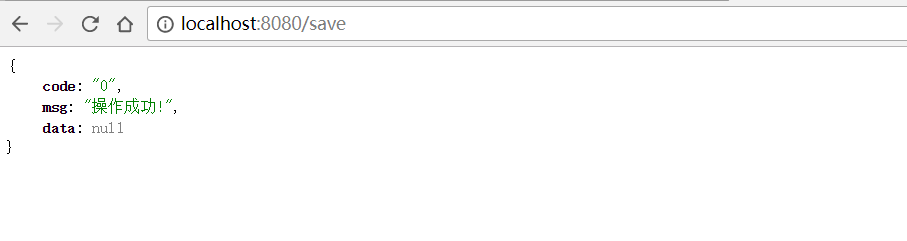
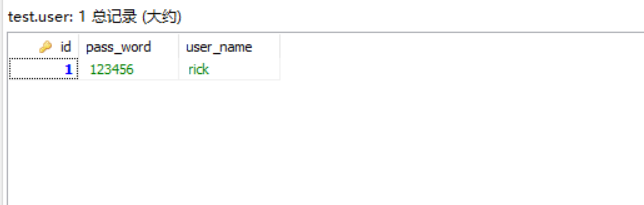
数据库添加数据成功:
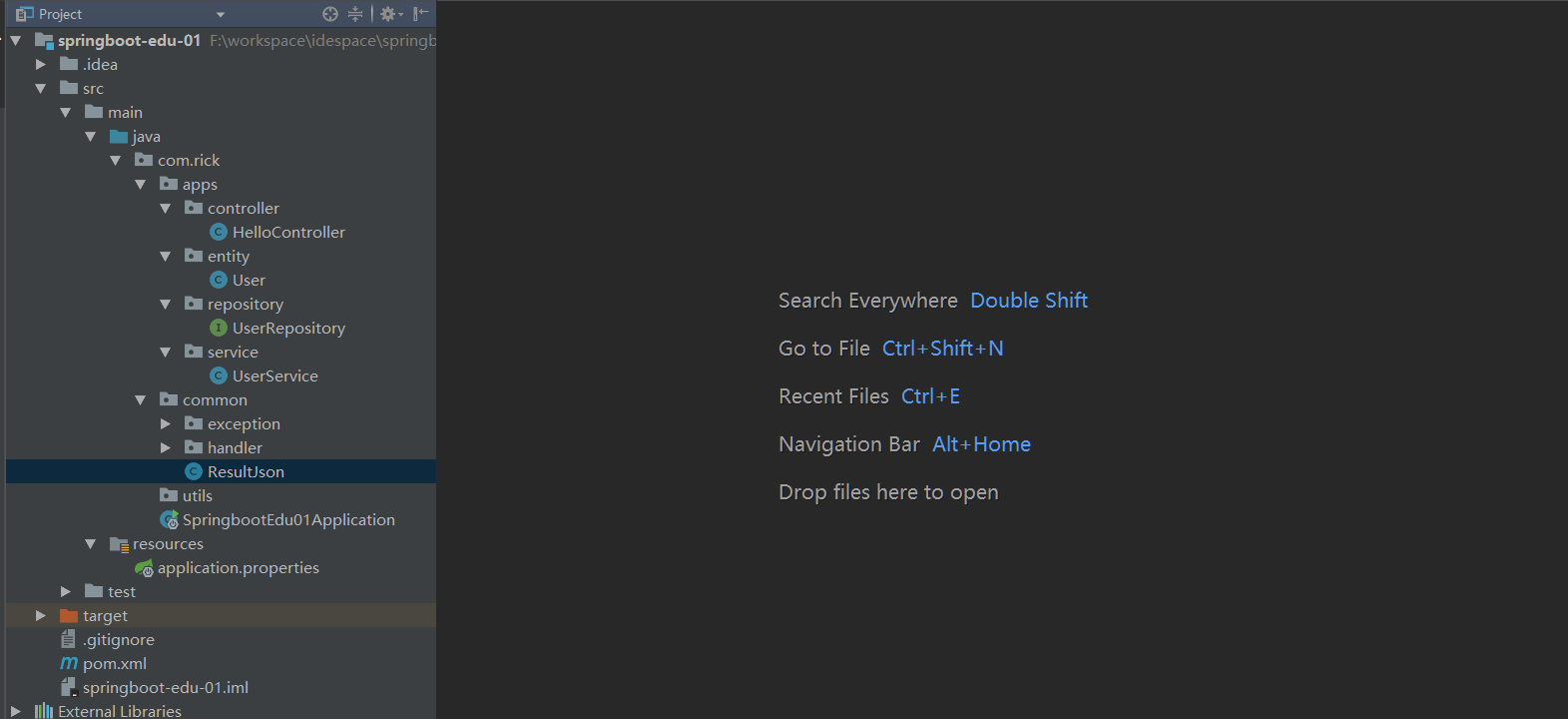
项目截图
170622、springboot编程之JPA操作数据库的更多相关文章
- 170623、springboot编程之JdbcTemplate操作数据库
使用JdbcTemplate操作mysql数据库! 1.在pom中引入jpa包 <dependency> <groupId>org.springframework.boot&l ...
- 第12章—使用NoSQL数据库—使用MongoDB+Jpa操作数据库
使用MongoDB+Jpa操作数据库 SpringData还提供了对多种NoSQL数据库的支持,包括MongoDB;neo4j和redis.他不仅支持自动化的repository,还支持基于模板的数据 ...
- JAVA - SpringBoot项目引用MyBatis操作数据库
JAVA - SpringBoot项目引用MyBatis操作数据库 1. 创建SpringBoot项目,参考:https://www.cnblogs.com/1285026182YUAN/p/1232 ...
- 界面编程之QT的数据库操作20180801
/*******************************************************************************************/ 一.数据库连 ...
- 一篇搞定spring Jpa操作数据库
开始之前你必须在项目配置好数据库,本文使用的spring boot,相比spring,spring boot省去了很多各种对以来组件复杂的配置,直接在pom配置组件,完后会自动帮我们导入组件 < ...
- 170717、springboot编程之mybatis数据库开发和aop拦截
一.springboot整合mybaits (1)新建maven project; 新建一个maven project,取名为:spring-boot-mybatis (2)在pom.xml文件中引入 ...
- 使用spring boot中的JPA操作数据库
前言 Spring boot中的JPA 使用的同学都会感觉到他的强大,简直就是神器一般,通俗的说,根本不需要你写sql,这就帮你节省了很多时间,那么下面我们来一起来体验下这款神器吧. 一.在pom中添 ...
- spring-boot-route(九)整合JPA操作数据库
单调的增删改查让越来越多的程序员感到乏味,这时候就出现了很多优秀的框架,完成了对增删改查操作的封装,只需要简单配置,无需书写任何sql,就可以完成增删改查.这里比较推荐的是Spring Data Jp ...
- 170720、springboot编程之properties文件讲解
但是在实际开发过程中有更复杂的需求,我们在对properties进一步的升华.在本篇博客中您将会学到如下知识(这节中有对之前的知识的温故,对之前的升华): (1) 在application.prope ...
随机推荐
- snmp trap编写
1.MIB库查看net-snmp的安装目录./usr/share/snmp/mibs目录下: NET-SNMP-EXAMPLES-MIB.mib本件部分内容如下: netSnmpExampleHear ...
- 网络协议之bt---bt协议详解 DHT篇(下)
-------------------------author:pkf -------------------------------qq:1327706646 ------------------- ...
- 在系统中使用read函数读取文件内容
read函数(读取文件) read函数可以读取文件.读取文件指从某一个已打开地文件中,读取一定数量地字符,然后将这些读取的字符放入某一个预存的缓冲区内,供以后使用. 使用格式如下: number = ...
- (转)学习linux的几本书
成为一名精通 Linux 程序设计的高级程序员一直是不少朋友孜孜以求的目标.根据中华英才网统计数据,北京地区 Linux 程序员月薪平均为 Windows 程序员的 1.8 倍.Java 程序员的 2 ...
- 平时收集的一些有关UED的团队和个人博客(转)
UCDChina导航 前端团队 阿里巴巴 UED -- 我们设计的界面,并没有几十亿的流量,但每天来自上百个国家的百万商人在使用着. 阿里巴巴中国站UED -- 阿里巴巴中国站UED成立于1999年, ...
- CSS导入使用及引用的两种方法
方法一<link rel="stylesheet" type="text/css" href="test.css"> 方法二&l ...
- HBase复制
HBase复制是一种在不同HBase部署中复制数据的方法.它能够作为一种故障恢复的方法,并提供HBase层次的高可用性.在实际应用中,比如.能够将数据从一个面向页面的集群拷贝到一个MapReduce集 ...
- ChemDraw中如何输入化学式分隔点
ChemDraw最实用的化学结构绘图软件,在绘制化学结构时,离不开给化学结构标记原子名称,有时还需要插入分隔点,本教程以下图给出的化学结构为例,讲解ChemDraw中如何输入化学式分隔点. 化学结构 ...
- VS 清除编译产生的临时文件、文件夹
VS编译过程中会产生一些临时文件,通过以下脚本可清除 @echo off for /r %%i in (*.sdf,*.ncb,*.suo,*.exp,*.user,*.aps,*.idb,*.dep ...
- 对于jsp中编码的理解
1.会话都是从客户端也就是浏览器开始发起的,首先用户将地址输入到地址栏中, 当用户输入enter或者点击转到的按钮时,浏览器会根据当前页面的charset对地址栏中的地址进行encode一次,当服务器 ...