
Zabbix 监控redis
Zabbix 监控redis
1.监控脚本,github上的
[root@localhost ~]# cat /etc/zabbix/script/redis-status.sh

#!/bin/bash

#Redis status

METRIC="$2"

SERV="$1"

DB="$3"

PORT=""

if [[ -z "$1" ]]; then

    echo "Please set server"

    exit

fi

CACHETTL=""

CACHE="/tmp/redis-status-`echo $SERV | md5sum | cut -d" " -f1`.cache"

if [ -s "$CACHE" ]; then

    TIMECACHE=`stat -c"%Z" "$CACHE"`

else

    TIMECACHE=

fi

TIMENOW=`date '+%s'`

if [ "$(($TIMENOW - $TIMECACHE))" -gt "$CACHETTL" ]; then

    (echo -en "INFO\r\n"; sleep ;) | nc -w1 $SERV $PORT > $CACHE || exit

fi

FIRST_ELEMENT=

function json_head {

    printf "{";

    printf "\"data\":[";

}

function json_end {

    printf "]";

    printf "}";

}

function check_first_element {

    if [[ $FIRST_ELEMENT -ne  ]]; then

        printf ","

    fi

    FIRST_ELEMENT=

}

function databse_detect {

    json_head

    for dbname in $LIST_DATABSE

    do

        local dbname_t=$(echo $dbname| sed 's!\n!!g')

        check_first_element

        printf "{"

        printf "\"{#DBNAME}\":\"$dbname_t\""

        printf "}"

    done

    json_end

}

case $METRIC in

    'redis_version')

        cat $CACHE | grep "redis_version:" | cut -d':' -f2

        ;;

    'redis_git_sha1')

        cat $CACHE | grep "redis_git_sha1:" | cut -d':' -f2

        ;;

    'redis_git_dirty')

        cat $CACHE | grep "redis_git_dirty:" | cut -d':' -f2

        ;;

    'redis_mode')

        cat $CACHE | grep "redis_mode:" | cut -d':' -f2

        ;;

    'arch_bits')

        cat $CACHE | grep "arch_bits:" | cut -d':' -f2

        ;;

    'multiplexing_api')

        cat $CACHE | grep "multiplexing_api:" | cut -d':' -f2

        ;;

    'gcc_version')

        cat $CACHE | grep "gcc_version:" | cut -d':' -f2

        ;;

    'uptime_in_seconds')

        cat $CACHE | grep "uptime_in_seconds:" | cut -d':' -f2

        ;;

    'lru_clock')

        cat $CACHE | grep "lru_clock:" | cut -d':' -f2

        ;;

    'connected_clients')

        cat $CACHE | grep "connected_clients:" | cut -d':' -f2

        ;;

    'client_longest_output_list')

        cat $CACHE | grep "client_longest_output_list:" | cut -d':' -f2

        ;;

    'client_biggest_input_buf')

        cat $CACHE | grep "client_biggest_input_buf:" | cut -d':' -f2

        ;;

    'used_memory')

        cat $CACHE | grep "used_memory:" | cut -d':' -f2

        ;;

    'used_memory_peak')

        cat $CACHE | grep "used_memory_peak:" | cut -d':' -f2

        ;;

    'mem_fragmentation_ratio')

        cat $CACHE | grep "mem_fragmentation_ratio:" | cut -d':' -f2

        ;;

    'loading')

        cat $CACHE | grep "loading:" | cut -d':' -f2

        ;;

    'rdb_changes_since_last_save')

        cat $CACHE | grep "rdb_changes_since_last_save:" | cut -d':' -f2

        ;;

    'rdb_bgsave_in_progress')

        cat $CACHE | grep "rdb_bgsave_in_progress:" | cut -d':' -f2

        ;;

    'aof_rewrite_in_progress')

        cat $CACHE | grep "aof_rewrite_in_progress:" | cut -d':' -f2

        ;;

    'aof_enabled')

        cat $CACHE | grep "aof_enabled:" | cut -d':' -f2

        ;;

    'aof_rewrite_scheduled')

        cat $CACHE | grep "aof_rewrite_scheduled:" | cut -d':' -f2

        ;;

    'total_connections_received')

        cat $CACHE | grep "total_connections_received:" | cut -d':' -f2

        ;;

    'total_commands_processed')

        cat $CACHE | grep "total_commands_processed:" | cut -d':' -f2

        ;;

    'instantaneous_ops_per_sec')

        cat $CACHE | grep "instantaneous_ops_per_sec:" | cut -d':' -f2

        ;;

    'rejected_connections')

        cat $CACHE | grep "rejected_connections:" | cut -d':' -f2

        ;;

    'expired_keys')

        cat $CACHE | grep "expired_keys:" | cut -d':' -f2

        ;;

    'evicted_keys')

        cat $CACHE | grep "evicted_keys:" | cut -d':' -f2

        ;;

    'keyspace_hits')

        cat $CACHE | grep "keyspace_hits:" | cut -d':' -f2

        ;;

    'keyspace_misses')

        cat $CACHE | grep "keyspace_misses:" | cut -d':' -f2

        ;;

    'pubsub_channels')

        cat $CACHE | grep "pubsub_channels:" | cut -d':' -f2

        ;;

    'pubsub_patterns')

        cat $CACHE | grep "pubsub_patterns:" | cut -d':' -f2

        ;;

    'latest_fork_usec')

        cat $CACHE | grep "latest_fork_usec:" | cut -d':' -f2

        ;;

    'role')

        cat $CACHE | grep "role:" | cut -d':' -f2

        ;;

    'connected_slaves')

        cat $CACHE | grep "connected_slaves:" | cut -d':' -f2

        ;;

    'used_cpu_sys')

        cat $CACHE | grep "used_cpu_sys:" | cut -d':' -f2

        ;;

    'used_cpu_user')

        cat $CACHE | grep "used_cpu_user:" | cut -d':' -f2

        ;;

    'used_cpu_sys_children')

        cat $CACHE | grep "used_cpu_sys_children:" | cut -d':' -f2

        ;;

    'used_cpu_user_children')

        cat $CACHE | grep "used_cpu_user_children:" | cut -d':' -f2

        ;;

    'key_space_db_keys')

        cat $CACHE | grep $DB:|cut -d':' -f2|awk -F, '{print $1}'|cut -d'=' -f2

        ;;

    'key_space_db_expires')

        cat $CACHE | grep $DB:|cut -d':' -f2|awk -F, '{print $2}'|cut -d'=' -f2

        ;;

    'list_key_space_db')

        LIST_DATABSE=`cat $CACHE | grep '^db.:'|cut -d: -f1`

        databse_detect

        ;;

    *)

        echo "Not selected metric"

        exit

        ;;

esac
2.看看效果

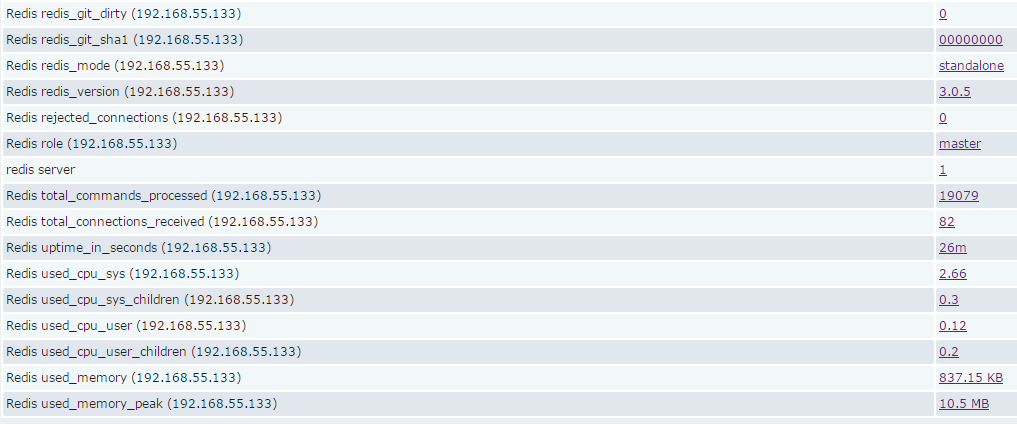
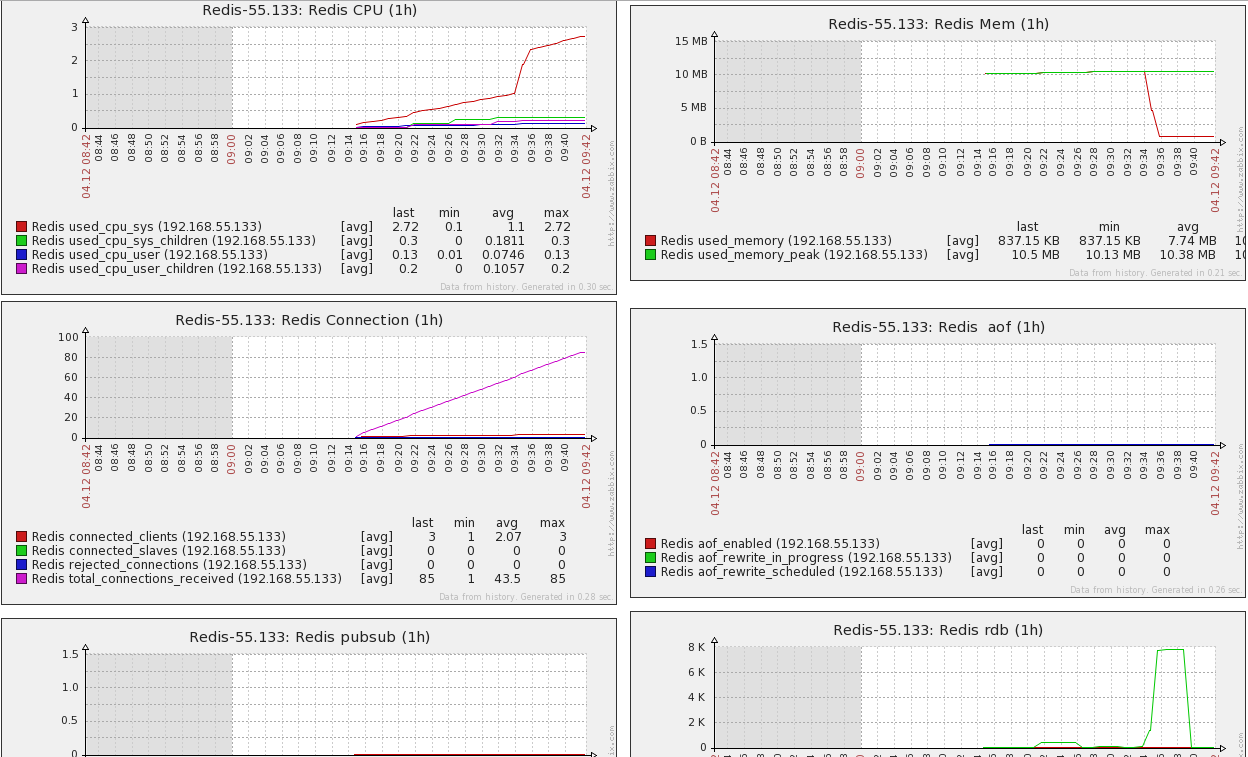
Zabbix 监控redis的更多相关文章
- Zabbix应用六:Zabbix监控Redis
利用Zabbix监控Redis Zabbix监控redis就比较简单了,因为zabbix官方提供了监控redis的模版和脚本,而且脚本有nodejs和python两种,下载地址:https://git ...
- Zabbix监控redis status
概述 zabbix采用Trapper方式监控redis status 原理 redis-cli info命令得到redis服务器的统计信息,脚本对信息分两部分处理: (1)# Keyspace部分为Z ...
- 01:zabbix监控redis
一.zabbix 自动发现并监控redis多实例 1.1 编写脚本 1.1.1 redis_low_discovery.sh 用于发现redis多实例 [root@redis02 homed]# ca ...
- 最新 centos7下zabbix 监控redis状态
准备 先准备两台服务器,已经部署好了zabbix-sever和zabbix-agent zabbix-server 192.168.1.70 centos7.2 zabbix-agent 192.16 ...
- zabbix监控redis多实例(low level discovery)
对于多实例部署的tomcat.redis等应用,可以利用zabbix的low level discovery功能来实现监控,减少重复操作. 注:Zabbix版本: Zabbix 3.0.2 一.服务 ...
- zabbix监控redis
导入监控模板 点击[configuration]-->[templates]-->[import],导入xml监控模板. 配置客户端key 在被监控的主机上,新建/etc/zabbix/z ...
- zabbix监控redis性能
创建采集脚本 mkdir -p /etc/zabbix/scripts chown -R zabbix.root /etc/zabbix/scripts vim redis_status.sh #! ...
- (十二)zabbix监控redis
1)agent端配置 安装redis yum install epel-release -y yum install redis -y 配置认证密码 #vim /etc/redis.conf requ ...
- zabbix 监控redis python3脚本
一:安装redis-python模块 wge thttps://pypi.python.org/packages/source/r/redis/redis-2.9.1.tar.gz tar xf r ...
随机推荐
- jd-eclipse插件的安装
一,资源 jd-eclipse-site-1.0.0-RC2.zip 百度网盘链接:https://pan.baidu.com/s/1GTFFY_1jg4k9vjZNE4JliQ 提 ...
- tomcat这种http服务器,是能接收到客户端的断开信息的,并能打印出来
如,tomcat的运行文件 DEBUG -- CLOSE BY CLIENT STACK TRACE
- event loop js事件循环 microtask macrotask
转: 原文 http://blog.csdn.net/sjn0503/article/details/76087631 ---------------------------------------- ...
- 跳過 Windows RT的UI
RT启动进入常规桌面 微软Surface RT发布的时间已经不短了,相信很多朋友都已经熟悉了这个全新的平板,并且已经上手.Surface RT开机默认进入的界面为Windows UI,这对于经常使用A ...
- 11082 完全二叉树的种类 O(n) 卡特兰数
11082 完全二叉树的种类 时间限制:800MS 内存限制:1000K提交次数:0 通过次数:0 题型: 编程题 语言: G++;GCC;VC Description 构造n个(2<=n ...
- BZOJ 1798: [Ahoi2009]Seq 维护序列seq (线段树乘法加法的混合操作)
题目:点击打开链接 大意:一个数组.三个操作.第一种是区间[a,b]每一个数乘乘,另外一种是区间[a,b]每一个数加c,第三种是查询[a,b]区间的和并对p取摸. 两种操作就不能简单的仅仅往下传 ...
- (WIP) DPDK理论学习(by quqi99)
作者:张华 发表于:2016-04-22版权声明:能够随意转载,转载时请务必以超链接形式标明文章原始出处和作者信息及本版权声明 ( http://blog.csdn.net/quqi99 ) 组成模 ...
- C#程序猿学习 Python
孙广东 2016.1.1 交互: C# 运行Python代码: http://stackoverflow.com/questions/11779143/run-a-python-script-fro ...
- Server Tomcat v8.0 Server at localhost failed to start.
怎么办? 查资料的话别人会告诉你须要删除一个东西.这是一种方法.可是你的错误并不是通过这种方法能够解决. 比方像我 <url-pattern>login</url-pattern&g ...
- 寒城攻略:Listo 教你用 Swift 写IOS UI 项目生活记事本
刚才用 Swift 写了一个记事本的应用,仅仅是简单的 UI 方向的开发,先来上产品的界面: 如今 Listo 给分享源码: 共同进步,开源中国.转载请声明出处