
winfor应用程序打印报表清单
最近一周竟然有2位以前的同事问我在winfor应用程序里面打印怎么搞,所以才有了写这篇文章的打算,索性现在没事就写出来
在窗体上简单的布局设置一下如图
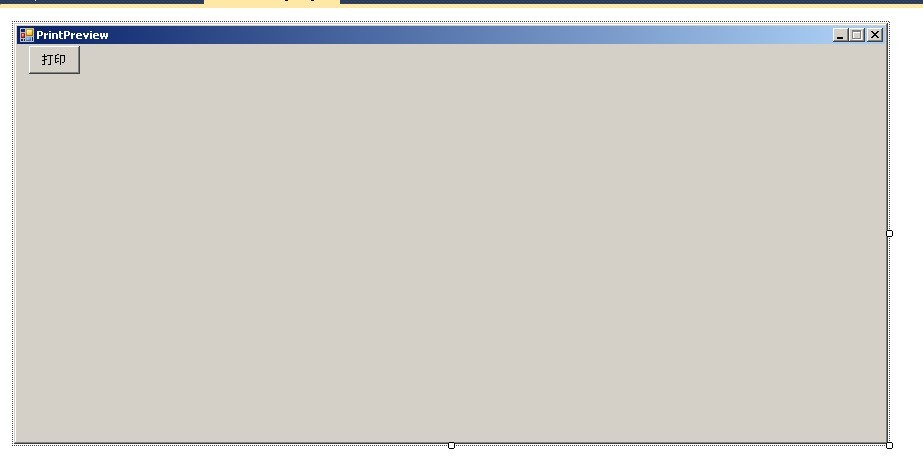
定义一个Model 我在里面放了属性之外还从写了ToString方法和返回模型的方法。
代码如下
  #region Model

             public DateTime CreateDate = DateTime.Today;

             public string DocNumber;

             public string Title { get; set; }

             public string Consignee { get; set; }

             public string ProductName { get; set; }

             public string ProductLot { get; set; }

             public string Specification { get; set; }

             public string Factory { get; set; }

             public string RegNo { get; set; }

             public string PermitNo { get; set; }

             public DateTime ExpirationDate { get; set; }

             public DateTime DeliveryDate { get; set; }

             public string Unit { get; set; }

             public int Count { get; set; }

             public float Price { get; set; }

             public float Money { get; set; }

         #endregion

         private const char Spliter = '|';//分割txt里面的值

         public override string ToString()

         {

             StringBuilder sb = new StringBuilder();

             sb.Append(CreateDate);

             sb.Append(Spliter);

             sb.Append(DocNumber);

             sb.Append(Spliter);

             sb.Append(Title);

             sb.Append(Spliter);

             sb.Append(Consignee);

             sb.Append(Spliter);

             sb.Append(ProductName);

             sb.Append(Spliter);

             sb.Append(ProductLot);

             sb.Append(Spliter);

             sb.Append(Specification);

             sb.Append(Spliter);

             sb.Append(Factory);

             sb.Append(Spliter);

             sb.Append(RegNo);

             sb.Append(Spliter);

             sb.Append(PermitNo);

             sb.Append(Spliter);

             sb.Append(ExpirationDate);

             sb.Append(Spliter);

             sb.Append(DeliveryDate);

             sb.Append(Spliter);

             sb.Append(Unit);

             sb.Append(Spliter);

             sb.Append(Count);

             sb.Append(Spliter);

             sb.Append(Price);

             sb.Append(Spliter);

             sb.Append(Money);

             sb.Append(Spliter);

             return sb.ToString();

         }

         public static OutshipDoc FromString(string s)

         {

             try

             {

                 int i = ;

                 OutshipDoc doc = new OutshipDoc();

                 string[] pars = s.Split(new char[] { Spliter });

                 doc.CreateDate = DateTime.Parse(pars[i++]);

                 doc.DocNumber = pars[i++];

                 doc.Title = pars[i++];

                 doc.Consignee = pars[i++];

                 doc.ProductName = pars[i++];

                 doc.ProductLot = pars[i++];

                 doc.Specification = pars[i++];

                 doc.Factory = pars[i++];

                 doc.RegNo = pars[i++];

                 doc.PermitNo = pars[i++];

                 doc.ExpirationDate = DateTime.Parse(pars[i++]);

                 doc.DeliveryDate = DateTime.Parse(pars[i++]);

                 doc.Unit = pars[i++];

                 doc.Count = int.Parse(pars[i++]);

                 doc.Price = float.Parse(pars[i++]);

                 doc.Money = float.Parse(pars[i++]);

                 return doc;

             }

             catch (System.Exception ex)

             {

                 return null;

             }

         }
Model里面的东西已经准备完了,现在就开始前台的代码了
 OutshipDoc doc;

        internal OutshipDoc Doc

        {

            get { return doc; }

            set { doc = value; }

        }
以上是model,接下来就是定义公用的
PrintDocument
private System.Drawing.Printing.PrintDocument docToPrint =

           new System.Drawing.Printing.PrintDocument();//创建一个PrintDocument的实例
定义好了就用构造函数初始化Model
 public PrintPreview()

        {

            InitializeComponent();

            doc = new OutshipDoc();

            doc.Title = "广州市xx医疗器械有限公司送货清单";

            doc.Consignee = "阳江人民医院";

            doc.ProductName = "银尔通活性银离子抗菌液III型";

            doc.DocNumber = "X2012040201";

            doc.DeliveryDate = DateTime.Parse("2012/4/2");

            doc.Factory = "西安康旺抗菌科技股份有限公司";

            doc.Specification = "1200ml/盒";

            doc.RegNo = "陕食药监械(准)字2008第2640064号";

            doc.PermitNo = "陕食药监械生产许20052286号";

            doc.ProductLot = "";

            doc.ExpirationDate = DateTime.Parse("2014/04/01");

            doc.Unit = "盒";

            doc.Count = ;

            doc.Price = 39.00F;

            doc.Money = 37441.18F;

            docToPrint.PrintPage += new System.Drawing.Printing.PrintPageEventHandler(docToPrint_PrintPage);

        }
//画打印格式

        void docToPrint_PrintPage(object sender, System.Drawing.Printing.PrintPageEventArgs e)

        {

            int margin = ;

            int width = ;

            int height  = e.PageBounds.Height;

            int left = (e.PageBounds.Width - width) / ;

            int top = ;

            renderDocument(doc, e.Graphics, left, top, width, height);

        }
public static void renderDocument(OutshipDoc d, Graphics g, int left, int top, int width, int height)

        {

            width = ;

            Brush br = Brushes.Black;

            // 打印抬头

            Font ft;

            StringFormat sf;

            ft = new Font("宋体", );

            sf = new StringFormat();

            sf.Alignment = StringAlignment.Center;

            sf.FormatFlags = StringFormatFlags.NoClip;

            g.DrawString(d.Title, ft, br

                , new RectangleF(new PointF(left, top), new SizeF(width , height ))

                , sf);

            string info1 = "收货单位:" + d.Consignee + "   " + "品名:" + d.ProductName;

            ft.Dispose();

            ft = new Font("宋体", );

            g.DrawString(info1, ft, br, new PointF(left, top + ));

            info1 = "编号:" + d.DocNumber;

            g.DrawString(info1, ft, br, new PointF(left + width - , top + ));

            ft.Dispose();

            ft = new Font("宋体", );

            info1 = "生产厂家:" + d.Factory;

            g.DrawString(info1, ft, br, new PointF(left, top + ));

            info1 = "送货日期:" + d.DeliveryDate.Year + "年" + d.DeliveryDate.Month + "月" + d.DeliveryDate.Day + "日";

            g.DrawString(info1, ft, br, new PointF(left + width - , top + ));

            int x = left, y = top + ;

            Pen pn = Pens.Black;

            g.DrawLine(pn, new Point(left, y), new Point(left + width, y));

            y += ;

            g.DrawLine(pn, new Point(left, y), new Point(left + width, y));

            y += ;

            g.DrawLine(pn, new Point(left, y), new Point(left + , y));

            g.DrawLine(pn, new Point(left +  + , y), new Point(left + width, y));

            y += ;

            g.DrawLine(pn, new Point(left, y), new Point(left + width, y));

            y += ;

            g.DrawLine(pn, new Point(left, y), new Point(left + width, y));

            int y1 = top + ;

            int y2 = top + ;

            int y3 = top + ;

            g.DrawLine(pn, new Point(x, y1), new Point(left, y3));

            x += ;

            g.DrawLine(pn, new Point(x, y1), new Point(x, y3));

            x += ;

            g.DrawLine(pn, new Point(x, y1), new Point(x, y2));

            x += ;

            g.DrawLine(pn, new Point(x, y1), new Point(x, y2));

            x += ;

            g.DrawLine(pn, new Point(x, y1), new Point(x, y2));

            x += ;

            g.DrawLine(pn, new Point(x, y1), new Point(x, y2));

            x += ;

            g.DrawLine(pn, new Point(x, y1), new Point(x, y2));

            x += ;

            g.DrawLine(pn, new Point(x, y1), new Point(x, y2));

            x += ;

            g.DrawLine(pn, new Point(x, y1), new Point(x, y3));

            x = left + width;

            g.DrawLine(pn, new Point(x, y1), new Point(x, y3));

            sf.Alignment =  StringAlignment.Center;

            sf.LineAlignment = StringAlignment.Center;

            ft.Dispose();

            ft = new Font("宋体", );

            x = left;

            g.DrawString("规格", ft, br, new RectangleF(x, y1, , ), sf);

            x += ;

            g.DrawString("产品注册证号", ft, br, new RectangleF(x, y1, , ), sf);

            x += ;

            g.DrawString("医疗器械生产企业许可证号", ft, br, new RectangleF(x, y1, , ), sf);

            x += ;

            g.DrawString("产品批号", ft, br, new RectangleF(x, y1, , ), sf);

            x += ;

            g.DrawString("失效日期", ft, br, new RectangleF(x, y1, , ), sf);

            x += ;

            g.DrawString("单位", ft, br, new RectangleF(x, y1, , ), sf);

            x += ;

            g.DrawString("数量", ft, br, new RectangleF(x, y1, , ), sf);

            x += ;

            g.DrawString("单价", ft, br, new RectangleF(x, y1, , ), sf);

            x += ;

            g.DrawString("金额", ft, br, new RectangleF(x, y1, , ), sf);

            x += ;

            x = left;

            g.DrawString(d.Specification, ft, br, new RectangleF(x, y1 + , , ), sf);

            x += ;

            g.DrawString(d.RegNo, ft, br, new RectangleF(x, y1 + , , ), sf);

            x += ;

            g.DrawString(d.PermitNo, ft, br, new RectangleF(x, y1 + , , ), sf);

            x += ;

            g.DrawString(d.ProductLot, ft, br, new RectangleF(x, y1 + , , ), sf);

            x += ;

            g.DrawString(d.ExpirationDate.ToString("yyyyMMdd"), ft, br, new RectangleF(x, y1 + , , ), sf);

            x += ;

            g.DrawString(d.Unit, ft, br, new RectangleF(x, y1 + , , ), sf);

            x += ;

            g.DrawString(d.Count.ToString(), ft, br, new RectangleF(x, y1 + , , ), sf);

            x += ;

            g.DrawString(d.Price.ToString("#.00"), ft, br, new RectangleF(x, y1 + , , ), sf);

            x += ;

            g.DrawString(d.Money.ToString("#.00"), ft, br, new RectangleF(x, y1 + , , ), sf);

            x += ;

            x = left;

            sf.Alignment = StringAlignment.Near;

            g.DrawString("合计:", ft, br, new RectangleF(x, y2, , ), sf);

            x += ;

            g.DrawString("人民币(大写)" + moneyToString(d.Money), ft, br, new RectangleF(x, y2, , ), sf);

            x += ;

            x += ;

            x += ;

            x += ;

            x += ;

            x += ;

            x += ;

            sf.Alignment = StringAlignment.Center;

            g.DrawString(d.Money.ToString("#.00"), ft, br, new RectangleF(x, y2, , ), sf);

            x += ;

            x = left;

            sf.Alignment = StringAlignment.Near;

            g.DrawString("收货单位:", ft, br, new RectangleF(x, y3, , ), sf);

            x += ;

            g.DrawString("送货单位:", ft, br, new RectangleF(x, y3, , ), sf);

        }
 //货币大写转换

        private static string moneyToString(double p)

        {

            string[] numbers = new string[] { "零", "壹", "贰", "叁", "肆", "伍", "陆", "柒", "捌", "镹"};

            string[] unit = new string[] { "元", "拾", "佰", "仟", "万", "拾万", "佰万", "仟万" };

            string[] xunit = new string[] { "角", "分" };

            int x = (int)p;

            string s = "";

            int i = ;

            for (i = ; i <  && x > ; i++)

            {

                if (x %  != )

                    s = numbers[x % ] + unit[i] + s;

                x /= ;

            }

            if (s == "")

                s = "零";

            if (!s.EndsWith("元"))

                s += "元";

            double y = p - (int)p;

            if (y != 0.0f)

            {

                y *= ;

                if ((int)y != )

                    s += numbers[(int)y] + "角";

                y = y - (int)y;

                y *= ;

                if ((int)y != )

                    s += numbers[(int)y] + "分";

            }

            if (s.EndsWith("元"))

                s += "整";

            return s;

        }
输出的格式浏览就已经写完最好就差真正的打印了
private void btnPrint_Click(object sender, EventArgs e)

        {

            PrintDialog pd = new PrintDialog();

            pd.Document = docToPrint;

            if (pd.ShowDialog() == DialogResult.OK)

            {

                docToPrint.Print();

            }

        }
到此就已经写完了看看效果了,如图下面就是最后的效果

winfor应用程序打印报表清单的更多相关文章
- C# WPF打印报表
前天我的一个同学由于打印报表而苦恼,所以就介绍了一下WPF的打印报表,希望能帮助到大家. 展示报表 1. 首先新建项“报表”,选定项目,右击,点击“添加”->“新建项”->“报表”
- .Net_用控制台程序打印指定行数的三角型(面试题)
.Net_用控制台程序打印指定行数的三角型(面试题) 下面是一个由*号组成的4行倒三角形图案.要求: 1.输入倒三角形的行数,行数的取值3-21之间,对于非法的行数,要求抛出提示“非法行数!”: ...
- 如何在C/S下打印报表
java应用有不少是C/S模式,在C/S模式下,同样可以调用API接口运算报表.CSReport是C/S模式下的报表控件类,在这个类中可以获得报表的显示面板.获得报表的打印面板.显示报表打印窗口 ...
- 代码实现从键盘接收一个字符串, 程序对其中所有字符进行排序,例如键盘输入: helloitcast程序打印:acehillostt
package com.loaderman.test; import java.util.Comparator; import java.util.Scanner; import java.util. ...
- 最全的WEB前端开发程序员学习清单
史上最全的WEB前端开发程序员学习清单! 今天为什么要给大家分享这篇文章呢,我发现最近来学前端的特别多,群里面整天都有人问:前端好找工作吗?前端要怎么学啊?前端工资怎么样?前端XX,前端XXX,虽然我 ...
- java例题_47 读取 7 个数(1—50)的整数值,每读取一个值,程序打印出该值个数的*
1 /*47 [程序 47 打印星号] 2 题目:读取 7 个数(1-50)的整数值,每读取一个值,程序打印出该值个数的*. 3 */ 4 5 /*分析 6 * 1.多次读取---for循环 7 * ...
- IIS下打印报表到Excel
阅读本文之前,请先看上一篇文章<.NET下Excel报表的打印>. 上一篇文章<.NET下Excel报表的打印>介绍了关于报表打印到Excel文件中的方法.若要把项目通过IIS ...
- 使用功能强大的插件FastReport.Net打印报表实例
我第一次使用FastReport插件做的功能是打印一个十分复杂的excel表格,有几百个字段都需要绑定数据,至少需要4个数据源,而且用到横向.竖向合并单元格. 我不是直接连接数据库,而是使用Regis ...
- 12、借助Jacob实现Java打印报表(Excel、Word)
12.使用Jacob来处理文档 Word或Excel程序是以一种COM组件形式存在的.如果能够在Java中调用相应组件,便能使用它的方法来获取文档中的文本信息.Jacob是一个JAVA到微软的COM接 ...
随机推荐
- 水题 Codeforces Round #286 (Div. 2) A Mr. Kitayuta's Gift
题目传送门 /* 水题:vector容器实现插入操作,暴力进行判断是否为回文串 */ #include <cstdio> #include <iostream> #includ ...
- 在HTML页面中实时获取新消息的方法 “JavaScript中的setInterval用法”
JavaScript中的setInterval用法(资料来源:博主---八神吻你 ) setInterval动作的作用是在播放动画的时,每隔一定时间就调用函数,方法或对象.可以使用本动作更新来自数 ...
- GDI双缓冲绘图
一.简介 在进行复杂图形绘制时,若直接在屏幕DC上进行绘制,则会出现明显的闪烁.闪烁产生的原因是当绘制的图形较为 复杂时,图形绘制过程中就被刷新到屏幕上,导致结果断断续续地显示出来.双缓冲绘图的原理是 ...
- PopupWindow(1)简介
PopupWindow有点类似于Dialog,相同点在于都是弹出窗口,并且都可以对其进行自定义显示,并且里面的监听组件,进行相应的操作,但它与Dialog又有很大的区别,PopupWindow只是弹出 ...
- jmeter(二十一)JMeter 命令行(非GUI)
一.应用场景 1.无需交互界面或受环境限制(linux text model) 2.远程或分布式执行 3.持续集成,通过shell脚本或批处理命令均可执行,生成的测试结果可被报表生成模块直接使用,便于 ...
- Backbone.js入门教程第二版笔记(3)
视图渲染 <!DOCTYPE html> <html> <head> <meta charset="UTF-8"> <titl ...
- 拦截@RequestBody的请求数据
要拦截首先想到的是拦截器,@RequestBody只能以流的方式读取,流被读过一次后,就不在存在了,会导致会续无法处理,因此不能直接读流 为了解决这个问题,思路如下: 1.读取流前先把流保存一下 2. ...
- CF782A Andryusha and Socks
题意: Andryusha is an orderly boy and likes to keep things in their place. Today he faced a problem to ...
- Android单独继承View类来实现自定义控件
一个单独继承view类来实现自定义控件,在该方法中,需要重写ondraw方法来绘制自己所需要的控件,下面也以一个简单的例子来说明如何实现自定义控件.该方法可以实现所需要的所有的自定义控件. 属性文件中 ...
- sprintf使用时需要注意的问题