
Java 添加、更新和移除PDF超链接
简介
PDF超链接用一个简单的链接包含了大量的信息,满足了人们在不占用太多空间的情况下渲染外部信息的需求。下面将介绍通过Java 在PDF中添加、更新和移除超链接。
(一)工具使用:
- Free Spire.PDF for Java 2.4.4(免费版)
- Intellij IDEA
(二)导入Jar文件包:
- 方式一:首先,从官网获取Free Spire.PDF for Java文件包。
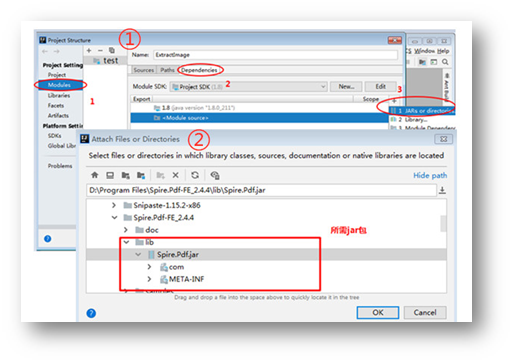
Step 1: 下载控件包之后解压,打开“Project Structure”界面。(以下是三种在IDEA中快速打开Project Structure界面的方式,可选其中任意一种)

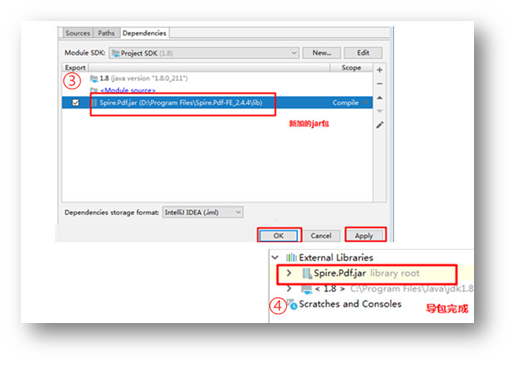
Step 2:按以下操作步骤进行导入。① 选择“Modules”—“Dependencies”,添加外置jar包;② 进入"Attach File or Directories"界面选择jar文件路径,然后点击“OK”;③ 勾选jar路径选项,点击”OK”/”Apply”;④ 导入完成。如下图:
- 方式二:使用Maven配置导包。可以参考导入方法。
Java代码示例参考
(一) 添加超链接到PDF
添加命名空间:
import com.spire.pdf.*;
import com.spire.pdf.annotations.*;
import com.spire.pdf.graphics.*;
import java.awt.*;
import java.awt.font.TextAttribute;
import java.awt.geom.*;
import java.util.HashMap;
1. 添加超文本连接
public class TextLink {
    public static void main(String[] args) throws Exception{
        //创建PDF文档
        PdfDocument doc = new PdfDocument();
        PdfPageBase page = doc.getPages().add();
        //初始化X,Y坐标
        ;
        ;
        // 创建一个普通字体
        PdfTrueTypeFont plainFont = ),true);
        //创建一个带下划线的字体
        HashMap<TextAttribute, Object> hm = new HashMap<TextAttribute, Object>();
        hm.put(TextAttribute.UNDERLINE, TextAttribute.UNDERLINE_ON);
        hm.put(TextAttribute.SIZE, );
        hm.put(TextAttribute.FAMILY, "Arial");
        Font font = new Font(hm);
        PdfTrueTypeFont underlineFont = new PdfTrueTypeFont(font,true);

        //添加超文本链接到PDF
        String label= "超文本链接: ";
        PdfStringFormat format = new PdfStringFormat();
        format.setMeasureTrailingSpaces(true);
        page.getCanvas().drawString(label, plainFont, PdfBrushes.getOrange(), , y, format);
        x = (float)plainFont.measureString(label,format).getWidth();
        //创建PdfTextWebLink对象
        PdfTextWebLink webLink = new PdfTextWebLink();
        //设置超链接文本
        webLink.setText("主页");
        //设置超链接地址
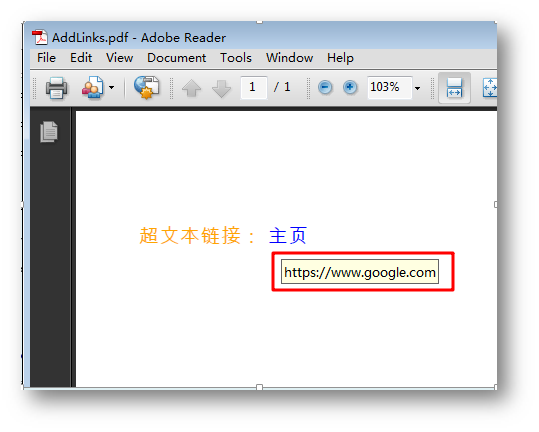
        webLink.setUrl("https://www.google.com");
        //设置超链接字体和字体颜色
        webLink.setFont(plainFont);
        webLink.setBrush(PdfBrushes.getBlue());
        //添加超链接到页面
        webLink.drawTextWebLink(page.getCanvas(), new Point2D.Float(x, y));
        y= y +;
        //保存文档
        doc.saveToFile("AddLinks.pdf");
        doc.close();
    }
}
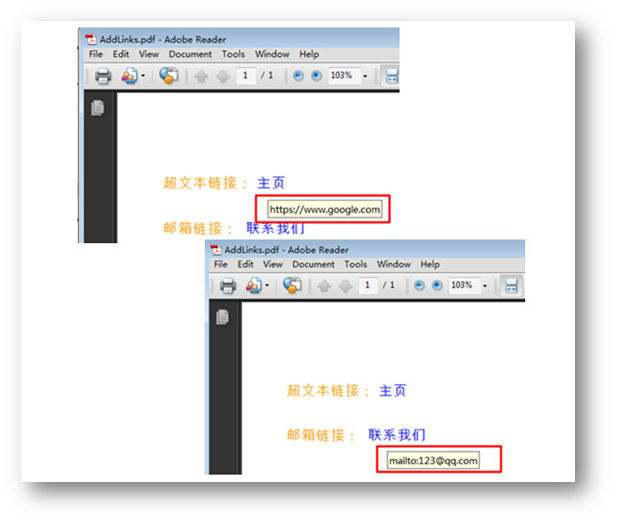
添加结果:
2. 添加邮箱链接
public class EMailLink {
    public static void main(String[] args) throws Exception{
        //创建PDF文档
        PdfDocument doc = new PdfDocument();
        PdfPageBase page = doc.getPages().add();
        //初始化X,Y坐标
        ;
        ;
        // 创建一个普通字体
        PdfTrueTypeFont plainFont = ),true);
        //创建一个带下划线的字体
        HashMap<TextAttribute, Object> hm = new HashMap<TextAttribute, Object>();
        hm.put(TextAttribute.UNDERLINE, TextAttribute.UNDERLINE_ON);
        hm.put(TextAttribute.SIZE, );
        hm.put(TextAttribute.FAMILY, "Arial");
        Font font = new Font(hm);
        PdfTrueTypeFont underlineFont = new PdfTrueTypeFont(font,true);
        //添加邮箱链接
        String label = "邮箱链接:  ";
        PdfStringFormat format = new PdfStringFormat();
        format.setMeasureTrailingSpaces(true);
        page.getCanvas().drawString(label, plainFont, PdfBrushes.getOrange(), , y, format);
        x = (float)plainFont.measureString(label, format).getWidth();
        //创建PdfTextWebLink对象
        PdfTextWebLink webLink = new PdfTextWebLink();
        webLink = new PdfTextWebLink();
        //设置超链接文本
        webLink.setText("联系我们");
        //设置超链接地址
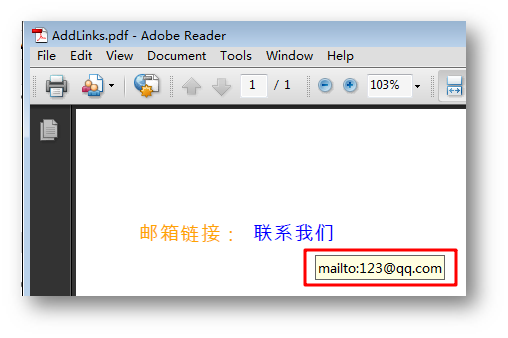
        webLink.setUrl("mailto:123@qq.com");
        //设置超链接字体和字体颜色
        webLink.setFont(plainFont);
        webLink.setBrush(PdfBrushes.getBlue());
        //添加超链接到页面
        webLink.drawTextWebLink(page.getCanvas(), new Point2D.Float(x, y));
        y = y + ;

        //保存文档
        doc.saveToFile("AddLinks.pdf");
        doc.close();
    }
}
添加结果:
3. 添加文档链接
public class FileLink {
    public static void main(String[] args) throws Exception{
        //创建PDF文档
        PdfDocument doc = new PdfDocument();
        PdfPageBase page = doc.getPages().add();
        //初始化X,Y坐标
        ;
        ;
        // 创建一个普通字体
        PdfTrueTypeFont plainFont = ),true);
        //创建一个带下划线的字体
        HashMap<TextAttribute, Object> hm = new HashMap<TextAttribute, Object>();
        hm.put(TextAttribute.UNDERLINE, TextAttribute.UNDERLINE_ON);
        hm.put(TextAttribute.SIZE, );
        hm.put(TextAttribute.FAMILY, "Arial");
        Font font = new Font(hm);
        PdfTrueTypeFont underlineFont = new PdfTrueTypeFont(font,true);
        //添加文档链接到PDF
        String label = "文档超链接: ";
        PdfStringFormat format = new PdfStringFormat();
        format.setMeasureTrailingSpaces(true);
        page.getCanvas().drawString(label, plainFont, PdfBrushes.getOrange(), , y, format);
        x = (float)plainFont.measureString(label, format).getWidth();
        page.getCanvas().drawString("打开文件", plainFont, PdfBrushes.getBlue(), x, y, format);
        Rectangle2D rect = ,,);
        //创建一个文件超链接对象并加载文件
        PdfFileLinkAnnotation fileLinkAnnotation = new PdfFileLinkAnnotation(rect,"C:\\Users\\Administrator\\Desktop\\Sample.pdf");
        fileLinkAnnotation.setBorder(new PdfAnnotationBorder(0f));
        //添加文件到超链接
        ((PdfNewPage) ((page instanceof PdfNewPage) ? page : null)).getAnnotations().add(fileLinkAnnotation);
        //保存文档
        doc.saveToFile("AddLinks.pdf");
        doc.close();
    }
}
添加结果:

(二) 更新和移除超链接
测试文档:
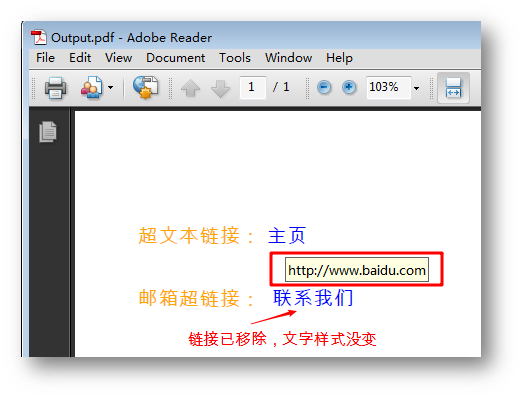
使用PDFAnnotatioCollection 类和PdfTextWebLinkAnnotationWidget类创建超链注释集合并获取到第一个超链接,使用getUrl ()方法设置超链接地址,removeAt()方法移除超链接。
import com.spire.pdf.PdfDocument;
import com.spire.pdf.PdfPageBase;
import com.spire.pdf.annotations.PdfAnnotationCollection;
import com.spire.pdf.annotations.PdfTextWebLinkAnnotationWidget;

public class UpdateDelLinks {
    public static void main(String[] args) throws Exception {
        //创建PDF文档
        PdfDocument doc = new PdfDocument();
        //加载PDF源文件
        doc.loadFromFile("data/AddLinks.pdf");
        //获取文档第一页
        PdfPageBase page = doc.getPages().);
        //获取第一页超链接注释的集合
        PdfAnnotationCollection annotationCollection = page.getAnnotationsWidget();
        //获取第一个超链接
        PdfTextWebLinkAnnotationWidget uriAnnotationWidget = (PdfTextWebLinkAnnotationWidget) annotationCollection.);
        //设置超链接
        uriAnnotationWidget.setUrl("www.baidu.com");
        //removeAt()方法移除第二条超链接
        annotationCollection.removeAt();
       //保存文件
        doc.saveToFile("Output.pdf");
    }
}
更新移除结果:
(本文完)
转载请注明出处!
Java 添加、更新和移除PDF超链接的更多相关文章
- JAVA 添加、修改和删除PDF书签
当阅读篇幅较长的PDF文档时,为方便我们再次阅读时快速定位到上一次的阅读位置,可以插入一个书签进行标记:此外,对于文档中已有的书签,我们也可以根据需要进行修改或者删除等操作.本篇文章将通过Java编程 ...
- Java 添加、替换、删除PDF中的图片
概述 本文介绍通过java程序向PDF文档添加图片,以及替换和删除PDF中已有的图片.另外,关于图片的操作还可参考设置PDF 图片背景.设置PDF图片水印.读取PDF中的图片.将PDF保存为图片等文章 ...
- Java 添加、下载、读取PDF附件信息(基于Spire.Cloud.SDK for Java)
Spire.Cloud.SDK for Java提供了PdfAttachmentsApi接口添加附件addAttachment().下载附件downloadAttachment().获取附件信息get ...
- 创建PDF模板,java添加内容、导出下载PDF
本文主要内容是:用java在pdf模板中加入数据,图片. 废话不多说,举个非常简单的例子: 首先创建word文档,导出PDF. 用 软件adobe acrobat打开,操作步骤如图: 在指定位置添加文 ...
- Java添加、提取、替换和删除PDF图片
(一)简介 这篇文章将介绍在Java中添加.提取.删除和替换PDF文档中的图片. 工具使用: Free Spire.PDF for JAVA 2.4.4(免费版) Intellij IDEA Jar包 ...
- Java 添加、验证PDF 数字签名
在设置文档内容保护的方法中,除了对文档加密.添加水印外,应用数字签名也是一种有效防伪手段.数字签名的文件比较容易验证,并且具有较高的权威性和可信度.在PDF文档中,有可直接添加或验证数字签名的功能方法 ...
- Java 添加、隐藏/显示、删除PDF图层
本文介绍操作PDF图层的方法.可分为添加图层(包括添加线条.形状.字符串.图片等图层).隐藏或显示图层.删除图层等.具体可参考如下Java代码示例. 工具:Free Spire.PDF for Jav ...
- Java 添加、提取PDF中的图片
Spire.Cloud.SDK for Java提供了PdfImagesApi接口可用于添加图片到PDF文档addImage().提取PDF中的图片extractImages(),具体操作步骤和Jav ...
- Java 添加条码、二维码到PDF文档
本文介绍如何通过Java程序在PDF文档中添加条码和二维码.创建条码时,可创建多种不同类型的条码,包括Codebar.Code11.Code128A.Code128B.Code32.Code39.Co ...
随机推荐
- 简单工厂模式及php实现
简单工厂模式(Simple Factory Pattern): 又称为静态工厂方法(Static Factory Method)模式,它属于类创建型模式.在简单工厂模式中,可以根据参数的不同返回不同类 ...
- 重写java.lang.String IndexOf()方法,实现对字符串以ASCII规则截取
/** * 根据元数据和目标ascii位数截取字符串,失败返回-1 * @param sourceStr 元数据字符串 * @param endIndex 截取到第几位 * @return 结果字符串 ...
- Oracle Mysql的jdbc连接
Oracle和MySql的jdbc或连接池中的连接,写下来以便随时参考 Oracle: driverClassName=oracle.jdbc.driver.OracleDriver url=jdbc ...
- DLL线程中坑爹的Synchronize?
1, 缘起 某次开发语音对讲windows程序,采用delphi语言,及delphix的TDXSound控件. DXSound提供了TSoundCaptureStream类,可以实现指定频率.位数.声 ...
- Redis缓存Object,List对象
一.到目前为止(jedis-2.2.0.jar),在Jedis中其实并没有提供这样的API对对象,或者是List对象的直接缓存,即并没有如下类似的API jedis.set(String key, O ...
- 洛谷 P2341 [HAOI2006]受欢迎的牛
题目描述 每头奶牛都梦想成为牛棚里的明星.被所有奶牛喜欢的奶牛就是一头明星奶牛.所有奶 牛都是自恋狂,每头奶牛总是喜欢自己的.奶牛之间的“喜欢”是可以传递的——如果A喜 欢B,B喜欢C,那么A也喜欢C ...
- close - 关闭一个文件描述符
SYNOPSIS 总览 #include <unistd.h> int close(int fd); DESCRIPTION 描述 close 关闭 一个 文件 描述符 , 使它 不在 指 ...
- 删除目录文件夹时出现:rm: cannot remove `/data/wwwroot/backidc': Is a directory
rm -f 删除目录文件夹时出现:rm: cannot remove `/data/wwwroot/backidc': Is a directory cannot remove is a direct ...
- eclipse修改xml文件默认的打开方式为XML Editor
1.菜单:Window -> Preferences -> General -> Editors -> File Associations ...
- zay大爷的神仙题目 D1T3-膜你抄
依旧是外链 锦鲤抄 [题目背景] 你在尘世中辗转了千百年 却只让我看你最后一眼 火光描摹容颜燃尽了时间 别留我一人,孑然一身 凋零在梦境里面. ——银临&云の泣<锦鲤抄> [问题描 ...