
我的NopCommerce之旅(4): 定时任务之邮件
一、功能简介
用户购买物品生成订单后,系统将发送邮件提醒给用户
二、操作步骤
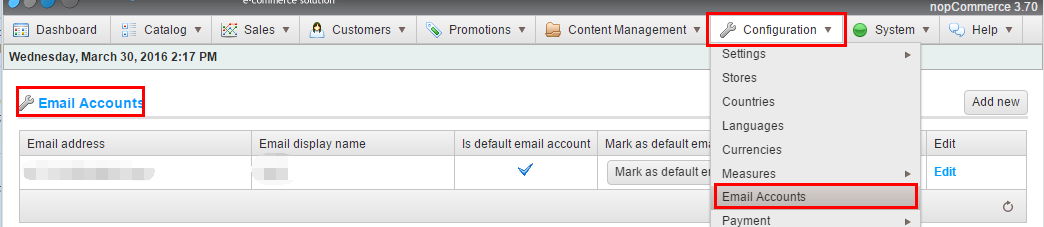
- 后台配置一个系统的默认发送邮箱
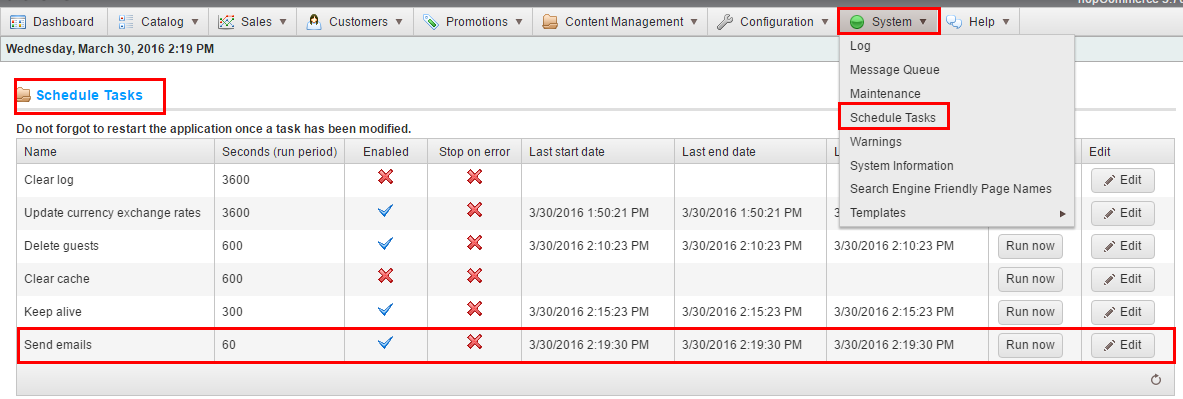
- 启动定时任务,这里包括多个任务,只需要启动邮件任务
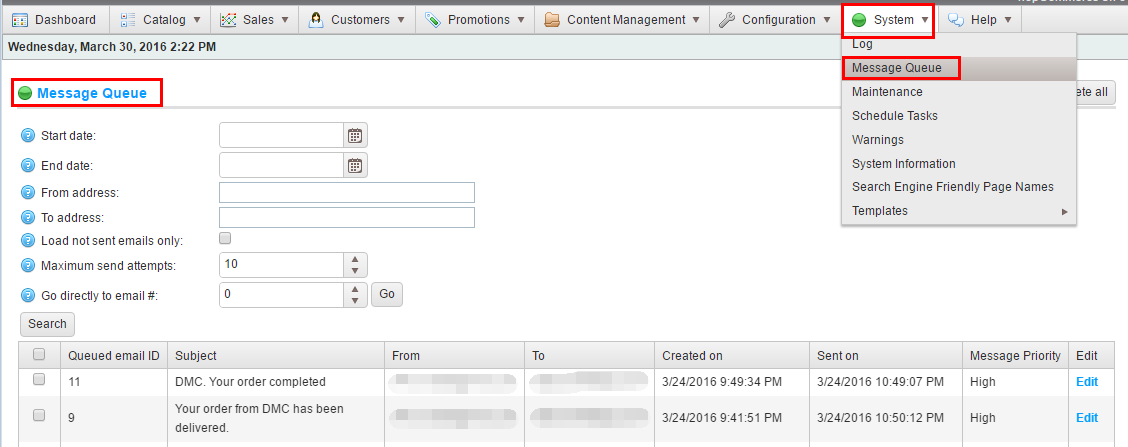
- 查看邮件发送情况
三、数据库分析
- [dbo].[Log] 系统日志表,可查看邮件发送失败的异常信息
- [dbo].[EmailAccount] 系统发送邮件配置表
- [dbo].[QueuedEmail] 订单邮件序列表,[SentTries]为重试次数,默认尝试3次失败后不再发送。
- [dbo].[ScheduleTask] 定时任务信息表,存储定时任务信息。
四、源码解析
- 根据MVC命名规则,可定位到Nop.Admin.Controllers命名空间,
- 查看ScheduleTaskController的RunNow方法,可跟踪查看到任务调用机制。
- 通过反射类型,采用autofac实例化对象,然后执行。
- 任务实现Nop.Services.Tasks.ITask接口的Execute()方法,如Nop.Services.Messages.QueuedMessagesSendTask。
         private ITask CreateTask(ILifetimeScope scope)

         {

             ITask task = null;

             if (this.Enabled)

             {

                 var type2 = System.Type.GetType(this.Type);

                 if (type2 != null)

                 {

                     object instance;

                     if (!EngineContext.Current.ContainerManager.TryResolve(type2, scope, out instance))

                     {

                         //not resolved

                         instance = EngineContext.Current.ContainerManager.ResolveUnregistered(type2, scope);

                     }

                     task = instance as ITask;

                 }

             }

             return task;

         }
         /// <summary>

         /// Executes the task

         /// </summary>

         /// <param name="throwException">A value indicating whether exception should be thrown if some error happens</param>

         /// <param name="dispose">A value indicating whether all instances should be disposed after task run</param>

         /// <param name="ensureRunOnOneWebFarmInstance">A value indicating whether we should ensure this task is run on one farm node at a time</param>

         public void Execute(bool throwException = false, bool dispose = true, bool ensureRunOnOneWebFarmInstance = true)

         {

             ...

                 //initialize and execute 初始化成功后执行任务

                 var task = this.CreateTask(scope);

                 if (task != null)

                 {

                     this.LastStartUtc = DateTime.UtcNow;

                     if (scheduleTask != null)

                     {

                         //update appropriate datetime properties

                         scheduleTask.LastStartUtc = this.LastStartUtc;

                         scheduleTaskService.UpdateTask(scheduleTask);

                     }

                     task.Execute();

                     this.LastEndUtc = this.LastSuccessUtc = DateTime.UtcNow;

                 }

             }

             catch (Exception exc)

             {

                 this.Enabled = !this.StopOnError;

                 this.LastEndUtc = DateTime.UtcNow;

                 //log error

                 var logger = EngineContext.Current.ContainerManager.Resolve<ILogger>("", scope);

                 logger.Error(string.Format("Error while running the '{0}' schedule task. {1}", this.Name, exc.Message), exc);

                 if (throwException)

                     throw;

             }

             if (scheduleTask != null)

             {

                 //update appropriate datetime properties

                 scheduleTask.LastEndUtc = this.LastEndUtc;

                 scheduleTask.LastSuccessUtc = this.LastSuccessUtc;

                 scheduleTaskService.UpdateTask(scheduleTask);

             }

             //dispose all resources

             if (dispose)

             {

                 scope.Dispose();

             }

         }
五、技术解析
- Autofac的依赖注入
- 反射
我的NopCommerce之旅(4): 定时任务之邮件的更多相关文章
- [转]NopCommerce之旅: 应用启动
本文转自:http://www.cnblogs.com/devilsky/p/5359881.html 我的NopCommerce之旅(6): 应用启动 一.基础介绍 Global.asax 文件 ...
- 我的NopCommerce之旅(8): 路由分析
一.导图和基础介绍 本文主要介绍NopCommerce的路由机制,网上有一篇不错的文章,有兴趣的可以看看NopCommerce源码架构详解--对seo友好Url的路由机制实现源码分析 SEO,Sear ...
- Jenkins+Jmeter持续集成笔记(四:定时任务和邮件通知)
通过前几篇文章,jmeter+ant+jenkins自动化持续构建的测试平台基本成型.既然要自动化平台,最基本的肯定要实现不经过人工干预,平台会在特定的条件下自动运行测试脚本,并在脚本运行结束后,发送 ...
- 我的NopCommerce之旅(6): 应用启动
一.基础介绍 Global.asax 文件(也称为 ASP.NET 应用程序文件)是一个可选文件,该文件包含响应 ASP.NET 或 HTTP 模块所引发的应用程序级别和会话级别事件的代码. Appl ...
- 我的NopCommerce之旅(9): 编写Plugin实例
一.基础介绍 ——In computing, a plug-in (or plugin) is a set of software components that add specific abili ...
- 我的NopCommerce之旅(7): 依赖注入(IOC/DI)
一.基础介绍 依赖注入,Dependency Injection,权威解释及说明请自己查阅资料. 这里简单说一下常见使用:在mvc的controller的构造方法中定义参数,如ICountryServ ...
- 我的NopCommerce之旅(5): 缓存
一.基础介绍 1.什么是cache Web缓存是指一个Web资源(如html页面,图片,js,数据等)存在于Web服务器和客户端(浏览器)之间的副本. 2.为什么要用cache 即 ...
- 我的NopCommerce之旅(1): 系统综述
一.概述 NopCommerce是一个开源的购物网站,它的特点是Pluggable modular/layered architecture(可插拔模块分层架构) 二.功能特色介绍 1.适配手机端 2 ...
- 我的NopCommerce之旅(3): 系统代码结构分析
一.概述 基于MVC 二.详细描述 \Libraries\Nop.Core 核心类,包括缓存.事件.帮助类.业务对象(订单.客户实体) \Libraries\Nop.Data 数据访问层,采用Enti ...
随机推荐
- idea提交新项目到远程git创库
1.创建远程版本库 http://192.168.28.130:81 登陆用户:maohx/123456 版本库名称最后与本地项目名称一致 如:spring-cloud-demo 2.创建本地版本库 ...
- 解决Spring MVC中文乱码
在web.xml中设置编码过滤器 <filter> <filter-name>characterEncodingFilter</filter-name> <f ...
- hdu-5744 Keep On Movin(思维)
题目链接: Keep On Movin Time Limit: 4000/2000 MS (Java/Others) Memory Limit: 65536/65536 K (Java/Oth ...
- CodeForces - 840D:(主席树求出现区间出现次数大于某值的最小数)
Once, Leha found in the left pocket an array consisting of n integers, and in the right pocket q que ...
- BZOJ_4154_[Ipsc2015]Generating Synergy_KDTree
BZOJ_4154_[Ipsc2015]Generating Synergy_KDTree Description 给定一棵以1为根的有根树,初始所有节点颜色为1,每次将距离节点a不超过l的a的子节点 ...
- Spring创建对象的三种方式以及创建时间
创建对象的三种方式: 1.采用默认的构造函数创建 2.采用静态工厂方法 1.写一个静态工厂方法类 public class HelloWorldFactory { public static Hell ...
- Linux : Linux命令
接触linux一段时间了,在网上搜罗了一些命令,以备后用.我有点爱上Linux了. 来自 :http://www.php100.com/html/webkaifa/Linux/2009/1106/34 ...
- Java的栈和堆
JVM的内存区域可以被分为:线程栈,堆,静态方法区(实际上还有更多功能的区域,并且这里说的是JVM的内存区域) 线程栈: 注意这个栈和数据结构中的stack有相似之处,但并不是用户态的.准确 ...
- 【网络爬虫】【python】网络爬虫(四):scrapy爬虫框架(架构、win/linux安装、文件结构)
scrapy框架的学习,目前个人觉得比较详尽的资料主要有两个: 1.官方教程文档.scrapy的github wiki: 2.一个很好的scrapy中文文档:http://scrapy-chs.rea ...
- TypeScript完全解读(26课时)_6.TypeScript完全解读-泛型
6.TypeScript完全解读-泛型 创建实例ts文件generics.ts 在index.ts内引入 fill是填充数组,创建的数组的元素数是times,填充的值就是接收的value的值 这里传入 ...