
我的NopCommerce之旅(4): 定时任务之邮件
一、功能简介
用户购买物品生成订单后,系统将发送邮件提醒给用户
二、操作步骤
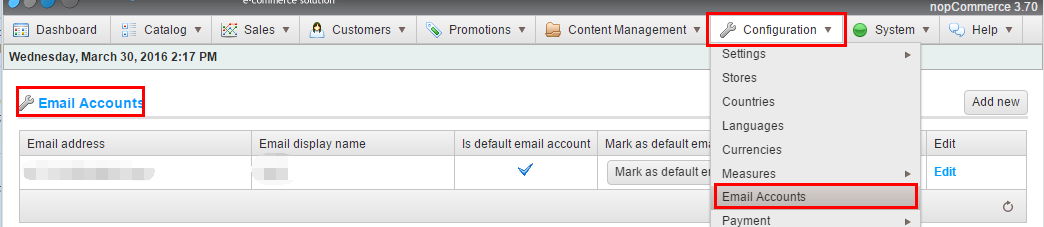
- 后台配置一个系统的默认发送邮箱
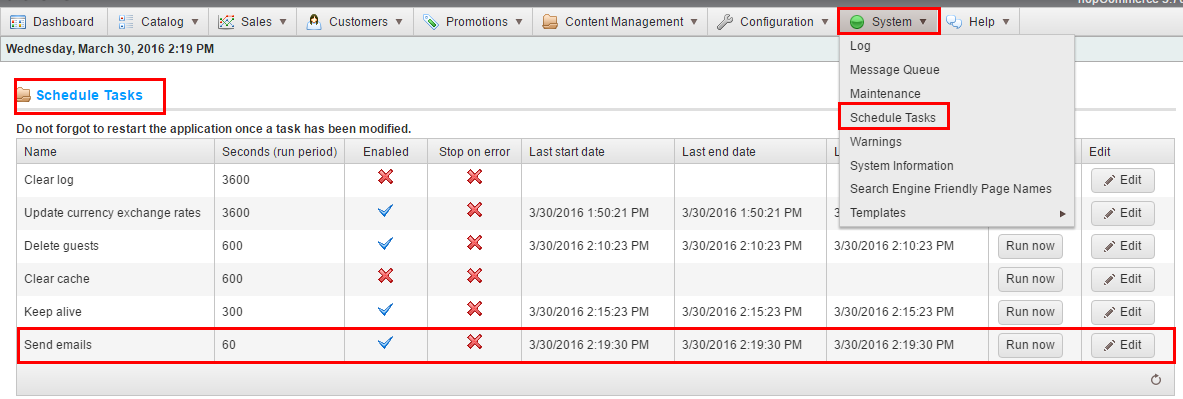
- 启动定时任务,这里包括多个任务,只需要启动邮件任务
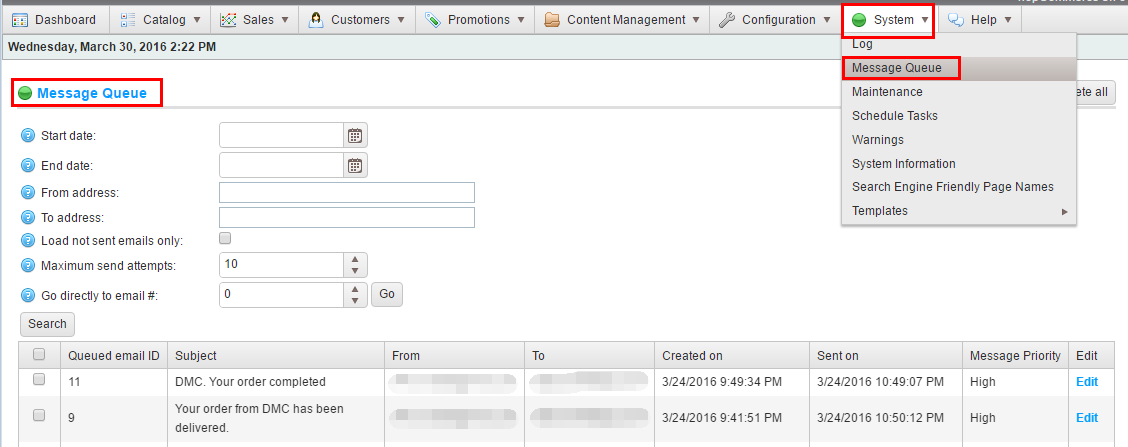
- 查看邮件发送情况
三、数据库分析
- [dbo].[Log] 系统日志表,可查看邮件发送失败的异常信息
- [dbo].[EmailAccount] 系统发送邮件配置表
- [dbo].[QueuedEmail] 订单邮件序列表,[SentTries]为重试次数,默认尝试3次失败后不再发送。
- [dbo].[ScheduleTask] 定时任务信息表,存储定时任务信息。
四、源码解析
- 根据MVC命名规则,可定位到Nop.Admin.Controllers命名空间,
- 查看ScheduleTaskController的RunNow方法,可跟踪查看到任务调用机制。
- 通过反射类型,采用autofac实例化对象,然后执行。
- 任务实现Nop.Services.Tasks.ITask接口的Execute()方法,如Nop.Services.Messages.QueuedMessagesSendTask。
         private ITask CreateTask(ILifetimeScope scope)

         {

             ITask task = null;

             if (this.Enabled)

             {

                 var type2 = System.Type.GetType(this.Type);

                 if (type2 != null)

                 {

                     object instance;

                     if (!EngineContext.Current.ContainerManager.TryResolve(type2, scope, out instance))

                     {

                         //not resolved

                         instance = EngineContext.Current.ContainerManager.ResolveUnregistered(type2, scope);

                     }

                     task = instance as ITask;

                 }

             }

             return task;

         }
         /// <summary>

         /// Executes the task

         /// </summary>

         /// <param name="throwException">A value indicating whether exception should be thrown if some error happens</param>

         /// <param name="dispose">A value indicating whether all instances should be disposed after task run</param>

         /// <param name="ensureRunOnOneWebFarmInstance">A value indicating whether we should ensure this task is run on one farm node at a time</param>

         public void Execute(bool throwException = false, bool dispose = true, bool ensureRunOnOneWebFarmInstance = true)

         {

             ...

                 //initialize and execute 初始化成功后执行任务

                 var task = this.CreateTask(scope);

                 if (task != null)

                 {

                     this.LastStartUtc = DateTime.UtcNow;

                     if (scheduleTask != null)

                     {

                         //update appropriate datetime properties

                         scheduleTask.LastStartUtc = this.LastStartUtc;

                         scheduleTaskService.UpdateTask(scheduleTask);

                     }

                     task.Execute();

                     this.LastEndUtc = this.LastSuccessUtc = DateTime.UtcNow;

                 }

             }

             catch (Exception exc)

             {

                 this.Enabled = !this.StopOnError;

                 this.LastEndUtc = DateTime.UtcNow;

                 //log error

                 var logger = EngineContext.Current.ContainerManager.Resolve<ILogger>("", scope);

                 logger.Error(string.Format("Error while running the '{0}' schedule task. {1}", this.Name, exc.Message), exc);

                 if (throwException)

                     throw;

             }

             if (scheduleTask != null)

             {

                 //update appropriate datetime properties

                 scheduleTask.LastEndUtc = this.LastEndUtc;

                 scheduleTask.LastSuccessUtc = this.LastSuccessUtc;

                 scheduleTaskService.UpdateTask(scheduleTask);

             }

             //dispose all resources

             if (dispose)

             {

                 scope.Dispose();

             }

         }
五、技术解析
- Autofac的依赖注入
- 反射
我的NopCommerce之旅(4): 定时任务之邮件的更多相关文章
- [转]NopCommerce之旅: 应用启动
本文转自:http://www.cnblogs.com/devilsky/p/5359881.html 我的NopCommerce之旅(6): 应用启动 一.基础介绍 Global.asax 文件 ...
- 我的NopCommerce之旅(8): 路由分析
一.导图和基础介绍 本文主要介绍NopCommerce的路由机制,网上有一篇不错的文章,有兴趣的可以看看NopCommerce源码架构详解--对seo友好Url的路由机制实现源码分析 SEO,Sear ...
- Jenkins+Jmeter持续集成笔记(四:定时任务和邮件通知)
通过前几篇文章,jmeter+ant+jenkins自动化持续构建的测试平台基本成型.既然要自动化平台,最基本的肯定要实现不经过人工干预,平台会在特定的条件下自动运行测试脚本,并在脚本运行结束后,发送 ...
- 我的NopCommerce之旅(6): 应用启动
一.基础介绍 Global.asax 文件(也称为 ASP.NET 应用程序文件)是一个可选文件,该文件包含响应 ASP.NET 或 HTTP 模块所引发的应用程序级别和会话级别事件的代码. Appl ...
- 我的NopCommerce之旅(9): 编写Plugin实例
一.基础介绍 ——In computing, a plug-in (or plugin) is a set of software components that add specific abili ...
- 我的NopCommerce之旅(7): 依赖注入(IOC/DI)
一.基础介绍 依赖注入,Dependency Injection,权威解释及说明请自己查阅资料. 这里简单说一下常见使用:在mvc的controller的构造方法中定义参数,如ICountryServ ...
- 我的NopCommerce之旅(5): 缓存
一.基础介绍 1.什么是cache Web缓存是指一个Web资源(如html页面,图片,js,数据等)存在于Web服务器和客户端(浏览器)之间的副本. 2.为什么要用cache 即 ...
- 我的NopCommerce之旅(1): 系统综述
一.概述 NopCommerce是一个开源的购物网站,它的特点是Pluggable modular/layered architecture(可插拔模块分层架构) 二.功能特色介绍 1.适配手机端 2 ...
- 我的NopCommerce之旅(3): 系统代码结构分析
一.概述 基于MVC 二.详细描述 \Libraries\Nop.Core 核心类,包括缓存.事件.帮助类.业务对象(订单.客户实体) \Libraries\Nop.Data 数据访问层,采用Enti ...
随机推荐
- java学习之super关键字
对于具有public或者protected属性的父类,其子类若想继承父亲的属性或者方法,那么需要用到super 实例:
- hadoop应用场景
大数据量存储:分布式存储 日志处理: Hadoop擅长这个 海量计算: 并行计算 ETL:数据抽取到oracle.mysql.DB2.mongdb及主流数据库 使用HBase做数据分析: 用扩展性应对 ...
- IO多路复用模型之select()函数详解
IO复用 我们首先来看看服务器编程的模型,客户端发来的请求服务端会产生一个进程来对其进行服务,每当来一个客户请求就产生一个进程来服务,然而进程不可能无限制的产生,因此为了解决大量客户端访问的问题,引入 ...
- 微信小程序的ajax数据请求wx.request
微信小程序的ajax数据请求,很多同学找不到api在哪个位置,这里单独把小程序的ajax请求给列出来,微信小程序的请求就是wx.request这个api,wx.request(一些对象参数),微信小程 ...
- AndroidStudio检测不到genymotion虚拟设备
重启adb 单击 Reset adb
- vs缩进多行,vs2013测试可用
vs缩进多行,vs2013测试可用 选中要缩进的行,然后点击tab会直接在选中行增大缩进 快捷键 功能 描述 tab 增大缩进 选中要缩进的行,可多行 shift + table 减小缩进 选中要缩进 ...
- java 整除(/) 求余(%) 运算
1. java 整除(/) 求余(%) 运算 1.求余 System.out.println(11%2); //顾名思义就是11除2的余数-->1 System.out. ...
- Robot Framework基础学习(一)
Robot Framework语法学习: 一.变量的声明.赋值与使用 1.变量标识符:每个变量都可以用 变量标识符 ${变量名} 来表示. 2.变量声明:可以在TestSuite上点右键或者在Edi ...
- UVa 10214 Trees in a Wood. (数论-欧拉函数)
题意:给定一个abs(x) <= a, abs(y) <= b,除了原点之外的整点各有一棵树,可以相互阻挡,求从原点可以看到多少棵树. 析:由于a < b,所以我们可以一列一列的统计 ...
- LeetCode: 485 Max Consecutive Ones(easy)
题目: Given a binary array, find the maximum number of consecutive 1s in this array. Example 1: Input: ...