
Page-Object思想
为什么要使用page-object
集中管理元素对象
集中管理一个page内的公共方法
后期维护方便
集中管理元素对象
实现方法:
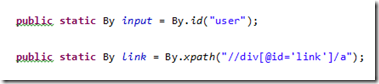
调用方法:
WebElement element = driver.findElement(Test7.input);
Page类的实现
目的:
有了page类后,在具体的脚本中,要用到哪个page,就new这个page的对象,然后调用里面的公共方法即可
实现方法:
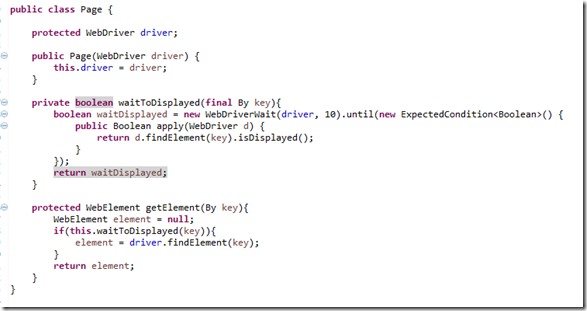
Page类的实现
说明:
Page类是一个基础类,其它的Page类都要继承该类,比如:

在具体的脚本中的使用方法:
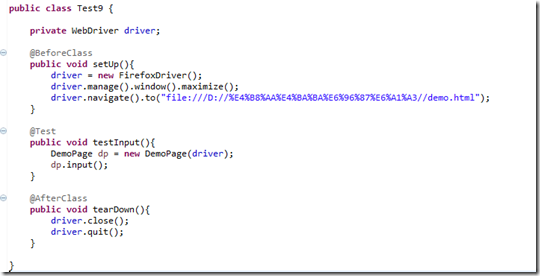
具体代码如下:
Page.java具体代码:
 package com.selenium.utils;

 import org.openqa.selenium.By;

 import org.openqa.selenium.WebDriver;

 import org.openqa.selenium.WebElement;

 import org.openqa.selenium.support.ui.ExpectedCondition;

 import org.openqa.selenium.support.ui.WebDriverWait;

 public class Page {

     protected WebDriver driver;

     public Page(WebDriver driver) {

         this.driver = driver;

     }

     private boolean waitForToDisplayed(final By key) {

         boolean waitDisplayed = new WebDriverWait(driver, 10)

                 .until(new ExpectedCondition<Boolean>() {

                     public Boolean apply(WebDriver d) {

                         return d.findElement(key).isDisplayed();

                     }

                 });

         return waitDisplayed;

     }

     protected WebElement getElement(WebDriver driver, By key) {

         WebElement element = null;

         if (this.waitForToDisplayed(key)) {

             element = driver.findElement(key);

         }

         return element;

     }

 }
DemoPage.java:
package com.selenium.utils;

import org.openqa.selenium.By;

import org.openqa.selenium.WebDriver;

import org.openqa.selenium.WebElement;

public class DemoPage extends Page {

    public static By input = By.id("user");

    public static By link = By.xpath("//div[id='link']/a");

    public static By select = By.cssSelector("select[name='select']");

    public static By radio = By.name("identity");

    public static By check = By.xpath("//div[@id='checkbox']/input");

    public static By button = By.className("button");

    public static By alert = By.className("alert");

    public static By action = By.className("over");

    public static By upload = By.id("load");

    public static String iframe = "aa";

    public static By multiWin = By.className("open");

    public static By wait = By.className("wait");

    public DemoPage(WebDriver driver) {

        super(driver);

        // TODO Auto-generated constructor stub

    }

    public void input(WebDriver Driver, String message) {

        WebElement element = this.getElement(Driver, input);

        element.sendKeys(message);

        try {

            Thread.sleep(5000);

        } catch (InterruptedException e) {

            // TODO Auto-generated catch block

            e.printStackTrace();

        }

    }

    public void input_clear(WebDriver Driver) {

        WebElement element = this.getElement(Driver, input);

        element.clear();

    }

}
IframePage.java:
package com.selenium.utils;

import org.openqa.selenium.By;

import org.openqa.selenium.WebDriver;

import org.openqa.selenium.WebElement;

public class IframePage extends Page {

	public static By input = By.id("user");

	public static By link = By.xpath("//div[id='link']/a");

	public static By select = By.cssSelector("select[name='select']");

	public static By radio = By.name("identity");

	public static By check = By.xpath("//div[@id='checkbox']/input");

	public static By button = By.className("button");

	public static By alert = By.className("alert");

	public static By action = By.className("over");

	public static By upload = By.id("load");

	public static By iframe = By.xpath("//iframe[@name='aa']");

	public static By multiWin = By.className("open");

	public static By wait = By.className("wait");

	public IframePage(WebDriver driver) {

		super(driver);

		// TODO Auto-generated constructor stub

	}

	public void input(WebDriver Driver, String message) {

		WebElement element = this.getElement(Driver, input);

		element.sendKeys(message);

		try {

			Thread.sleep(5000);

		} catch (InterruptedException e) {

			// TODO Auto-generated catch block

			e.printStackTrace();

		}

	}

	public void input_clear(WebDriver Driver) {

		WebElement element = this.getElement(Driver, input);

		element.clear();

	}

	public void switchToIframe(WebDriver Driver) {

		WebElement element = this.getElement(Driver, iframe);

		Driver.switchTo().frame(element);

		try {

			Thread.sleep(5000);

		} catch (InterruptedException e) {

			// TODO Auto-generated catch block

			e.printStackTrace();

		}

	}

	public void swipeOutFromIframe(WebDriver Driver) {

		Driver.switchTo().defaultContent();

	}

}
具体用起来是这样的:
TestPageObject.java
package com.selenium.test;

import org.openqa.selenium.WebDriver;

import org.openqa.selenium.firefox.FirefoxDriver;

import org.testng.annotations.AfterClass;

import org.testng.annotations.BeforeClass;

import org.testng.annotations.Test;

import com.selenium.utils.DemoPage;

import com.selenium.utils.IframePage;

public class TestPageObject {

    private WebDriver driver;

    @BeforeClass

    public void setUp() {

        driver = new FirefoxDriver();

        driver.manage().window().maximize();

        driver.navigate().to("file:///D:/BaiduYunDownload/selenium2/demo.html");

    }

    @AfterClass

    public void tearDown() {

        driver.close();

        // driver.quit();

    }

    @Test

    public void testInput() {

        DemoPage dp = new DemoPage(driver);

        dp.input(driver, "i love you");

        dp.input_clear(driver);

        IframePage ifp = new IframePage(driver);

        ifp.switchToIframe(driver);

        ifp.input(driver, "iframe");

        ifp.input_clear(driver);

        ifp.swipeOutFromIframe(driver);

        dp.input(driver, "i love you again");

        dp.input_clear(driver);

    }

}
最后打个广告,不要介意哦~
最近我在Dataguru学了《软件自动化测试Selenium2》网络课程,挺不错的,你可以来看看!要是想报名,可以用我的优惠码 G863,立减你50%的固定学费!
链接:http://www.dataguru.cn/invite.php?invitecode=G863
Page-Object思想的更多相关文章
- Selenium的PO模式(Page Object Model)[python版]
Page Object Model 简称POM 普通的测试用例代码: .... #测试用例 def test_login_mail(self): driver = self.driver driv ...
- Selenium的PO模式(Page Object Model)|(Selenium Webdriver For Python)
研究Selenium + python 自动化测试有近两个月了,不能说非常熟练,起码对selenium自动化的执行有了深入的认识. 从最初无结构的代码,到类的使用,方法封装,从原始函数 ...
- 浅析selenium的page object模式
selenium目前比较流行的设计模式就是page object,那么到底什么是page object呢,简单来说,就是把页面作为对象,在使用中传递页面对象,来使用页面对象中相应的成员或者方法,能更好 ...
- python+selenium自动化软件测试(第7章):Page Object模式
什么是Page ObjectModel模式Page Objects是selenium的一种测试设计模式,主要将每个页面看作是一个class.class的内容主要包括属性和方法,属性不难理解,就是这个页 ...
- 这可能是最简单的Page Object库
做过web自动化测试的同学,对Page object设计模式应该不陌生. Page object库应该根据以下目标开发: Page object应该易于使用 清晰的结构 PageObjects 对于页 ...
- Python+Selenium框架设计--- Page Object Model
POM(Page Object Model):页面对象模型,POM是一种最近几年非常流行的自动化测试模型,或者思想,POM不是一个框架,就是一个解决问题的思想.采用POM的目的,是为了解决前端中UI变 ...
- Appium+Python之PO模型(Page object Model)
思考:我们进行自动化测试时,如果把代码都写在一个脚本中,代码的可读性会变差,且后期代码维护也麻烦,最好的想法就是测试对象和测试用例可以分离,可以很快定位问题,代码可读性高,也比较容易理解.这里推荐大家 ...
- Page Object设计模式(一)
一.简介 主要特点体现在“对界面交互细节的封装”上,使测试用例更专注于业务的操作,从而提高测试用例的可维护性.解决UI变动问题. page对象的一个基本原则经验法则是:凡是人能做的事,page对象通过 ...
- 初识Page Object
PageObject是UI自动化测试项目开发实践的最佳设计模式之一,它的主要特点体现在对界面交互细节的封装上,使测试用例更加专注于业务的操作,从而提高测试用例的可维护性. 1.认识Page Objec ...
- 使用page object模式抓取几个主要城市的pm2.5并从小到大排序后写入txt文档
#coding=utf-8from time import sleepimport unittestfrom selenium import webdriverfrom selenium.webdri ...
随机推荐
- MongoDB 最初级步骤
对库TEST下的LOG聚集集合中的inserttim字段加索引 步骤(注意:前四步步骤不能错,错了不行): 一,打开F:\mongodb\bin\mongo.exe,也可以用cmd命令指到这个exe执 ...
- h5点击区域和实际区域对不上
点击区域和实际区域对不上 然后点击后触发的其实是上面的区域,会导致事件触发错误
- Spring 计划任务
计划任务在Spring 中实现变得非常简单: 1. 首先通过在配置类中注解 @EnableScheduling 来开启对计划任务的支持 2. 然后在你执行任务的方法上注解 @Scheduled 来声明 ...
- intelliJ idea 激活和配置
1. 双击打开 Intellij IDEA 桌面快捷方式图标,如下图: 2. 点击 ok 按钮,进入激活页面: 3. 他提供的三种方式激活:账号激活,激活码激活,服务器地址激活,我们选择激活码激活,去 ...
- SDOI 2018二轮题解(除Day2T1)
博主诈尸啦 虽然一轮之后就退役了但是二轮还是要去划划水呀~ 然鹅学了不到一个月文化课再回来看OI的东西有一种恍如隔世的感觉,烤前感觉也没啥可复习的,就补一补去年二轮的题吧. 题目思路基本都参考自sha ...
- hashlib(加盐)回炉练习
简介: 用于加密相关的操作,代替了md5模块和sha模块,主要提供SHA1,SHA224,SHA256,SHA384,SHA512,MD5算法.在python3中已经废弃了md5和sha模块,简单说明 ...
- java 实现 excel sheet 拷贝到另一个Excel文件中 poi
public class CopyExcelSheetToAnotherExcelSheet { public static void main(String[] args) throws FileN ...
- iOS-Swift相比Objective-C有哪些优缺点
Swift,是苹果于2014年WWDC(苹果开发者大会)发布的新开发语言,可与Objective-C共同运行于Mac OS和iOS平台,用于搭建基于苹果平台的应用程序.它是一款易学易用的编程语言,而且 ...
- 【extjs6学习笔记】1.4 初始:ajax请求django应用
使用sencha创建应用,默认如下: personnel数据使用的是本地数据 做以下修改,使用ajax 启动时会报404[此次调用是使用nginx部署] django应用app_jiake中,修改vi ...
- Java-Web总结03
*1 dom4j解析器 1)CRUD的含义:CreateReadUpdateDelete增删查改 2)XML解析器有二类,分别是DOM和SAX. a)DOM一次性将整个XML文件读到内存,形成 ...