
vmware tools for linux 安装
Linux VMware Tools安装步骤简易版
Linux VMware Tools安装估计有点困难,我也在网上看了好多版本的Linux安装VMware Tools,方法都一样。但是自己在安装过程中,还是遇到了点问题。但是最终还是搞定。我运行的是VMware workstation 8.0.4 , OS: CentOS 6.0
1. 在CD-ROM虚拟光驱中选择使用ISO镜像,找到VMWARE TOOLS 安装文件,如C:\program\VMware\VMware Workstation\Programs\linux.iso
当然这个ISO是你安装VMware workstation 的目录下的Linux.iso,不是你的Linux OS 镜像文件。VMware Tools一般都在这个文件里。
2. 以管理员身份进入Linux,root账号
3. 退出到windows,在虚拟机菜单栏中点击 虚拟机-> 安装 VMWARE TOOLS 子菜单,会弹出对话框,点击"确认" 安装
4. 挂载光驱:Mount -t iso9660 /dev/cdrom /mnt
加载CDROM设备,这是如果进入/mnt 目录下,你会发现一个文件:
VMwareTools-8.8.4-743747.tar.gz
这个就死VMware Tools的Linux软件包,也是我们刚才使用的WinISO打开的Liunx.ISO
有的虚拟机上估计执行mount /dev/cdrom /mnt/cdrom
如果提示如下错误,挂载点不存在。,[root@localhost /]#mount /dev/cdrom /mnt/cdrom
mount: mount point /mnt/cdrom dose not exist
请直接执行此命令:
mount /dev/cdrom /opt
cd /opt
或者应该可以使用自动挂载,直接进入
cd /misc/cd
5. copy 此文件到临时文件夹
cp /mnt/mVMwareTools-8.8.4-743747.tar.gz /tmp
6. 卸载CDROM,执行 umount /dev/cdrom
7. 进入tmp文件目录并解压此文件包
cd /tmp
tar zxf vmware-linux-tools.tar.gz
解压默认到vmware-tools-distrib目录下:此时你可以使用ls -ll 查看文件夹下的文件
8. 进入vmware-tools-distrib,安装vmware tools.
./vmware-install.pl 执行安装,
安装过程中他会一步一步的有问题回应,此过程中,你遇到后面显示[yes],[no],[yes][no]的直接输入yes,然后回车。其他的问题不管[]里面是什么,直接回车就好了,不要输入。
9. 大约5分钟左右安装完成。 执行init 6重启ok。
Linux VMware Tools安装步骤图文版,大家可以参考下
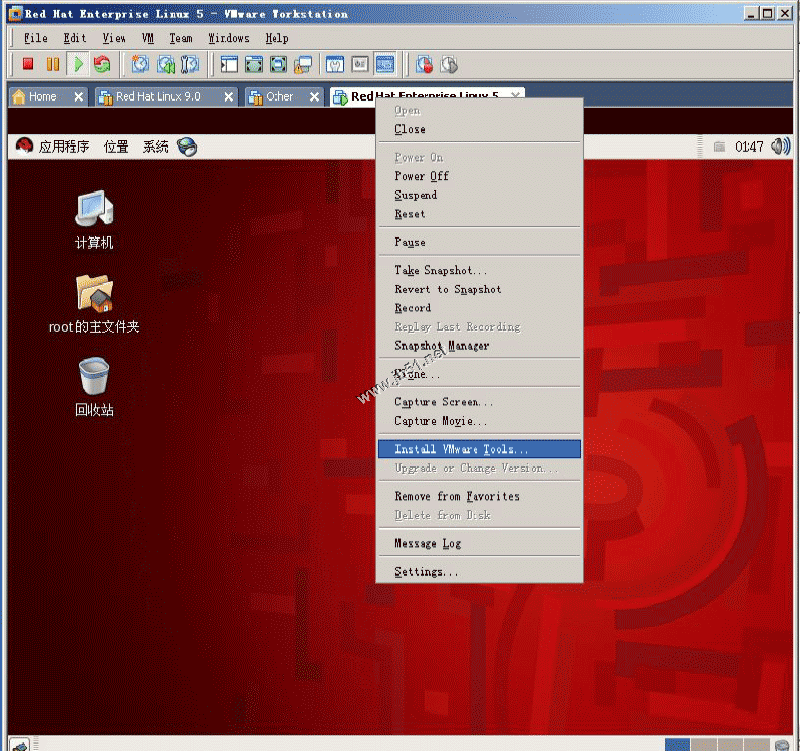
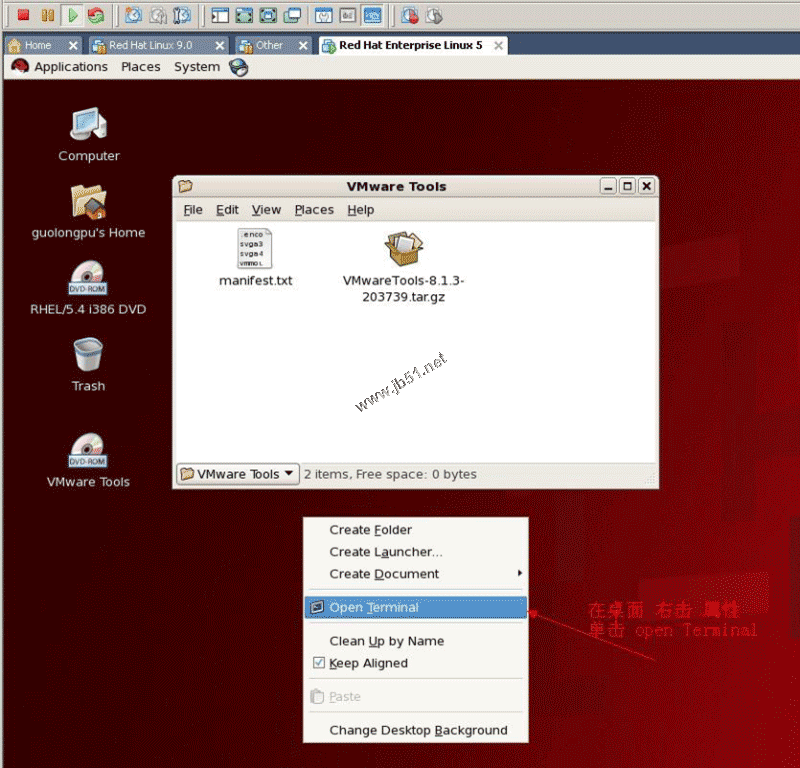
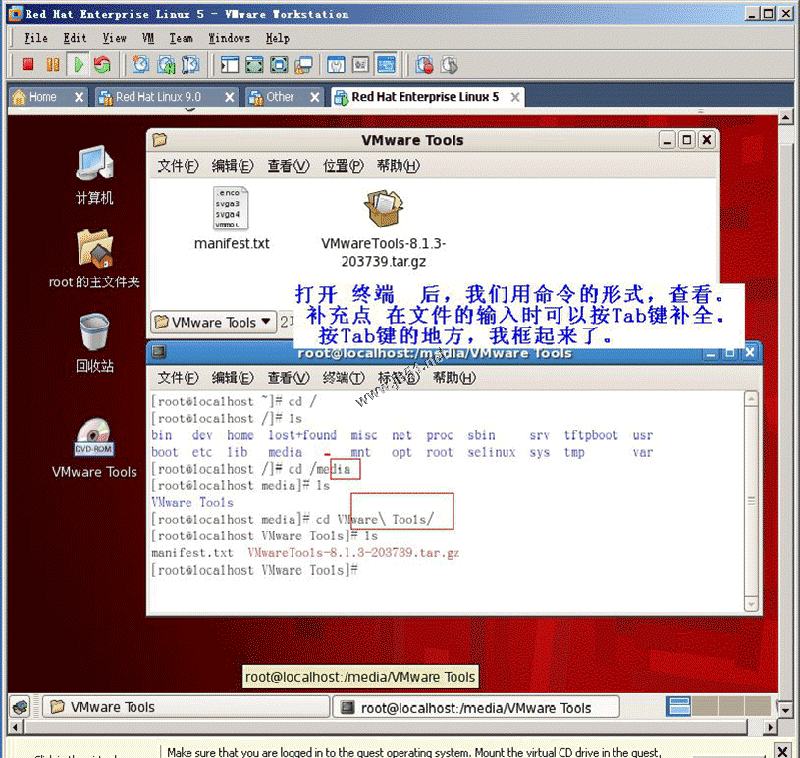
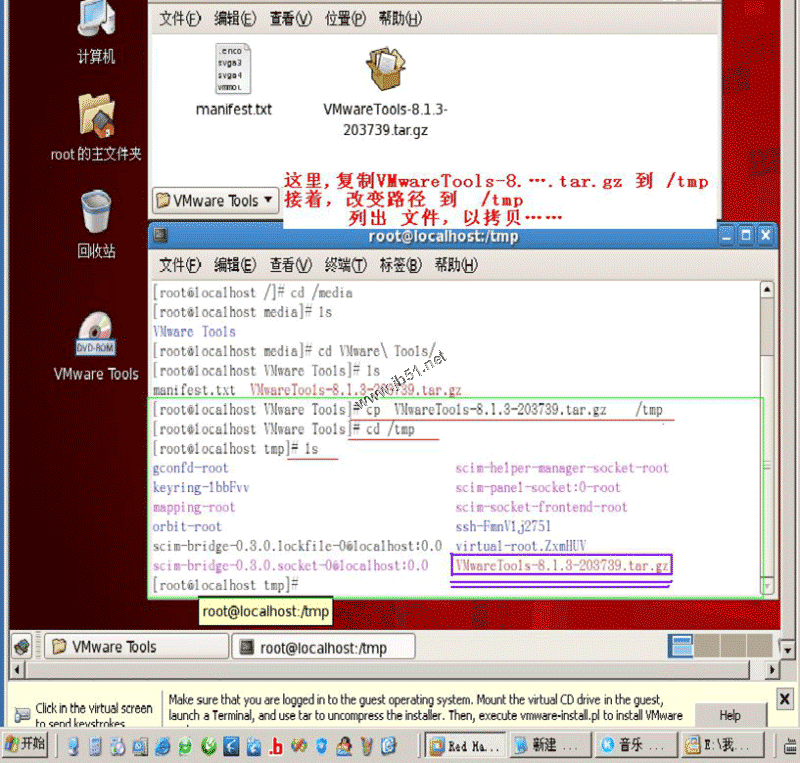
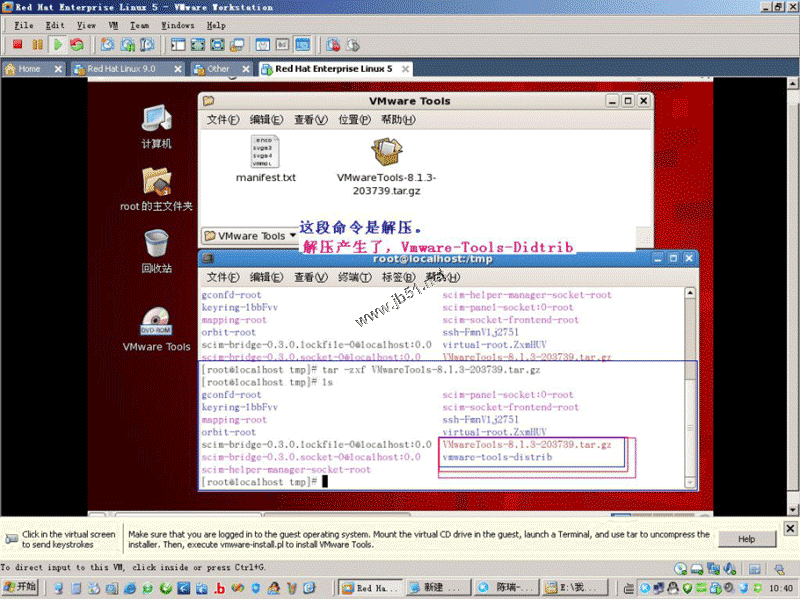
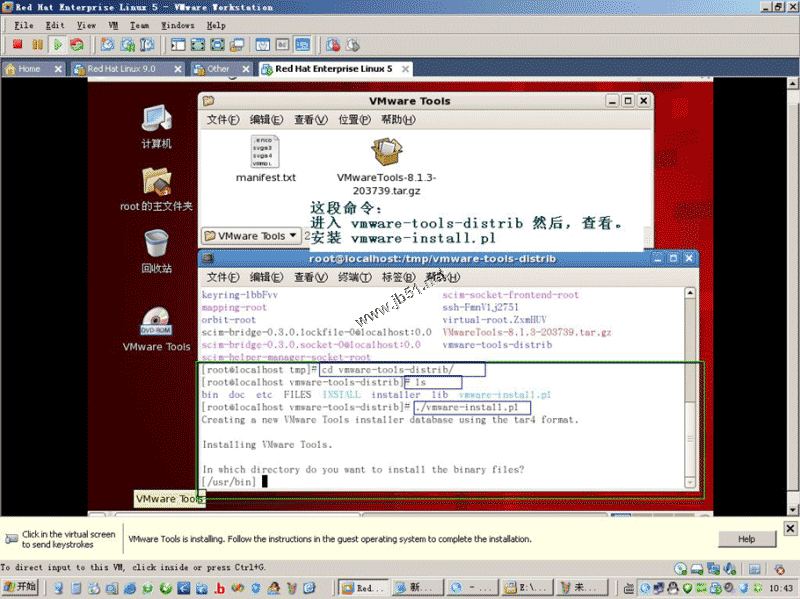
操作过程如下:
[root@localhost ~]# cd /
[root@localhost /]# ls
bin dev home lost+found misc net proc sbin srv tftpboot usr
boot etc lib media mnt opt root selinux sys tmp var
[root@localhost /]# cd /media
[root@localhost media]# ls
VMware Tools
[root@localhost media]# cd VMware\ Tools/
[root@localhost VMware Tools]# ls
manifest.txt VMwareTools-8.1.3-203739.tar.gz
[root@localhost VMware Tools]# cp VMwareTools-8.1.3-203739.tar.gz /tmp
[root@localhost VMware Tools]# cd /tmp
[root@localhost tmp]# ls
gconfd-root scim-helper-manager-socket-root
keyring-lbbFvv scim-panel-socket:0-root
mapping-root scim-socket-frontend-root
orbit-root ssh-FmnVlj2751
scim-bridge-0.3.0.lockfile-0@localhost:0.0 virtual-root.ZxmHUV
scim-bridge-0.3.0.socket-0@localhost:0.0 VMwareTools-8.1.3-203739.tar.gz
[root@localhost tmp]# tar -zxf VMwareTools-8.1.3-203739.tar.gz
[root@localhost tmp]# ls
gconfd-root scim-panel-socket:0-root
keyring-lbbFvv scim-socket-frontend-root
mapping-root ssh-FmnVlj2751
orbit-root virtual-root.ZxmHUV
scim-bridge-0.3.0.lockfile-0@localhost:0.0 VMwareTools-8.1.3-203739.tar.gz
scim-bridge-0.3.0.socket-0@localhost:0.0 vmware-tools-distrib
scim-helper-manager-socket-root
[root@localhost tmp]# cd vmware-tools-distrib/
[root@localhost vmware-tools-distrib]# ls
bin doc etc FILES INSTALL installer lib vmware-install.pl
[root@localhost vmware-tools-distrib]# ./vmware-install.pl
Creating a new VMware Tools installer database using the tar4 format.
Installing VMware Tools.
In which directory do you want to install the binary files?
[/usr/bin] yes
The path "yes" is a relative path. Please enter an absolute path.
In which directory do you want to install the binary files?
[/usr/bin]
What is the directory that contains the init directories (rc0.d/ to rc6.d/)?
[/etc/rc.d]
What is the directory that contains the init scripts?
[/etc/rc.d/init.d]
In which directory do you want to install the daemon files?
[/usr/sbin]
In which directory do you want to install the library files?
[/usr/lib/vmware-tools]
The path "/usr/lib/vmware-tools" does not exist currently. This program is
going to create it, including needed parent directories. Is this what you want?
[yes]
yes
In which directory do you want to install the documentation files?
[/usr/share/doc/vmware-tools]
The path "yes" is a relative path. Please enter an absolute path.
In which directory do you want to install the documentation files?
[/usr/share/doc/vmware-tools]
The path "/usr/share/doc/vmware-tools" does not exist currently. This program
is going to create it, including needed parent directories. Is this what you
want? [yes]
The installation of VMware Tools 8.1.3 build-203739 for Linux completed
successfully. You can decide to remove this software from your system at any
time by invoking the following command: "/usr/bin/vmware-uninstall-tools.pl".
Before running VMware Tools for the first time, you need to configure it by
invoking the following command: "/usr/bin/vmware-config-tools.pl". Do you want
this program to invoke the command for you now? [yes]
Stopping VMware Tools services in the virtual machine:
Guest operating system daemon: [确定]
Virtual Printing daemon: [确定]
Unmounting HGFS shares: [确定]
Guest filesystem driver: [确定]
Found a compatible pre-built module for vmmemctl. Installing it...
Found a compatible pre-built module for vmhgfs. Installing it...
Found a compatible pre-built module for vmxnet. Installing it...
Found a compatible pre-built module for vmblock. Installing it...
[EXPERIMENTAL] The VMware FileSystem Sync Driver (vmsync) is a new feature that
creates backups of virtual machines. Please refer to the VMware Knowledge Base
for more details on this capability. Do you wish to enable this feature?
[no]
Found a compatible pre-built module for vmci. Installing it...
Found a compatible pre-built module for vsock. Installing it...
Found a compatible pre-built module for vmxnet3. Installing it...
Found a compatible pre-built module for pvscsi. Installing it...
Detected X.org version 7.1.
Host resolution detected as "1440 x 900".
Please choose one of the following display sizes that X will start with:
[1] "320x200"
[2] "320x240"
[3] "400x300"
[4] "512x384"
[5] "640x400"
[6] "640x480"
[7] "720x480"
[8] "800x480"
[9] "854x480"
[10] "720x576"
[11] "800x600"
[12] "1024x768"
[13] "1280x720"
[14] "1280x768"
[15] "1152x864"
[16] "1280x800"
[17]< "1366x768"
Please enter a number between 1 and 17:
[17] 12
X Window System Version 7.1.1
Release Date: 12 May 2006
X Protocol Version 11, Revision 0, Release 7.1.1
Build Operating System: Linux 2.6.18-128.1.16.el5 i686 Red Hat, Inc.
Current Operating System: Linux localhost.localdomain 2.6.18-164.el5 #1 SMP Tue Aug 18 15:51:54 EDT 2009 i686
Build Date: 22 July 2009
Build ID: xorg-x11-server 1.1.1-48.67.el5
Before reporting problems, check http://wiki.x.org
to make sure that you have the latest version.
Module Loader present
Markers: (--) probed, (**) from config file, (==) default setting,
(++) from command line, (!!) notice, (II) informational,
(WW) warning, (EE) error, (NI) not implemented, (??) unknown.
(++) Log file: "/tmp/vmware-config0/XF86ConfigLog.16172", Time: Thu Apr 1 02:40:28 2010
(++) Using config file: "/tmp/vmware-config0/XF86Config.16172"
The XKEYBOARD keymap compiler (xkbcomp) reports:
> Warning: Multiple symbols for level 1/group 1 on key <I5F>
> Using XF86Sleep, ignoring XF86Standby
> Warning: Symbol map for key <I5F> redefined
> Using last definition for conflicting fields
Errors from xkbcomp are not fatal to the X server
X is running fine with the new config file.
FreeFontPath: FPE "unix/:7100" refcount is 2, should be 1; fixing.
Creating a new initrd boot image for the kernel.
Starting VMware Tools services in the virtual machine:
Switching to guest configuration: [确定]
Paravirtual SCSI module: [确定]
Guest filesystem driver: [确定]
Mounting HGFS shares: [失败]
Guest memory manager: [确定]
Guest vmxnet fast network device: [确定]
VM communication interface: [确定]
VM communication interface socket family: [确定]
Blocking file system: [确定]
File system sync driver: [确定]
Guest operating system daemon: [确定]
Virtual Printing daemon: [确定]
The configuration of VMware Tools 8.1.3 build-203739 for Linux for this running
kernel completed successfully.
You must restart your X session before any mouse or graphics changes take
effect.
You can now run VMware Tools by invoking the following command:
"/usr/bin/vmware-toolbox" during an X server session.
To enable advanced X features (e.g., guest resolution fit, drag and drop, and
file and text copy/paste), you will need to do one (or more) of the following:
1. Manually start /usr/bin/vmware-user
2. Log out and log back into your desktop session; and,
3. Restart your X session.
To use the vmxnet driver, restart networking using the following commands:
/etc/init.d/network stop
rmmod pcnet32
rmmod vmxnet
modprobe vmxnet
/etc/init.d/network start
Enjoy,
--the VMware team
Found VMware Tools CDROM mounted at /media/VMware Tools. Ejecting device
/dev/hdc ...
[root@localhost vmware-tools-distrib]#
vmware tools for linux 安装的更多相关文章
- Linux挂载:VMware tools for Linux安装
安装VMTools [root@localhost ~]# mkdir /mnt/cdrom [root@localhost ~]# mount /dev/cdrom /mnt/cdrom/ [roo ...
- (转)Ubuntu 12.04 LTS安装VMware Tools实现linux和window 互相复制:无法找到kernel header path的问题
Ubuntu 12.04 LTS安装VMware Tools无法找到kernel header path的问题 ubuntuvmware Ubuntu 12.04 安装 VMware Tools, ...
- VMware Tools的简易安装---解决Ubuntu 14.10不能满屏显示问题
由于使用的VMware WorkStation是中文破解版,安装时又是简易安装,因此VMware Tools并没有安装上,导致Ubuntu 14.10在VMware中装上之后,并不能满屏显示,如图1所 ...
- Vmware Tools 下载及安装方法
Vmware Tools 下载及安装方法 王尚2014.11.20 一.介绍 VMware Tools 是VMware 虚拟机中自带的一种增强工具,相当于 VirtualBox 中的增强功能(Sun ...
- CentOS-6.4 minimal - 安装VMware Tools(linux)
本文参考自:http://www.cnblogs.com/xyq/p/4068018.html 1.挂载光驱 2./mnt下面默认显示以下文件 3.卸载/mnt 4.点击安装VMware Tools ...
- vmware虚拟机工具vmware tools介绍及安装排错
VMware Tools是VMware虚拟机中自带的一种增强工具,相当于VirtualBox中的增强功能(Sun VirtualBox Guest Additions),是VMware提供的增强虚拟显 ...
- vmware tools 在linux中的作用
VMware Tools是VMware虚拟机中自带的一种增强工具,相当于VirtualBox中的增强功能 是VMware提供的增强虚拟显卡和硬盘性能 以及同步虚拟机与主机时钟的驱动程序. 只有在VMw ...
- vmware 中 ubuntu linux 安装vmware tools
参考官方方法 http://kb.vmware.com/selfservice/microsites/search.do?language=en_US&cmd=displayKC&ex ...
- VMware虚拟机及Linux安装
VMware虚拟机安装指南:http://bbs.luobotou.org/thread-5750-1-1.html Linux系统各发行版镜像下载地址:http://www.linuxidc.com ...
随机推荐
- java 图片加水印,设置透明度。说明非常具体
package com.yidao.common; import java.awt.AlphaComposite; import java.awt.Graphics2D; import java.aw ...
- C++继承:公有,私有,保护(转)
公有继承(public).私有继承(private).保护继承(protected)是常用的三种继承方式. 1. 公有继承(public) 公有继承的特点是基类的公有成员和保护成员作为派生类的成员时, ...
- Word Ladder(找出start——end的最短长度)——bfs
Word Ladder Given two words (start and end), and a dictionary, find the length of shortest transform ...
- DataSource是什么
public interface DataSource 该工厂用于提供到此 DataSource 对象表示的物理数据源的连接.作为 DriverManager(二者区别:http://tobylxy. ...
- Cocos2d-x 3.1.1 学习日志5--cocos2d-x3.1.1打飞机的实现
近期学习了cocos2dx3.1.1的一些功能,认为和曾经版本号改的太多了. 所以就做了一个小项目--打飞机来练习练习,在这里我仅仅讲飞机实现的步骤,至于代码.回复5次就可以获得coco2d-x3.1 ...
- yum安装zabbix监控
公司的服务器由于没有监控软件监控,最感觉不安全,就开始研究zabbix的安装,最后找到一个最简单的安装方法,在这里记录一下,方便以后的查阅 1.安装zabbix官方的软件配置仓库 rpm -ivh h ...
- Jenkins系列之-—06 Ant构建
一.Ant 简介&构建环境 Apache Ant 是由 Java 语言开发的工具 构建ant环境: 1). 安装jdk,设置JAVA_HOME ,PATH ,CLASS_PATH 2). 下载 ...
- Struts MVC工作原理(转载)
1.Struts MVC中Model 1 和Model 2简介 我们在开发Web应用时经常提到的一个概念是Model 1/Model 2,那么到底它是什么意思呢?其实它是对采用JSP技术构成Web应用 ...
- jackrabbit官方英文文档加补充(转载)
关于Jackrabbit To get started with Jackrabbit you should first become familiar with the JCR API. Downl ...
- Spring Data MongoDB 四:基本文档改动(update)(一)
Spring Data MongoDB 三:基本文档查询(Query.BasicQuery)(一) 学习MongoDB 二:MongoDB加入.删除.改动 一.简单介绍 Spring Data Mo ...