
JSP内置对象的cookie和session实现简单登录界面
创建一个index.jsp页面
<%@ page language="java" contentType="text/html; charset=utf-8"

    pageEncoding="utf-8"%>

<!DOCTYPE html PUBLIC "-//W3C//DTD HTML 4.01 Transitional//EN" "http://www.w3.org/TR/html4/loose.dtd">

<html>

<head>

<meta http-equiv="Content-Type" content="text/html; charset=utf-8">

<title>Insert title here</title>

</head>

<body>

<form action="login" method="post">

    用户名:<input type="text" name="uid" /><br>

    密码:<input type="password" name="pwd" /><br>

    <input type="submit" value="登录">

</form>

</body>

</html>
创建一个main.jsp页面
<%@ page language="java" contentType="text/html; charset=ISO-8859-1"

    pageEncoding="ISO-8859-1"%>

<!DOCTYPE html PUBLIC "-//W3C//DTD HTML 4.01 Transitional//EN" "http://www.w3.org/TR/html4/loose.dtd">

<html>

<head>

<meta http-equiv="Content-Type" content="text/html; charset=ISO-8859-1">

<title>Insert title here</title>

</head>

<body>

<%--

if(session.getAttribute("user")==null){

    response.sendRedirect("index.jsp");

}

--%>

<%

Cookie[] cc = request.getCookies();

boolean has = false;

for(Cookie c:cc){

    if(c.getName().equals("user")){

        has=true;

    }

}

if(has==false){

    response.sendRedirect("index.jsp");

}

%>

welcome:<%=session.getAttribute("user") %>

<%

for(Cookie c:cc){

    if(c.getName().equals("user")){

        out.print(c.getValue());

    }

}

%>

</body>

</html>
创建一个servlet界面,名为Login
package com.ceshi;

import java.io.IOException;

import javax.servlet.ServletException;

import javax.servlet.annotation.WebServlet;

import javax.servlet.http.Cookie;

import javax.servlet.http.HttpServlet;

import javax.servlet.http.HttpServletRequest;

import javax.servlet.http.HttpServletResponse;

import javax.servlet.http.HttpSession;

/**

 * Servlet implementation class Login

 */

@WebServlet("/login")

public class Login extends HttpServlet {

    private static final long serialVersionUID = 1L;

    /**

     * @see HttpServlet#HttpServlet()

     */

    public Login() {

        super();

        // TODO Auto-generated constructor stub

    }

    /**

     * @see HttpServlet#doGet(HttpServletRequest request, HttpServletResponse response)

     */

    protected void doGet(HttpServletRequest request, HttpServletResponse response) throws ServletException, IOException {

        // TODO Auto-generated method stub

        //response.getWriter().append("Served at: ").append(request.getContextPath());

        String uid = request.getParameter("uid");

        String pwd = request.getParameter("pwd");

        //HttpSession session= request.getSession();

        //session.setAttribute("user",uid);

        Cookie c = new Cookie("user", uid);

        response.addCookie(c);

        response.sendRedirect("main.jsp");

    }

    /**

     * @see HttpServlet#doPost(HttpServletRequest request, HttpServletResponse response)

     */

    protected void doPost(HttpServletRequest request, HttpServletResponse response) throws ServletException, IOException {

        // TODO Auto-generated method stub

        doGet(request, response);

    }

}
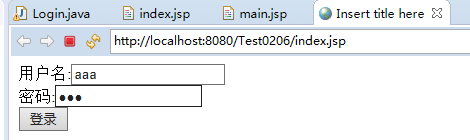
显示如下:

JSP内置对象的cookie和session实现简单登录界面的更多相关文章
- JSP 内置对象(request response session application out pageContext)
request对象 javax.servlet.http.HttpServletRequest接口的实例 request.setCharacterEncoding("utf-8" ...
- JSP内置对象--pageContent,request,response,session,application,config,out,page,exception
- EL表达式,JSP内置对象
基本语法格式 EL都是以 ${ 为起始.以} 为结尾的 ${ EL Expression} 示例: ${ “Helloworld” } //输出字符串常量 ${ str } //输出字符串变量st ...
- JSP内置对象——session
sessionsession表示客户端与服务器的一次会话Web中的session指的是用户在浏览某个网站时,从进入网站到浏览器关闭所进过的这段时间,也就是用户浏览这个网站所花费的时间从上述定义中可以看 ...
- jsp内置对象浅谈
jsp内置对象浅谈 | 浏览:1184 | 更新:2013-12-11 16:01 JSP内置对象:我们在使用JSP进行页面编程时可以直接使用而不需自己创建的一些Web容器已为用户创建好的JSP内置对 ...
- Jsp内置对象及EL表达式的使用
一.JSP的内置对象(9个JSP内置对象) JSP的内置对象引用名称 对应的类型 request HttpServletRequest response HttpServletResponse ses ...
- JavaWeb之 JSP:内置对象,EL表达式,JSP标签基础
JSP的内置对象 什么是JSP的内置对象呢? 在JSP页面进行编程的时候,如果我们要使用一些对象,如:HttpSession,ServletConfig,ServletContext这些对象,如果每次 ...
- JSP内置对象详解
jsp中内置对象:request.response.session.applecation.out.pagecontesx.config.page.exception.cookie 1.request ...
- JSP内置对象(上)
在JSP中为了简化页面的开发提供了一些内置的对象.这些对象不需要由JSP的编写者通过new关键字实例化,他们都由容器实现和管理,在所有的JSP页面中都可以使用内置对象. JSP中共有9大内置对象: o ...
随机推荐
- 【TensorFlow入门完全指南】神经网络篇·自动编码机
自动编码机(Autoencoder)属于非监督学习,不需要对训练样本进行标记.自动编码机(Autoencoder)由三层网络组成,其中输入层神经元数量与输出层神经元数量相等,中间层神经元数量少于输入层 ...
- Kippo-Failed to load application: 'module' object has no attribute 'IPluggableAuthenticationModules'
Kippo-Failed to load application: 'module' object has no attribute 'IPluggableAuthenticationModules' ...
- Codeforces Round #320 (Div. 1) [Bayan Thanks-Round] C A Weakness and Poorness (三分)
显然f(x)是个凹函数,三分即可,计算方案的时候dp一下.eps取大了会挂精度,指定循环次数才是正解. #include<bits/stdc++.h> using namespace st ...
- Controller接收处理json、xml格式数据
1.RequestBody接收json格式的数据,并直接转为对象. User.java使用lombok依赖包 @Data @AllArgsConstructor @NoArgsConstructor ...
- 怎么在WEBSTORM中设置代码模板 Live Templates
怎么在WEBSTORM中设置代码模板 Live Templates setting 里面 https://www.cnblogs.com/xinzaimengzai/p/9938464.html
- Launch Instance---source for openstack
If you want to create an instance that uses ephemeral storage, meaning the instance data is lost whe ...
- beta版和alpha版
外部测试版的意思. 软件会出现三种版本 1.alpha内部测试版本,极不稳定,一般也不会出现的公众视线,仅供内部测试人员测试用. 2.beta公共测试版,就是对外发布软件的测试版,收集公众的意见和建议 ...
- java基础—接口概念
一.接口的概念 JAVA是只支持单继承的,但现实之中存在多重继承这种现象,如“金丝猴是一种动物”,金丝猴从动物这个类继承,同时“金丝猴是一种值钱的东西”,金丝猴从“值钱的东西”这个类继承,同时“金丝猴 ...
- Bootstrap历练实例:默认的缩略图
本章将讲解Bootstrap缩略图,大多数站点都需要要在网格中布局图像,视频,文本.Bootstrap通过缩略图为此提供了一些简便的方法,使用Bootstrap创建缩略图的步骤如下: 1.在图像的周围 ...
- 01_3_创建一个Action
01_3_创建一个Action 1. 定义一个action 具体视图的返回可以由用户自己定义的Action来决定 具体的手段是根据返回的字符串找到相应的配置项,来决定视图的内容 具体Action的实现 ...