
用户登录保存数据实例(慕课笔记 使用SharedPreferences保存用户名)
学习视频之后自己操作时的笔记。
0.视频地址:http://www.imooc.com/video/3265
1.功能预览:
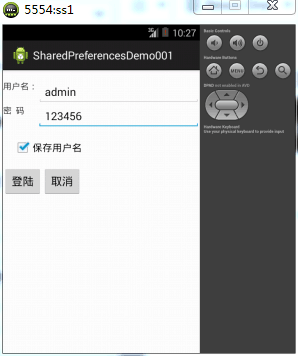
说明:1)输入错误用户名和密码,点击登录,弹出提示框“禁止登录”;
2)输入正确用户名和密码,点击登录,弹出提示框“登录成功”;
3)输入正确用户名和密码,并且勾选保存用户名,点击登录,弹出框显示“登录成功”,退出APP,再次打开,用户名已有。
2.具体布局:
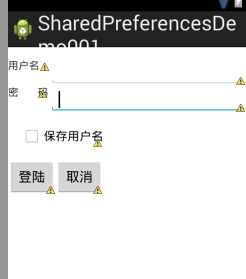
activity_main.xml:
<RelativeLayout xmlns:android="http://schemas.android.com/apk/res/android"

    xmlns:tools="http://schemas.android.com/tools"

    android:layout_width="match_parent"

    android:layout_height="match_parent"

    tools:context=".MainActivity" >

     <TextView

        android:id="@+id/textView1"

        android:layout_width="wrap_content"

        android:layout_height="wrap_content"

        android:layout_alignParentLeft="true"

        android:layout_alignParentTop="true"

        android:layout_marginTop="16dp"

        android:text="用户名:" />

    <EditText

        android:id="@+id/etuserName"

        android:layout_width="wrap_content"

        android:layout_height="wrap_content"

        android:layout_alignParentRight="true"

        android:layout_alignTop="@+id/textView1"

        android:layout_toRightOf="@+id/textView1"

        android:ems="10" />

    <TextView

        android:id="@+id/aa"

        android:layout_width="wrap_content"

        android:layout_height="wrap_content"

        android:layout_alignParentLeft="true"

        android:layout_below="@+id/etuserName"

        android:text="密        码" />

    <EditText

        android:id="@+id/etuserPass"

        android:layout_width="wrap_content"

        android:layout_height="wrap_content"

        android:layout_alignLeft="@+id/etuserName"

        android:layout_alignParentRight="true"

        android:layout_alignTop="@+id/aa"

        android:ems="10" >

        <requestFocus />

    </EditText>

    <Button

        android:id="@+id/btnLogin"

        android:layout_width="wrap_content"

        android:layout_height="wrap_content"

        android:layout_alignParentLeft="true"

        android:layout_below="@+id/etuserPass"

        android:layout_marginTop="62dp"

        android:onClick="doClick"

        android:text="登陆" />

    <Button

        android:id="@+id/btnCancel"

        android:layout_width="wrap_content"

        android:layout_height="wrap_content"

        android:layout_alignBaseline="@+id/btnLogin"

        android:layout_alignBottom="@+id/btnLogin"

        android:layout_toRightOf="@+id/btnLogin"

        android:onClick="doClick"

        android:text="取消" />

    <CheckBox

        android:id="@+id/checkBox1"

        android:layout_width="wrap_content"

        android:layout_height="wrap_content"

        android:layout_alignRight="@+id/btnCancel"

        android:layout_below="@+id/etuserPass"

        android:layout_marginTop="15dp"

        android:checked="false"

        android:text="保存用户名" />

</RelativeLayout>
3.MainActivity.java:
public class MainActivity extends Activity {

    EditText etUserName,etUserPass;

    CheckBox chk;

    SharedPreferences pref;

    Editor editor;

    @Override

    protected void onCreate(Bundle savedInstanceState) {

        super.onCreate(savedInstanceState);

        setContentView(R.layout.activity_main);

        //绑定对应布局控件

        etUserName=(EditText)findViewById(R.id.etuserName);

        etUserPass=(EditText)findViewById(R.id.etuserPass);

        chk=(CheckBox)findViewById(R.id.checkBox1);

        pref=getSharedPreferences("UserInfo",MODE_PRIVATE);

        editor=pref.edit();

        String name=pref.getString("userName", "");

        if(name==null){

            chk.setChecked(false);

        }else{

            chk.setChecked(true);

            etUserName.setText(name);

        }

    }

//为按钮添加响应

public void doClick(View v){

    switch(v.getId()){

    case R.id.btnLogin:

        //转成字符串进行判断

        String name=etUserName.getText().toString().trim();

        String pass=etUserPass.getText().toString().trim();

        if("admin".equals(name)&&"123456".equals(pass)){

            if(chk.isChecked()){

                //用户名与密码均正确且保存用户名确认框处于选,

                //则保存数据并提交到数据库

                editor.putString("userName", name);

                editor.commit();

            }else{

                editor.remove("userName");

                editor.commit();

            }

            //加信息提示框

            Toast.makeText(MainActivity.this, "登录成功",

                    Toast.LENGTH_LONG).show();

            }else{Toast.makeText(MainActivity.this, "禁止登录",

                Toast.LENGTH_LONG).show();

        }

        break;

        default:

            break;

    }

}

}
用户登录保存数据实例(慕课笔记 使用SharedPreferences保存用户名)的更多相关文章
- Redis缓存Mysql模拟用户登录Java实现实例[www]
Redis缓存Mysql模拟用户登录Java实现实例 https://jingyan.baidu.com/article/09ea3ede1dd0f0c0aede3938.html redis+mys ...
- JavaWeb实现用户登录注册功能实例代码(基于Servlet+JSP+JavaBean模式)
一.Servlet+JSP+JavaBean开发模式(MVC)介绍 Servlet+JSP+JavaBean模式(MVC)适合开发复杂的web应用,在这种模式下,servlet负责处理用户请求,jsp ...
- ubuntu14.04使用root用户登录桌面 分类: 学习笔记 linux ubuntu 2015-07-05 10:30 199人阅读 评论(0) 收藏
ubuntu安装好之后,默认是不能用root用户登录桌面的,只能使用普通用户或者访客登录.怎样开启root用户登录桌面呢? 先用普通用户登录,然后切换到root用户,然后执行如下命令: vi /usr ...
- python实现用户登录、注册实例
python面向函数式编程,模拟用户登录验证.注册的代码实现. 主要有以下两个文件: 1.user.txt文档文件,相当于数据库的用户信息表,主要是记录用户名和密码. 注意:1)此文档需要与.py文件 ...
- 使用SharePreferences存取数据(慕课笔记 )
0.视频地址:http://www.imooc.com/video/3265 1.使用SharePreferences存取数据: public class MainActivity extends A ...
- Redis缓存Mysql模拟用户登录Java实现实例
https://blog.csdn.net/suneclipse/article/details/50920396
- Android学习笔记-保存数据的实现方法2-SharedPreferences
Android下,数据的保存,前面介绍过了,把数据保存到内存以及SD卡上,这次我们就介绍一下,更为常用的采用SharedPreferences的方式来保存数据, 1,得到SharedPreferenc ...
- Java基础:String类详解,案例用户登录实现,案例手机号截取实现,案例敏感词替换实现;StringBuilder类详解,StringBuilder和String相互转换,附练习案例.
1.API 1.1 API概述-帮助文档的使用 什么是API API (Application Programming Interface) :应用程序编程接口 java中的API 指的就是 JDK ...
- DRF 商城项目 - 用户( 登录, 注册,登出,个人中心 ) 逻辑梳理
用户登录 自定义用户登录字段处理 用户的登录时通过 手机号也可以进行登录 需要重写登录验证逻辑 from django.contrib.auth.backends import ModelBacken ...
随机推荐
- hdu水仙花
水仙花数 Time Limit : 2000/1000ms (Java/Other) Memory Limit : 65536/32768K (Java/Other) Total Submission ...
- Android如何解析json数组对象
import org.json.JSONArray; import org.json.JSONObject; //jsonData的数据格式:[{ "id": "27Jp ...
- (三)整合SSH测试项目
整合struts 和 spring 预期:如果可以在action中能够正确调用service里面的方法执行并返回到一个页面中:那么我们认定struts和spring的整合是成功的. 编写JUnit测试 ...
- hdu 4336 Card Collector (概率dp+位运算 求期望)
题目链接 Card Collector Time Limit: 2000/1000 MS (Java/Others) Memory Limit: 32768/32768 K (Java/Othe ...
- Jodd发送邮件
public static void main(String[] args) { Email email = Email.create().from("xxx") .to(&quo ...
- php 生成图片,只获取字节数据,不以图片格式输出
提示:与直接将结果输出到浏览器的任何内容一样,可以使用输出控制函数(http://www.php.net/./en/ref.outcontrol.php)捕获此函数的输出,并将其保存在字符串(例如)中 ...
- Spring Boot Dubbo 构建分布式服务
概述: 节点角色说明 节点 角色说明 Provider 暴露服务的服务提供方 Consumer 调用远程服务的服务消费方 Registry 服务注册与发现的注册中心 Monitor 统计服务的调用次数 ...
- 在github上下载子文件夹(svn命令)
Q: 平时都是用git clone这个命令从github中克隆出完整的文件,但有时我们仅需要其中某个文件夹时,该如何下载? A: 可以使用svn命令来完成. 具体用法:(以视觉slam14讲的gith ...
- JavaScript进阶 - 第10章 编程挑战
10-1 编程挑战 现在利用之前我们学过的JavaScript知识,实现选项卡切换的效果. 效果图:
- python之字典的相关操作
一.什么是字典 dict 用{}表示,用来存放键值对数据 {key:value} 键:具有唯一性,不能重复,不可变 必须是可哈希的(不可变的数据类型) 字典是无序的,没有索引 值: 没有任何限制 已知 ...