
nodejs 在windows10中设置动态(视频)壁纸
node版本
λ node -v

v12.16.2
main.js
const ffi = require("@saleae/ffi");

const child_process = require("child_process");

const W32 = require("./w32");

const argv = process.argv.slice(2);

if (!argv || !argv.length) process.exit(1);

const play = child_process.fork("./play.js");

// ffplay -noborder -loop 0 -fs -vf scale=w=1920:h=-1 "${argv[0]}"

// -noborder 无边框

// -loop 0 循环次数,0无限循环

// -vf scale=w=1920:h=-1 使用scale滤镜, See also: https://trac.ffmpeg.org/wiki/Scaling

// ffplay -noborder -x 1920 -y 1080  无边框,强制设置宽高

play.send(`ffplay -noborder -x 1920 -y 1080 -loop 0 "${argv[0]}" `);

play.on("message", playCallback);

function playCallback() {

  let ffplayw = 0; // ffplay句柄

  let t;

  t = setInterval(() => {

    ffplayw = getFFplayHandle();

    if (ffplayw !== 0) {

      clearInterval(t);

      setDynamicWallpaper(ffplayw);

    }

  }, 1000);

}

function setDynamicWallpaper(ffplayw) {

  const progman = W32.FindWindowW(TEXT("Progman"), null);

  // 要触发在桌面图标和墙纸之间创建WorkerW窗口,我们必须向程序管理器发送一条消息。

  // 该消息是未记录的消息,因此没有专用的Windows API名称,除了0x052C

  W32.SendMessageTimeoutW(

    progman,

    0x052c, // 在程序管理器上生成墙纸工作程序的未记录消息

    0,

    0,

    0x0000,

    1000,

    0

  );

  // 我们枚举所有Windows

  W32.EnumWindows(

    ffi.Callback("bool", ["int32", "int32"], (tophandle, topparamhandle) => {

      // 找到一个具有SHELLDLL_DefView的Windows

      const SHELLDLL_DefView = W32.FindWindowExW(

        tophandle,

        0,

        TEXT("SHELLDLL_DefView"),

        0

      );

      if (SHELLDLL_DefView !== 0) {

        // 将其下一个同级分配给workerw。

        const workerw = W32.FindWindowExW(0, tophandle, TEXT("WorkerW"), 0);

        W32.SetParent(ffplayw, workerw);

      }

      return true;

    }),

    0

  );

}

function TEXT(text) {

  return Buffer.from(`${text}\0`, "ucs2");

}

// 获取ffplay句柄

function getFFplayHandle() {

  return W32.FindWindowW(TEXT("SDL_app"), null);

}
play.js
const child_process = require("child_process");

process.on("message", (runFFplayCommand) => {

  process.send(true);

  child_process.execSync(runFFplayCommand);

});
w32.js
const ffi = require("@saleae/ffi");

// Import user32

const W32 = new ffi.Library("user32", {

  // 检索顶级窗口的句柄,该顶级窗口的类名和窗口名与指定的字符串匹配。此功能不搜索子窗口。此功能不执行区分大小写的搜索。

  FindWindowW: ["int32", ["string", "string"]],

  // 将指定的消息发送到一个或多个窗口

  SendMessageTimeoutW: [

    "int32",

    ["int32", "int32", "int32", "int32", "int32", "int32", "int32"],

  ],

  // 通过将句柄传递给每个窗口,依次传递到应用程序定义的回调函数,可以枚举屏幕上所有的顶级窗口

  EnumWindows: ["bool", ["pointer", "int32"]],

  // 检索其类名和窗口名与指定字符串匹配的窗口的句柄。该功能搜索子窗口,从指定子窗口之后的子窗口开始。此功能不执行区分大小写的搜索。

  FindWindowExW: ["int32", ["int32", "int32", "string", "int32"]],

  // 更改指定子窗口的父窗口。

  // HWND SetParent(HWND hWndChild, HWND hWndNewParent);

  SetParent: ["int32", ["int32", "int32"]],

  // int MessageBox(

  //   HWND    hWnd, 要创建的消息框的所有者窗口的句柄。如果此参数为NULL,则消息框没有所有者窗口

  //   LPCTSTR lpText, 要显示的消息

  //   LPCTSTR lpCaption, 对话框标题

  //   UINT    uType 对话框的内容和行为

  // );

  MessageBoxW: ["int32", ["int32", "string", "string", "int32"]],

  // 最小化(但不破坏)指定的窗口。

  CloseWindow: ["bool", ["int32"]],

  // 销毁指定的窗口

  DestroyWindow: ["bool", ["int32"]],

  // 打开指定的桌面对象

  OpenDesktopW: ["int32", ["string", "int32", "bool", "int32"]],

  // 确定指定窗口的可见性状态。

  IsWindowVisible: ["bool", ["int32"]],

  // 设置指定窗口的显示状态。

  ShowWindow: ["bool", ["int32", "int32"]],

});

module.exports = W32;
运行
>node main.js "D:\dynamic wallpaper\Nightcore-We-Wish-You-A-Merry-Christmas-Live-Wallpaper.mp4"
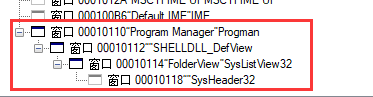
运行前的窗口:
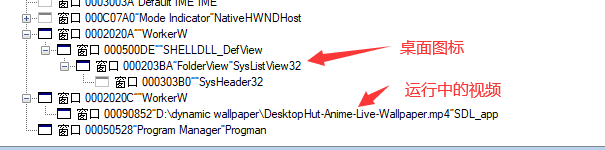
运行后的窗口:
将视频放在Progman下面
现在测试来看,这种方法要好些,关闭进程后不会显示残留壁纸
function setDynamicWallpaper(ffplayw) {

  const progman = W32.FindWindowW(TEXT("Progman"), null);

  // 要触发在桌面图标和墙纸之间创建WorkerW窗口,我们必须向程序管理器发送一条消息。

  // 该消息是未记录的消息,因此没有专用的Windows API名称,除了0x052C

  W32.SendMessageTimeoutW(

    progman,

    0x052c, // 在程序管理器上生成墙纸工作程序的未记录消息

    0,

    0,

    0x0000,

    1000,

    0

  );

  // 我们枚举所有Windows

  W32.EnumWindows(

    ffi.Callback("bool", ["int32", "int32"], (tophandle, topparamhandle) => {

      // 找到一个具有SHELLDLL_DefView的Windows

      const SHELLDLL_DefView = W32.FindWindowExW(

        tophandle,

        0,

        TEXT("SHELLDLL_DefView"),

        0

      );

      if (SHELLDLL_DefView !== 0) {

        // 将其下一个同级分配给workerw。

        const workerw = W32.FindWindowExW(0, tophandle, TEXT("WorkerW"), 0);

        const isVisible = W32.IsWindowVisible(workerw);

        if (isVisible) {

          // 设置窗口为未激活状态,否则这个窗口会遮挡视频

          W32.ShowWindow(workerw, 0);

        }

        W32.SetParent(ffplayw, progman);

      }

      return true;

    }),

    0

  );

}
现在按下Ctrl+c指令后,node进程结束,ffplay关闭,壁纸将显示之前的壁纸

使用ffplay你可以解析本地视频,图片,http视频,直播流,ts视频段,m3u8,等等...
参考连接
- https://stackoverflow.com/questions/1978077/c-sharp-set-window-behind-desktop-icons
- https://www.codeproject.com/Articles/856020/Draw-Behind-Desktop-Icons-in-Windows-plus
- https://www.cnblogs.com/ajanuw/p/12787653.html
- https://docs.microsoft.com/en-us/windows/win32/api/winuser/
- https://docs.microsoft.com/en-us/visualstudio/debugger/how-to-start-spy-increment?view=vs-2019
- https://www.ffmpeg.org/
- https://stackoverflow.com/questions/6936283/why-are-some-items-greyed-out-in-spys-windows-view
nodejs 在windows10中设置动态(视频)壁纸的更多相关文章
- [UWP开发]在windows10中设置壁纸~UserProfilePersonalizationSettings
在之前的wp8.1和wp8中,微软没有公开设置壁纸的API,只有一个设置锁屏的API,但在Windows10中,微软为我们提供了设置壁纸的API:TrySetWallpaperImageAsync,他 ...
- vue 在微信中设置动态标题
1.安装插件 cnpm install vue-wechat-title --save 2.在main.js中引入 import VueWechatTitle from 'vue-wechat-tit ...
- laydate中设置动态改变max与min值的方法
参考网址: 原网址:https://blog.csdn.net/cherry_11qianqian/article/details/82259704 改进的网址:https://blog.csdn.n ...
- 【nodeJS】webstorm中设置nodej智能提示
- 为你的Windows7设置动态壁纸
From:http://www.cnblogs.com/killerlegend/p/3644014.html By KillerLegend DreamScene是Vista上的一个功能,可以让你设 ...
- nodejs爬虫如何设置动态ip以及userAgent
nodejs爬虫如何设置动态ip以及userAgent 转https://blog.csdn.net/u014374031/article/details/78833765 前言 在写nodejs爬虫 ...
- Quartz在Spring中动态设置cronExpression (spring设置动态定时任务)
什么是动态定时任务:是由客户制定生成的,服务端只知道该去执行什么任务,但任务的定时是不确定的(是由客户制定). 这样总不能修改配置文件每定制个定时任务就增加一个trigger吧,即便允许客户 ...
- 为TextView设置两种状态,程序中可以动态切换
经常会需要用文字的两种状态来表示当前系统的某两种状态.比如: 这里的第一个TextView和后两个TextView就表示了两种状态.我们可以在程序的动态的切换状态(而不是直接修改颜色) ...
- windows下nodejs express安装及入门网站,视频资料,开源项目介绍
windows下nodejs express安装及入门网站,视频资料,开源项目介绍,pm2,supervisor,npm,Pomelo,Grunt安装使用注意事项等总结 第一步:下载安装文件下载地址: ...
随机推荐
- 当前日期减去TIMESTAMP(6)日期
select trunc(sysdate- to_date(to_char(j.create_date,'yyyy-mm-dd'),'yyyy-mm-dd')) 相差天数 from sys_user ...
- ajax带checkbox选择值到后台
function togglefun(checkbox){//全选 $('input[name=cids]').prop('checked', $(checkbox).prop('checked')) ...
- docker(12)使用Dockerfile创建jenkins+python3+pytest环境
前言 之前我们用docker手动安装了jenkins环境,在jenkins中又安装了python3环境和各种安装包,如果我们想要在其他3台机器上安装,又是重复操作,重复劳动,那会显得很low,这里可以 ...
- CentOS环境下搭建青岛大学OJ
1.安装必要的依赖sudo yum updatesudo yum -y install epel-releasesudo yum -y install python-pipsudo yum clean ...
- HDU-6148 Valley Number (数位DP)
当一个数字,从左到右依次看过去数字没有出现先递增接着递减的"山峰"现象,就被称作 Valley Number.它可以递增,也可以递减,还可以先递减再递增.在递增或递减的过程中可以出 ...
- hdu 2072 单词数(字符串)
题目链接:http://acm.hdu.edu.cn/showproblem.php?pid=2072 题意 每行输入由小写字母和空格组成,统计每行中不同的单词数. 题解 题解一 比较简洁的解法,读入 ...
- 2019中国大学生程序设计竞赛(CCPC) - 网络选拔赛(8/11)
$$2019中国大学生程序设计竞赛(CCPC)\ -\ 网络选拔赛$$ \(A.\hat{} \& \hat{}\) 签到,只把AB都有的位给异或掉 //#pragma comment(lin ...
- Codeforces Round #648 (Div. 2) D. Solve The Maze
这题犯了一个很严重的错误,bfs 应该在入队操作的同时标记访问,而不是每次只标记取出的队首元素. 题目链接:https://codeforces.com/contest/1365/problem/D ...
- Codeforces Round #633 div2 A~C
A. Filling Diamonds 题意:给你n个菱形方块,问能构成图示形状的有多少种 题解:自己画几个不难发现答案是n 代码: 1 #include <iostream> 2 #in ...
- Codeforces Global Round 9 B. Neighbor Grid (构造,贪心)
题意:给一个\(n\)X\(m\)的矩阵,矩阵中某个数字\(k\)表示其四周恰好有\(k\)个不为0的数字,你可以使任意位置上的数字变大,如果操作后满足条件,输出新矩阵,否则输出NO. 题解:贪心,既 ...