
spring再学习之整合JDBC
一、JDBCTemplate JDBC模板
user类
package cn.itcast.bean;

import java.util.Date;

public class User {

    private Integer id;

    private String username;

    private Date birthday;

    private String sex;

    private String address;

    public Integer getId() {

        return id;

    }

    public void setId(Integer id) {

        this.id = id;

    }

    public String getUsername() {

        return username;

    }

    public void setUsername(String username) {

        this.username = username == null ? null : username.trim();

    }

    public Date getBirthday() {

        return birthday;

    }

    public void setBirthday(Date birthday) {

        this.birthday = birthday;

    }

    public String getSex() {

        return sex;

    }

    public void setSex(String sex) {

        this.sex = sex == null ? null : sex.trim();

    }

    public String getAddress() {

        return address;

    }

    public void setAddress(String address) {

        this.address = address == null ? null : address.trim();

    }

}
准备数据库:
package cn.itcast.a_jdbctemplate;

import java.beans.PropertyVetoException;

import org.junit.Test;

import org.springframework.jdbc.core.JdbcTemplate;

import com.mchange.v2.c3p0.ComboPooledDataSource;

//演示JDBC模板

public class Demo {

    @Test

    public void fun1() throws Exception {

        //0准备连接池C3p0

        ComboPooledDataSource dataSource = new ComboPooledDataSource();

        dataSource.setDriverClass("com.mysql.jdbc.Driver");

        dataSource.setJdbcUrl("jdbc:mysql:///mybatis");

        dataSource.setUser("root");

        dataSource.setPassword("mysqladmin");

        //1创建JDBC模板对象

        JdbcTemplate it = new JdbcTemplate();

        it.setDataSource(dataSource);

        //2、书写sql语句,并执行

        String sql="insert into user(username) value('rose')";

        it.update(sql);

    }

}
结果:

二、UserDao用JDBCJDBCTemplate实现
public interface UserDao {

    //增

    void save (User u);

    //删

    void delete(Integer id);

    //改

    void update(User u);

    //查

    User getById(Integer id);

    //查

    int getTotalCount();

    //查

}
实现类:
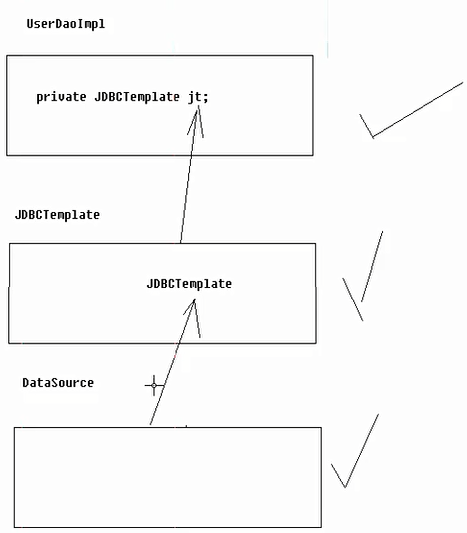
手动注入JDBC模板
private JdbcTemplate it;
package cn.itcast.a_jdbctemplate;

import java.sql.ResultSet;

import java.sql.SQLException;

import org.springframework.jdbc.core.JdbcTemplate;

import org.springframework.jdbc.core.RowMapper;

import cn.itcast.bean.User;

public class UserDaoImpl implements UserDao{

    private JdbcTemplate it;

    @Override

    public void save(User u) {

        String sql="insert into user value(null,?)";

        // TODO Auto-generated method stub

        it.update(sql, u.getUsername());

    }

    public JdbcTemplate getIt() {

        return it;

    }

    public void setIt(JdbcTemplate it) {

        this.it = it;

    }

    @Override

    public void delete(Integer id) {

        // TODO Auto-generated method stub

    }

    @Override

    public void update(User u) {

        // TODO Auto-generated method stub

    }

    @Override

    public User getById(Integer id) {

        String sql = "select * from user where id=?";

       return it.queryForObject(sql, new RowMapper<User>() {

            @Override

            public User mapRow(ResultSet rs, int arg1) throws SQLException {

                User u = new User();

                u.setId(rs.getInt("id"));

                u.setUsername(rs.getString("name"));

                // TODO Auto-generated method stub

                return u;

            }

        }, id);

        // TODO Auto-generated method stub

    }

    @Override

    public int getTotalCount() {

        String sql = "select count(*) from user";

        // TODO Auto-generated method stub

        return it.queryForObject(sql,Integer.class);

    }

}
配置文件:
顺序:
db.properties配置文件
jdbc.jdbcUrl=jdbc:mysql:///mybatis

jdbc.driverClass=com.mysql.jdbc.Driver

jdbc.user=root

jdbc.password=*****
spring配置文件:
<?xml version="1.0" encoding="UTF-8"?>

<beans xmlns:xsi="http://www.w3.org/2001/XMLSchema-instance"
       xmlns="http://www.springframework.org/schema/beans"
       xmlns:p="http://www.springframework.org/schema/p"
       xmlns:context="http://www.springframework.org/schema/context"
       xsi:schemaLocation="http://www.springframework.org/schema/beans
       http://www.springframework.org/schema/beans/spring-beans-4.2.xsd
       http://www.springframework.org/schema/context
       http://www.springframework.org/schema/context/spring-context-4.2.xsd ">

   <!--指定Spring读取db.properties  -->

   <context:property-placeholder location="classpath:db.properties"  />

   <!-- 1.将连接池交给Spring管理 -->

      <bean name="dataSource" class="com.mchange.v2.c3p0.ComboPooledDataSource">

          <property name="jdbcUrl" value="${jdbc.jdbcUrl}"></property>

          <property name="driverClass" value="${jdbc.driverClass}"></property>

          <property name="user" value="${jdbc.user}"></property>

          <property name="password" value="${jdbc.password}"></property>

      </bean>

   <!-- 2.将JDBCTemplate放入Spring容器 -->

      <bean name="jdbcTemplate" class="org.springframework.jdbc.core.JdbcTemplate">

           <property name="dataSource" ref="dataSource"></property>

      </bean>

   <!-- 3.将UserDao放入spring容器 -->

   <bean name="userDao" class="cn.itcast.a_jdbctemplate.UserDaoImpl">

        <property name="it" ref="jdbcTemplate"></property>

   </bean>

</beans>
测试:
package cn.itcast.a_jdbctemplate;

import javax.annotation.Resource;

import org.junit.Test;

import org.junit.runner.RunWith;

import org.springframework.test.context.ContextConfiguration;

import org.springframework.test.context.junit4.SpringJUnit4ClassRunner;

import cn.itcast.bean.User;

//演示JDBC模板

@RunWith(SpringJUnit4ClassRunner.class)

@ContextConfiguration("classpath:applicationContext.xml")

public class Demo02 {

    @Resource(name="userDao")

    private UserDao ud;

    @Test

    public void fun() throws Exception{

        int totalCount = ud.getTotalCount();

        System.out.println(totalCount);

        }

}
结果:
数据库资料:
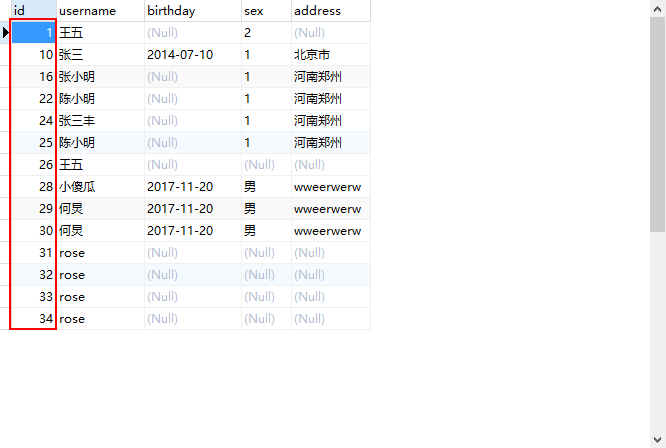
控制台输出结果:
14
三、通过继承来准备JDBC模板
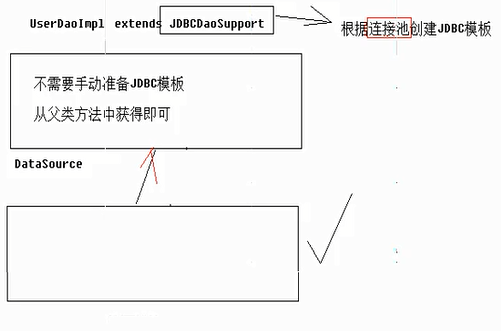
配置文件修改:
<?xml version="1.0" encoding="UTF-8"?>

<beans xmlns:xsi="http://www.w3.org/2001/XMLSchema-instance"
       xmlns="http://www.springframework.org/schema/beans"
       xmlns:p="http://www.springframework.org/schema/p"
       xmlns:context="http://www.springframework.org/schema/context"
       xsi:schemaLocation="http://www.springframework.org/schema/beans
       http://www.springframework.org/schema/beans/spring-beans-4.2.xsd
       http://www.springframework.org/schema/context
       http://www.springframework.org/schema/context/spring-context-4.2.xsd ">

   <!--指定Spring读取db.properties  -->

   <context:property-placeholder location="classpath:db.properties"  />

   <!-- 1.将连接池交给Spring管理 -->

      <bean name="dataSource" class="com.mchange.v2.c3p0.ComboPooledDataSource">

          <property name="jdbcUrl" value="${jdbc.jdbcUrl}"></property>

          <property name="driverClass" value="${jdbc.driverClass}"></property>

          <property name="user" value="${jdbc.user}"></property>

          <property name="password" value="${jdbc.password}"></property>

      </bean>

   <!-- 2.将UserDao放入spring容器 -->

   <bean name="userDao" class="cn.itcast.a_jdbctemplate.UserDaoImpl">

     <!--   <property name="it" ref="jdbcTemplate"></property>-->

        <property name="dataSource" ref="dataSource"></property>

   </bean>

</beans>
spring再学习之整合JDBC的更多相关文章
- Spring学习5-Spring整合JDBC及其事务处理(注解方式)
一.整合的步骤 1.步骤一:首先要获得DataSource连接池(推荐使用B方式): 要对数据库执行任何的JDBC操作,需要有一个Connection.在Spring中,Connection对象是 ...
- Spring Boot 学习笔记--整合Thymeleaf
1.新建Spring Boot项目 添加spring-boot-starter-thymeleaf依赖 <dependency> <groupId>org.springfram ...
- Spring Boot2.0之 整合JDBC
很入门的知识,大家了解下就OK maven配置文件pom: spring: datasource: url: jdbc:mysql://localhost:3306/test username: ro ...
- spring再学习之设计模式
今天我们来聊一聊,spring中常用到的设计模式,在spring中常用的设计模式达到九种. 第一种:简单工厂 三种工厂模式:https://blog.csdn.net/xiaoddt/article/ ...
- spring再学习之AOP事务
spring中的事务 spring怎么操作事务的: 事务的转播行为: 事务代码转账操作如下: 接口: public interface AccountDao { //加钱 void addMoney( ...
- spring再学习之注解
1.使用注解配置spring <?xml version="1.0" encoding="UTF-8"?> <beans xmlns:xsi= ...
- spring再学习之配置详解
applicationContext.xml文件配置: bean元素: <?xml version="1.0" encoding="UTF-8"?> ...
- spring再学习之简单测试
一.spring是怎么工作的那,通过一个类装载进容器进行描述: 首先创建一个类user: package cn.itcast.bean; public class User { public User ...
- Spring再学习
一.主要版本变更 框架最早发布于2004年,其后发布了几个重大的版本更新:在Spring 2.0中提供对XML命名空间和AspectJ的支持:Spring 2.5中新增了注解驱动的配置:在Spring ...
随机推荐
- python3.8.1安装cx_Freeze
按照官网的提示命令python -m pip install cx_Freeze --upgrade安装,不成功,报了一个错误,说cx_Freeze找不到需要的版本,还有一些警告说PIP需要升级,没理 ...
- 24V转5V芯片,高输入电压LDO线性稳压器
PW6206系列是一个高精度,高输入电压低静态电流,高速,低功耗降线性稳压器具有高纹波抑制.输入电压高达40V,负载电流为在VOUT=5V和VIN=7V时高达300mA.该设备采用BCD工艺制造.PW ...
- 输入5V,输出5V限流芯片,4A限流,短路保护
USB限流芯片,5V输入,输出5V电压,限流值可以通过外围电阻进行调节,PWCHIP产品中可在限流范围0.4A-4.8A,并具有过压关闭保护功能. 过压关闭保护: 如芯片:PW1555,USB我们一半 ...
- Java 8中字符串拼接新姿势:StringJoiner
介绍 StringJoiner是java.util包中的一个类,用于构造一个由分隔符分隔的字符序列(可选),并且可以从提供的前缀开始并以提供的后缀结尾.虽然这也可以在StringBuilder类的帮助 ...
- 请谨慎使用 avaliable 方法来申请缓冲区
问题 今天开始尝试用 Java 写 http 服务器,开局就遇到 Bug. 我先写了一个多线程的.BIO 的 http 服务器,其中接收请求的部分,会将请求的第一行打印出来. 下面是浏览器发出的请求和 ...
- mysqldump导出数据库导入数据库
使用mysqldump命令导出数据库,格式如下,请按实际要求对参数进行替换: mysqldump -u 用户名 -p 数据库名 > 导出的文件名 比如导出数据库business_db: mysq ...
- Redis二进制安全
为了便于理解,举一个例子: 在很多编辑器中,都会默认/n是换行字符,也就意味着一串字符存进去,涉及/n都会做一个默认的转义处理,这在编辑语言中,C也有这个特性,例如字符串Hello,\0 World! ...
- 正向代理 forward proxy、反向代理 reverse proxy、透明代理 transparent proxy
https://zh.wikipedia.org/wiki/反向代理 反向代理在计算机网络中是代理服务器的一种.服务器根据客户端的请求,从其关系的一组或多组后端服务器(如Web服务器)上获取资源,然后 ...
- Why should I avoid blocking the Event Loop and the Worker Pool?
Don't Block the Event Loop (or the Worker Pool) | Node.js https://nodejs.org/en/docs/guides/dont-blo ...
- GDB查看内存命令(x命令) 用gdb查看指定地址的内存内容
GDB查看内存命令(x命令) - super119 - 博客园 https://www.cnblogs.com/super119/archive/2011/11/18/2254382.html 可以使 ...