
jQuery 点击input框标题收起
<!DOCTYPE html>
<html> <head>
<meta charset="UTF-8">
<title></title>
<link rel="stylesheet" type="text/css" href="css/bootstrap4.5.min.css" />
<style type="text/css">
.box2 {
position: relative;
width: 300px;
border: 1px solid #ccc;
} .box2 .label {
position: absolute;
left: 20px;
top: 11px;
transition: all 0.3s;
} .box2 .inputs {
padding: 12px 0 12px 80px;
border: none;
/*border-bottom: 1px solid #9E9E9E;*/
width: 100%;
} :focus {
outline: -webkit-focus-ring-color auto 0px;
outline-color: -webkit-focus-ring-color;
outline-style: auto;
outline-width: 0px;
} .box2 .label.label12 {
position: absolute;
left: 5px;
top: 0px;
font-size: 12px;
} .box2 .ins {
padding: 19px 10px 5px !important;
}
/*下拉选*/ .selectes {
position: relative;
width: 500px;
height: 50px;
border: 1px solid #ccc;
padding: 17px 35px 5px 10px;
cursor: pointer;
/*background-color: aliceblue;*/
} .selectTitle {
position: absolute;
font-size: 12px;
left: 5px;
top: 0px;
} .imgs {
width: 20px;
position: absolute;
right: 7px;
top: 15px;
transition: all .6s;
transform: rotate(180deg);
} .imgs2 {
transform: rotate(0deg);
} .option-con>img {
/*width: 60px;*/
height: 18px;
vertical-align: middle;
} .list-option {
border: 1px solid #ccc;
width: 500px;
height: 200px;
overflow: auto;
display: none;
} .list-option ul,
li {
list-style: none;
} .list-option li:hover {
background-color: #dcdcdc;
cursor: pointer;
}
</style>
</head> <body>
<div class="box2 m-5">
<span for="" class="label">姓名</span>
<input type="" class="inputs mochu" name="name2" id="name2" value="" placeholder=""/>
</div> <div class="box2 m-5">
<span for="" class="label">年龄</span>
<input type="" class="inputs mochu" name="name2" id="name2" value="" placeholder=""/>
</div> <div class="selectes mx-5 mt-5" onclick="selects(this)">
<span for="" class="selectTitle text-black-50">物流</span>
<div class="selCon">
<div class="option-con h-100 d-flex justify-content-start align-items-center">
<span class="px-3" name="name2" id="name2" value="">Please choose</span>
</div>
</div>
<img class="imgs" src="img/arrows.png" />
</div>
<div class="mx-5 list-option">
<ul class="p-2 mb-0"></ul>
</div> <script src="js/jquery-1.12.4.min.js" type="text/javascript" charset="utf-8"></script>
<script type="text/javascript">
$(function() {
//取获焦点
focuss(); var datas = [{
id: "1",
logistics: "img/mts.jpg",
other: "Hub Brand",
price: "929+"
}, {
id: "2",
logistics: "img/new-ems.jpg",
other: "Spoke Head",
price: "289+"
}, {
id: "3",
logistics: "img/new-tpd.jpg",
other: "Brake System",
price: "869+"
}, {
id: "4",
logistics: "img/fedex.jpg",
other: "Flyweight",
price: "889+"
}, {
id: "5",
logistics: "img/new-ems.jpg",
other: "Center Channel Hole",
price: "909+"
}, {
id: "6",
logistics: "img/mts.jpg",
other: "Rim Warranty",
price: "239+"
}, {
id: "7",
logistics: "img/fedex.jpg",
other: "Standard",
price: "791+"
}, {
id: "8",
logistics: "img/imgList/vehicle1.jpg",
other: "Matte Mango",
price: "1791+"
}, {
id: "9",
logistics: "img/imgList/vehicle2.jpg",
other: "Turquoise",
price: "191+"
}, {
id: "11",
logistics: "img/imgList/vehicle3.jpg",
other: "straight pull",
price: "330+"
}, {
id: "12",
logistics: "img/imgList/vehicle4.jpg",
other: "J-bend",
price: "210+"
}, {
id: "13",
logistics: "img/imgList/vehicle5.jpg",
other: "Center lock",
price: "214+"
}, {
id: "14",
logistics: "img/imgList/vehicle6.jpg",
other: "Industry Nine Hydra",
price: "130+"
}, {
id: "15",
logistics: "img/imgList/vehicle7.jpg",
other: "Chris King ISO AB / ISO B",
price: "1110+"
}, {
id: "16",
logistics: "img/imgList/vehicle8.jpg",
other: "Hope Pro 4",
price: "118+"
}
]
$.each(datas, function(index, item) {
// console.log(item.logistics);
var html = `<li>
<div class="option-con py-1 d-flex justify-content-start align-items-center">
<img class="" src="${item.logistics}" />
<span class="px-3" name="name2" id="name2" value="">${item.other}</span>
<span class="text-black-50" name="name2" id="name2" value="">USD: <span>${item.price}</span></span>
</div>
</li>`;
$(".list-option>ul").append(html);
}) lis();
})
//失去焦点
blurs(); //失去焦点
function blurs() {
$('.inputs').blur(function() {
$(this).prev(".label").removeClass("label12");
$(this).removeClass("ins");
$(this).css('border-color', '#9E9E9E');
});
} //获取焦点
function focuss() {
$('.inputs').focus(function() {
$(this).bind('input propertychange', function() {
if($(this).val().length > 0) {
$(this).css('border-color', 'blue');
$(this).unbind("blur");
} else {
blurs();
$(this).css('border-color', 'red');
}
})
$(this).prev(".label").addClass("label12");
$(this).addClass("ins"); });
} //下拉选
function selects(that) {
//方案一:
//$(".list-option").slideToggle(); //方案二:
if($(".list-option").is(":hidden")){
$(".list-option").slideDown(200);
$(that).find(".imgs").addClass("imgs2");
}else{
$(".list-option").slideUp(200);
$(that).find(".imgs").removeClass("imgs2");
}
} //下拉选内容
function lis() {
$(".list-option>ul").on("click","li",function() {
var selEl = $(this).children().clone();
$(".selCon").html(selEl);
$(".list-option").slideUp(200);
$(".imgs").removeClass("imgs2");
console.log($(this).children().text().replace(/\s*/g, ""));
})
}
</script>
</body> </html>
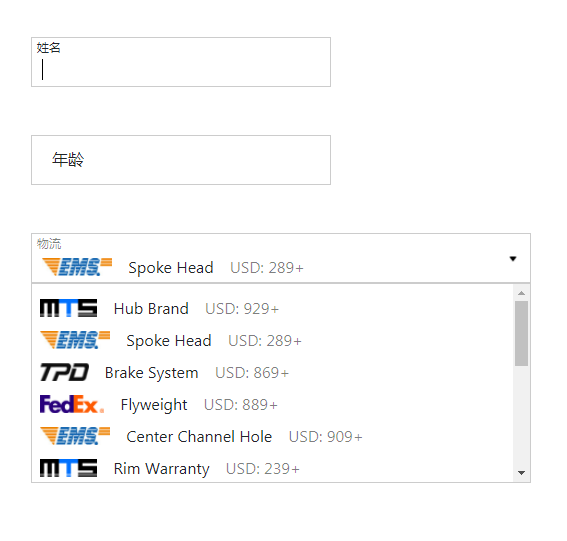
效果预览:
jQuery 点击input框标题收起的更多相关文章
- jquery点击复选框触发事件给input赋值
体验效果:http://keleyi.com/keleyi/phtml/jqtexiao/31.htm 代码如下: <!DOCTYPE html> <html xmlns=" ...
- jquery 点击查看,收起特效
<div class="all"> <p><a href="javascript:;" id="onvk"&g ...
- JQUERY实现点击INPUT使光标移动到最后或指定位置
下面本文章给大家简单介绍一下JQUERY实现点击INPUT使光标移动到最后或指定位置例子,希望对各位有帮助,你要知道面对一个 处女座的 需求者, focus()是远远不够的,比如说“我点进去的时候光标 ...
- JQuery 当点击input后,单选多选的选中状态
1.当点击input元素,此元素的选中checked的值 = 此元素此时表现的选中与否的状态. eg:input元素开始是未选中,点击后表现的是选中状态,此元素的checked为true(和此元素开始 ...
- 解决默写浏览器中点击input输入框时,placeholder的值不消失的方法
html中,placeholder作为input的一个属性,起到了在输入框中占位并提示的作用. 但是有一些浏览器,如chrome,当鼠标点击输入框时,placeholder的值不消失,只有输入数据才消 ...
- html5点击input没有出现光标完美解决方案
html5点击input没有出现光标完美解决方案 <pre> <input type="text" placeholder="输入姓名" cl ...
- 一个实例 ---灵活使用jquery选择器实现input一个key,多个value 。 用ajax传递对象到后台控制器
标题可能不是很清晰,我们看实例: 简单来说就是需要实现sku的功能...一件商品可以有多个属性, 一个属性可以有多个值 . 最后以json格式存到数据库 难点一: 如何实现input输入框的弹性使用 ...
- 关于点击input框唤醒键盘导致input被遮盖的问题
关于点击input框唤醒键盘导致input被遮盖的问题 这个问题相信大家在实际开发过程当中都有遇见,我自己也遇见过很多次.之前在百度上看见大多数的方法利用的都是键盘唤醒了之后,页面的实际高度会发生变化 ...
- 点击input时,里面默认字体消失显示
点击input时,点击input里面默认字体消失显示: <input type="" name="" id="" value=&quo ...
随机推荐
- 对路径binroslyn..的访问被拒绝
一开始的解决办法就是把bin下的文件都删除了,但是roslyn文件夹下的部分文件一直被占用,必须进程中把vbcscompiler进程干掉,才能删除,再重新编译,就没问题了.
- sqlserver 汉字转全拼函数
create function fn_Getquanpin (@str varchar(100)) returns varchar(8000) as begin declare @re varchar ...
- 1.mysql表优化和避免索引失效原则
表优化 1.单表优化 建立索引 根据sql的实际解析顺序建立复合索引 最佳左前缀,保持索引的定义和使用顺序一致 2.多表优化 连接查询 小表驱动大表:对于双层循环来说,外层循环(数据量)越小,内层循环 ...
- WEB层知识点
目录 Web 应用程序技术 HTTP 1.1 HTTP请求 1.2 HTTP响应 1.3 HTTP方法 1.4 URL 1.5 HTTP消息头 1.常用消息头 2.请求消息头 3.响应消息头 1.7 ...
- [译] ConstraintLayout 可视化[Design]编辑器(这到底是什么)[第四部分]
原文地址:Testing Views in Isolation with Espresso 原文作者:Ataul Munim 译文出自:掘金翻译计划 译者:yazhi1992 校对者:lovexiao ...
- 基于docker,consul,consul-template, registrator, nginx服务注册发现集群
介绍 该工程主要实现服务的自动注册发现,从而达到提高运维效率,做到服务的自动发现和动态扩展. 服务注册发现 服务启动后自动被发现 动态变更负载均衡 自动伸缩 工具 1.Registrator 这是 ...
- 超长JVM总结,面试必备
什么是JVM JVM 是可运行 Java 代码的假想计算机 ,包括一套字节码指令集.一组寄存器.一个栈.一个垃圾回收,堆 和 一个存储方法域.JVM 是运行在操作系统之上的,它与硬件没有直接的交互. ...
- [LeetCode]231. Power of Two判断是不是2\3\4的幂
/* 用位操作,乘2相当于左移1位,所以2的幂只有最高位是1 所以问题就是判断你是不是只有最高位是1,怎判断呢 这些数-1后形成的数,除了最高位,后边都是1,如果n&n-1就可以判断了 如果是 ...
- 简单web页面第一步---表单
1 <%@ page language="java" contentType="text/html; charset=UTF-8" 2 pageEncod ...
- ArrayListHashmap嵌套
package arrayListHashMap; import java.util.ArrayList; import java.util.HashMap; import java.util.Map ...