
linux设备文件
一、前言
在调用了alloc_chrdev_region函数或register_chrdev_region函数之后可以在/proc/devices中看到该设备的主设备号,比如我注册的hello模块的主设备号为1024,如下图:
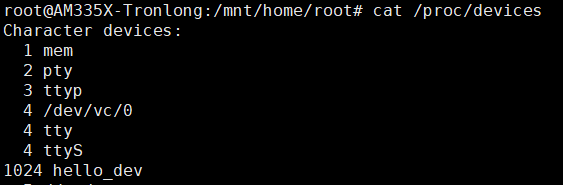
现在使用lsmod能看到驱动名,使用cat /proc/devices能看到设备名,那怎么来使用这个设备呢,这个时候我们还需要一个设备文件,这个设备文件就是在应用程序中用open函数打开的文件。
二、创建设备文件
方法一:手动创建
使用mknod指令,mknod用法:mknod <filename> <type> <major> <minor>
filename:设备文件名
type:设备类型
major:主设备号
minor:次设备号
如:mknod /dev/haha c 1024 0
这就是说创建了一个/dev/haha的文件,类型是字符设备,主设备号为1024,次设备号为0
方法二:自动创建
三、struct file
有了设备文件之后,便可以用open打开这个设备文件,然后用read,write等函数来操作这个文件,但是在用户态中怎么调用到内核的东西呢。
系统每打开一个文件在内核空间都有一个相关联的struct file,它由内核在打开文件时创建,在关闭文件后释放。
struct file的定义如下:
 1 struct file {

 2     union {

 3         struct llist_node    fu_llist;

 4         struct rcu_head     fu_rcuhead;

 5     } f_u;

 6     struct path        f_path;

 7     struct inode        *f_inode;    /* cached value */

 8     const struct file_operations    *f_op;

 9

10     /*

11      * Protects f_ep_links, f_flags.

12      * Must not be taken from IRQ context.

13      */

14     spinlock_t        f_lock;

15     atomic_long_t        f_count;

16     unsigned int         f_flags;

17     fmode_t            f_mode;

18     struct mutex        f_pos_lock;

19     loff_t            f_pos;

20     struct fown_struct    f_owner;

21     const struct cred    *f_cred;

22     struct file_ra_state    f_ra;

23

24     u64            f_version;

25 #ifdef CONFIG_SECURITY

26     void            *f_security;

27 #endif

28     /* needed for tty driver, and maybe others */

29     void            *private_data;

30

31 #ifdef CONFIG_EPOLL

32     /* Used by fs/eventpoll.c to link all the hooks to this file */

33     struct list_head    f_ep_links;

34     struct list_head    f_tfile_llink;

35 #endif /* #ifdef CONFIG_EPOLL */

36     struct address_space    *f_mapping;

37 } __attribute__((aligned(4)));    /* lest something weird decides that 2 is OK */
其中有一个重要成员就是 const struct file_operations *f_op;
struct file_operations的定义如下:
 1 struct file_operations {

 2     struct module *owner;

 3     loff_t (*llseek) (struct file *, loff_t, int);

 4     ssize_t (*read) (struct file *, char __user *, size_t, loff_t *);

 5     ssize_t (*write) (struct file *, const char __user *, size_t, loff_t *);

 6     ssize_t (*read_iter) (struct kiocb *, struct iov_iter *);

 7     ssize_t (*write_iter) (struct kiocb *, struct iov_iter *);

 8     int (*iterate) (struct file *, struct dir_context *);

 9     unsigned int (*poll) (struct file *, struct poll_table_struct *);

10     long (*unlocked_ioctl) (struct file *, unsigned int, unsigned long);

11     long (*compat_ioctl) (struct file *, unsigned int, unsigned long);

12     int (*mmap) (struct file *, struct vm_area_struct *);

13     int (*open) (struct inode *, struct file *);

14     int (*flush) (struct file *, fl_owner_t id);

15     int (*release) (struct inode *, struct file *);

16     int (*fsync) (struct file *, loff_t, loff_t, int datasync);

17     int (*aio_fsync) (struct kiocb *, int datasync);

18     int (*fasync) (int, struct file *, int);

19     int (*lock) (struct file *, int, struct file_lock *);

20     ssize_t (*sendpage) (struct file *, struct page *, int, size_t, loff_t *, int);

21     unsigned long (*get_unmapped_area)(struct file *, unsigned long, unsigned long, unsigned long, unsigned long);

22     int (*check_flags)(int);

23     int (*flock) (struct file *, int, struct file_lock *);

24     ssize_t (*splice_write)(struct pipe_inode_info *, struct file *, loff_t *, size_t, unsigned int);

25     ssize_t (*splice_read)(struct file *, loff_t *, struct pipe_inode_info *, size_t, unsigned int);

26     int (*setlease)(struct file *, long, struct file_lock **, void **);

27     long (*fallocate)(struct file *file, int mode, loff_t offset,

28               loff_t len);

29     void (*show_fdinfo)(struct seq_file *m, struct file *f);

30 #ifndef CONFIG_MMU

31     unsigned (*mmap_capabilities)(struct file *);

32 #endif

33 };
这里面就包含了打开文件之后可以对文件的操作,在用open打开一个文件之后获得一个文件描述符fd,比如要对该文件进行写操作,则调用write函数,实际上会调用到 file_operations中的read函数,而在内核驱动中是需要自己编写read函数的,这样就能实现应用和内核之间的交互。
linux设备文件的更多相关文章
- (转载)使用 udev 高效、动态地管理 Linux 设备文件
概述: Linux 用户常常会很难鉴别同一类型的设备名,比如 eth0, eth1, sda, sdb 等等.通过观察这些设备的内核设备名称,用户通常能知道这些是什么类型的设备,但是不知道哪一个设备是 ...
- 嵌入式 使用udev高效、动态地管理Linux 设备文件
本文以通俗的方法阐述 udev 及相关术语的概念.udev 的配置文件和规则文件,然后以 Red Hat Enterprise Server 为平台演示一些管理设备文件和查询设备信息的实例.本文会使那 ...
- 【转】使用 udev 高效、动态地管理 Linux 设备文件
简介: 本文以通俗的方法阐述 udev 及相关术语的概念.udev 的配置文件和规则文件,然后以 Red Hat Enterprise Server 为平台演示一些管理设备文件和查询设备信息的实例.本 ...
- 使用 udev 高效、动态地管理 Linux 设备文件
本文转自:https://www.ibm.com/developerworks/cn/linux/l-cn-udev/index.html 概述: Linux 用户常常会很难鉴别同一类型的设备名,比如 ...
- 使用 udev 管理 Linux 设备文件
本文以通俗的方法阐述 udev 及相关术语的概念.udev 的配置文件和规则文件,然后以 Red Hat Enterprise Server 为平台演示一些管理设备文件和查询设备信息的实例.本文会使那 ...
- Linux设备文件简介(转载)
Linux 中的设备有2种类型:字符设备(无缓冲且只能顺序存取).块设备(有缓冲且可以随机存取).每个字符设备和块设备都必须有主.次设备号,主设备号相同的设 备是同类设备(使用同一个驱动程序).这些设 ...
- Linux设备文件自动生成
第一种是使用mknod手工创建:# mknod <devfilename> <devtype> <major> <minor> 第二种是自动创建设备节点 ...
- Linux设备文件三大结构:inode,file,file_operations
驱动程序就是向下控制硬件,向上提供接口,这里的向上提供的接口最终对应到应用层有三种方式:设备文件,/proc,/sys,其中最常用的就是使用设备文件,而Linux设备中用的最多的就是字符设备,本文就以 ...
- linux 设备文件和设备之间联系的建立
<设备驱动模型> 注:几乎所有的设备结构体都包含"strcut kobject kobj"和"srtuct list_head list"该结构体 ...
- Linux设备文件简介
转:http://www.360doc.com/content/11/0418/00/5087210_110410837.shtml 版权声明 本 文作者是一位自由软件爱好者,所以本文虽然不是软件,但 ...
随机推荐
- AddressSanitizer —— ASAN分析内存错误
简介 AddressSanitizer 是一个性能非常好的C/C++ 内存错误探测工具. 它由编译器的插桩模块和替换了malloc函数的运行时库组成. 这个工具可以探测如下这些类型的错误: 对堆.栈和 ...
- 豆瓣读书top250数据爬取与可视化
爬虫–scrapy 题目:根据豆瓣读书top250,根据出版社对书籍数量分类,绘制饼图 搭建环境 import scrapy import numpy as np import pandas as p ...
- Geoserver 谷歌瓦片地图的使用 多级发布
下面,我来介绍一下如何在离线的情况下,在Geoserver 中配置出如同谷歌地图般绚丽的效果. 为了让大家有动力看我我接下来写的东西,我先把结果图给大伙儿展现一下: 正如上图所示,该地图是谷歌第四级的 ...
- sql优化的几种方式
一.为什么要对SQL进行优化 我们开发项目上线初期,由于业务数据量相对较少,一些SQL的执行效率对程序运行效率的影响不太明显,而开发和运维人员也无法判断SQL对程序的运行效率有多大,故很少针对SQL进 ...
- 阿里面试:问springBoot自动装配我这样回答的,面试官对我竖起了大拇指
引言 最近有个读者在面试,面试中被问到了这样一个问题"看你项目中用到了springboot,你说下springboot的自动配置是怎么实现的?"这应该是一个springboot里面 ...
- window下运行nginx出现nginx: [emerg] bind() to 0.0.0.0:80 failed (10013: An attempt was made to access a socket in a way forbidden by its access permissions)
做谷粒学院项目,用nginx出现nginx: [emerg] bind() to 0.0.0.0:80 failed (10013: An attempt was made to access a s ...
- git-廖雪峰版教程学习笔记
- dede织梦技巧:教你彻底解决dede按权重排序的问题(转)
dede排序对网站来说一直存在问题,默认是按照最新发布时间排序.这样排序有个问题,一旦更新之后即被视为最新发布,于是原本做好的排序瞬间就乱了. 这种时候,按权重排序是个很好的选择,但按权重排序到处存在 ...
- 网络爬虫第一步:通用代码框架(python版)
import requests def getHTMLText(url): try: r=requests.get(url,timeout=30) r.rais ...
- 使用sublime text3搭建Python编辑环境
最近在工作遇到一个难题. 我所在的测试组有一套PC软件前端自动化工程,在进行自动化测试时,需要在一台古老的xp机器上运行,但这台古老的xp机器带给我诸多烦恼,特别是使用Pycharm编辑器时,我遇到了 ...