
linux设备文件
一、前言
在调用了alloc_chrdev_region函数或register_chrdev_region函数之后可以在/proc/devices中看到该设备的主设备号,比如我注册的hello模块的主设备号为1024,如下图:
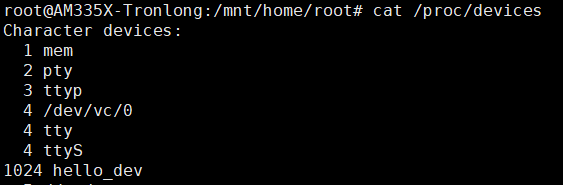
现在使用lsmod能看到驱动名,使用cat /proc/devices能看到设备名,那怎么来使用这个设备呢,这个时候我们还需要一个设备文件,这个设备文件就是在应用程序中用open函数打开的文件。
二、创建设备文件
方法一:手动创建
使用mknod指令,mknod用法:mknod <filename> <type> <major> <minor>
filename:设备文件名
type:设备类型
major:主设备号
minor:次设备号
如:mknod /dev/haha c 1024 0
这就是说创建了一个/dev/haha的文件,类型是字符设备,主设备号为1024,次设备号为0
方法二:自动创建
三、struct file
有了设备文件之后,便可以用open打开这个设备文件,然后用read,write等函数来操作这个文件,但是在用户态中怎么调用到内核的东西呢。
系统每打开一个文件在内核空间都有一个相关联的struct file,它由内核在打开文件时创建,在关闭文件后释放。
struct file的定义如下:
 1 struct file {

 2     union {

 3         struct llist_node    fu_llist;

 4         struct rcu_head     fu_rcuhead;

 5     } f_u;

 6     struct path        f_path;

 7     struct inode        *f_inode;    /* cached value */

 8     const struct file_operations    *f_op;

 9

10     /*

11      * Protects f_ep_links, f_flags.

12      * Must not be taken from IRQ context.

13      */

14     spinlock_t        f_lock;

15     atomic_long_t        f_count;

16     unsigned int         f_flags;

17     fmode_t            f_mode;

18     struct mutex        f_pos_lock;

19     loff_t            f_pos;

20     struct fown_struct    f_owner;

21     const struct cred    *f_cred;

22     struct file_ra_state    f_ra;

23

24     u64            f_version;

25 #ifdef CONFIG_SECURITY

26     void            *f_security;

27 #endif

28     /* needed for tty driver, and maybe others */

29     void            *private_data;

30

31 #ifdef CONFIG_EPOLL

32     /* Used by fs/eventpoll.c to link all the hooks to this file */

33     struct list_head    f_ep_links;

34     struct list_head    f_tfile_llink;

35 #endif /* #ifdef CONFIG_EPOLL */

36     struct address_space    *f_mapping;

37 } __attribute__((aligned(4)));    /* lest something weird decides that 2 is OK */
其中有一个重要成员就是 const struct file_operations *f_op;
struct file_operations的定义如下:
 1 struct file_operations {

 2     struct module *owner;

 3     loff_t (*llseek) (struct file *, loff_t, int);

 4     ssize_t (*read) (struct file *, char __user *, size_t, loff_t *);

 5     ssize_t (*write) (struct file *, const char __user *, size_t, loff_t *);

 6     ssize_t (*read_iter) (struct kiocb *, struct iov_iter *);

 7     ssize_t (*write_iter) (struct kiocb *, struct iov_iter *);

 8     int (*iterate) (struct file *, struct dir_context *);

 9     unsigned int (*poll) (struct file *, struct poll_table_struct *);

10     long (*unlocked_ioctl) (struct file *, unsigned int, unsigned long);

11     long (*compat_ioctl) (struct file *, unsigned int, unsigned long);

12     int (*mmap) (struct file *, struct vm_area_struct *);

13     int (*open) (struct inode *, struct file *);

14     int (*flush) (struct file *, fl_owner_t id);

15     int (*release) (struct inode *, struct file *);

16     int (*fsync) (struct file *, loff_t, loff_t, int datasync);

17     int (*aio_fsync) (struct kiocb *, int datasync);

18     int (*fasync) (int, struct file *, int);

19     int (*lock) (struct file *, int, struct file_lock *);

20     ssize_t (*sendpage) (struct file *, struct page *, int, size_t, loff_t *, int);

21     unsigned long (*get_unmapped_area)(struct file *, unsigned long, unsigned long, unsigned long, unsigned long);

22     int (*check_flags)(int);

23     int (*flock) (struct file *, int, struct file_lock *);

24     ssize_t (*splice_write)(struct pipe_inode_info *, struct file *, loff_t *, size_t, unsigned int);

25     ssize_t (*splice_read)(struct file *, loff_t *, struct pipe_inode_info *, size_t, unsigned int);

26     int (*setlease)(struct file *, long, struct file_lock **, void **);

27     long (*fallocate)(struct file *file, int mode, loff_t offset,

28               loff_t len);

29     void (*show_fdinfo)(struct seq_file *m, struct file *f);

30 #ifndef CONFIG_MMU

31     unsigned (*mmap_capabilities)(struct file *);

32 #endif

33 };
这里面就包含了打开文件之后可以对文件的操作,在用open打开一个文件之后获得一个文件描述符fd,比如要对该文件进行写操作,则调用write函数,实际上会调用到 file_operations中的read函数,而在内核驱动中是需要自己编写read函数的,这样就能实现应用和内核之间的交互。
linux设备文件的更多相关文章
- (转载)使用 udev 高效、动态地管理 Linux 设备文件
概述: Linux 用户常常会很难鉴别同一类型的设备名,比如 eth0, eth1, sda, sdb 等等.通过观察这些设备的内核设备名称,用户通常能知道这些是什么类型的设备,但是不知道哪一个设备是 ...
- 嵌入式 使用udev高效、动态地管理Linux 设备文件
本文以通俗的方法阐述 udev 及相关术语的概念.udev 的配置文件和规则文件,然后以 Red Hat Enterprise Server 为平台演示一些管理设备文件和查询设备信息的实例.本文会使那 ...
- 【转】使用 udev 高效、动态地管理 Linux 设备文件
简介: 本文以通俗的方法阐述 udev 及相关术语的概念.udev 的配置文件和规则文件,然后以 Red Hat Enterprise Server 为平台演示一些管理设备文件和查询设备信息的实例.本 ...
- 使用 udev 高效、动态地管理 Linux 设备文件
本文转自:https://www.ibm.com/developerworks/cn/linux/l-cn-udev/index.html 概述: Linux 用户常常会很难鉴别同一类型的设备名,比如 ...
- 使用 udev 管理 Linux 设备文件
本文以通俗的方法阐述 udev 及相关术语的概念.udev 的配置文件和规则文件,然后以 Red Hat Enterprise Server 为平台演示一些管理设备文件和查询设备信息的实例.本文会使那 ...
- Linux设备文件简介(转载)
Linux 中的设备有2种类型:字符设备(无缓冲且只能顺序存取).块设备(有缓冲且可以随机存取).每个字符设备和块设备都必须有主.次设备号,主设备号相同的设 备是同类设备(使用同一个驱动程序).这些设 ...
- Linux设备文件自动生成
第一种是使用mknod手工创建:# mknod <devfilename> <devtype> <major> <minor> 第二种是自动创建设备节点 ...
- Linux设备文件三大结构:inode,file,file_operations
驱动程序就是向下控制硬件,向上提供接口,这里的向上提供的接口最终对应到应用层有三种方式:设备文件,/proc,/sys,其中最常用的就是使用设备文件,而Linux设备中用的最多的就是字符设备,本文就以 ...
- linux 设备文件和设备之间联系的建立
<设备驱动模型> 注:几乎所有的设备结构体都包含"strcut kobject kobj"和"srtuct list_head list"该结构体 ...
- Linux设备文件简介
转:http://www.360doc.com/content/11/0418/00/5087210_110410837.shtml 版权声明 本 文作者是一位自由软件爱好者,所以本文虽然不是软件,但 ...
随机推荐
- (五)vimscript打印信息
1.打印信息 使用vimscript时,打印信息的命令是echo和echom,可以通过help echo及help echom命令查看帮助文档,而echo与echom有些许的区别, :echom &q ...
- 【mybatis-plus】分页、逻辑删除
通过mybatis-plus实现分页,也是很简单,插件大法. 一.分页 1.配置分页插件 把分页的插件也配置到统一的配置类里: @Configuration // 配置扫描mapper的路径 @Map ...
- 【代码周边】MongoDB与Mysql对比以及插入稳定性分析(指定主键的影响)
在数据库存放的数据中,有一种特殊的键值叫做主键,它用于惟一地标识表中的某一条记录.也就是说,一个表不能有多个主键,并且主键不能为空值. 无论是MongoDB还是MySQL,都存在着主键的定义. 对于M ...
- JavaDailyReports10_05
1 package varycode; 2 3 import java.util.ArrayList; 4 import java.util.Random; 5 6 public class Vary ...
- Java学习日报7.10
package Address;import java.util.Scanner; public class Address{ Scanner sc=new Scanner(System.in); p ...
- 学习 Gin 总结(2020.12.30-31)
2020.12.30 问题总结 中间件 context.Next() 源码注释: // Next should be used only inside middleware. // It execut ...
- LVS之3---健康检查
LVS实现健康性检查功能 LVS高可用性 解决方案: 由Director对各RS健康状态进行检查,失败时禁用,成功时启用 keepalived heartbeat/corosync ldirector ...
- sql操作数据库(2)--->DQL、数据库备份和还原
查询 查询表中的所有的行和列的数据 select * from 表名; select * from student; 查询指定列的数据:如果有多个列,中间用逗号隔开. select 列名1,列 ...
- Openwrt_Linux_crontab任务_顺序执行脚本
Openwrt_Linux_crontab任务_顺序执行脚本 转载注明来源: 本文链接 来自osnosn的博客,写于 2020-12-21. Linux (openwrt,debian,centos. ...
- docker nginx 自定义配置容器
准备 拉取nginx官方镜像 docker pull nginx etc/nginx/ 下新建目录 cert 和 conf cert 存放证书 conf 存放配置文件 mkdir /etc/nginx ...