
架构实例之Demo_JSP
架构实例之Demo_JSP
1、开发工具和开发环境
开发工具: MyEclipse10,JDK1.6.0_13(32位),Tomcat7.0(32位),mysql5.7.13
开发环境:WIN10
2、Demo_JSP实现功能
用户登录、用户注册、退出登录。
3、Demo_JSP使用技术
本实例使用了JSP、JDBC来实现用户登录、用户注册和退出登录功能。系统架构图如图一所示:

图一:Demo_JSP系统架构图
下面请看图二(Demo_JSP中JSP文件间逻辑关系图):
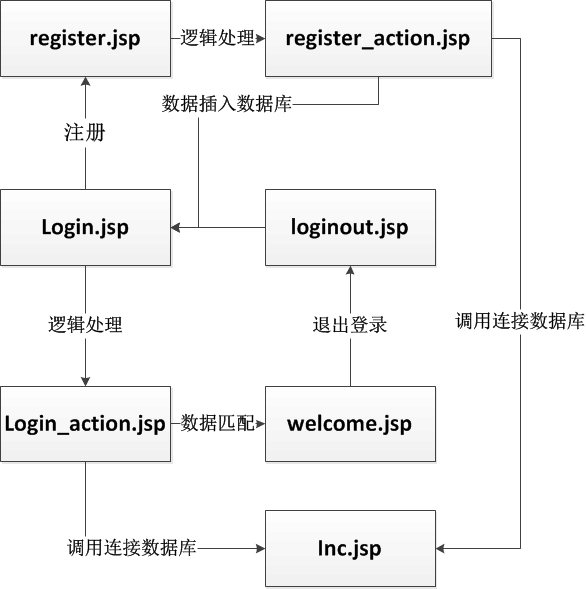
图二:Demo_JSP中JSP文件间逻辑关系图
4、具体实现
(1)在MyEclipse中新建一个Web project项目,并命名为Demo_JSP;
(2)向Demo_JSP项目中导入mysql-connector-java-5.1.6-bin.jar,这个包是实现Java连接数据库功能的包(不会导入包的同学,可以百度哟);
附:mysql-connector-java-5.1.6-bin.jar百度云下载链接:http://pan.baidu.com/s/1i5psdDF 密码:meyg
(3)在Demo_JSP项目中新建以下JSP文件:
1)login.jsp,用户登录的首页界面,代码如下:
<%@ page language="java" import="java.util.*" pageEncoding="UTF-8"%>

<%

String path = request.getContextPath();

String basePath = request.getScheme()+"://"+request.getServerName()+":"+request.getServerPort()+path+"/";

%>

<!DOCTYPE HTML PUBLIC "-//W3C//DTD HTML 4.01 Transitional//EN">

<html>

  <head>

    <base href="<%=basePath%>">

    <title>登录界面</title>

    <meta http-equiv="pragma" content="no-cache">

    <meta http-equiv="cache-control" content="no-cache">

    <meta http-equiv="expires" content="0">

    <meta http-equiv="keywords" content="keyword1,keyword2,keyword3">

    <meta http-equiv="description" content="This is my page">

    <!--

    <link rel="stylesheet" type="text/css" href="styles.css">

    -->

  </head>

  <body>

    <form name="form1" action="login_action.jsp" method="post">

    <table width="200" border="1">

    <tr>

        <td colspan="2">登录窗口</td>

    </tr>

    <tr>

        <td>用户名</td>

        <td><input type="text" name="username" size="10"></td>

    </tr>

    <tr>

        <td>密码</td>

        <td><input type="password" name="password" size="10"></td>

    </tr>

    <tr>

        <td colspan="2"><input type="submit" name="submit" value="登录"> <a

            href="register.jsp">注册新用户</a></td>

    </tr>

</table>

</form>

  </body>

</html>
2)login_action.jsp,接收login.jsp页面中用户输入的用户名和密码,通过JDBC实现登录认证,具体代码如下:
<%@ page language="java" import="java.util.*,java.sql.*" pageEncoding="UTF-8"%>

<%@ include file="inc.jsp"%>

<%

//get parameters

String username = request.getParameter("username");

String password = request.getParameter("password");

//check null

if (username == null || password == null) {

    response.sendRedirect("login.jsp");

}

//validate

boolean isValid = false;

String sql = "select * from userInfo where username='"+username+"' and password='"+password+"'";

try {

    Class.forName(drv).newInstance();

    Connection conn = DriverManager.getConnection(url, usr, pwd);

    Statement stm = conn.createStatement();

    ResultSet rs = stm.executeQuery(sql);

    if(rs.next())isValid = true;

    rs.close();

    stm.close();

    conn.close();

} catch (Exception e) {

    e.printStackTrace();

    out.println(e);

} finally {

}

if (isValid) {

    session.setAttribute("username", username);

    response.sendRedirect("welcome.jsp");

} else {

    response.sendRedirect("login.jsp");

}

%>

<!DOCTYPE HTML PUBLIC "-//W3C//DTD HTML 4.01 Transitional//EN">

<html>

  <head>

    <title>My JSP 'login_action.jsp' starting page</title>

    <meta http-equiv="pragma" content="no-cache">

    <meta http-equiv="cache-control" content="no-cache">

    <meta http-equiv="expires" content="0">

    <meta http-equiv="keywords" content="keyword1,keyword2,keyword3">

    <meta http-equiv="description" content="This is my page">

    <!--

    <link rel="stylesheet" type="text/css" href="styles.css">

    -->

  </head>

  <body>

  </body>

</html>
3)inc.jsp,存放数据库连接的地址,具体代码如下:
<%@ page language="java" import="java.util.*,java.sql.*" pageEncoding="UTF-8"%>

<%

String drv = "com.mysql.jdbc.Driver";

String url = "jdbc:mysql://localhost:3306/library_system";

String usr = "root";

String pwd = "root";

%>

<!DOCTYPE HTML PUBLIC "-//W3C//DTD HTML 4.01 Transitional//EN">

<html>

  <head>

    <title>My JSP 'inc.jsp' starting page</title>

    <meta http-equiv="pragma" content="no-cache">

    <meta http-equiv="cache-control" content="no-cache">

    <meta http-equiv="expires" content="0">

    <meta http-equiv="keywords" content="keyword1,keyword2,keyword3">

    <meta http-equiv="description" content="This is my page">

    <!--

    <link rel="stylesheet" type="text/css" href="styles.css">

    -->

  </head>

  <body>

    This is my JSP page. <br>

  </body>

</html>
4)welcome.jsp,用户登录成功后的主界面,具体代码如下:
<%@ page language="java" import="java.util.*" pageEncoding="UTF-8"%>

<%

String path = request.getContextPath();

String basePath = request.getScheme()+"://"+request.getServerName()+":"+request.getServerPort()+path+"/";

%>

<!DOCTYPE HTML PUBLIC "-//W3C//DTD HTML 4.01 Transitional//EN">

<html>

  <head>

    <base href="<%=basePath%>">

    <title>My JSP 'welcome.jsp' starting page</title>

    <meta http-equiv="pragma" content="no-cache">

    <meta http-equiv="cache-control" content="no-cache">

    <meta http-equiv="expires" content="0">

    <meta http-equiv="keywords" content="keyword1,keyword2,keyword3">

    <meta http-equiv="description" content="This is my page">

    <!--

    <link rel="stylesheet" type="text/css" href="styles.css">

    -->

  </head>

  <body>

    <table width="100%">

    <tr>

        <td><img src="data:images/picture_01.png"></td>

        <td><img src="data:images/picture_03.jpg" width="600" height="120"></td>

    </tr>

    <tr>

        <td colspan="2">

        <hr>

        </td>

    </tr>

    <tr>

        <td>

        <table>

            <tr>

                <td><a href="welcome.jsp">Main</a></td>

            </tr>

            <tr>

                <td><a href="menu1.jsp">Menu1</a></td>

            </tr>

            <tr>

                <td><a href="menu2.jsp">Menu2</a></td>

            </tr>

            <tr>

                <td><a href="menu3.jsp">Menu3</a></td>

            </tr>

            <tr>

                <td><a href="menu4.jsp">Menu4</a></td>

            </tr>

            <tr>

                <td><a href="menu5.jsp">Menu5</a></td>

            </tr>

            <tr>

                <td><a href="menu6.jsp">Menu6</a></td>

            </tr>

            <tr>

                <td><a href="menu7.jsp">Menu7</a></td>

            </tr>

            <tr>

                <td><a href="menu8.jsp">Menu8</a></td>

            </tr>

        </table>

        </td>

        <td>

        <form name="form1" action="logout.jsp" method="post">

        <table width="200" border="1">

            <tr>

                <td colspan="2">登录成功</td>

            </tr>

            <tr>

                <td>欢迎你,</td>

                <td><%=(String) session.getAttribute("username")%></td>

            </tr>

            <tr>

                <td colspan="2"><input type="submit" name="submit" value="退出"></td>

            </tr>

        </table>

        </form>

        </td>

    </tr>

</table>

  </body>

</html>
5)loginout.jsp,用户退出登录,返回登录主界面,具体代码如下:
<%@ page language="java" import="java.util.*" pageEncoding="UTF-8"%>

<%

session.removeAttribute("username");

response.sendRedirect("login.jsp");

%>

<!DOCTYPE HTML PUBLIC "-//W3C//DTD HTML 4.01 Transitional//EN">

<html>

  <head>

    <title>My JSP 'logout.jsp' starting page</title>

    <meta http-equiv="pragma" content="no-cache">

    <meta http-equiv="cache-control" content="no-cache">

    <meta http-equiv="expires" content="0">

    <meta http-equiv="keywords" content="keyword1,keyword2,keyword3">

    <meta http-equiv="description" content="This is my page">

    <!--

    <link rel="stylesheet" type="text/css" href="styles.css">

    -->

  </head>

  <body>

  </body>

</html>
6)register.jsp,实现用户注册界面,具体代码如下:
<%@ page language="java" import="java.util.*" pageEncoding="UTF-8"%>

<%

String path = request.getContextPath();

String basePath = request.getScheme()+"://"+request.getServerName()+":"+request.getServerPort()+path+"/";

%>

<!DOCTYPE HTML PUBLIC "-//W3C//DTD HTML 4.01 Transitional//EN">

<html>

  <head>

    <base href="<%=basePath%>">

    <title>My JSP 'register.jsp' starting page</title>

    <meta http-equiv="pragma" content="no-cache">

    <meta http-equiv="cache-control" content="no-cache">

    <meta http-equiv="expires" content="0">

    <meta http-equiv="keywords" content="keyword1,keyword2,keyword3">

    <meta http-equiv="description" content="This is my page">

    <!--

    <link rel="stylesheet" type="text/css" href="styles.css">

    -->

  </head>

  <body>

    <form name="form1" action="register_action.jsp" method="post">

    <table width="200" border="1">

    <tr>

        <td colspan="2">注册窗口</td>

    </tr>

    <tr>

        <td>用户名</td>

        <td><input type="text" name="username" size="10"></td>

    </tr>

    <tr>

        <td>密码</td>

        <td><input type="password" name="password1" size="10"></td>

    </tr>

    <tr>

        <td>确认密码</td>

        <td><input type="password" name="password2" size="10"></td>

    </tr>

    <tr>

        <td>Email</td>

        <td><input type="text" name="email" size="10"></td>

    </tr>

    <tr>

        <td colspan="2"><input type="submit" name="submit" value="登录"> <a

            href="login.jsp">返回</a></td>

    </tr>

</table>

</form>

  </body>

</html>
7)register_action.jsp,通过JDBC实现注册,并把数据写入数据库,具体代码如下:
<%@ include file="inc.jsp"%>

<%

String path = request.getContextPath();

String basePath = request.getScheme()+"://"+request.getServerName()+":"+request.getServerPort()+path+"/";

%>

<%

//get parameters

String username = request.getParameter("username");

String password1 = request.getParameter("password1");

String password2 = request.getParameter("password2");

String email = request.getParameter("email");

//check null

if (username == null || password1 == null || password2 == null || !password1.equals(password2)) {

    response.sendRedirect("register.jsp");

}

//validate

boolean isValid = false;

String sql = "select * from userInfo where username='"+username+"'";

try {

    Class.forName(drv).newInstance();

    Connection conn = DriverManager.getConnection(url, usr, pwd);

    Statement stm = conn.createStatement();

    ResultSet rs = stm.executeQuery(sql);

    if(!rs.next()) {

        sql = "insert into userInfo(username,password,mail) values('"+username+"','"+password1+"','"+email+"')";

        stm.execute(sql);

        isValid = true;

    }

    rs.close();

    stm.close();

    conn.close();

} catch (Exception e) {

    e.printStackTrace();

    out.println(e);

}

if (isValid) {

    response.sendRedirect("login.jsp");

} else {

    response.sendRedirect("register.jsp");

}

%>

<!DOCTYPE HTML PUBLIC "-//W3C//DTD HTML 4.01 Transitional//EN">

<html>

  <head>

    <base href="<%=basePath%>">

    <title>My JSP 'register_action.jsp' starting page</title>

    <meta http-equiv="pragma" content="no-cache">

    <meta http-equiv="cache-control" content="no-cache">

    <meta http-equiv="expires" content="0">

    <meta http-equiv="keywords" content="keyword1,keyword2,keyword3">

    <meta http-equiv="description" content="This is my page">

    <!--

    <link rel="stylesheet" type="text/css" href="styles.css">

    -->

  </head>

  <body>

  </body>

</html>
5、运行结果展示
(1)在浏览器中输入http://localhost:8080/Demo_JSP/login.jsp,将出现如下图三所示:
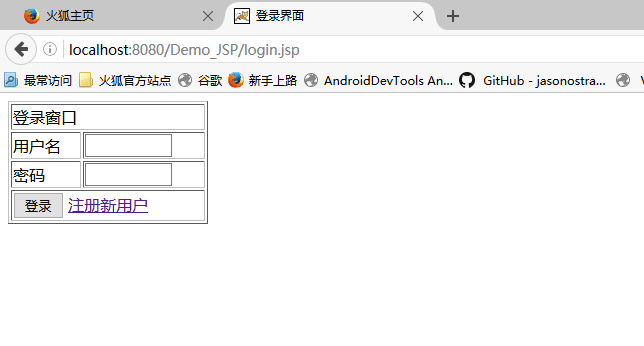
图三:登录界面
(2)点击注册新用户,将会出现如下图四所示:

图四:注册界面
(3)注册成功后,会自动返回到登录界面,然后输入用户名和密码,点击登录将出现如下图五所示:

图五:登录后的welcome.jsp界面
附:Demo_JSP项目实例源码百度云下载链接:http://pan.baidu.com/s/1mifI8nI 密码:j3wp; 本实例所使用数据库建表sql语句文件下载链接:http://pan.baidu.com/s/1eS0n9aM 密码:7ttd
架构实例之Demo_JSP的更多相关文章
- 架构实例之Demo_JSP_JavaBean
架构实例之Demo_JSP_JavaBean 1.开发工具和开发环境 开发工具: MyEclipse10,JDK1.6.0_13(32位),Tomcat7.0(32位),mysql5.7.1 ...
- 架构实例之SpringTest
架构实例之SpringTest 1.开发工具和开发环境 开发工具: MyEclipse10,JDK1.6.0_13(32位),Tomcat7.0(32位),mysql5.7.13 开发环境 ...
- 架构实例之Demo_JSP_JavaBean_Servlet
架构实例之Demo_JSP_JavaBean_Servlet 1.开发工具和开发环境 开发工具: MyEclipse10,JDK1.6.0_13(32位),Tomcat7.0(32位),m ...
- 【DDD】领域驱动设计实践 —— 架构风格及架构实例
概述 DDD为复杂软件的设计提供了指导思想,其将易发生变化的业务核心域放置在限定上下文中,在确保核心域一致性和内聚性的基础上,DDD可以被多种语言和多种技术框架实现,具体的框架实现需要根据实际的业务场 ...
- JavaWeb学习之三层架构实例(三)
引言 通过上一篇博客JavaWeb学习之三层架构实例(二)我们基本上已经实现了对学生信息列表的增删改查操作(UI除外),但是不难看出,代码冗余度太高了,尤其是StudentDao这个类,其中的增删改查 ...
- JavaWeb学习之三层架构实例(二)
引言 这个实例是上一个实例JavaWeb学习 三层架构实例(一)的加强版,实现的是在前端对数据库中student表的 增.删.改.查 操作.关于三层组成云云,这里就不再叙述. 实例 效果图 先来看一下 ...
- linux驱动由浅入深系列:高通sensor架构实例分析之二(驱动代码结构)【转】
本文转载自:https://blog.csdn.net/radianceblau/article/details/73498303 本系列导航: linux驱动由浅入深系列:高通sensor架构实例分 ...
- linux驱动由浅入深系列:高通sensor架构实例分析之三(adsp上报数据详解、校准流程详解)【转】
本文转载自:https://blog.csdn.net/radianceblau/article/details/76180915 本系列导航: linux驱动由浅入深系列:高通sensor架构实例分 ...
- java:Session(概述,三层架构实例(实现接口封装JDBC),Session实现简单购物车实例)
1.Session概述: Session:在计算机中,尤其是在网络应用中,称为“会话控制”.Session 对象存储特定用户会话所需的属性及配置信息.这样,当用户在应用程序的 Web 页之间跳转时,存 ...
随机推荐
- SSL介绍与Java实例
有关SSL的原理和介绍在网上已经有不少,对于Java下使用keytool生成证书,配置SSL通信的教程也非常多.但如果我们不能够亲自动手做一个SSL Sever和SSL Client,可能就永远也不能 ...
- Extjs.Button 按钮
Extjs Button 的简单使用 ,同时调用Ajax服务 <!DOCTYPE html> <html xmlns="http://www.w3.org/1999/xh ...
- form表单提交数据
js代码: // form 跳转 gotourl//跳转的页面 options json格式参数 function FromGoTo(gotourl, options) { var inputhtml ...
- WCF入门教程(五)配置文件
WCF入门教程(五)配置文件 服务协定以及实现写好后,需要将相关服务公布出去,就需要HOST来承载,供客户端来调用. 承载服务有两种方式,一种通过配置文件,一种通过代码进行配置.上一章已经介绍了代码方 ...
- navicat怎么导出和导入数据表
1.选中要导出的数据表,右击,然后点击"导出向导". 2.点击sql脚本文件(*sql)->点击下一步. 3.点击保存位置->下一步->保存 ********** ...
- Codeforces Round #234A
Inna and choose option 题意: 一个由12个字符('O'或'X')组成的字符串,这12个字符可以排列成a*b(a*b=12)的矩阵,要求矩阵某一列都是'X'.用户输入t个 ...
- java中抽象、分装、继承和多态的理解
1.抽象.封装装.继承和多态是java面向对象编程的几大特点. 抽象:所谓抽象就是对某件事务,我们忽略我们不关心不需要的部分,提取我们想要的属性和行为,并且以代码的形式提现出来:例如我们需要对一个学生 ...
- 从CSS实现正片叠底看=>混合模式mix-blend-mode
兼容性:这个东西说多了也没意思,像HTML5和CSS3这种兼容性时刻变化的东东,我们最好在自己支持的设备上实验,不支持,就在想办法呗,这个东西就是为了方便和好玩 所有属性: mix-blend-mod ...
- 又到周末了,我们一起来研究【浏览器如何检测是否安装app】吧
前言 扯淡 这个月比较倒霉,我送了女朋友一台笔记本电脑作为生日礼物,结果15天一过电脑就坏了,悲剧的我还把电脑盒子给扔了!淘宝不给换更不给退 于是被女朋友臭骂了一过星期后,今天本来在公司有任务的,但是 ...
- jQuery实现checkbox反选(转载)
//反选 $("#btnInvert").click(function () { //1.方法一实现反选 $("#chk input:checkbox").ea ...