
.net core3.1中实现简单的jwt认证
1.创建项目
使用visual studio创建一个名为JwtDemo的空项目,创建后如图
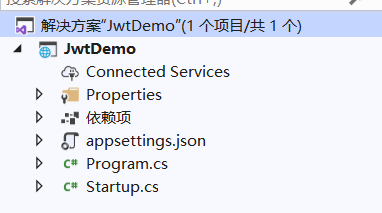
2.添加依赖项
- 在nuget包管理器中搜索 Microsoft.AspNetCore.Authentication.JwtBearer、System.IdentityModel.Tokens.Jwt
- 在nuget包管理控制台安装
Install-Package Microsoft.AspNetCore.Authentication.JwtBearer -Version 3.1.7

Install-Package System.IdentityModel.Tokens.Jwt -Version 6.7.1
3.编写代码
创建一个接口(IJwtAuthenticationHandler),声明一个用于创建token的方法(Authenticate)
namespace JwtDemo

{

    public interface IJwtAuthenticationHandler

    {

        string Authenticate(string username, string password);

    }

}
创建一个类,继承接口(IJwtAuthenticationHandler),并实现方法,这里简单起见就将用户硬编码在代码中
using System;

using System.Collections.Generic;

using System.IdentityModel.Tokens.Jwt;

using System.Linq;

using System.Security.Claims;

using System.Text;

using Microsoft.IdentityModel.Tokens;

namespace JwtDemo

{

    public class JwtAuthenticationHandler: IJwtAuthenticationHandler

    {

        private readonly IDictionary<string, string> users = new Dictionary<string, string>()

        {

            {"user1","password1"},

            {"user2","password2"},

        };

        private readonly string _token;   //声明一个加密的密钥,由外部传入

        public JwtAuthenticationHandler(string token)

        {

            _token = token;

        }

        public string Authenticate(string username, string password)

        {

            //如果用户名密码错误则返回null

            if (!users.Any(t => t.Key == username && t.Value == password))

            {

                return null;

            }

            var tokenKey = new SymmetricSecurityKey(Encoding.UTF8.GetBytes(_token));

            var tokenHandler = new JwtSecurityTokenHandler();

            var tokenDescriptor = new SecurityTokenDescriptor()

            {

                SigningCredentials = new SigningCredentials(tokenKey, SecurityAlgorithms.HmacSha256),

                Expires = DateTime.Now.AddMinutes(10),

                Subject = new ClaimsIdentity(new Claim[]

                {

                    new Claim(ClaimTypes.Name,username),

                })

            };

            var token = tokenHandler.CreateJwtSecurityToken(tokenDescriptor);

            return tokenHandler.WriteToken(token);

        }

    }

}
修改Startup类
using System.Text;

using Microsoft.AspNetCore.Authentication.JwtBearer;

using Microsoft.AspNetCore.Builder;

using Microsoft.AspNetCore.Hosting;

using Microsoft.Extensions.DependencyInjection;

using Microsoft.Extensions.Hosting;

using Microsoft.IdentityModel.Tokens;

namespace JwtDemo

{

    public class Startup

    {

        public void ConfigureServices(IServiceCollection services)

        {

            services.AddControllers();

            string tokenSecretKey = "this is a test token secret key"; //加密的密钥

            services.AddAuthentication(config =>

            {

                //认证方案设置为Jwt

                config.DefaultAuthenticateScheme = JwtBearerDefaults.AuthenticationScheme;

                config.DefaultChallengeScheme = JwtBearerDefaults.AuthenticationScheme;

            }).AddJwtBearer(config=>

            {

                config.RequireHttpsMetadata = false;

                config.SaveToken = true;  //保存token

                config.TokenValidationParameters = new TokenValidationParameters()

                {

                    ValidateIssuer = false,//不验证签发人

                    ValidateAudience = false,  //不验证听众

                    ValidateIssuerSigningKey = true, //验证签发者密钥

                    IssuerSigningKey = new SymmetricSecurityKey(Encoding.UTF8.GetBytes(tokenSecretKey)) //签发者密钥

                };

            });

            //将生成token的类注册为单例

            services.AddSingleton<IJwtAuthenticationHandler>(new JwtAuthenticationHandler(tokenSecretKey));

        }

        public void Configure(IApplicationBuilder app, IWebHostEnvironment env)

        {

            if (env.IsDevelopment())

            {

                app.UseDeveloperExceptionPage();

            }

            app.UseRouting();

            app.UseAuthentication();

            app.UseAuthorization();

            app.UseEndpoints(endpoints =>

            {

                endpoints.MapControllers();

            });

        }

    }

}
创建一个控制器(UserController),包含一个认证方法和一个获取用户列表(加了权限认证)的方法
using System.Collections.Generic;

using Microsoft.AspNetCore.Authorization;

using Microsoft.AspNetCore.Mvc;

namespace JwtDemo.Controllers

{

    [ApiController]

    public class UserController: Controller

    {

        private readonly IJwtAuthenticationHandler _jwtAuthenticationHandler;

        //构造函数注入生成token的类

        public UserController(IJwtAuthenticationHandler jwtAuthenticationHandler)

        {

            _jwtAuthenticationHandler = jwtAuthenticationHandler;

        }

        [AllowAnonymous]  //表示可以匿名访问

        [Route("user/authenticate")]

        [HttpPost]

        public IActionResult Authenticate([FromBody] LoginViewModel loginViewModel)

        {

            var token = _jwtAuthenticationHandler.Authenticate(loginViewModel.UserName,loginViewModel.Password);

            if (token == null)

            {

                return Unauthorized();

            }

            return Ok(token);

        }

        [Authorize]   //表示需要认证授权访问

        [Route("user/list")]

        [HttpGet]

        public List<object> List()

        {

            return new List<object>()

            {

                "user1","user2","user3","user..."

            };

        }

    }

}
LoginViewModel类
namespace JwtDemo.Controllers

{

    public class LoginViewModel

    {

        public string UserName { get; set; }

        public string Password { get; set; }

    }

}
完成后的项目结构

4.测试接口
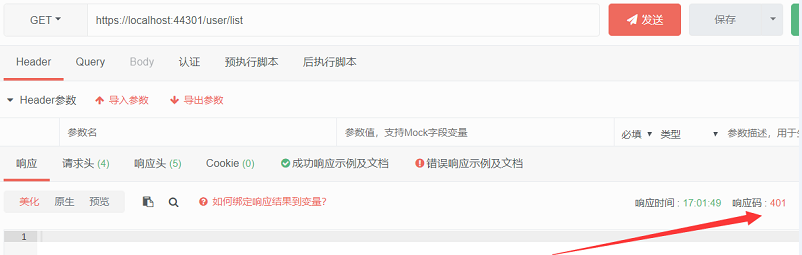
运行项目,我们直接请求用户列表的接口,返回401,表示未授权
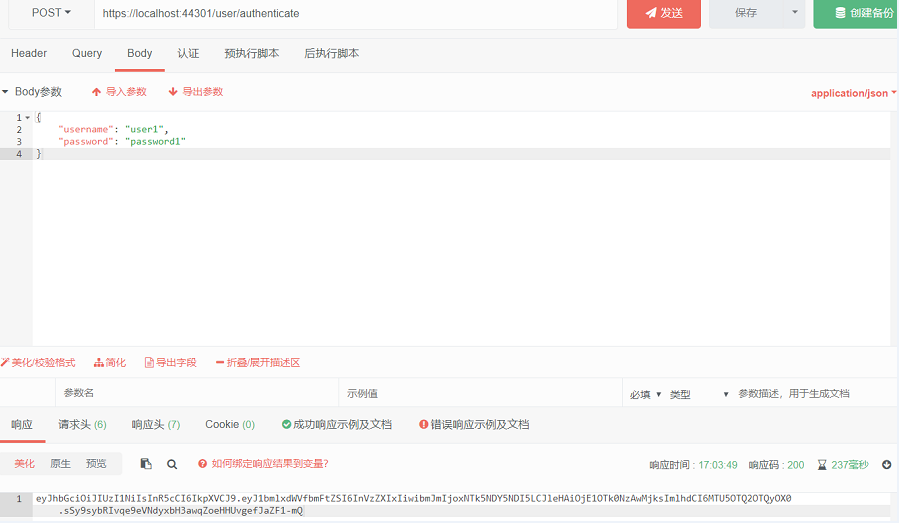
我们请求认证接口进行认证,输入正确的用户名和密码,会返回一个token
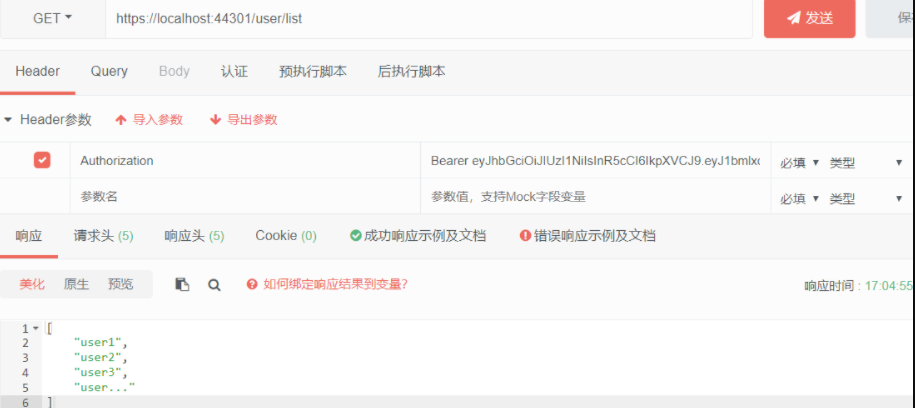
使用上面的token再次请求用户列表接口,将Header中加入Authorization:Bearer token,可以正常返回数据,表示已经成功
.net core3.1中实现简单的jwt认证的更多相关文章
- 记录一下在SpringBoot中实现简单的登录认证
代码参考博客: https://blog.csdn.net/weixin_37891479/article/details/79527641 在做学校的课设的时候,发现了安全的问题,就不怀好意的用户有 ...
- drf JWT认证模块与自定制
JWT模块 在djangorestframework中,有一款扩展模块可用于做JWT认证,使用如下命令进行安装: pip install djangorestframework-jwt 现在,就让我们 ...
- NetCore+Dapper WebApi架构搭建(六):添加JWT认证
WebApi必须保证安全,现在来添加JWT认证 1.打开appsettings.json添加JWT认证的配置信息 2.在项目根目录下新建一个Models文件夹,添加一个JwtSettings.cs的实 ...
- drf认证组件(介绍)、权限组件(介绍)、jwt认证、签发、jwt框架使用
目录 一.注册接口 urls.py views.py serializers.py 二.登录接口 三.用户中心接口(权限校验) urls.py views.py serializers.py 四.图书 ...
- 如何简单的在 ASP.NET Core 中集成 JWT 认证?
前情提要:ASP.NET Core 使用 JWT 搭建分布式无状态身份验证系统 文章超长预警(1万字以上),不想看全部实现过程的同学可以直接跳转到末尾查看成果或者一键安装相关的 nuget 包 自上一 ...
- Jwt在Java项目中的简单实际应用
1.什么是jwt 双方之间传递安全信息的简洁的.URL安全的表述性声明规范.JWT作为一个开放的标准(RFC 7519),定义了一种简洁的,自包含的方法用于通信双方之间以Json对象的形式安全的传递信 ...
- Laravel 中使用 JWT 认证的 Restful API
Laravel 中使用 JWT 认证的 Restful API 5天前/ 678 / 3 / 更新于 3天前 在此文章中,我们将学习如何使用 JWT 身份验证在 Laravel 中构建 r ...
- drf框架中jwt认证,以及自定义jwt认证
0909自我总结 drf框架中jwt 一.模块的安装 官方:http://getblimp.github.io/django-rest-framework-jwt/ 他是个第三方的开源项目 安装:pi ...
- ASP.Net Core 3.0 中使用JWT认证
JWT认证简单介绍 关于Jwt的介绍网上很多,此处不在赘述,我们主要看看jwt的结构. JWT主要由三部分组成,如下: HEADER.PAYLOAD.SIGNATURE HEADER包 ...
随机推荐
- selenium WebDriverWait类等待机制的实现
在自动化测试脚本的运行过程中,可以通过设置等待的方式来避免由于网络延迟或浏览器卡顿导致的偶然失败,常用的等待方式有三种: 很多人学习python,不知道从何学起.很多人学习python,掌握了基本语法 ...
- 用Python绘制一套“会跳舞”的动态图形给你看看
在读技术博客的过程中,我们会发现那些能够把知识.成果讲透的博主很多都会做动态图表.他们的图是怎么做的?难度大吗?这篇文章就介绍了 Python 中一种简单的动态图表制作方法. 看这优美的舞姿 很多人学 ...
- jquery 事件对象笔记
jQuery元素操作 设置或获取元素固有属性 获取 prop(属性名) 修改 prop(属性名,值) 获取自定义属性 ...
- 【av68676164(p33-p34)】进程通信
4.7.1 匿名管道通信 任务:把一个CMD控制台程序改成窗口程序 "算命大师"程序的改进版 改进目标:标准的Windows窗口程序 (匿名)管道通信机制 管道定义 pipe 定义 ...
- three.js 着色器材质之变量(三)
这篇郭先生在练习一下着色器变量,在度娘上面或者官网上经常看到类似水波一样的效果,这篇就试着做一个这样的效果,顺便巩固一下顶点着色器和片元着色器,毕竟多多练习才能更好地掌握.效果如下图,在线案例请点击博 ...
- css实现折扇效果
总结思路: 1.首先进行结构的书写 <div class="box"></div> 2.要进行图片的重叠要用到position定位,需要重叠的元素及子元 ...
- 每日一道 LeetCode (10):搜索插入位置
每天 3 分钟,走上算法的逆袭之路. 前文合集 每日一道 LeetCode 前文合集 代码仓库 GitHub: https://github.com/meteor1993/LeetCode Gitee ...
- 【模式识别与机器学习】——4.3离散K-L变换
全称:Karhunen-Loeve变换(卡洛南-洛伊变换) 前面讨论的特征选择是在一定准则下,从n个特征中选出k个来反映原有模式. 这种简单删掉某n-k个特征的做法并不十分理想,因为一般来说,原来的n ...
- [HNOI2009]最小圈 题解
题目大意 给你一个有向图,求出图中环的平均值的最小值 环的平均值定义:环中所有的边权和/环中点数量 思路 看到使平均值最大或最小,可以考虑分数规划 分数规划用于解决一些要让平均值最大或最小的问题 具体 ...
- .net Core使用sql语句实现批量修改数据状态
上图为查出的所有满足条件的数据,要选中若干条数据将其状态设置为作废 一共选中6条数据,当点击确认后修改数据状态. 前端代码 1.安装NuGet包 [Abp.Dapper]于EFCore中, 2.创建文 ...