
unity 顶点弹性网格效果
1.球衰减
首先,我们将处理球衰减,鼠标或手指点中网格的点是碰撞点,越往外它所受的影响越小。我们需要从CPU中获取“_ImpactPos”这个碰撞点,获取摄像机和碰撞点的矢量,我们将对我们网格的每个顶点执行相对于撞击点的球面衰减。
|
1
2
3
4
5
6
|
void vert(inout appdata v) { float3 dst = _ImpactPos - v.vertex.xyz; dst.x = dot(dst, dst) / _Radius; float attenuation = 1 / (1 + dst.x); // To Do} |
2.反弹效应
在CPU里,我们用AnimationCurve手动调好一个正弦曲线,衰减随着时间的推移,以获得预期的效果(见图2.1)。
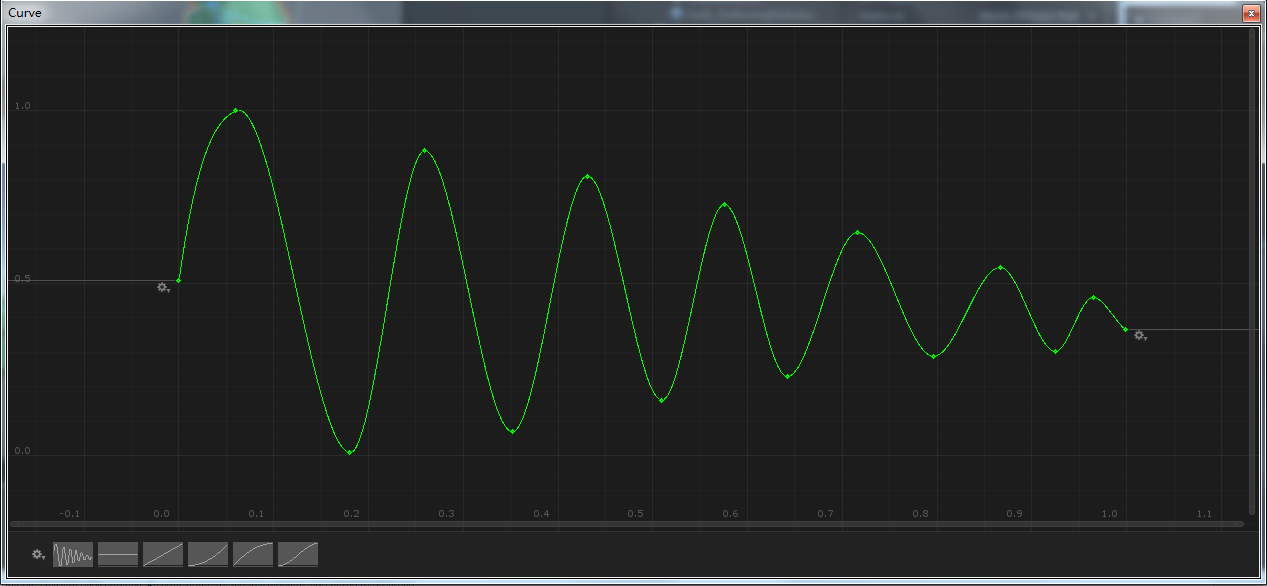
图2.1.指数阻尼正弦波(也可以自己在代码里写阻尼公式)
public class DeformableActor : MonoBehaviour

{

    [SerializeField]

    private float maxScale = 3f;

    [SerializeField]

    private float duration = 1f;

    [SerializeField]

    private AnimationCurve curve;

    private Camera mainCamera;

    private Material dynamicMat;

    private bool bIsBouncing;

    private float timer;

    private Vector3 direction,

        dampingVector;

    // Use this for initialization

    private void Start()

    {

        mainCamera = Camera.main;

        dynamicMat = GetComponent<MeshRenderer>().material;

    }

    // Update is called once per frame

    private void Update()

    {

        if (bIsBouncing)

            BounceActor();

        if (!Input.GetMouseButton(0))

            return;

        DoRayCasting();

    }

    // ---------------------

    private void OnDestroy()

    {

        Destroy(dynamicMat);

    }

    // -------------------------------------------------------------

    private void BounceActor()

    {

        timer += Time.deltaTime / duration;

        if (timer <= 1f)

        {

            dampingVector = curve.Evaluate(timer)

                * maxScale * direction;

            dynamicMat.SetVector("_DampingVector", dampingVector);

        }

        else

        {

            bIsBouncing = false;

            dynamicMat.SetVector("_DampingVector", Vector3.zero);

        }

    }

    // ------------------------------------------------------------------

    private void DoRayCasting()

    {

        RaycastHit hit = new RaycastHit();

        if (Physics.Raycast(mainCamera

            .ScreenPointToRay(Input.mousePosition), out hit))

        {

            dynamicMat.SetVector("_ImpactPos",

                transform.InverseTransformPoint(hit.point));

            direction = (mainCamera.transform.position

                - hit.point).normalized;

            direction = transform.InverseTransformDirection(direction);

            bIsBouncing = true;

            timer = 0f;

        }

    }

}
3.关于网格顶点变形的shader
Shader "FI/DeformableActor" {

    Properties{

        _Radius("Radius", Float) = 1

        _Color("Color", Color) = (1,1,1,1)

        _MainTex("Albedo (RGB)", 2D) = "white" {}

        _Normal("Normal", 2D) = "bump" {}

        _Glossiness ("Smoothness", Range(0,1)) = 0.5

        _Metallic ("Metallic", Range(0,1)) = 0.0

    }

    SubShader {

        Tags { "RenderType"="Opaque" }

        LOD 200

        Cull Off

        CGPROGRAM

        #pragma surface surf Standard fullforwardshadows vertex:vert addshadow //在surface shader中想要进行顶点偏移,要加上vertex:vert

        #pragma target 3.0

        #include "UnityCG.cginc"

        struct appdata {

            float4 vertex : POSITION;

            float4 tangent : TANGENT;

            float3 normal : NORMAL;

            float2 texcoord : TEXCOORD0;

        };

        sampler2D _MainTex;

        sampler2D _Normal;

        half _Glossiness;

        half _Metallic;

        fixed4 _Color;

        float _Radius;

        float3 _DampingVector;

        float3 _ImpactPos;

        struct Input {

            float2 uv_MainTex;

        };

        void vert(inout appdata v) {

            float3 dst = _ImpactPos - v.vertex.xyz;

            dst.x = dot(dst, dst) / _Radius;

            float attenuation = 1 / (1 + dst.x); //离hit的点越远的顶点得到的attenuation的值越小,即顶点的晃动就会越小

            v.vertex.xyz += _DampingVector * attenuation;

        }

        UNITY_INSTANCING_BUFFER_START(Props)

        UNITY_INSTANCING_BUFFER_END(Props)

        void surf (Input IN, inout SurfaceOutputStandard o) {

            fixed4 c = tex2D (_MainTex, IN.uv_MainTex) * _Color;

            o.Albedo = c.rgb;

            o.Normal = UnpackNormal(tex2D(_Normal, IN.uv_MainTex));

            o.Metallic = _Metallic;

            o.Smoothness = _Glossiness;

            o.Alpha = c.a;

        }

        ENDCG

    }

    FallBack "Diffuse"

}
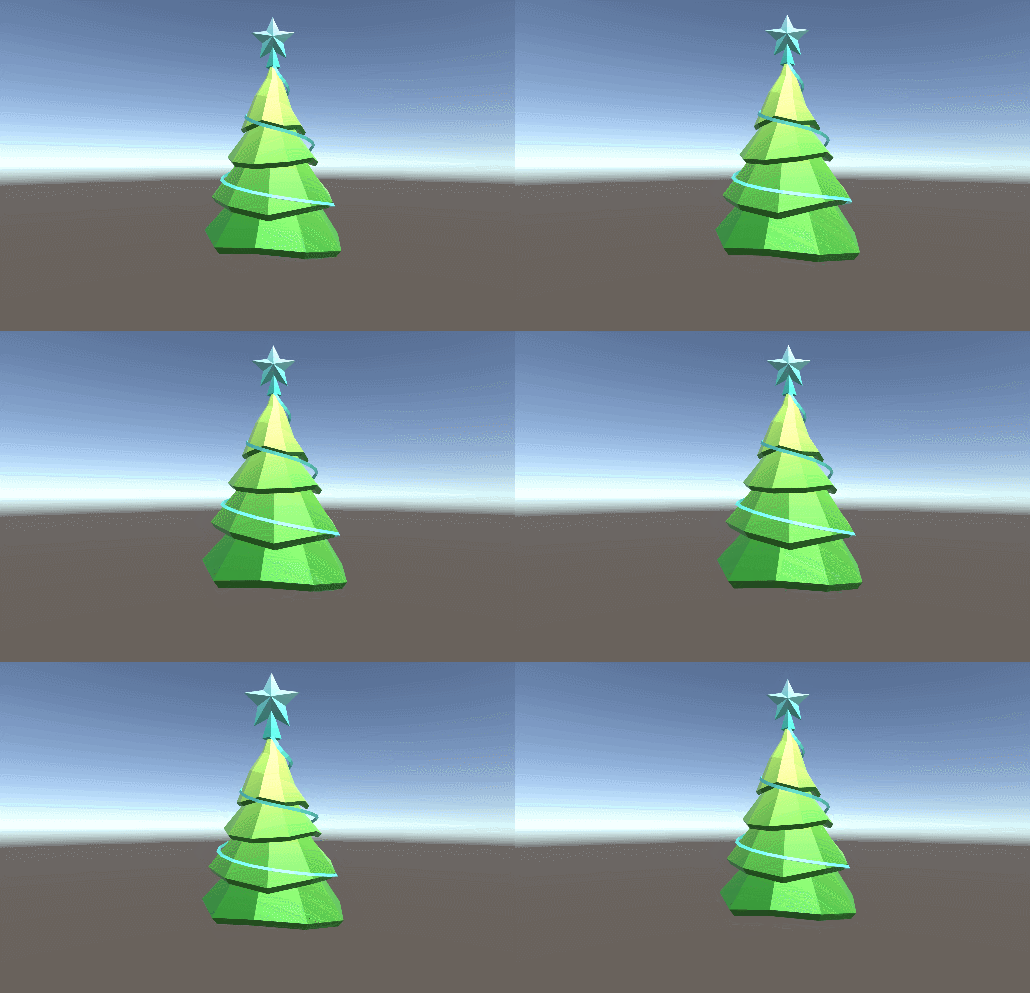
类似的例子(心脏的跳动):https://blog.csdn.net/u010133610/article/details/51863887
unity 顶点弹性网格效果的更多相关文章
- Unity中实现网格轮廓效果,选中边框效果
问题背景: 最近要实现选中实体的高亮效果,要那种类似于unity中Outline的效果,网格轮廓高亮效果. 效果图: 具体代码: OutlineEffect.cs 实体高亮效果类: 轮廓边总控制类,该 ...
- Unity 实现物体破碎效果(转)
感谢网友分享,原文地址(How to Make an Object Shatter Into Smaller Fragments in Unity),中文翻译地址(Unity实现物体破碎效果) In ...
- css3网格效果(整理)
css3网格效果(整理) 一.总结 一句话总结: css3网格原理是渐变(linear-gradient)绘制图形,background-size属性指定重复的小单元的大小 多个渐变(linear-g ...
- unity 实现物体破碎效果的一些方法 - 细雨淅淅
游戏越来越接近现实的感觉,如果有一个真是的 虚拟现实设备,可能我们真的会感觉是在真实世界.场景的逼真是在渲染效果.角色AI.游戏逻辑.物理效果等等一起导致的结果.现在游戏越来越大,除了渲染,物理估计是 ...
- unity 实现物体破碎效果的一些方法
游戏越来越接近现实的感觉,如果有一个真是的 虚拟现实设备,可能我们真的会感觉是在真实世界.场景的逼真是在渲染效果.角色AI.游戏逻辑.物理效果等等一起导致的结果.现在游戏越来越大,除了渲染,物理估计是 ...
- 关于Unity中Mesh网格的详解
3D模型 通过3D建模软件所建出来的点和面,如以三角形为主的点和面,比如人的脑袋一个球,就是由各种各样的三角形组成的点和面. 点和面以及纹理坐标都是通过3D建模软件建模出来的. Unity会帮我们把模 ...
- 关于Unity中蒙皮网格和布料的使用
所以物体的要绘制出来就必须要有网格组件+材质属性,如果还需要其他特效或丰富内容的话,还可以再加组件. 蒙皮网格和布料 1: 例如要模拟衣服,随风摆动,模拟布料需要用到蒙皮网格和布料;2: 蒙皮网格可以 ...
- Unity Shader 之 透明效果
透明效果 透明效果一般有两种实现方法: 第一种,使用透明度测试(Alpha Test) 第二种,使用透明度混合(Alpha Blending) 透明度测试和透明度混合机制: 透明度测试(Alpha T ...
- Unity Shader实现描边效果
http://gad.qq.com/article/detail/28346 描边效果是游戏里面非常常用的一种效果,一般是为了凸显游戏中的某个对象,会给对象增加一个描边效果.本篇文章和大家介绍下利用S ...
随机推荐
- centos8平台使用vmstat监控系统
一,vmstat的用途和特点: vmstat 是一个常用的系统性能分析工具,主要用来分析系统的内存使用情况,也常用来分析 CPU 上下文切换和中断的次数. 相对于 iostat 来说,vmstat 可 ...
- centos8平台编译安装nginx1.18.0
一,nginx的官网: http://nginx.org/ 说明:刘宏缔的架构森林是一个专注架构的博客,地址:https://www.cnblogs.com/architectforest 对应的源码 ...
- react渲染数据3种方式
直接渲染,()类似于模板字符串,包裹一个dom元素 ReactDOM.render( (<div> <h2>现在时间:{new Date().toLocaleTimeStrin ...
- Luogu-2480 古代猪文
我们首先来概括一下题意,其实就是给定 \(n,g\),求: \[g^{\sum_{k\nmid n} C_n^{\frac{n}{k}}}\operatorname{mod} 999911659 \] ...
- linux ssh自动输入密码,expect使用
想搞一个使用ssh登录批量ip地址执行命令,自动输入密码的脚本,但是ssh不能使用标准输入来实现自动输入密码,于是了解到了expect这个可以交互的命令 是什么 查看使用man查看expect,是这么 ...
- git学习(六) git reset操作
git reset 操作 git reset git reset HEAD 文件名 移除不必要的添加到暂存区的文件 git reset HEAD^ 或者 commitid 去掉上一次的提交 git r ...
- linux mount 挂载提示 mount: you must specify the filesystem type
解决方法: mkfs.ext3 /dev/vdv mount -t ext3 /dev/vdv /usr1
- Pyqy5 让窗口居中
# QDesktopWidget import sys from PyQt5.QtWidgets import QDesktopWidget,QMainWindow,QApplication from ...
- c++ stl库中的set
简单说来 set(集合)里的元素 不会有相同元素(也就是说 相同的值不存 )并且 存进去会自动排序 类比sort默认排序从小到大 set排序也是 set/multiset会根据待定的排序准则,自动将 ...
- 使用Socket通信(一)
使用socket需要一个服务器,我用的是tomcat,好像AS不支持Tomcat了,还有什么好的服务器求推荐,使用Tomcat去官网下载,然后还要安装Java的jdk,然后配置jak环境变量,然后配置 ...