
9.25 DOM作业
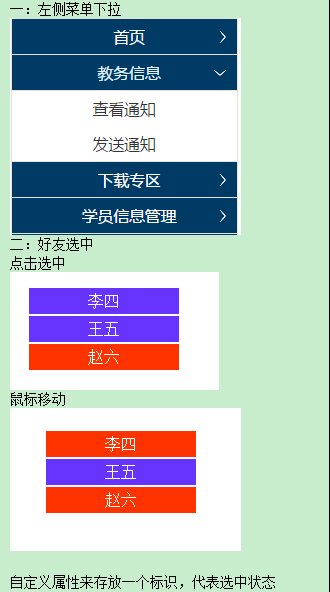
一
<style type="text/css">
*{margin:0px auto; padding:0px; font-family:微软雅黑; font-size:16px}
#cd{ width:100px; margin:30px 0px 0px 30px; background-color:#0FF}
.dh{ width:100px; height:25px; line-height:25px; text-align:center; vertical-align:middle; background-color:#F63; margin-top:2px}
.dh:hover{ cursor:pointer; background-color:#0CC}
.nr{width:100px;}
.fx{width:100px; height:25px; line-height:25px; text-align:center; vertical-align:middle; background-color:#0FF; margin-top:2px}
</style>
</head>
<body>
<div id="cd">
<div class="dh" onclick="show('z1')">首页</div>
<div class="nr" id="z1" style="display:none">
<div class="fx">查看通知</div>
<div class="fx">发送通知</div>
</div>
<div class="dh" onclick="show('z2')">教务信息</div>
<div class="nr" id="z2" style="display:none">
<div class="fx">查看通知</div>
<div class="fx">发送通知</div>
</div>
<div class="dh" onclick="show('z3')">下载专区</div>
<div class="nr" id="z3" style="display:none">
<div class="fx">查看通知</div>
<div class="fx">发送通知</div>
</div>
<div class="dh" onclick="show('z4')">学员信息管理</div>
<div class="nr" id="z4" style="display:none">
<div class="fx">查看通知</div>
<div class="fx">发送通知</div>
</div>
</div>
<script type="text/javascript">
function show(id)
{
var z=document.getElementById(id);
if(z.style.display=="none")
{z.style.display="block"}
else
{z.style.display="none"}
var nr=document.getElementsByClassName("nr");
var n=nr.length;
for(i=0;i<n;i++)
{
if(nr[i]!=z)
{nr[i].style.display="none";}
}
}
</script>
二. 第二题提供两种方法,略有不同,仅做对比:
方法1:
<style type="text/css">
*{ margin:0px auto; padding:0px; font-family:微软雅黑; font-size:16px;}
.f{ width:200px; height:30px; color:white; text-align:center; line-height:30px; vertical-align:middle; margin-top:3px}
.f:hover{ cursor:pointer;}
</style>
</head>
<body>
<div style="width:200px; height:600px; margin-top:30px">
<div class="f" onclick="Xuan(this)" onmouseover="Bian(this)" onmouseout="Hui(this)" xz="0">张三</div>
<div class="f" onclick="Xuan(this)" onmouseover="Bian(this)" onmouseout="Hui(this)" xz="0">李四</div>
<div class="f" onclick="Xuan(this)" onmouseover="Bian(this)" onmouseout="Hui(this)" xz="0">王五</div>
<div class="f" onclick="Xuan(this)" onmouseover="Bian(this)" onmouseout="Hui(this)" xz="0">赵六</div>
<div class="f" onclick="Xuan(this)" onmouseover="Bian(this)" onmouseout="Hui(this)" xz="0">马七</div>
</div>
</body>
<script type="text/javascript">
function Xuan(a)
{
var attr = document.getElementsByClassName("f");
for(var i=0;i<attr.length;i++)
{
attr[i].style.backgroundColor = "#63C";
attr[i].setAttribute("xz","0");
}
a.setAttribute("xz","1");
a.style.backgroundColor = "#F63";
}
function Bian(a)
{
var attr = document.getElementsByClassName("f");
for(var i=0;i<attr.length;i++)
{
if(attr[i].getAttribute("xz")=="0")
{
attr[i].style.backgroundColor = "#63C";
}
}
a.style.backgroundColor = "#F63";
}
function Hui(a)
{
var attr = document.getElementsByClassName("f");
for(var i=0;i<attr.length;i++)
{
if(attr[i].getAttribute("xz")=="0")
{
attr[i].style.backgroundColor = "#63C";
}
}
}
</script>
方法2:
*{margin:0px auto; padding:0px; font-family:微软雅黑; font-size:16px}
#list{ width:150px; margin-top:35px;}
.mingzi{ width:150px; height:30px; line-height:30px; text-align:center; vertical-align:middle; background-color:#36F;9 margin-top:3px; border:1px solid #CCC}
.mingzi:hover{ /*background-color:#C93;*/ cursor:pointer}
</style>
</head>
<body>
<h1>好友选择</h1>
<div id="list">
<div class="mingzi" onclick="jh('z1')" onmouseover="bs('z1')" onmouseout="bh('z1')" id="z1" bianliang="0">EI</div>
<div class="mingzi" onclick="jh('z2')" onmouseover="bs('z2')" onmouseout="bh('z2')" id="z2" bianliang="0">ANDY</div>
<div class="mingzi" onclick="jh('z3')" onmouseover="bs('z3')" onmouseout="bh('z3')" id="z3" bianliang="0">JUDY</div>
<div class="mingzi" onclick="jh('z4')" onmouseover="bs('z4')" onmouseout="bh('z4')" id="z4" bianliang="0">FOCUS</div>
<div class="mingzi" onclick="jh('z5')" onmouseover="bs('z5')" onmouseout="bh('z5')" id="z5" bianliang="0">WARNER</div>
</div>
<script type="text/javascript">
function jh(id)
{
var no=document.getElementsByClassName("mingzi");
var n=no.length;
for(i=0;i<n;i++)
{no[i].style.backgroundColor="#36F";
no[i].setAttribute("bianliang",0);
}
document.getElementById(id).style.backgroundColor="#C93";
var a=document.getElementById(id);
a.setAttribute("bianliang",1);
}
function bs(id)
{
document.getElementById(id).style.backgroundColor="#C93";
}
function bh(id)
{ var a=document.getElementById(id);
var pd=a.getAttribute("bianliang");
if(pd==0)
{document.getElementById(id).style.backgroundColor="#36F";}
}
</script>
9.25 DOM作业的更多相关文章
- dom作业
<body> <select size="7" style="width: 200px;" id="slt"> &l ...
- noip第25课作业
1. 求一个有向图所有顶点入度的和 输入有向图的顶点个数,边数以及各顶点之间的关联情况,要求求出这个有向图的所有顶点入度的总和. [输入格式] 第1行:2个空格分开的整数n(2<=n< ...
- 2016/1/25 多线程 作业 方法一 继承Thread 方法二 实现Runnable 多线程笔记
/* * 1,尝试定义一个继承Thread类的类,并覆盖run()方法, * 在run()方法中每隔100毫秒打印一句话.*/ package Stream; //方法一 继承Thread 实现多线程 ...
- 凤翔中学高三数学[备课&作业]
#tab{ font-size:22px ;font-family:楷体;text-align:center;} a:link { text-decoration: none;} 凤中2020届高三文 ...
- syspolicy_purge_history作业故障排除
描述 我们有一台数据库服务器windows 2012 r2 上有安装sql server 2012 和sql server 2016双实例,后续又把sql 2016的服务全部停用,即只保留sql 20 ...
- [BUAA2021软工助教]案例分析作业总结
目录 一.作业链接 二.优秀作业推荐 A+作业推荐 A作业推荐 三.总结 所有案例分析总结 特色与优点 问题与建议 不同类产品案例分析Bug汇总 CSDN问答社区.Stack Overflow.Seg ...
- jQuery源码分析系列
声明:本文为原创文章,如需转载,请注明来源并保留原文链接Aaron,谢谢! 版本截止到2013.8.24 jQuery官方发布最新的的2.0.3为准 附上每一章的源码注释分析 :https://git ...
- jQuery数据缓存方案详解:$.data()的使用
我们经常使用隐藏控件或者是js全局变量来临时存储数据,全局变量容易导致命名污染,隐藏控件导致经常读写dom浪费性能.jQuery提供了自己的数据缓存方案,能够达到和隐藏控件.全局变量相同的效果,但是j ...
- jquery2源码分析系列
学习jquery的源码对于提高前端的能力很有帮助,下面的系列是我在网上看到的对jquery2的源码的分析.等有时间了好好研究下.我们知道jquery2开始就不支持IE6-8了,从jquery2的源码中 ...
随机推荐
- OSPF协议详解
CCNP OSPF协议详解 2010-02-24 20:30:22 标签:CCNP 职场 OSPF 休闲 OSPF(Open Shortest Path Fitst,ospf)开放最短路径优先协议,是 ...
- ios UITableview 刷新某一个cell 或 section
//一个section刷新 NSIndexSet *indexSet=[[NSIndexSet alloc]initWithIndex:]; [tableview reloadSections:ind ...
- jquery渐渐的显示、隐藏效果
<!DOCTYPE html> <html> <head> <meta charset="gb2312" /> <title& ...
- 理解MySQL数据库覆盖索引
话说有这么一个表: CREATE TABLE `user_group` ( `id` int(11) NOT NULL auto_increment, `uid` int(11) NOT NULL, ...
- [转]javascript Date format(js日期格式化)
方法一:这个很不错,好像是 csdn 的 Meizz 写的: // 对Date的扩展,将 Date 转化为指定格式的String // 月(M).日(d).小时(h).分(m).秒(s).季度(q) ...
- iOS开发,音效的播放简单实现以及音效播放的简单封装
一.音效的播放简单实现 二.音效播放的封装 -- 封装思路:将生成的SystemSoundID存放到字典中,每次播放的时候从字典中取出对应的SystemSoundID,没有的话再创建 头文件中定义类方 ...
- Java 测试代码模板
package com.robert.service; import org.apache.commons.logging.Log; import org.apache.commons.logging ...
- 【BZOJ 1178】【APIO 2009】CONVENTION会议中心
http://www.lydsy.com/JudgeOnline/problem.php?id=1178 这道题想了好久没想明白,倍增数组通过看题解很快就明白了,但是一小段区间内应有的最多线段数一直不 ...
- Python % 格式化字符串
格式字符串 python 使用一个字符串作为模板 模板中含有格式符,为真实值预留位置 使用tuple或者字典来传递值 模板和值之间,用 % 来表示格式化操作 例子: 1) tuple 传值 print ...
- 65.Android 三大图片缓存原理、特性对比 (转)
这是 Trinea 在 MDCC 上分享的内容(略微改动),也是源码解析第一期发布时介绍的源码解析后续会慢慢做的事. 从总体设计和原理上对几个图片缓存进行对比,没用到他们的朋友也可以了解他们在某些特性 ...