
Token Based Authentication in Web API 2
原文地址:http://www.c-sharpcorner.com/uploadfile/736ca4/token-based-authentication-in-web-api-2/
Introduction
This article explains the OWIN OAuth 2.0 Authorization and how to implement an OAuth 2.0 Authorization server using the OWIN OAuth middleware.
The OAuth 2.0 Authorization framwork is defined in RFC 6749. It enables third-party applications to obtain limited access to HTTP services, either on behalf of a resource owner by producing a desired effect on approval interaction between the resource owner and the HTTP service or by allowing the third-party application to obtain access on its own behalf.
Now let us talk about how OAuth 2.0 works. It supports the following two (2) different authentication variants:
- Three-Legged
- Two-Legged
Three-Legged Approach: In this approach, a resource owner (user) can assure a third-party client (mobile applicant) about the identity, using a content provider (OAuthServer) without sharing any credentials to the third-party client.
Two-Legged Approach: This approach is known as a typical client-server approach where the client can directly authenticate the user with the content provider.
Multiple classes are in OAuth Authorization
OAuth Authorization can be done using the following two classes:
- IOAuthorizationServerProvider
- OAuthorizationServerOptions
IOAuthorizationServerProvider
It extends the abstract AuthenticationOptions from Microsoft.Owin.Security and is used by the core server options such as:
- Enforcing HTTPS
- Error detail level
- Token expiry
- Endpoint paths
We can use the IOAuthorizationServerProvider class to control the security of the data contained in the access tokens and authorization codes. System.Web will use machine key data protection, whereas HttpListener will rely on the Data Protection Application Programming Interface (DPAPI). We can see the various methods in this class.
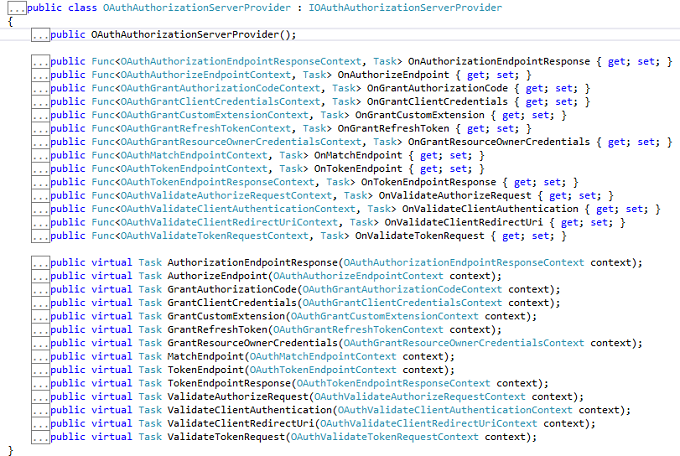
OAuthorizationServerOptions
IOAuthAuthorizationServerProvider is responsible for processing events raised by the authorization server. Katana ships with a default implementation of IOAuthAuthorizationServerProvider called OAuthAuthorizationServerProvider. It is a very simple starting point for configuring the authorization server, since it allows us to either attach individual event handlers or to inherit from the class and override the relevant method directly.We can see the various methods in this class.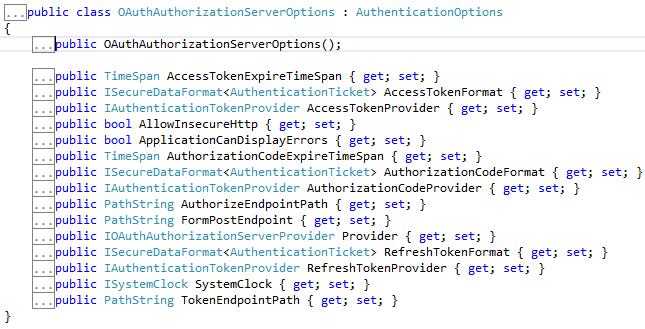
From now we can start to learn how to build an application having token-based authentication.
Step 1
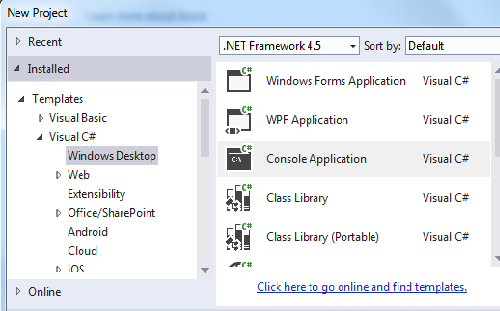
Open the Visual Studio 2013 and click New Project.
Step 2
Select the Console based application and provide a nice name for the project.
Step 3
Create a Token class and Add some Property.
- public class Token
- {
- [JsonProperty("access_token")]
- public string AccessToken { get; set; }
- [JsonProperty("token_type")]
- public string TokenType { get; set; }
- [JsonProperty("expires_in")]
- public int ExpiresIn { get; set; }
- [JsonProperty("refresh_token")]
- public string RefreshToken { get; set; }
- }
Step 4
Create a startup class and use the IOAuthorizationServerProvider class as well as the OAuthorizationServerOptions class and set the dummy password and username. I have also set the default TokenEndpoint and TokenExpire time.
- public class Startup
- {
- public void Configuration(IAppBuilder app)
- {
- var oauthProvider = new OAuthAuthorizationServerProvider
- {
- OnGrantResourceOwnerCredentials = async context =>
- {
- if (context.UserName == "rranjan" && context.Password == "password@123")
- {
- var claimsIdentity = new ClaimsIdentity(context.Options.AuthenticationType);
- claimsIdentity.AddClaim(new Claim("user", context.UserName));
- context.Validated(claimsIdentity);
- return;
- }
- context.Rejected();
- },
- OnValidateClientAuthentication = async context =>
- {
- string clientId;
- string clientSecret;
- if (context.TryGetBasicCredentials(out clientId, out clientSecret))
- {
- if (clientId == "rajeev" && clientSecret == "secretKey")
- {
- context.Validated();
- }
- }
- }
- };
- var oauthOptions = new OAuthAuthorizationServerOptions
- {
- AllowInsecureHttp = true,
- TokenEndpointPath = new PathString("/accesstoken"),
- Provider = oauthProvider,
- AuthorizationCodeExpireTimeSpan= TimeSpan.FromMinutes(1),
- AccessTokenExpireTimeSpan=TimeSpan.FromMinutes(3),
- SystemClock= new SystemClock()
- };
- app.UseOAuthAuthorizationServer(oauthOptions);
- app.UseOAuthBearerAuthentication(new OAuthBearerAuthenticationOptions());
- var config = new HttpConfiguration();
- config.MapHttpAttributeRoutes();
- app.UseWebApi(config);
- }
- }
Step 5
Add a controller inherited from API controller.
- [Authorize]
- public class TestController : ApiController
- {
- [Route("test")]
- public HttpResponseMessage Get()
- {
- return Request.CreateResponse(HttpStatusCode.OK, "hello from a secured resource!");
- }
- }
Step 6
Now check the authorization on the basis of the token, so in the Program class validate it.
- static void Main()
- {
- string baseAddress = "http://localhost:9000/";
- // Start OWIN host
- using (WebApp.Start<Startup>(url: baseAddress))
- {
- var client = new HttpClient();
- var response = client.GetAsync(baseAddress + "test").Result;
- Console.WriteLine(response);
- Console.WriteLine();
- var authorizationHeader = Convert.ToBase64String(Encoding.UTF8.GetBytes("rajeev:secretKey"));
- client.DefaultRequestHeaders.Authorization = new AuthenticationHeaderValue("Basic", authorizationHeader);
- var form = new Dictionary<string, string>
- {
- {"grant_type", "password"},
- {"username", "rranjan"},
- {"password", "password@123"},
- };
- var tokenResponse = client.PostAsync(baseAddress + "accesstoken", new FormUrlEncodedContent(form)).Result;
- var token = tokenResponse.Content.ReadAsAsync<Token>(new[] { new JsonMediaTypeFormatter() }).Result;
- Console.WriteLine("Token issued is: {0}", token.AccessToken);
- Console.WriteLine();
- client.DefaultRequestHeaders.Authorization = new AuthenticationHeaderValue("Bearer", token.AccessToken);
- var authorizedResponse = client.GetAsync(baseAddress + "test").Result;
- Console.WriteLine(authorizedResponse);
- Console.WriteLine(authorizedResponse.Content.ReadAsStringAsync().Result);
- }
- Console.ReadLine();
- }
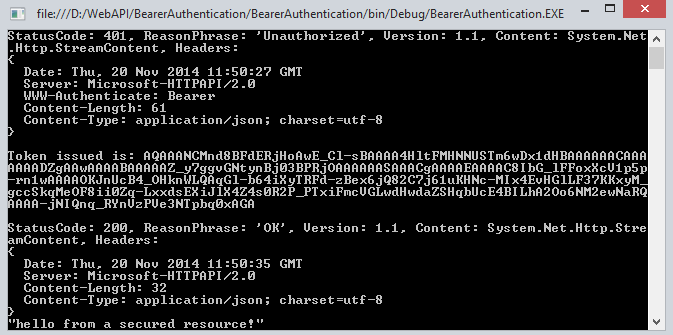
Output
When all the authentication of username and password is not correct then it doesn't generate the token.
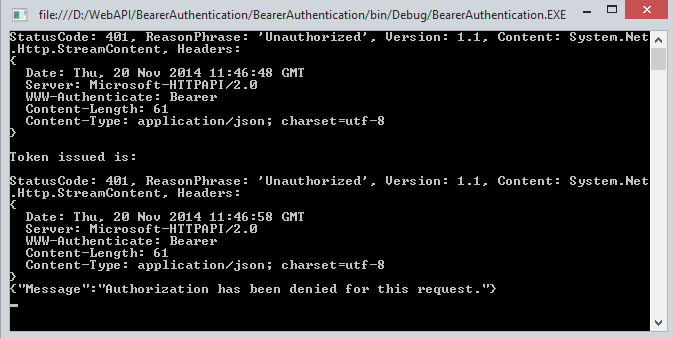
When the Authentication is passed we get success and we get a token.
Summary
In this article we have understand the token-based authentication in Web API 2. I hope you will like it.
Token Based Authentication in Web API 2的更多相关文章
- Claims Based Authentication and Token Based Authentication和WIF
基于声明的认证方式,其最大特性是可传递(一方面是由授信的Issuer,即claims持有方,发送到你的应用上,注意信任是单向的.例如QQ集成登录,登录成功后,QQ会向你的应用发送claims.另一方面 ...
- [转] JSON Web Token in ASP.NET Web API 2 using Owin
本文转自:http://bitoftech.net/2014/10/27/json-web-token-asp-net-web-api-2-jwt-owin-authorization-server/ ...
- JSON Web Token in ASP.NET Web API 2 using Owin
In the previous post Decouple OWIN Authorization Server from Resource Server we saw how we can separ ...
- Dynamics CRM模拟OAuth请求获得Token后在外部调用Web API
关注本人微信和易信公众号: 微软动态CRM专家罗勇 ,回复233或者20161104可方便获取本文,同时可以在第一间得到我发布的最新的博文信息,follow me!我的网站是 www.luoyong. ...
- Asp.Net MVC webAPI Token based authentication
1. 需要安装的nuget <package id="Microsoft.AspNet.Identity.Core" version="2.2.1" ta ...
- 基于JWT(Json Web Token)的ASP.NET Web API授权方式
token应用流程 初次登录:用户初次登录,输入用户名密码 密码验证:服务器从数据库取出用户名和密码进行验证 生成JWT:服务器端验证通过,根据从数据库返回的信息,以及预设规则,生成JWT 返还JWT ...
- Token Based Authentication -- Implementation Demonstration
https://www.w3.org/2001/sw/Europe/events/foaf-galway/papers/fp/token_based_authentication/
- Implement JSON Web Tokens Authentication in ASP.NET Web API and Identity 2.1 Part 3 (by TAISEER)
http://bitoftech.net/2015/02/16/implement-oauth-json-web-tokens-authentication-in-asp-net-web-api-an ...
- 在ASP.NET Web API 2中使用Owin基于Token令牌的身份验证
基于令牌的身份验证 基于令牌的身份验证主要区别于以前常用的常用的基于cookie的身份验证,基于cookie的身份验证在B/S架构中使用比较多,但是在Web Api中因其特殊性,基于cookie的身份 ...
随机推荐
- Guacamole之本地安装Guacamole(二)
摘要 在网上看到一篇Guacamole官方手册的翻译,但是找不到后续,于是想自己也翻译几篇,有时间的话,会尽量多翻译一些. 原文地址:http://guacamole.incubator.apache ...
- [Cordova] 无法编译Visual Studio项目里Plugin副本的Native Code
[Cordova] 无法编译Visual Studio项目里Plugin副本的Native Code 问题情景 开发Cordova Plugin的时候,开发的流程应该是: 建立Cordova Plug ...
- NProgress.js template
NProgress.js:加载进度条:http://ricostacruz.com/nprogress/ 基础的这几个方法 这个网站上都有 我在一个地方看到这个代码 NProgress.configu ...
- swift学习笔记之-访问控制
//访问控制 import UIKit /*访问控制(Access Control) 1.访问控制可以限定其他源文件或模块中的代码对你的代码的访问级别.这个特性可以让我们隐藏代码的一些实现细节,并且可 ...
- 27款后台管理页面设计 DIV+CSS+JS
-----------. 演示: http://www.websjy.com/club/websj ... _61040268/index.htm http://www.websjy.com/club ...
- kali 忘记登录密码后重置的方法
首先启动你的卡里系统,等出现引导界面时选择恢复模式.如下图: 再出来一个界面时,选择第二个并按E键进入编辑模式.如下图: 进入编辑模式后找到如下图的代码: 把ro改为rw,并且在.gz 后面写上ini ...
- .net 模拟登录Post提交
最近在做一个项目,要求集成到第三方系统中,由于先前没有做过类似的活,所以折腾了几天,蹭着有闲情的时候记录一下. 以下实例,都是我用Asp.net语言进行开发的,关于HTML元素的获取,使用的是Goog ...
- 论使用LeanCloud中遇到的坑
1.短信验证码 当注册用户的时候,会发现收不到短信验证码,打印e : That operation isn't allowed for clients. 含义 - 该操作无法从客户端发起.请检查该错误 ...
- Gradle多渠道打包
国内Android市场众多渠道,为了统计每个渠道的下载及其它数据统计,就需要我们针对每个渠道单独打包 以友盟多渠道打包为例 在AndroidManifest.xml里面 <meta-data a ...
- 如何为Swift进行宏定义
这阵子一直在自学Swift, 因为之前iOS的开发一直用Objective-C, 所以习惯了C语言那种宏定义方式, Swift作为一款更加安全的语言, 放弃了C语言中的宏定义, 有效的防止预编译时代码 ...