
Ubuntu之MaxScale安装配置
原文github:https://github.com/mariadb-corporation/MaxScale/blob/develop/Documentation/Documentation-Contents.md
参考 github上的说明,在Ubuntu上做以下处理即可:
1.安装相关命令:
sudo apt-get install git build-essential libssl-dev libaio-dev ncurses-dev bison flex cmake perl libtool libcurl4-openssl-dev libpcre3-dev tcl
tcl-dev uuid uuid-dev
2.从GitHub上拷贝MaxScale:
git clone https://github.com/mariadb-corporation/MaxScale
3.创建一个build文件夹,并进入:
mkdir build
cd build
4.配置构建参数【build】:
cmake ../MaxScale -DBUILD_TESTS=Y
5.一旦参数配置完成,就可以进行编译、测试和安装MaxScale
make
make test
sudo make install
安装路径说明:
配置模板文件和相关说明文件位于 /usr/local/share/maxscale目录下
配置文件为:/etc/maxscale.cnf
启动文件为:/etc/init.d/maxscale
Log文件:/var/log/maxscale
Cache:/var/cache/maxscale
bin文件:/usr/local/bin/maxscale
相关参考: http://www.yunweipai.com/archives/9148.html
http://blog.5ibc.net/p/68683.html
使用:
在开始配置前,要在Master为MaxScale创建两个用户,用于监控模块和路由模块。
创建监控用户:scalemon 123456

创建路由用户:maxscale 123456
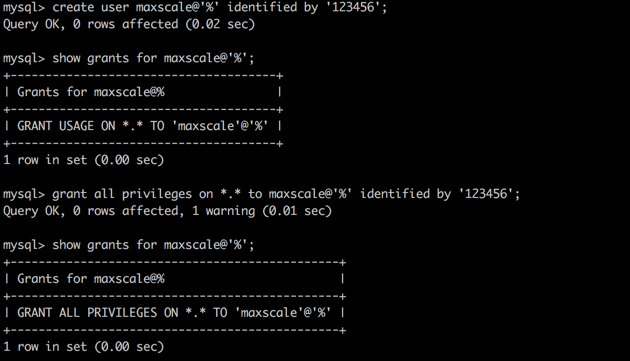
用户创建完成后,开始配置
vi /etc/maxscale.cnf
找到 [server1] 部分,修改其中的 address 和 port,指向 master 的 IP 和端口。
复制2次 [server1] 的整块儿内容,改为 [server2] 与 [server3],同样修改其中的 address 和 port,分别指向 slave1 和 slave2,可参考如下:
[maxscale]
threads=1
log_info=1
logdir=/var/log/maxscale/
datadir=/usr/local/var/lib/maxscale/data/
# default is true.when all slave dumped ,master is read-writeable.
detect_stale_master=false
#default is true,means master can handle read
master_accept_reads=false
[server1]
type=server
address=192.168.7.222
port=3306
protocol=MySQLBackend
[server2]
type=server
address=192.168.7.224
port=3306
protocol=MySQLBackend
[server3]
type=server
address=192.168.7.223
port=3306
protocol=MySQLBackend
[MySQL Monitor]
type=monitor
module=mysqlmon
servers=server1,server2,server3
user=scalemon
passwd=9E509EC08A55148962B5CA53A64211C1
monitor_interval=1000
[Read-Write Service]
type=service
router=readwritesplit
servers=server1,server2,server3
user=maxscale
passwd=9E509EC08A55148962B5CA53A64211C1
max_slave_connections=100%
[MaxAdmin Service]
type=service
router=cli
[MaxAdmin Listener]
type=listener
service=MaxAdmin Service
protocol=maxscaled
address=localhost
port=6603
[Read-Write Listener]
type=listener
service=Read-Write Service
protocol=MySQLClient
port=4006
passwd使用的是加密
由maxkeys创建位于datadir下的.secrets文件,maxpasswd 进行加密。
如下:


会生成加密后的密码。
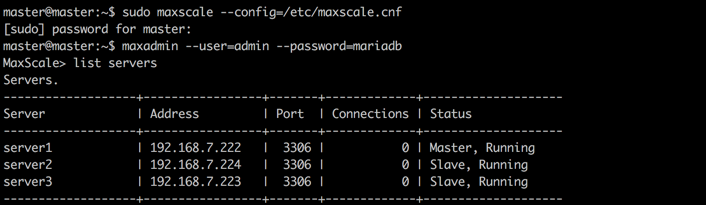
启动maxscale 管理器maxadmin 及进行测试,可参考上述资料。
如果有其他问题,可在此提问:
  Email: maxscale@googlegroups.com

  Forum: http://groups.google.com/forum/#!forum/maxscale
Ubuntu之MaxScale安装配置的更多相关文章
- Ubuntu server16.04安装配置驱动418.87、cuda10.1、cudnn7.6.4.38、anaconda、pytorch超详细解决
目录 安装GCC 安装NVIDIA驱动 1. 卸载原有驱动(没装跳过) 2. 禁用nouveau 3. 安装NVIDIA显卡驱动 安装CUDA10.1 安装cudnn 安装anaconda 安装ten ...
- Ubuntu下apache2安装配置(内含数字证书配置)
Ubuntu下apache2安装配置(内含数字证书配置)安装命令:sudo apt-get updatesudo apt-get install apache2 配置1.查看apache2安装目录命令 ...
- Ubuntu 18.04安装配置Apache Ant
Ubuntu 18.04安装配置Apache Ant 文章目录 Ubuntu 18.04安装配置Apache Ant 下载 执行以下命令 `/etc/profile`中配置环境变量 载入配置 测试 执 ...
- Ubuntu 18.04 安装配置 go 语言
Ubuntu 18.04 安装配置 go 语言 1.下载 下载 jdk 到 Downloands 文件夹下 cd 进入 /usr/local, 创建 go 文件夹, 然后 cd 进这个文件夹 cd / ...
- 【转】Ubuntu 16.04安装配置TensorFlow GPU版本
之前摸爬滚打总是各种坑,今天参考这篇文章终于解决了,甚是鸡冻\(≧▽≦)/,电脑不知道怎么的,安装不了16.04,就安装15.10再升级到16.04 requirements: Ubuntu 16.0 ...
- 【云计算】ubuntu下docker安装配置指南
Docker Engine安装配置 以下描述仅Docker在Ubuntu Precise 12.04 (LTS).Ubuntu Trusty 14.04 (LTS).Ubuntu Wily 15.10 ...
- Ubuntu 14.04 安装配置备忘录
完全在 Linux 下工作,大概有3年时间了. 之前都是用 Windows, 而把 Linux 装在虚拟机里,现在反过来,把 Windows 装在了虚拟机里,只是因为偶尔还要用网银的缘故. 以我这几年 ...
- Ubuntu 15.04 安装配置Apache和mysql的方法
前 言 上篇海面特效的博文结尾提到了SideFX开发的HQueue分布式集群,配置HQueue首先需要安装mysql,所以今天先分享一下如何在Ubuntu系统中安装mysql和Apache: Ubun ...
- ubuntu 及 postgredql 安装配置小坑摘录
ubuntu 16.04.1 安装 Ubuntu Server 16.04.1安装配置图解教程,按教程修改局域网static IP 开启sftp必须 解决SSH服务拒绝密码,之后才能欢乐地使用file ...
随机推荐
- Why Reflection is slowly?(Trail: The Reflection API)
反射的使用 反射通常用于在JVM中应用程序运行中需要检查或者修改运行时行为的项目.这是一个相对高级的特性,并且仅仅可以被对深刻理解java原理的开发者使用.这里给出一个警告的意见,反射是一个强大的技术 ...
- H5图像遮罩-遁地龙卷风
(-1)写在前面 这个idea不是我的,向这位前辈致敬.我用的是chrome49.用到的图片资源在我的百度云盘里http://yun.baidu.com/share/link?shareid=1970 ...
- Android 网络请求框架android-async-http问题
今天通过接口请求服务器的一些app数据,发现一个很奇怪的问题,请求一个链接的时候,通常在第一次请求发起的时候没有什么问题,能很快的拿到数据,但是 往后再去请求的时候就会等待很久,而且最后会请求失败,一 ...
- jQuery学习笔记 - 基础知识扫盲入门篇
jQuery学习笔记 - 基础知识扫盲入门篇 2013-06-16 18:42 by 全新时代, 11 阅读, 0 评论, 收藏, 编辑 1.为什么要使用jQuery? 提供了强大的功能函数解决浏览器 ...
- VSSより、指定したファイルを取得するマクロ(パス入り)
Option Explicit'VSSのiniファイルの場所Private SRCSAFE_INI As String'VSS接続のユーザIDPrivate USER_ID As String'VSS ...
- Android中对Log日志文件的分析[转]
一,Bug出现了, 需要“干掉”它 bug一听挺吓人的,但是只要你懂了,android里的bug是很好解决的,因为android里提供了LOG机制,具体的底层代码,以后在来分析,只要你会看bug, a ...
- 极客DIY:制作一个可以面部、自主规划路径及语音识别的无人机
引言 现在大部分无人机厂商都会为第三方开发者提供无人机API接口,让他们更容易地开发无人机飞行控制应用程序,让无人机想怎么玩就怎么玩.有的API接口可以帮助开发者开发基于Web版的APP.手机APP甚 ...
- hustoj1353 节点选择 树形dp
1353: 结点选择 时间限制: 1 Sec 内存限制: 128 MB提交: 6 解决: 2[提交][状态][讨论版] 题目描述 问题描述 有一棵 n 个节点的树,树上每个节点都有一个正整数权值. ...
- bootstrap 响应式布局
先上点媒体查询css(某个著名的”段子“),跟bootstrap无关: <html> <head> <style> body { background-color: ...
- phpcms不显示验证码
只需修改./caches/configs/system.php即可 1.本地域名如果是 http://localhost 如果所有的文件都在根目录下(例如apache下的htdocs或www),此时, ...