
【AngularJS】—— 11 指令的交互
前面基本了解了指令的相关内容:
1 如何自定义指令
2 指令的复用
本篇看一下指令之间如何交互。学习内容来自《慕课网 指令3》
背景介绍
这例子是视频中的例子,有一个动感超人,有三种能力,力量strength,速度speed,发光light。
这三种能力作为三种属性,定义动感超人作为一个标签,只要添加对应的属性就能拥有该能力。
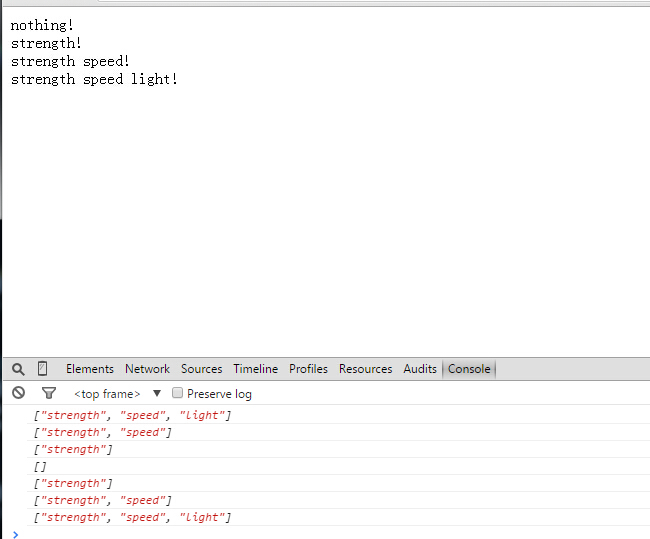
为了便于结果的展示,为标签添加鼠标的响应事件,当鼠标移动到对应的标签上就会触发一个方法,打印出具备的能力。
程序分析
html部分的代码如下:
        <div>

            <superman>nothing!</superman>

            <superman strength >strength!</superman>

            <superman strength speed >strength speed!</superman>

            <superman strength speed light >strength speed light!</superman>

        </div>
下面看看如何实现,首先依然是创建一个模块:
var myAppModule = angular.module("myApp",[]);
在该模块的基础上,创建标签superman,与前面类似。
myAppModule.directive("superman",function(){

                return{

                    scope:{},

                    restrict:'AE',

                    transclude:true,

                    template:"<div><div ng-transclude></div></div>",

                    controller:function($scope){

                        $scope.abilities = [];

                        this.addStrength = function(){

                            $scope.abilities.push("strength");

                        };

                        this.addSpeed = function(){

                            $scope.abilities.push("speed");

                        };

                        this.addLight = function(){

                            $scope.abilities.push("light");

                        };

                    },

                    link:function(scope,element,attr){

                        element.bind("mouseenter",function(){

                            console.log(scope.abilities);

                        });

                    }

                }

            });
这里不同的是,在方法内部有一个controller属性,这个并不是ng-controller这种控制器,而是指令对外开放的一个接口,里面声明的方法,在外部可以作为公开的方法使用,其他的指令可以通过依赖,使用这些方法。
接下来再创建三个能力对应的指令
            myAppModule.directive("strength",function(){

                return{

                    require:'^superman',

                    link:function(scope,element,attr,supermanCtrl){

                        supermanCtrl.addStrength();

                    }

                }

            });

            myAppModule.directive("speed",function(){

                return{

                    require:'^superman',

                    link:function(scope,element,attr,supermanCtrl){

                        supermanCtrl.addSpeed();

                    }

                }

            });

            myAppModule.directive("light",function(){

                return{

                    require:'^superman',

                    link:function(scope,element,attr,supermanCtrl){

                        supermanCtrl.addLight();

                    }

                }

            });
三个指令的代码都差不多,其中require指定了依赖的指令。
link中多了一个参数supermanCtrl,这个参数猜想是superman中的controller,所以命名采用superman+Ctrl的方式。
【由于不懂内部原理,这里仅仅是猜想,但是实验证明,如果改变这个参数的名字,会报错。】
声明了这三个指令,就可以把这三个指令当做super的属性来使用,当注明该属性时,就会触发内部的link内的方法,调用superman中公开的方法。
总结起来,指令的交互过程:
1 首先创建一个基本的指令,在controller属性后,添加对外公开的方法。
2 创建其他交互的指令,在require属性后,添加对应的指令依赖关系;在link中调用公开的方法
全部程序代码:
<!doctype html>

<html ng-app="myApp">

    <head>

         <meta http-equiv="Content-Type" content="text/html; charset=utf-8" />

         <script src="http://apps.bdimg.com/libs/angular.js/1.2.16/angular.min.js"></script>

    </head>

    <body>

        <div>

            <superman>nothing!</superman>

            <superman strength >strength!</superman>

            <superman strength speed >strength speed!</superman>

            <superman strength speed light >strength speed light!</superman>

        </div>

        <script type="text/javascript">

            var myAppModule = angular.module("myApp",[]);

            myAppModule.directive("superman",function(){

                return{

                    scope:{},

                    restrict:'AE',

                    transclude:true,

                    template:"<div><div ng-transclude></div></div>",

                    controller:function($scope){

                        $scope.abilities = [];

                        this.addStrength = function(){

                            $scope.abilities.push("strength");

                        };

                        this.addSpeed = function(){

                            $scope.abilities.push("speed");

                        };

                        this.addLight = function(){

                            $scope.abilities.push("light");

                        };

                    },

                    link:function(scope,element,attr){

                        element.bind("mouseenter",function(){

                            console.log(scope.abilities);

                        });

                    }

                }

            });

            myAppModule.directive("strength",function(){

                return{

                    require:'^superman',

                    link:function(scope,element,attr,supermanCtrl){

                        supermanCtrl.addStrength();

                    }

                }

            });

            myAppModule.directive("speed",function(){

                return{

                    require:'^superman',

                    link:function(scope,element,attr,supermanCtrl){

                        supermanCtrl.addSpeed();

                    }

                }

            });

            myAppModule.directive("light",function(){

                return{

                    require:'^superman',

                    link:function(scope,element,attr,supermanCtrl){

                        supermanCtrl.addLight();

                    }

                }

            });

        </script>

    </body>

</html>
运行结果:
【AngularJS】—— 11 指令的交互的更多相关文章
- AngularJS: 自定义指令与控制器数据交互
<!doctype html> <html> <head> <meta charset="utf-8"> <title> ...
- 学习AngularJs:Directive指令用法(完整版)
这篇文章主要学习AngularJs:Directive指令用法,内容很全面,感兴趣的小伙伴们可以参考一下 本教程使用AngularJs版本:1.5.3 AngularJs GitHub: http ...
- AngularJS之指令
紧接上篇博客“初探AngularJS” 一.前言 在AngularJS中指令尤为重要且内容庞多,固单独提炼出来,梳理一番.如有错误,请不吝讲解. 好了,言归正传,让我们一起走进Angular指令的世界 ...
- 带你走近AngularJS - 体验指令实例
带你走近AngularJS系列: 带你走近AngularJS - 基本功能介绍 带你走近AngularJS - 体验指令实例 带你走近AngularJS - 创建自定义指令 ------------- ...
- AngularJs自定义指令详解(2) - template
一些用于定义行为的指令,可能不需要使用template参数. 当指定template参数时,其值可以是一个字符串,表示一段HTML文本,也可以是一个函数,这函数接受两个参数:tElement和tAtt ...
- AngularJs自定义指令详解(1) - restrict
下面所有例子都使用angular-1.3.16.下载地址:http://cdn.bootcss.com/angular.js/1.3.16/angular.min.js 既然AngularJs快要发布 ...
- angularJS自定义指令间的“沟通”
由此例子我们可以看出,angularJS使用指令时link的执行顺序<html> <head> <meta charset="utf-8"/> ...
- 学习AngularJs:Directive指令用法
跟我学AngularJs:Directive指令用法解读(上) http://blog.csdn.net/evankaka/article/details/51232895 跟我学AngularJs: ...
- 《AngularJS》--指令的相互调用
转载自http://blog.csdn.net/zhoukun1008/article/details/51296692 人们喜欢AngularJS,因为他很有特色,其中他的指令和双向数据绑定很吸引着 ...
随机推荐
- Windows下Nginx+Mysql+Php(wnmp)环境搭建
前言 最近想在windows下使用nginx搭建web环境,本来想用套件(WNMP)一键安装,但后来放弃了,觉得还是自己动手,丰衣足食的好,而且套件的局限性太大.所以后来就各种搜索,看到前辈写关于wn ...
- 良精南方cms /inc/Check_Sql.asp SQL Injection Based On Cookie
catalog . 漏洞描述 . 漏洞触发条件 . 漏洞影响范围 . 漏洞代码分析 . 防御方法 . 攻防思考 1. 漏洞描述 Relevant Link:2. 漏洞触发条件 0x1: POC usi ...
- RabbitMQ Exchange中的fanout类型
fanout 多播 在之前都是使用direct直连类型的交换机,通过routingkey来决定把消息推到哪个queue中. 而fanout则是把拿到消息推到与之绑定的所有queue中. 分析业务,怎样 ...
- tar.xz文件如何解压
1. tar.xz介绍 XZ压缩最新压缩率之王 xz这个压缩可能很多都很陌生,不过您可知道xz是绝大数linux默认就带的一个压缩工具. 之前xz使用一直很少,所以几乎没有什么提起. 2. 压缩 ta ...
- GNU CMAKE 笔记
最近在调试OJ, 忙了4天多, 最后的问题是judge模块不能正常工作. judge 模块就是两个C++源文件, 它的工作是 从数据库获取用户提交的源码 测评 将测评结果写到数据库 测评部分是与数据库 ...
- Git 常见问题整理
在学习git的过程中,遇到如下问题,特整理如下: 1 error:src refspec master does not match any 问题产生 a git服务器使用如下命令新建一个项目 $ c ...
- 感受身边app
第一款:高考小秘书.http://www.liqucn.com/rj/519571.shtml.下载链接.我认为产品最大的优势在于对高考生非常有利,实用价值大,对于每年的高考生来说,高考资讯和大学资讯 ...
- linux(centos) 项目部署阶段相关命令汇总
1.ssh免密码登陆主要命令cat ~/.ssh/id_rsa.pub >> ~/.ssh/authorized_keys-->添加公钥service sshd restart -- ...
- JS获取select选中的值,所有option值
<select name="myselect" id="myselect"> <option value="2042"&g ...
- restClient访问SSL
IRestClient client = new RestClient("https://xxx.com/aa/bb"); "; ); ServicePointManag ...