
ASP.NET Core – Upload and Download Files (上传和下载文件)
前言
以前得文章 Asp.net core 学习笔记 ( upload/download files 文件上传与下载 ), 这篇是修订版.
Handle Upload File (处理上传文件)
我的例子是基于 Web API 和 Ajax 的.
前端 Ajax
const btn = document.querySelector('button')!;

btn.addEventListener('click', async () => {

  const formData = new FormData();

  formData.append('file', createTextBlob('Hello World'), 'text1.txt');

  // formData.append('file', createTextBlob('Derrick'), 'text2.txt'); // for multiple file

  await fetch('http://localhost:5221/Upload', {

    method: 'POST',

    body: formData,

  });

  function createTextBlob(text: string): Blob {

    const textEncoder = new TextEncoder();

    const bytes = textEncoder.encode(text);

    return new Blob([bytes], {

      type: 'text/plain',

    });

  }

});
upload 一个/多个 text file.
Web API
DTO
public class UploadDto

{

    public IFormFile File { get; set; } = null!;

}
关键就是这个 IFormFile, 它就是用来接收前端 File 的.
Controller
[ApiController]

public class UploadController : ControllerBase

{

    [HttpPost("Upload")]

    [Consumes("multipart/form-data")]

    [ProducesResponseType(StatusCodes.Status200OK)]

    public async Task<ActionResult> Upload([FromForm] UploadDto dto)

    {

        return Ok("ok");

    }

}
把 upload file 写入 disk
var fileRootFullPath = Path.Combine(AppContext.BaseDirectory, $@"..\..\..\{dto.File.FileName}");

using var fileStream = System.IO.File.Create(fileRootFullPath);

await dto.File.CopyToAsync(fileStream);
IFormFile 用法很简单, 它通过 .FileName 拿到文件名, 通过 CopyToAsync 把 stream 传给别人. 比如上面是把 stream 导入 file stream, 这样就写入磁盘了.
把 upload file stream 传给任何人使用
// 直接读 string 出来

using var stream = dto.File.OpenReadStream();

using var streamReader = new StreamReader(stream, encoding: Encoding.UTF8);

var text = await streamReader.ReadToEndAsync(); // Hello World
通过 OpenReadStream() 导出 stream 就可以做任何 stream 处理了.
handle multiple files
// JavaScript

const formData = new FormData();

formData.append('file', createTextBlob('Hello World'), 'text1.txt');

formData.append('file', createTextBlob('Derrick'), 'text2.txt'); // for multiple file

// C#

public class UploadDto

{

    public List<IFormFile> File { get; set; } = null!;

}
没什么提别的, 就只是换成了 List<IFormFile>
file size limit
ASP.NET Core 默认的 max upload file size 是 28.6 MB。
在 Program.cs
修改 Kestrel
builder.WebHost.ConfigureKestrel((context, serverOptions) =>

{

  serverOptions.Limits.MaxRequestBodySize = 157286400; // 150MB

});
修改 FormOptions
builder.Services.Configure<FormOptions>(options =>

{

  options.MultipartBodyLengthLimit = 157286400; // 150 MB

});
Production IIS 的话,修改 web.config
<?xml version="1.0" encoding="utf-8"?>

<configuration>

  <system.webServer>

    <security>

      <requestFiltering>

        <!-- Set the maximum allowed content length to 150 MB (in bytes) -->

        <requestLimits maxAllowedContentLength="157286400" />

      </requestFiltering>

    </security>

    <!-- Add other configurations as needed -->

  </system.webServer>

</configuration>
Download File (下载文件)
前端 HTML
<a href="http://localhost:5221/Download" download="">download</a>
Web API Controller
[ApiController]

public class UploadController : ControllerBase

{

    [HttpGet("Download")]

    [Produces(MediaTypeNames.Text.Plain)]

    [ProducesResponseType(StatusCodes.Status200OK)]

    public ActionResult Download()

    {

        return new FileContentResult(Encoding.UTF8.GetBytes("Hello World"), "text/plain")

        {

            FileDownloadName = "text.txt"

        };

        // 下面这个写法和上面是等价的

        // return File(

        //     fileContents: Encoding.UTF8.GetBytes("Hello World"),

        //     contentType: "text/plain",

        //     fileDownloadName: "text.txt"

        // );

    }

}
返回 bytes, 声明 ContentType 和 Download File Name 就可以了. 简单
Force open save as dialog (showSaveFilePicker)
用 Chrome 下载文件的体验是,它会直接放到 default location folder 里,除非用户开启 “Ask where to save each file before downloading” 设置
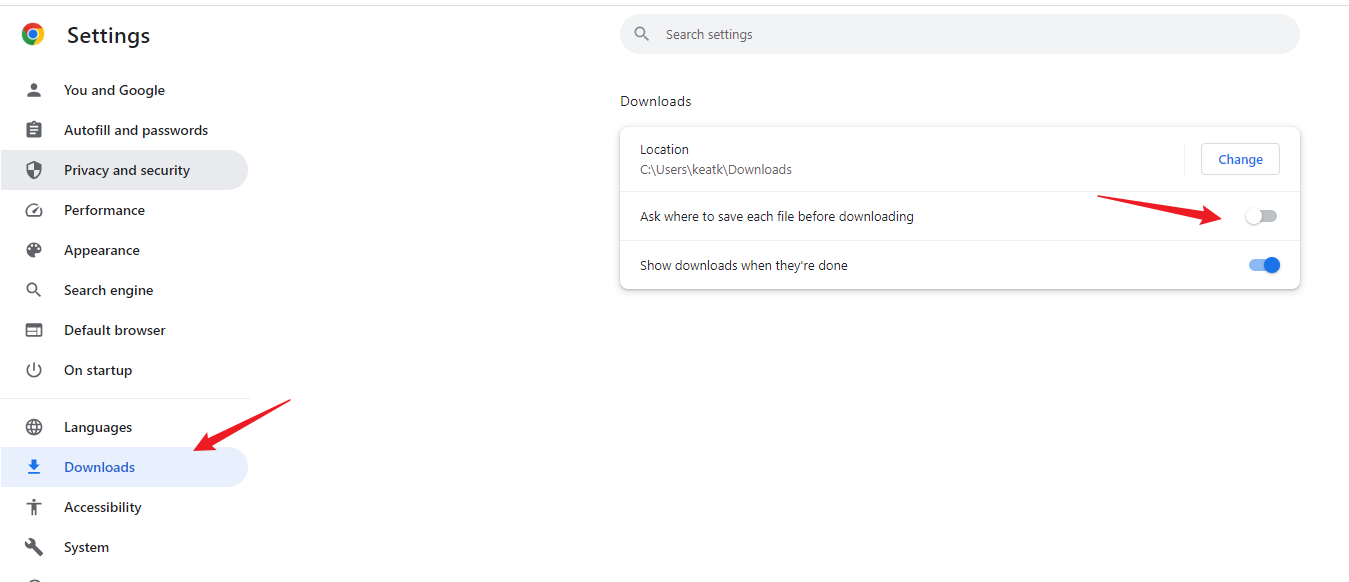
Firefox 也是这样。无意间发现 pixlr.com 在 Chrome 可以 force open save as dialog。
我猜它用了一个比较新的 File System API : showSaveFilePicker。目前只有 Chrome 支持。
参考: Stack Overflow – Force showing the "Save as" dialog box when downloading a file
代码大致长这样
const canvas = document.querySelector<HTMLCanvasElement>('.img')!;

const ctx = canvas.getContext('2d')!;

const response = await fetch('https://192.168.1.152:4200/src/images/nana.jpg');

const blob = await response.blob();

const img = await createImageBitmap(blob);

[canvas.width, canvas.height] = [img.width, img.height];

ctx.drawImage(img, 0, 0);

const btn = document.querySelector<HTMLElement>('.btn')!;

btn.addEventListener('click', () => {

  canvas.toBlob(async blob => {

    // 关键:

    const handle = await showSaveFilePicker({

      suggestedName: 'nana.jpg',

      types: [

        {

          description: 'Jpeg file',

          accept: {

            'image/jpeg': ['.jpeg', '.jpg'],

          },

        },

      ],

    });

    const writable = await handle.createWritable();

    await writable.write(blob!);

    writable.close();

  }, 'image/jpeg');

});
不过这个方式下载的文件,不会出现在 Chrome 的 recently download 记入里面,体验有点差。
另外,目前 TypeScript 还不支持哦,需要
yarn add @types/wicg-file-system-access --dev
ASP.NET Core – Upload and Download Files (上传和下载文件)的更多相关文章
- MVC文件上传03-使用Request.Files上传多个文件
本篇体验在控制器方法中使用controllerContext.HttpContext.Request.Files上传多个文件.兄弟篇为: MVC文件上传01-使用jquery异步上传并客户端验证类型和 ...
- Spring Boot之 Controller 接收参数和返回数据总结(包括上传、下载文件)
一.接收参数(postman发送) 1.form表单 @RequestParam("name") String name 会把传递过来的Form表单中的name对应 ...
- 利用SecureCRT上传、下载文件(使用sz与rz命令),超实用!
利用SecureCRT上传.下载文件(使用sz与rz命令),超实用! 文章来源:http://blog.csdn.net/dongqinliuzi/article/details/39623169 借 ...
- 每天一个linux命令(26)--用SecureCRT来上传和下载文件
用SSH管理Linux 服务器时经常需要远程与本地之间交互文件,而直接使用 SecureCRT 自带的上传下载功能无疑是最方便的,SecureCRT下的文件传输协议有ASCII.Xmodem.Zmod ...
- oracle EBS上传和下载文件(转)
最近一直在做一个工作流的项目,最终用户要求在发送消息的时候可以附带附件,这个又是给我的一个难题.在网上查了一下ORACLE上传资料,找到了黄建华前辈写的<Oracle EBS Forms开发指南 ...
- 【Loadrunner】使用LoadRunner上传及下载文件
使用LoadRunner上传及下载文件 1)LoadRunner上传文件 web_submit_data("importStudent.do", "Action=http ...
- SecureCRT上传和下载文件
SecureCRT上传和下载文件(下载默认目录) SecureCR 下的文件传输协议有ASCII .Xmodem .Ymodem .Zmodem ASCII:这是最快的传输协议,但只能传送文本文件. ...
- 11、只允许在主目录下上传和下载文件,不允许用putty登录
创建用户xiao, 使其只允许在用户主目录 (/var/www/html)下上传和下载文件,不允许用putty登录 (为了安全起见,不给过多的权限) 1.创建xiao用户 [root@localh ...
- 每天一个linux命令(26):用SecureCRT来上传和下载文件
用SSH管理linux服务器时经常需要远程与本地之间交互文件.而直接用SecureCRT自带的上传下载功能无疑是最方便的,SecureCRT下的文件传输协议有ASCII.Xmodem.Zmodem. ...
- Linux--用SecureCRT来上传和下载文件
SecureCRT下的文件传输协议有以下几种:ASCII.Xmodem.Ymodem.Zmodem ASCII:这是最快的传输协议,但只能传送文本文件. Xmodem:这种古老的传输协议速度较慢,但由 ...
随机推荐
- uBrand | 更适合个人创业者,小公司的AI品牌创建平台
在跟一些辞职创业的朋友聊品牌,这个问题大家不约而同地都会提到:"我不会设计也没有资金请专业的设计师,有没有低成本打造品牌的方法呢?" 正好这段时间赶上AI的风潮,从众多AI工具中刚 ...
- CSS+JS 实现动态曲线进度条
由于系统UI风格升级,产品童鞋和UI童鞋总是想要搞点儿事情出来,项目页面上的进度条从直线变成了曲线,哈哈,好吧,那就迎难而上 实现效果: 1.简单搞一搞 CSS , 此处代码有折叠 .process ...
- 题解:AT_abc359_e [ABC359E] Water Tank
背景 中考结束了,但是暑假只有一天,这就是我现在能在机房里面写题解的原因-- 分析 这道题就是个单调栈. 题目上问你第一滴水流到每个位置的时间.我们考虑,答案其实就是比当前木板高且距离当前木板最近的那 ...
- 开源新纪元:Llama 3.1超大杯405B跑分惊艳,首次超越GPT-4o,下载链接曝光!
开源巨擘Llama 3.1崭露头角,性能卓越引发热议 在科技界的瞩目下,Llama 3.1系列模型以其卓越的性能脱颖而出,尤其是其405B超大杯版本,在微软Azure-ML GitHub平台的多项评测 ...
- 假期小结8XML之LXML
这桌我初步学习了爬虫相关知识的python库LXML的一些基本用法 以下是我的部分总结 lxml是Python中一个流行的第三方库,用于处理XML和HTML数据.它提供了高效且易于使用的工具,使你能够 ...
- ssh 转发 和 切换图形化
适用环境 宿主机连接到一台服务器是,服务器系统里面的浏览器点击http网页卡顿,那么这时可以通过ssh将端口转发到宿主机 使用宿主机的浏览器点击,则不会很卡顿. [root@foundation1 ~ ...
- 【Spring】05 注解开发
环境搭建 配置ApplicationContext.xml容器文件[半注解实现] <?xml version="1.0" encoding="UTF-8" ...
- 【ActiveJdbc】01 入门
官方快速上手文档: https://javalite.io/activejdbchttps://javalite.io/getting_started 完整介绍: https://javalite.i ...
- 【OracleDB】 10g 安装(Windows)
Win7系统环境建议右键[管理员身份运行] - 指明选择的安装目录在哪[只更换盘符即可,对官方默认的目录不更改] - 安装类型选择企业版 - 安装Oracle的同时创建数据库服务[数据库] - 口令即 ...
- 【Vue】05 Webpack
Webpack是一个现代JS应用的静态模块打包的工具 学习Webpack需要我们安装NodeJS 配置CNPM & CRM 使用切换镜像的方式配置:[不建议] npm config set r ...