
SpringBoot项目 前后端分离 ajax附件上传下载
前台界面

上传

下载
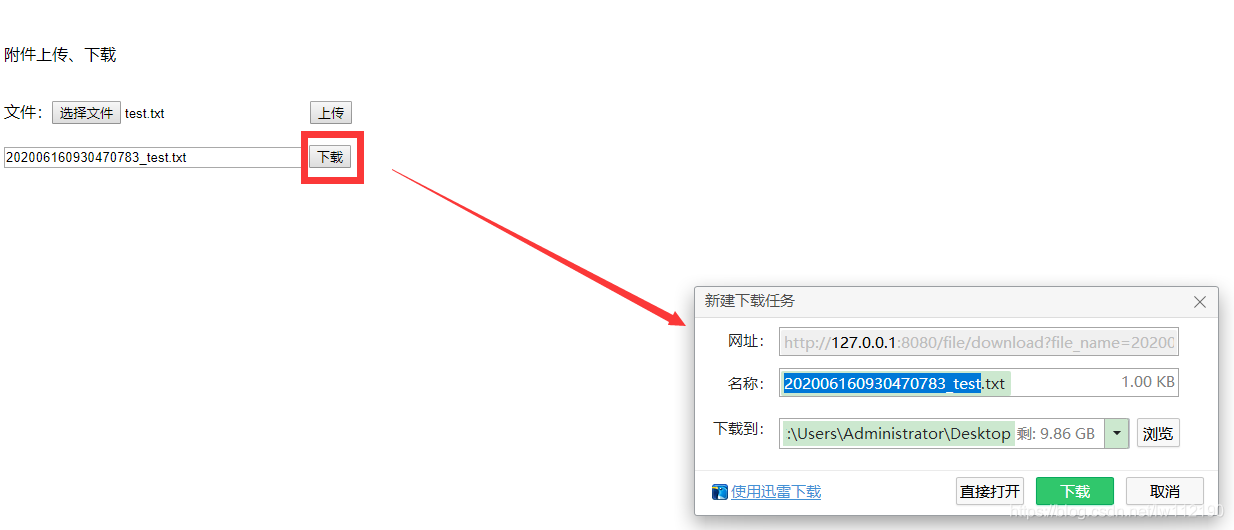
前台代码
<!DOCTYPE html PUBLIC "-//W3C//DTD XHTML 1.0 Transitional//EN" "http://www.w3.org/TR/xhtml1/DTD/xhtml1-transitional.dtd">

<html xmlns="http://www.w3.org/1999/xhtml">

<head>

    <title>附件上传、下载</title>

    <script type="text/javascript" src="http://libs.baidu.com/jquery/2.0.0/jquery.min.js"></script>

</head>

<body>

    <br />

    <p>

        附件上传、下载</p>

    <br />

    <form enctype="multipart/form-data" id="upload">

    文件:<input type="file" name="file" id="file" />

    <input type="button" value="上传" onclick="fn_upload()" />

    </form>

    <br />

    <input type="text" id="file_name" style="width: 296px;" />

    <input type="button" value="下载" onclick="fn_download()" />

    <script type="text/javascript">

        function fn_download() {

            var file_name = $("#file_name").val();

            if (file_name == "") {

                alert("请输入下载文件名称!");

                $("#file_name").focus();

                return;

            }

            var url = "http://127.0.0.1:8080/file/download?file_name=" + file_name;

            var a = document.createElement("a");

            a.href = url;

            a.click();

        }

        function fn_upload() {

            var file = $('#file')[0].files[0];

            if (file == undefined) {

                alert("请选择文件!");

                return;

            }

            var formData = new FormData($('#upload')[0]);

            formData.append('file', file);

            formData.append('fid', "10"); //其他参数  比如外键ID

            jQuery.support.cors = true;

            $.ajax({

                url: "http://127.0.0.1:8080/file/upload",

                type: "POST",

                data: formData,

                processData: false,    //不需要对数据做任何预处理

                contentType: false,    //不设置数据格式

                timeout: 5000,

                error: function (XMLHttpRequest, textStatus, errorThrown) {

                    if (XMLHttpRequest.responseText == "") {

                        alert("请求超时,请检查网络!", { icon: 2 });

                    } else {

                        alert(XMLHttpRequest.statusText, { icon: 2 });

                    }

                },

                success: function (d) {

                    if (d.code == 0) {

                        alert("上传成功!");

                        $("#file_name").val(d.data)

                    } else {

                        alert("删除失败" + d.msg);

                    }

                }

            });

        }

    </script>

</body>

</html>
后台项目结构
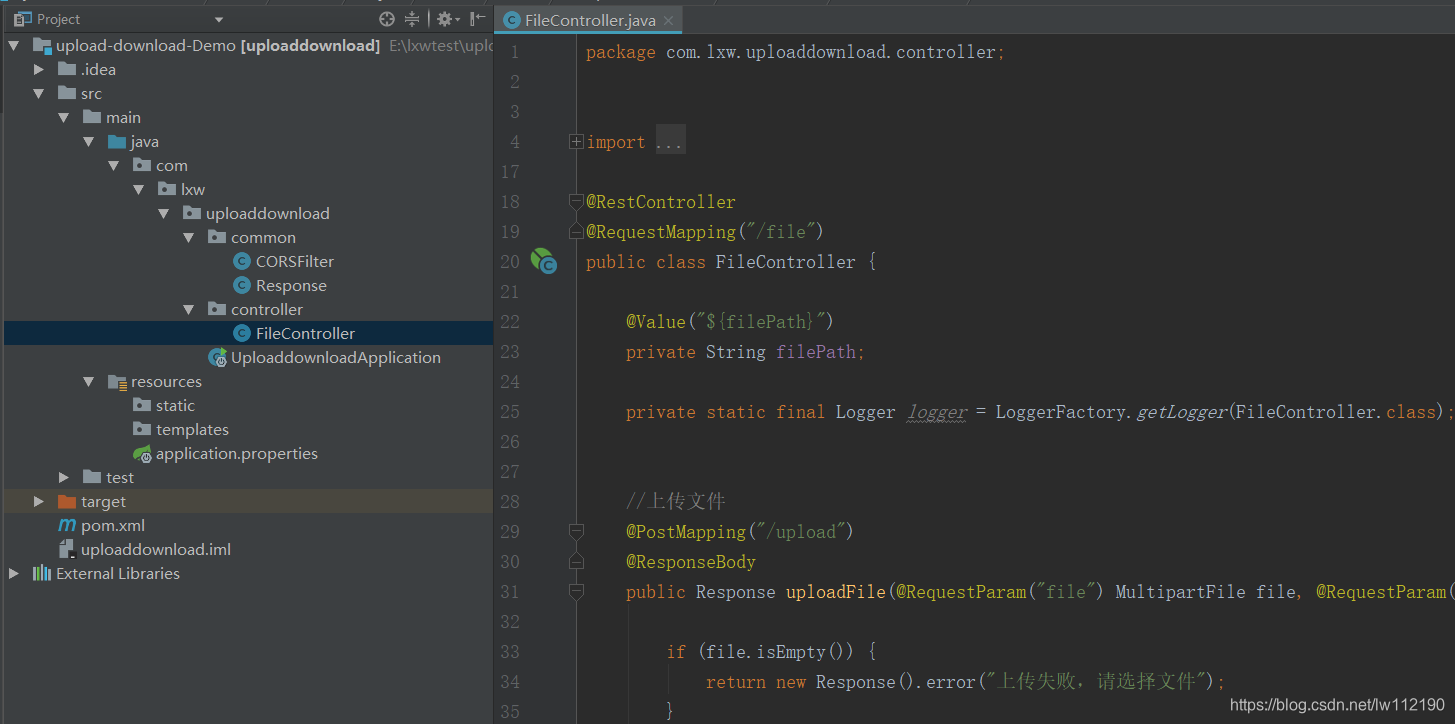
后台主要代码
package com.lxw.uploaddownload.controller;

import com.lxw.uploaddownload.common.Response;

import org.slf4j.Logger;

import org.slf4j.LoggerFactory;

import org.springframework.beans.factory.annotation.Value;

import org.springframework.web.bind.annotation.*;

import org.springframework.web.multipart.MultipartFile;

import javax.servlet.ServletException;

import javax.servlet.http.HttpServletRequest;

import javax.servlet.http.HttpServletResponse;

import java.io.*;

import java.text.SimpleDateFormat;

import java.util.Date;

@RestController

@RequestMapping("/file")

public class FileController {

    @Value("${filePath}")

    private String filePath;

    private static final Logger logger = LoggerFactory.getLogger(FileController.class);

    //上传文件

    @PostMapping("/upload")

    @ResponseBody

    public Response uploadFile(@RequestParam("file") MultipartFile file, @RequestParam("fid") Integer fid, HttpServletResponse response)  {

        if (file.isEmpty()) {

            return new Response().error("上传失败,请选择文件");

        }

        // 获得提交的文件名

        String fileName = file.getOriginalFilename();

        // 获取文件输入流

        //InputStream ins = file.getInputStream();

        // 获取文件类型

        //String contentType = file.getContentType();

        //加个时间戳,尽量避免文件名称重复

        fileName = new SimpleDateFormat("yyyyMMddHHmmssSSSS").format(new Date()) + "_" + fileName;

        File dest = new File(filePath + fileName);

        if (!dest.getParentFile().exists()) { //判断文件父目录是否存在

            dest.getParentFile().mkdir();

        }

        try {

            file.transferTo(dest);

            //logger.info("上传成功");

            return new Response().success(fileName);

        } catch (Exception e) {

            //logger.error(e.getMessage());

            return new Response().error("上传失败");

        }

    }

    //下载文件

    @GetMapping(value = "/download")

    public void downloadFile(@RequestParam(name = "file_name") String fileName,

                             HttpServletRequest request,

                             HttpServletResponse response) throws IOException {

        //logger.info("download....file_name:" + fileName);

        File file = new File(filePath + "/" + fileName);

        if (file.exists()) { //判断文件是否存在

            response.setContentType("application/force-download");

            response.setHeader("Content-Disposition", "attachment;fileName=" + fileName);

            byte[] buffer = new byte[1024];

            FileInputStream fis = null; //文件输入流

            BufferedInputStream bis = null;

            OutputStream os = null; //输出流

            try {

                os = response.getOutputStream();

                fis = new FileInputStream(file);

                bis = new BufferedInputStream(fis);

                int i = bis.read(buffer);

                while (i != -1) {

                    os.write(buffer);

                    i = bis.read(buffer);

                }

            } catch (Exception e) {

                e.printStackTrace();

            }

            logger.info("----------file download" + fileName);

            try {

                bis.close();

                fis.close();

            } catch (IOException e) {

                e.printStackTrace();

            }

        }else{

            response.setStatus(404);

        }

    }

}
调整对下载不存在文件的处理
效果

代码
        if (file.exists()) { //判断文件是否存在

             //

        } else {

            try {

                response.setContentType("text/html; charset=UTF-8"); //转码

                PrintWriter out = response.getWriter();

                out.flush();

                out.println("文件不存在或已经被删除!");

            } catch (IOException e) {

                // logger.error("下载文件出错:" + e);

            }

        }
SpringBoot项目 前后端分离 ajax附件上传下载的更多相关文章
- 仵航说 前后端分离,文件上传下载(springBoot+vue+elementUI)仵老大
1.介绍 本文主要是介绍前后端分离的上传下载,后端使用的是SpringBoot,持久层用的是mybatis-plus,前端用的Vue,UI用的elementUI,测试了一下,文本,图片,excel ...
- Ueditor 前后端分离实现文件上传到独立服务器
关于Ueditor 前后端分离实现文件上传到独立服务器,在网上搜索确实遇到大坑,不过还好遇到了 虚若影 最终实现了,在此感谢!虚若影的原文博客网址:http://www.cnblogs.com/hpn ...
- UEditor实现前后端分离时单图上传
首先,需要下载部署ueditor相关代码,可以参考一篇简单的博客,这里不再赘述: 环境搭建好后,我们先简单使用一下,启动http://web.yucong.com:8080/ueditor/index ...
- 关于Ueditor 前后端分离实现文件上传到独立服务器的问题 望大神们赐教
最近,由于网站实现多台服务器负载均衡,导致编辑器上传文件需要同步,可是使用同步软件太慢,不太现实,所以想到实现编辑器上传文件直接上传到独立文件服务器.可是没想到遇到坑了. 1.在本地IIS 中添加网站 ...
- 前后端分离--ajaxUpload异步上传文件成功,前端获取数据却失败的解决方案
转载:https://blog.csdn.net/baidu_32809053/article/details/78709951
- Springboot+vue前后端分离项目,poi导出excel提供用户下载的解决方案
因为我们做的是前后端分离项目 无法采用response.write直接将文件流写出 我们采用阿里云oss 进行保存 再返回的结果对象里面保存我们的文件地址 废话不多说,上代码 Springboot 第 ...
- SpringBoot+Vue前后端分离项目,在过滤器取值为Null
SpringBoot+Vue前后端分离项目,在过滤器取值为Null 是因为SessionID的问题,因为axios每次的请求都是一次新的sessionId,所以只需要在main.js下配置如下 axi ...
- springboot+apache前后端分离部署https
目录 1. 引言 2. 了解https.证书.openssl及keytool 2.1 https 2.1.1 什么是https 2.1.2 https解决什么问题 2.2 证书 2.2.1 证书内容 ...
- SpringBoot+Vue前后端分离,使用SpringSecurity完美处理权限问题
原文链接:https://segmentfault.com/a/1190000012879279 当前后端分离时,权限问题的处理也和我们传统的处理方式有一点差异.笔者前几天刚好在负责一个项目的权限管理 ...
- Vue+ElementUI+Springboot实现前后端分离的一个demo
目录 1.前期准备 2.创建一个vue项目 3.vue前端 4.java后端 5.启动 5.1.启动vue项目 5.2.启动后端 6.效果 7.总结 8.参考资料 vue官方文档:介绍 - Vue.j ...
随机推荐
- 【Android】使用Binder实现进程间通讯简单案例
1 前言 使用AIDL实现进程间通讯简单案例 和 使用AIDL实现进程间传递对象案例 中介绍了使用 AIDL 进行进程间通讯,文中提到在编写完 aidl 文件(如:IMessageManager.ai ...
- spring boot携手echarts实现双柱状图实战
说明 最近做了个图书管理系统,里面有个模块是统计最近一周借书和还书的情况. 设计为柱状图模式展现,自然需要用到echarts. 实现效果 开发步骤 1.页面和JS <!DOCTYPE html& ...
- Java Base64编码使用介绍
Base64编码介绍 BASE64 编码是一种常用的字符编码,Base64编码本质上是一种将二进制数据转成文本数据的方案. 但base64不是安全领域下的加密解密算法.能起到安全作用的效果很差 ...
- 新零售SaaS架构:什么是订单履约系统?
什么是订单履约系统? 订单履约系统用来管理从接到销售订单,到把货品送到客户手中的整个业务过程.它是上游交易(如销售和客户下单环节)和下游仓储配送(如库存管理.物流)之间的桥梁,确保信息流的顺畅和操作的 ...
- 【Azure 存储服务】使用PowerShell脚本创建存储账号(Storage Account)的共享访问签名(SASToken) : New-AzStorageContainerSASToken
问题描述 使用PowerShell脚本如何来创建存储账号(Storage Account)的共享访问签名呢?查询到可以使用 New-AzStorageContainerSASToken 命令来生成Az ...
- 【Azure 应用程序见解】通过无代码方式在App Service中启用Application Insights后,如何修改在Application Insights中显示的App Service实例名呢?
问题描述 在App Service中,可以非常容易的启动Application Insights服务.默认情况中,在Application Insights中查看信息时候,其中的对象名称默认为App ...
- 从真实案例出发,全方位解读 NebulaGraph 中的执行计划
本文整理自 NebulaGraph 核心开发 Yee 在直播<聊聊执行计划这件事>中的主题分享.分享视频参见 B站:https://www.bilibili.com/video/BV1Cu ...
- 可视化探索开源项目的 contributor 关系
引语:作为国内外最大的代码托管平台,根据最新的 GitHub 数据,它拥有超 372,000,000 个仓库,其中有 28,000,000 是公开仓.分布式图数据库 NebulaGraph 便是其中之 ...
- 基于 Nebula Graph 构建图学习能力
本文首发于 Nebula Graph Community 公众号 经常看技术文章的小伙伴可能会留意到除了正在阅读的那篇文章,在文章页面的正文下方或者右侧区域会有若干同主题.同作者的文章等你阅读:经常逛 ...
- 4、 mysql的explain分析执行计划
EXPLAIN或者 DESC命令获取 MySQL如何执行 SELECT 语句的信息,包括在 SELECT 语句执行过程中表如何连接和连接的顺序. 查询SQL语句的执行计划 : explain sele ...