
Android之绚丽的图片游览效果--有点像W7效果,透明的倒影,层叠的图片,渐变的颜色透明度
这里转载一个牛人的博客:http://www.cnblogs.com/tankaixiong/archive/2011/02/24/1964340.html
下面,是我参照他的博客实现的一个效果图。这个程序,在他的基础上进行了一些改良,但改良得不是很好,嘻嘻,等有空,继续研究。该实例下载路径:http://download.csdn.net/source/3275783
(一)截图
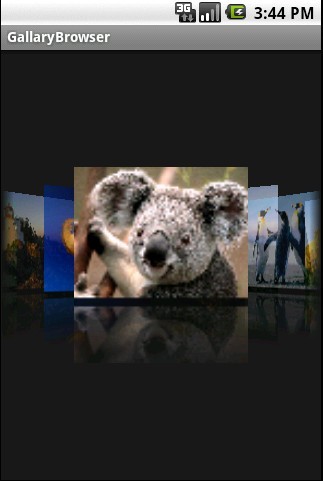

(二)实现关键:
1、改写Gallery,实现图片的层叠和透明度渐变。 主要是改写getChildStaticTransformation方法
2、对图片进行加工处理,实现透明倒影。
3、对于超大图片,先进行缩小。防止图片过大,超出屏幕范围报错。
(三)代码
1、Activity类代码:GallaryBrowser.java
- package com.myandroid.test;
- import android.app.Activity;
- import android.os.Bundle;
- import android.view.View;
- import android.widget.ImageSwitcher;
- import android.widget.ImageView;
- import android.widget.Gallery.LayoutParams;
- import android.widget.ViewSwitcher.ViewFactory;
- public class GallaryBrowser extends Activity {
- private Integer[] imageIds = new Integer[] {
- R.drawable.a, R.drawable.desert,
- R.drawable.hydrangeas, R.drawable.lighthouse,
- R.drawable.jellyfish, R.drawable.koala,
- R.drawable.lighthouse, R.drawable.penguins,
- R.drawable.tulips
- };
- /** Called when the activity is first created. */
- @Override
- public void onCreate(Bundle savedInstanceState) {
- super.onCreate(savedInstanceState);
- final CoverFlow cf = new CoverFlow(this);
- cf.setAdapter(new ImageAdapter(this, imageIds));
- cf.setAnimationDuration(1500);
- setContentView(cf);
- }
- }
2、图片处理代码,主要是实现旋转和倒影: MyImgView.java
- ///******************************************************************************//
- ///**************************请尊重tank的成果毕竟这也是花了笔者很多时间和心思*****//
- /************************* 为了让大家容易懂tank特地详细的写了很多的解释*********************************************////
- ///**************************欢迎访问我的博客http://www.cnblogs.com/tankaixiong/********************************************//
- ///***************************里面文章将持续更新!***************************************************//
- package com.myandroid.test;
- import android.graphics.Bitmap;
- import android.graphics.Canvas;
- import android.graphics.LinearGradient;
- import android.graphics.Matrix;
- import android.graphics.Paint;
- import android.graphics.PixelFormat;
- import android.graphics.PorterDuffXfermode;
- import android.graphics.Bitmap.Config;
- import android.graphics.PorterDuff.Mode;
- import android.graphics.Shader.TileMode;
- import android.graphics.drawable.Drawable;
- public class MyImgView {
- /**
- * 添加倒影,原理,先翻转图片,由上到下放大透明度
- *
- * @param originalImage
- * @return
- */
- public static Bitmap createReflectedImage(Bitmap originalImage) {
- // The gap we want between the reflection and the original image
- final int reflectionGap = 4;
- int width = originalImage.getWidth();
- int height = originalImage.getHeight();
- // This will not scale but will flip on the Y axis
- Matrix matrix = new Matrix();
- matrix.preScale(1, -1);
- // Create a Bitmap with the flip matrix applied to it.
- // We only want the bottom half of the image
- Bitmap reflectionImage = Bitmap.createBitmap(originalImage, 0,
- height / 2, width, height / 2, matrix, false);
- // Create a new bitmap with same width but taller to fit reflection
- Bitmap bitmapWithReflection = Bitmap.createBitmap(width,
- (height + height / 2), Config.ARGB_8888);
- // Create a new Canvas with the bitmap that's big enough for
- // the image plus gap plus reflection
- Canvas canvas = new Canvas(bitmapWithReflection);
- // Draw in the original image
- canvas.drawBitmap(originalImage, 0, 0, null);
- // Draw in the gap
- Paint defaultPaint = new Paint();
- canvas.drawRect(0, height, width, height + reflectionGap, defaultPaint);
- // Draw in the reflection
- canvas.drawBitmap(reflectionImage, 0, height + reflectionGap, null);
- // Create a shader that is a linear gradient that covers the reflection
- Paint paint = new Paint();
- LinearGradient shader = new LinearGradient(0,
- originalImage.getHeight(), 0, bitmapWithReflection.getHeight()
- + reflectionGap, 0x70ffffff, 0x00ffffff, TileMode.CLAMP);
- // Set the paint to use this shader (linear gradient)
- paint.setShader(shader);
- // Set the Transfer mode to be porter duff and destination in
- paint.setXfermode(new PorterDuffXfermode(Mode.DST_IN));
- // Draw a rectangle using the paint with our linear gradient
- canvas.drawRect(0, height, width, bitmapWithReflection.getHeight()
- + reflectionGap, paint);
- return bitmapWithReflection;
- }
- //drawable 类型转化为bitmap
- public static Bitmap drawableToBitmap(Drawable drawable) {
- Bitmap bitmap = Bitmap
- .createBitmap(
- drawable.getIntrinsicWidth(),
- drawable.getIntrinsicHeight(),
- drawable.getOpacity() != PixelFormat.OPAQUE ? Bitmap.Config.ARGB_8888
- : Bitmap.Config.RGB_565);
- Canvas canvas = new Canvas(bitmap);
- // canvas.setBitmap(bitmap);
- drawable.setBounds(0, 0, drawable.getIntrinsicWidth(), drawable
- .getIntrinsicHeight());
- drawable.draw(canvas);
- return bitmap;
- }
- }
3、自定义的Gallery,继承Gallery类,重写getChildStaticTransformation方法,实现图片的重叠和透明度渐变:CoverFlow.java
- ///******************************************************************************//
- ///**************************请尊重tank的成果毕竟这也是花了笔者很多时间和心思*****//
- /************************* 为了让大家容易懂tank特地详细的写了很多的解释*********************************************////
- ///**************************欢迎访问我的博客http://www.cnblogs.com/tankaixiong/********************************************//
- ///***************************里面文章将持续更新!***************************************************//
- package com.myandroid.test;
- import android.content.Context;
- import android.graphics.Camera;
- import android.graphics.Matrix;
- import android.util.AttributeSet;
- import android.util.Log;
- import android.view.View;
- import android.view.animation.Transformation;
- import android.widget.Gallery;
- import android.widget.ImageView;
- //自己定义的Gallery
- public class CoverFlow extends Gallery {
- private Camera mCamera = new Camera();
- private int mMaxRotationAngle = 50;
- private int mMaxZoom = -500;
- private int mCoveflowCenter;
- private boolean mAlphaMode = true;
- private boolean mCircleMode = false;
- public CoverFlow(Context context) {
- super(context);
- this.setStaticTransformationsEnabled(true);
- Log.e("sequence", "CoverFlow2");
- }
- public CoverFlow(Context context, AttributeSet attrs) {
- super(context, attrs);
- this.setStaticTransformationsEnabled(true);
- }
- public CoverFlow(Context context, AttributeSet attrs, int defStyle) {
- super(context, attrs, defStyle);
- this.setStaticTransformationsEnabled(true);
- }
- public int getMaxRotationAngle() {
- return mMaxRotationAngle;
- }
- public void setMaxRotationAngle(int maxRotationAngle) {
- mMaxRotationAngle = maxRotationAngle;
- }
- public boolean getCircleMode() {
- return mCircleMode;
- }
- public void setCircleMode(boolean isCircle) {
- mCircleMode = isCircle;
- }
- public boolean getAlphaMode() {
- return mAlphaMode;
- }
- public void setAlphaMode(boolean isAlpha) {
- mAlphaMode = isAlpha;
- }
- public int getMaxZoom() {
- return mMaxZoom;
- }
- public void setMaxZoom(int maxZoom) {
- mMaxZoom = maxZoom;
- }
- private int getCenterOfCoverflow() {
- return (getWidth() - getPaddingLeft() - getPaddingRight()) / 2
- + getPaddingLeft();
- }
- private static int getCenterOfView(View view) {
- return view.getLeft() + view.getWidth() / 2;
- }
- //重写Garray方法 ,产生层叠和放大效果
- @Override
- protected boolean getChildStaticTransformation(View child, Transformation t) {
- final int childCenter = getCenterOfView(child);
- final int childWidth = child.getWidth();
- int rotationAngle = 0;
- t.clear();
- t.setTransformationType(Transformation.TYPE_MATRIX);
- if (childCenter == mCoveflowCenter) {
- transformImageBitmap((ImageView) child, t, 0, 0);
- } else {
- rotationAngle = (int) (((float) (mCoveflowCenter - childCenter) / childWidth) * mMaxRotationAngle);
- // Log.d("test", "recanglenum:"+Math.floor ((mCoveflowCenter -
- // childCenter) / childWidth));
- if (Math.abs(rotationAngle) > mMaxRotationAngle) {
- rotationAngle = (rotationAngle < 0) ? -mMaxRotationAngle
- : mMaxRotationAngle;
- }
- transformImageBitmap((ImageView) child, t, rotationAngle,
- (int) Math.floor((mCoveflowCenter - childCenter)/ (childWidth==0?1:childWidth)));
- }
- Log.e("sequence", "getChildStaticTransformation");
- return true;
- }
- /**
- * This is called during layout when the size of this view has changed. If
- * you were just added to the view hierarchy, you're called with the old
- * values of 0.
- *
- * @param w
- * Current width of this view.
- * @param h
- * Current height of this view.
- * @param oldw
- * Old width of this view.
- * @param oldh
- * Old height of this view.
- */
- protected void onSizeChanged(int w, int h, int oldw, int oldh) {
- mCoveflowCenter = getCenterOfCoverflow();
- super.onSizeChanged(w, h, oldw, oldh);
- Log.e("sequence", "onSizeChanged");
- }
- /**
- * Transform the Image Bitmap by the Angle passed
- *
- * @param imageView
- * ImageView the ImageView whose bitmap we want to rotate
- * @param t
- * transformation
- * @param rotationAngle
- * the Angle by which to rotate the Bitmap
- */
- private void transformImageBitmap(ImageView child, Transformation t,
- int rotationAngle, int d) {
- mCamera.save();
- final Matrix imageMatrix = t.getMatrix();
- final int imageHeight = child.getLayoutParams().height;
- final int imageWidth = child.getLayoutParams().width;
- final int rotation = Math.abs(rotationAngle);
- mCamera.translate(0.0f, 0.0f, 100.0f);
- // As the angle of the view gets less, zoom in
- if (rotation <= mMaxRotationAngle) {
- float zoomAmount = (float) (mMaxZoom + (rotation * 1.5));
- mCamera.translate(0.0f, 0.0f, zoomAmount);
- if (mCircleMode) {
- if (rotation < 40)
- mCamera.translate(0.0f, 155, 0.0f);
- else
- mCamera.translate(0.0f, (255 - rotation * 2.5f), 0.0f);
- }
- if (mAlphaMode) {
- ((ImageView) (child)).setAlpha((int) (255 - rotation * 2.5));
- }
- }
- mCamera.rotateY(rotationAngle);
- mCamera.getMatrix(imageMatrix);
- imageMatrix.preTranslate(-(imageWidth / 2), -(imageHeight / 2));
- imageMatrix.postTranslate((imageWidth / 2), (imageHeight / 2));
- mCamera.restore();
- Log.e("sequence", "transformImageBitmap");
- }
- }
4、图片适配器:ImageAdapter。这里,我改写了getView方法,把图片按照一定比例进行缩放,防止图片过大,超出屏幕而导致报错。
- package com.myandroid.test;
- import java.io.InputStream;
- import android.content.Context;
- import android.content.res.Resources;
- import android.graphics.Bitmap;
- import android.graphics.BitmapFactory;
- import android.graphics.Matrix;
- import android.graphics.drawable.BitmapDrawable;
- import android.view.View;
- import android.view.ViewGroup;
- import android.widget.BaseAdapter;
- import android.widget.Gallery;
- import android.widget.ImageView;
- public class ImageAdapter extends BaseAdapter {
- private Context context;
- private Integer[] images;
- public ImageAdapter(Context context, Integer[] imageIds) {
- this.context = context;
- this.images = imageIds;
- }
- @Override
- public int getCount() {
- // TODO Auto-generated method stub
- return images.length;
- }
- @Override
- public Object getItem(int position) {
- // TODO Auto-generated method stub
- return position;
- }
- @Override
- public long getItemId(int position) {
- // TODO Auto-generated method stub
- return position;
- }
- @Override
- public View getView(int position, View convertView, ViewGroup parent) {
- ImageView imageView = new ImageView(context);
- //创建BitMap对象,用于显示图片
- Bitmap bitmap = BitmapFactory.decodeResource(context.getResources(),
- images[position]);
- Matrix matrix = new Matrix(); //矩阵,用于图片比例缩放
- matrix.postScale((float)80/bitmap.getWidth(),
- (float)60/bitmap.getHeight()); //设置高宽比例(三维矩阵)
- //图片不能超出屏幕范围,否则报错,这里进行缩小
- Bitmap newBmp = Bitmap.createBitmap(bitmap, 0, 0, bitmap.getWidth(),
- bitmap.getHeight(), matrix, true);
- imageView.setImageBitmap(MyImgView.createReflectedImage(newBmp));
- imageView.setLayoutParams(new Gallery.LayoutParams(80, 60));
- return imageView;
- }
- }
Android之绚丽的图片游览效果--有点像W7效果,透明的倒影,层叠的图片,渐变的颜色透明度的更多相关文章
- Android 图片合成:添加蒙板效果 不规则相框 透明度渐变效果的实现
Android 图片合成:添加蒙板效果 不规则相框 透明度渐变效果的实现 暂时还未有时间开发这效果,所以先贴出来. 先贴一张效果图,这是一张手机截屏: 左上方的风景图:背景图片 右上方的人物图:前景图 ...
- [Android实例] app引导页(背景图片切换加各个页面动画效果)(申明:来源于网络)
[Android实例] app引导页(背景图片切换加各个页面动画效果)(申明:来源于网络) 地址: http://www.eoeandroid.com/thread-918356-1-1.html h ...
- Android -- 自定义ViewGroup+贝塞尔+属性动画实现仿QQ点赞效果
1,昨天我们写了篇简单的贝塞尔曲线的应用,今天和大家一起写一个QQ名片上常用的给别人点赞的效果,实现效果图如下: 红心的图片比较丑,见谅见谅(哈哈哈哈哈哈).... 2,实现的思路和原理 从上面的效果 ...
- Android -- 《 最美有物》好看的点赞效果
1,前天在鸿洋的公众号上看到一款不错的点赞效果,是仿最美有物的点赞,再加上自己最近学习状态很差,自己想着通过这个效果练手一下,果然,花了整整两天的时间,按照以前的效率的话一天就够了,哎,已经调整了一个 ...
- android 4.4以上能够实现的沉浸式状态栏效果
仅仅有android4.4以及以上的版本号才支持状态栏沉浸效果 先把程序执行在4.4下面的手机上,看下效果: 在4.4以上的效果: watermark/2/text/aHR0cDovL2Jsb2cuY ...
- js简单 图片版时钟,带翻转效果
js简单 图片版时钟,带翻转效果 <!DOCTYPE html> <html> <head> <meta charset="UTF-8"& ...
- iOS开发——高级篇——图片轮播及其无限循环效果
平时APP中的广告位.或者滚动的新闻图片等用到的就是图片轮播这种效果,实现方式主要有两种,一种是ScrollView+ImageView,另一种则是通过CollectionView,今天总结的是Scr ...
- iOS开发笔记6:图片轮播及其无限循环效果
平时APP中的广告位或者滚动的新闻图片等用到的就是图片轮播这种效果,实现方式主要有两种,一种是ScrollView+ImageView,另一种则是通过CollectionView,今天总结的是Scro ...
- 《转》15种CSS混合模式让图片产生令人惊艳的效果
浏览器支持 按照现在情况来讲, 浏览器支持 CSSbackground-blend-mode属性还在不断的完善中.早期版本的浏览器目前还不支持,但caniuse.com报告说在Chrome,Firef ...
随机推荐
- java工程包的命名(-dev.jar,-javadoc.jar,jar)
1.-javadoc.jar 这个应该是一个doc包,就是API,相当于帮助文档,用来说明类.方法.静态变量 都是干什么的. 2.-dev.jar,.jar都有可能包含源码,也可能都不包含
- PHP 错误与异常 笔记与总结(15 )使用观察者模式处理异常信息
使异常处理变得更灵活.可观察,可以使用设计模式中的观察者模式. 文件 ① 定义观察者的接口 ExceptionObserver.php: <?php /* 给观察者定义的规范 */ interf ...
- treeview子节点文本过长超过DIV自动换行CSS解决
//文本不换行 .ygtvcell.ygtvcontent{ white-space: nowrap; } //文本超过div出现滚动条 .main .buttom .right{ overflow- ...
- Asp.net 服务器Application,Session,Cookie,ViewState和Cache区别
2.8 Context 的使用Context 对象包含与当前页面相关的信息,提供对整个上下文的访问,包括请求.响应.以及上文中的Session 和Application 等信息.可以使用此对象在网页之 ...
- SET ? DECLARE
http://dev.mysql.com/doc/refman/5.7/en/declare-local-variable.html http://dev.mysql.com/doc/refman/5 ...
- EFDC主控文件efdc.inp文件的xml格式化处理——转载http://blog.sina.com.cn/s/articlelist_1584892573_0_1.html
在对EFDC模型进行系统集成时,虽然可以通过一行一行读来进行解析处理,但那将是一个繁琐的工作.我们经过xml格式化处理后,再经xsd转成Dataset类对象,那么整个主控文件就是一个数据库表集合,对其 ...
- 五 mybatis的SqlMapConfig.xml详解
SqlMapConfig.xml <?xml version="1.0" encoding="UTF-8" ?> <!DOCTYPE conf ...
- Apache与Tomcat 区别联系(转)
转自:http://www.admin10000.com/document/974.html Apache 和 Tomcat 都是web网络服务器,两者既有联系又有区别,在进行HTML.PHP.JSP ...
- php内容
PHP语言原理:先把代码显示在源代码中,再通过浏览器解析在网页上 PHP中关键字通常分为四种类型: 1. 用于数据类型定义的关键字,如:int,string,bool,classic,object和a ...
- NRF51822之GPIOTE使用
---恢复内容开始--- 在上篇介绍nrf51822的GPIOTE http://www.cnblogs.com/libra13179/p/5336580.html 我们现在开始下水游泳. /** @ ...