
使用Jil序列化JSON提升Asp.net web api 性能
JSON序列化无疑是Asp.net web api 里面性能提升最重要的一环。 通天塔
在Asp.net web api 里面我们可以插入自定义的MediaTypeFormatter(媒体格式化器),
说白了就是根据HTTP content-type application/json
来判断采用哪种媒体格式化器
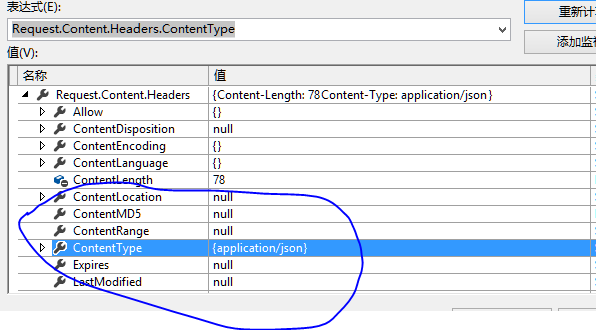
具体实现,记得要引入Jil包
  public class JilFormatter : MediaTypeFormatter

        {

        private readonly Options _jilOptions;

        private MethodInfo _method;

        public JilFormatter()

            {

            //要序列化的时间格式

            _jilOptions = new Options(dateFormat: DateTimeFormat.ISO8601);

            //媒体类型

            SupportedMediaTypes.Add(new MediaTypeHeaderValue("application/json"));

            //加入 UTF8Encoding 编码

            SupportedEncodings.Add(new UTF8Encoding(encoderShouldEmitUTF8Identifier: false, throwOnInvalidBytes: true));

            //加入 UnicodeEncoding 编码

            SupportedEncodings.Add(new UnicodeEncoding(bigEndian: false, byteOrderMark: true, throwOnInvalidBytes: true));

            }

        //判断是否反序列化类型

        public override bool CanReadType(Type type)

            {

            if (type == null)

                {

                throw new ArgumentNullException("type");

                }

            return true;

            }

        //判断是否序列化类型

        public override bool CanWriteType(Type type)

            {

            if (type == null)

                {

                throw new ArgumentNullException("type");

                }

            return true;

            }

        //  异步反序列化一个指定类型的对象。

        public override Task<object> ReadFromStreamAsync(Type type, Stream readStream, System.Net.Http.HttpContent content, IFormatterLogger formatterLogger)

            {

            return Task.FromResult(DeserializeFromStream(type, readStream));

            }

        private object DeserializeFromStream(Type type, Stream readStream)

            {

            try

                {

                using (var reader = new StreamReader(readStream))

                    {

                    return JSON.Deserialize(reader, type, _jilOptions);

                    }

                }

            catch

                {

                return null;

                }

            }

        //  异步序列化一个指定类型的对象。

        public override Task WriteToStreamAsync(Type type, object value, Stream writeStream, System.Net.Http.HttpContent content, TransportContext transportContext)

            {

            var streamWriter = new StreamWriter(writeStream);

            JSON.Serialize(value, streamWriter, _jilOptions);

            streamWriter.Flush();

            return Task.FromResult(writeStream);

            }

        }
加入到媒体格式化器集合中
 public static void Register(HttpConfiguration config)

        {

            // Web API 配置和服务

            // Web API 路由

            config.MapHttpAttributeRoutes();

            config.Routes.MapHttpRoute(

                name: "DefaultApi",

                routeTemplate: "api/{controller}/{id}",

                defaults: new { id = RouteParameter.Optional }

                );

            GlobalConfiguration.Configuration.Formatters[] = new JilFormatter();

            }

    }
控制类
  public class HomeController : ApiController

        {

     public static   List<Market> Markets = new List<Market>();

        public HomeController()

            {

            }

         static HomeController()

            {

            Markets.Add(new Market { Id = , Name = "", DateTimeNow = DateTime.Now });

            Markets.Add(new Market { Id = , Name = "", DateTimeNow = DateTime.Now });

            Markets.Add(new Market { Id = , Name = "", DateTimeNow = DateTime.Now });

            Markets.Add(new Market { Id = , Name = "", DateTimeNow = DateTime.Now });

            Markets.Add(new Market { Id = , Name = "", DateTimeNow = DateTime.Now });

            }

        public IEnumerable<Market> Get()

            {

            return Markets;

            }

        public HttpResponseMessage Post([FromBody]Market value)

            {

            Markets.Add(value);

            return new HttpResponseMessage(HttpStatusCode.OK);

            }

        public HttpResponseMessage Put(int id, [FromBody]Market value)

            {

            var market = Markets.Where(x => x.Id == id).FirstOrDefault();

            if (market == null)

                return new HttpResponseMessage(HttpStatusCode.NotFound);

            market.Name = value.Name;

            return new HttpResponseMessage(HttpStatusCode.OK);

            }

        public HttpResponseMessage Delete(int id)

            {

            var result = Markets.Remove(Markets.Where(x => x.Id == id).FirstOrDefault());

            return result

                ? new HttpResponseMessage(HttpStatusCode.Accepted)

                : new HttpResponseMessage(HttpStatusCode.NotFound);

            }

        }
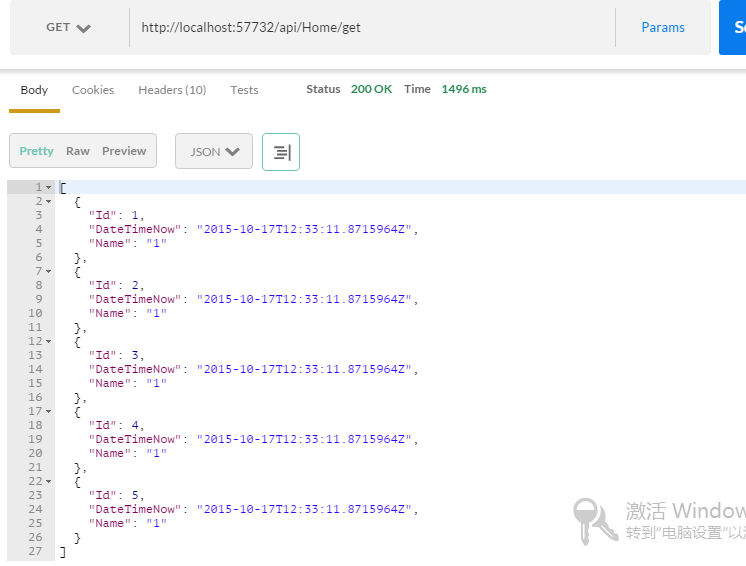
我们通过postman访问
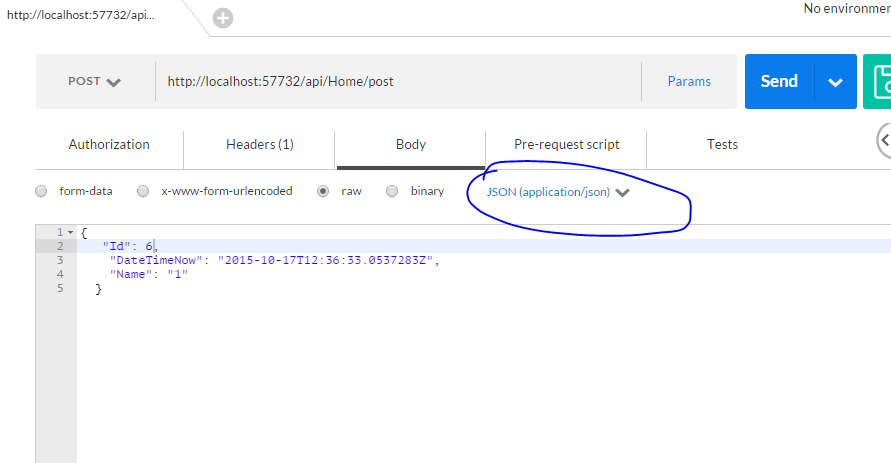
我们在post一个实体
我们在get一下
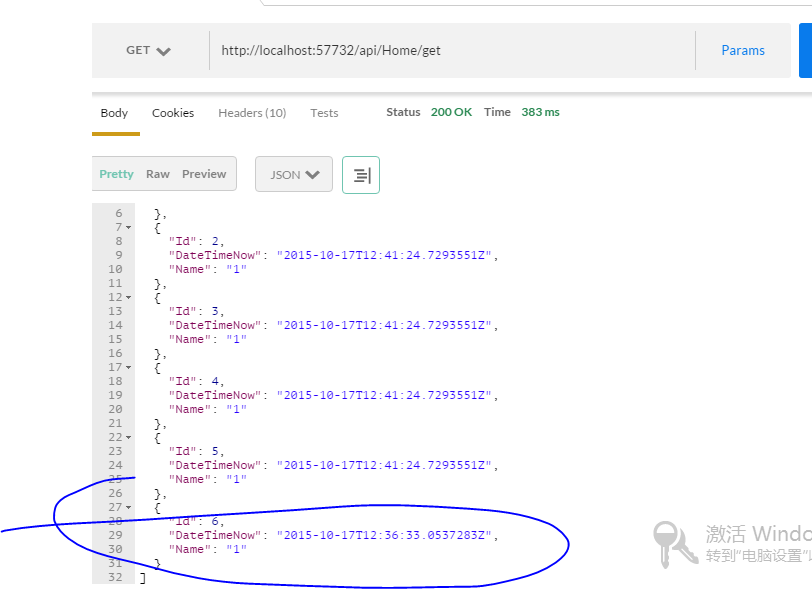
已经可以看见刚才post的实体了。
源码:http://pan.baidu.com/s/1i3o6KD3
Asp.net Mvc vnext 系列 http://www.cnblogs.com/liek/p/4634294.html
得到你的肯定是我最大的动力!
使用Jil序列化JSON提升Asp.net web api 性能的更多相关文章
- 8 种提升 ASP.NET Web API 性能的方法
ASP.NET Web API 是非常棒的技术.编写 Web API 十分容易,以致于很多开发者没有在应用程序结构设计上花时间来获得很好的执行性能. 在本文中,我将介绍8项提高 ASP.NET Web ...
- 六种简单方法提升ASP.NET Web API性能
ASP.NET Web API 是非常棒的技术.编写 Web API 十分容易,以致于很多开发者没有在应用程序结构设计上花时间来获得很好的执行性能. 在本文中,我将介绍8项提高 ASP.NET Web ...
- 8种提升ASP.NET Web API性能的方法
英文原文:8 ways to improve ASP.NET Web API performance ASP.NET Web API 是非常棒的技术.编写 Web API 十分容易,以致于很多开发者没 ...
- [转载]8 种提升 ASP.NET Web API 性能的方法
http://www.oschina.net/translate/8-ways-improve-asp-net-web-api-performance 英文原文:8 ways to improve A ...
- 8 种提升 ASP.NET Web API 性能的方法 (转)
出处:http://www.oschina.net/translate/8-ways-improve-asp-net-web-api-performance ASP.NET Web API 是非常棒的 ...
- 8 种提升ASP.NET Web API性能的方法
ASP.NET Web API 是非常棒的技术.编写 Web API 十分容易,以致于很多开发者没有在应用程序结构设计上花时间来获得很好的执行性能. 在本文中,我将介绍8项提高 ASP.NET Web ...
- 8种提升 ASP.NET Web API 性能的方法
- Jil序列化JSON
使用Jil序列化JSON提升Asp.net web api 性能 JSON序列化无疑是Asp.net web api 里面性能提升最重要的一环. 在Asp.net web api 里面我们可以插入 ...
- ASP.NET Web API 提升性能的方法实践
ASP.NET Web API 是非常棒的技术.编写 Web API 十分容易,以致于很多开发者没有在应用程序结构设计上花时间来获得很好的执行性能. 在本文中,我将介绍8项提高 ASP.NET Web ...
随机推荐
- 移动端<head>头部 常用<meta>标签
<!DOCTYPE html><html lang = ""><head> <title></title> <me ...
- Java基础之写文件——使用带缓冲的Writer写文件(WriterOutputToFile)
控制台程序,将一列字符串写入到文件中. import java.io.*; import java.nio.file.*; import java.nio.charset.Charset; publi ...
- 判断UpLoader是否安装了Flash
var flashVersion = (function() { var version; try { version ...
- 找区间连续值(HDU5247)
找连续数 Time Limit: 2000/1000 MS (Java/Others) Memory Limit: 32768/32768 K (Java/Others)Total Submis ...
- Linux MD5值递归比对目录中的文件是否有修改
项目上今天遇到检查两个版本的发布包rc1.tar.gz和rc2.tar.gz的一致性,解决方法做个总结,步骤如下 1. 建立文件夹 mkdir test_rc1 test_rc2 2. 文件解压缩 t ...
- 关于mybatis 在C#.Net中批量增,删,改
发现很久没有更新空间里的日志了,有时候实在忙没有时间记录,有时候又觉得自己整理的不够清晰,还是缓缓在记录吧. 下面直接进入正题 对于急需方法的阅读者 可以直接转至代码以下忽略 对于数据库进行操作的类 ...
- BJFU 1009
描述 现在社会上的抽奖活动简直是太多了.前段时间中国联通就举办了一个很无聊的抽奖活动,规则是每人可以向中国联通的短信系统发送一个实数,系统每天会从这些数字中选择一个无重复(就是有且只有一个)且最小的数 ...
- 一天弹出一次广告cookie
function setCookie(name, value, expire) { window.document.cookie = name + "=" + escape(val ...
- visio的简单用法
visio图边缘会自动扩展 将常用工具放到收藏夹中,拖进去就可以用. 基本形状基本能够满足一般的需求. 支持自己定义形状,将定义好的形状右击组合之后,收藏到收藏夹或导出模版. 多用组合,收藏夹,调整图 ...
- 夺命雷公狗---node.js---10之POST的接收
首先我们在项目下创建一个表单,代码如下所示: <!DOCTYPE html> <html lang="en"> <head> <meta ...