
Android Activity/Service/Broadcaster三大组件之间互相调用
我们研究两个问题,
1、Service如何通过Broadcaster更改activity的一个TextView。
(研究这个问题,考虑到Service从服务器端获得消息之后,将msg返回给activity)
2、Activity如何通过Binder调用Service的一个方法。
(研究这个问题,考虑到与服务器端交互的动作,打包至Service,Activity只呈现界面,调用Service的方法)
结构图见如下: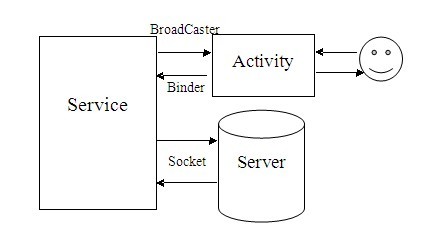
效果图如下: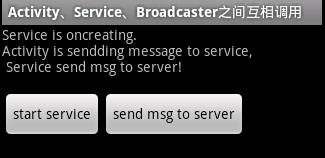
点击“start service”按钮,启动Service,然后更改Activity的UI。
点击“send msg to server”按钮调用Service的方法,显示NotificationBar
代码:
1、新建一个MyService类,继承Service
package com.ljq.activity;


import android.app.Notification;

import android.app.NotificationManager;

import android.app.PendingIntent;

import android.app.Service;

import android.content.Context;

import android.content.Intent;

import android.graphics.Color;

import android.os.Binder;

import android.os.IBinder;


public class MyService extends Service {

 private NotificationManager notificationManager = null;

 private final IBinder binder = new LocalBinder();


 @Override

 public void onCreate() {

  sendMsgtoActivty("Service is oncreating.\n");

 }


 @Override

 public IBinder onBind(Intent intent) {

  String msg = "Activity is sendding message to service,\n Service send msg to server!\n";

  sendMsgtoActivty(msg);

  return binder;

 }


 /**

  * 把信息传递给activity

  *

  * @param msg

  */

 private void sendMsgtoActivty(String msg) {

  Intent intent = new Intent("com.android.Yao.msg");

  intent.putExtra("msg", msg);

  this.sendBroadcast(intent);

 }


 @Override

 public void onDestroy() {

  super.onDestroy();

  if(notificationManager!=null){

   notificationManager.cancel(0);

   notificationManager=null;

  }

 }


 /**

  * 在状态栏显示通知

  *

  * @param msg

  */

 private void showNotification(String msg) {

  notificationManager = (NotificationManager) getSystemService(Context.NOTIFICATION_SERVICE);

  // 定义Notification的各种属性

  Notification notification =new Notification(R.drawable.icon,

          "A Message Coming!", System.currentTimeMillis());

  //FLAG_AUTO_CANCEL   该通知能被状态栏的清除按钮给清除掉

  //FLAG_NO_CLEAR      该通知不能被状态栏的清除按钮给清除掉

  //FLAG_ONGOING_EVENT 通知放置在正在运行

  //FLAG_INSISTENT     是否一直进行,比如音乐一直播放,知道用户响应

  notification.flags |= Notification.FLAG_ONGOING_EVENT; // 将此通知放到通知栏的"Ongoing"即"正在运行"组中

  notification.flags |= Notification.FLAG_NO_CLEAR; // 表明在点击了通知栏中的"清除通知"后,此通知不清除,经常与FLAG_ONGOING_EVENT一起使用

  notification.flags |= Notification.FLAG_SHOW_LIGHTS;

  //DEFAULT_ALL     使用所有默认值,比如声音,震动,闪屏等等

  //DEFAULT_LIGHTS  使用默认闪光提示

  //DEFAULT_SOUNDS  使用默认提示声音

  //DEFAULT_VIBRATE 使用默认手机震动,需加上<uses-permission android:name="android.permission.VIBRATE" />权限

  notification.defaults = Notification.DEFAULT_LIGHTS;

  //叠加效果常量

  //notification.defaults=Notification.DEFAULT_LIGHTS|Notification.DEFAULT_SOUND;

  notification.ledARGB = Color.BLUE;

  notification.ledOnMS =5000; //闪光时间,毫秒


  // 设置通知的事件消息

  //Intent notificationIntent =new Intent(MainActivity.this, MainActivity.class); // 点击该通知后要跳转的Activity

  Intent notificationIntent = new Intent(getApplicationContext(), MainActivity.class); // 加载类,如果直接通过类名,会在点击时重新加载页面,无法恢复最后页面状态。

  notificationIntent.setFlags(Intent.FLAG_ACTIVITY_SINGLE_TOP);

  PendingIntent contentItent = PendingIntent.getActivity(this, 0, notificationIntent, 0);

  notification.setLatestEventInfo(this, "Message", "Message:" + msg, contentItent);


  // 把Notification传递给NotificationManager

  notificationManager.notify(0, notification);


 }


 /**

  * 从activity获取信息

  *

  * @param msg

  */

 public void receiverMsgtoActivity(String msg){

  sendMsgtoActivty("\n receiverMsgtoActivity:"+msg);

 }


 public void sendMsgtoServer(String msg) {

  showNotification(msg);

 }


 public class LocalBinder extends Binder {

  public MyService getService() {

   return MyService.this;

  }

 }


}
2、新建MyBroadcastreceiver类,继承BroadcastReceiver,用来发送Intent启动服务
package com.ljq.activity;


import android.content.BroadcastReceiver;

import android.content.Context;

import android.content.Intent;


/**

 * 发送Intent启动服务

 *

 * @author jiqinlin

 *

 */

public class MyBroadcastreceiver extends BroadcastReceiver {

 @Override

 public void onReceive(Context context, Intent intent) {

  Intent service = new Intent(context, MyService.class);

  context.startService(service);

 }


}
3、新建MainActivity类,其实是一个activity,用来呈现界面
package com.ljq.activity;


import java.util.List;


import android.app.Activity;

import android.app.ActivityManager;

import android.content.BroadcastReceiver;

import android.content.ComponentName;

import android.content.Context;

import android.content.Intent;

import android.content.IntentFilter;

import android.content.ServiceConnection;

import android.os.Bundle;

import android.os.IBinder;

import android.util.Log;

import android.view.View;

import android.widget.TextView;


public class MainActivity extends Activity implements View.OnClickListener {

 private String msg = "";

 private TextView txtMsg;

 private UpdateReceiver receiver;

 private MyService myService;

 private final static String TAG=MainActivity.class.getSimpleName();


 @Override

 public void onCreate(Bundle savedInstanceState) {

  super.onCreate(savedInstanceState);

  setContentView(R.layout.main);


  txtMsg = (TextView) this.findViewById(R.id.txtMsg);

  this.findViewById(R.id.btnStart).setOnClickListener(this);

  this.findViewById(R.id.btnSend).setOnClickListener(this);


  //订阅广播Intent

  receiver = new UpdateReceiver();

  IntentFilter filter = new IntentFilter();

  filter.addAction("com.android.Yao.msg");

  this.registerReceiver(receiver, filter);


  //初始化时启动服务

  //Intent intent = new Intent(MainActivity.this, MyService.class);

  //this.bindService(intent, conn, BIND_AUTO_CREATE);

 }


 @Override

 protected void onDestroy() {

  super.onDestroy();

  //结束服务

  if(conn!=null){

   unbindService(conn);

   myService=null;

  }


 }


 public class UpdateReceiver extends BroadcastReceiver {


  @Override

  public void onReceive(Context context, Intent intent) {

   //获取service传过来的信息

   msg = intent.getStringExtra("msg");

   txtMsg.append(msg);

  }

 }


 private ServiceConnection conn = new ServiceConnection() {

  @Override

  public void onServiceConnected(ComponentName name, IBinder service) {

   myService = ((MyService.LocalBinder) service).getService();

   Log.i(TAG, "onServiceConnected myService: "+myService);

  }


  @Override

  public void onServiceDisconnected(ComponentName name) {

    myService = null;

  }


 };


 @Override

 public void onClick(View v) {

  Intent intent = new Intent(MainActivity.this, MyService.class);

  switch (v.getId()) {

  case R.id.btnStart:

   //判断服务是否启动

   if(false==isServiceRunning(this, MyService.class.getName())){

    Log.i(TAG, "start "+MyService.class.getSimpleName()+" service");

    this.bindService(intent, conn, BIND_AUTO_CREATE);

   }

   Log.i(TAG, MyService.class.getName()+" run status: "+isServiceRunning(this, MyService.class.getName()));

   break;

  case R.id.btnSend:

   //判断服务是否启动

   if(false==isServiceRunning(this, MyService.class.getName())){

    Log.i(TAG, "start "+MyService.class.getSimpleName()+" service");

    this.bindService(intent, conn, BIND_AUTO_CREATE);

   }


   Log.i(TAG, MyService.class.getName()+" run status: "+isServiceRunning(this, MyService.class.getName()));

   Log.i(TAG, "onClick myService: "+myService); //第一次启动服务时此处为null(小编认为虽然服务已启动成功,但是还没全部初始化)


   if(myService!=null){

       myService.sendMsgtoServer("i am sending msg to server");

       //从activity传递信息给service

       myService.receiverMsgtoActivity("this is a msg");

      }

   break;

  }

 }


 /**

  * 判断服务是否正在运行

  *

  * @param context

  * @param className 判断的服务名字:包名+类名

  * @return true在运行 false 不在运行

  */

 public static boolean isServiceRunning(Context context, String className) {

  boolean isRunning = false;


  ActivityManager activityManager = (ActivityManager) context

    .getSystemService(Context.ACTIVITY_SERVICE);

  //获取所有的服务

  List<ActivityManager.RunningServiceInfo> services= activityManager.getRunningServices(Integer.MAX_VALUE);

  if(services!=null&&services.size()>0){

   for(ActivityManager.RunningServiceInfo service : services){

    if(className.equals(service.service.getClassName())){

     isRunning=true;

     break;

    }

   }

  }


  return isRunning;

 }


}
4、main.xml布局文件
<?xml version="1.0" encoding="utf-8"?>

<LinearLayout xmlns:android="http://schemas.android.com/apk/res/android"

 android:orientation="vertical" android:layout_width="fill_parent"

 android:layout_height="fill_parent">

 <TextView android:layout_width="fill_parent"

  android:layout_height="wrap_content"

  android:id="@+id/txtMsg" />

 <LinearLayout

  xmlns:android="http://schemas.android.com/apk/res/android"

  android:orientation="horizontal"

  android:layout_width="wrap_content"

  android:layout_height="wrap_content">

  <Button android:layout_width="wrap_content"

   android:layout_height="wrap_content"

   android:text="start service"

   android:id="@+id/btnStart"/>

  <Button android:layout_width="wrap_content"

   android:layout_height="wrap_content"

   android:text="send msg to server"

   android:id="@+id/btnSend"/>

 </LinearLayout>

</LinearLayout>
5、清单文件AndroidManifest.xml,用来配置组件等信息
<?xml version="1.0" encoding="utf-8"?>

<manifest xmlns:android="http://schemas.android.com/apk/res/android"

      package="com.ljq.activity"

      android:versionCode="1"

      android:versionName="1.0">

    <application android:icon="@drawable/icon" android:label="@string/app_name">

        <activity android:name=".MainActivity"

                  android:label="@string/app_name">

            <intent-filter>

                <action android:name="android.intent.action.MAIN" />

                <category android:name="android.intent.category.LAUNCHER" />

            </intent-filter>

        </activity>

        <service android:name=".MyService"/>

        <receiver android:name=".MyBroadcastreceiver" />


    </application>

    <uses-sdk android:minSdkVersion="7" />


</manifest>
Android Activity/Service/Broadcaster三大组件之间互相调用的更多相关文章
- vue入坑教程(三)vue父子组件之间互相调用方法以及互相传递数据
1.父组件调用子组件的方法 父组件: <template> <div> <button v-on:click="clickParent">点击& ...
- Vue.js组件之间的调用
index.html: <div id="app"></div> 运行完index.html之后自动寻找运行main.js文件 main.js: impor ...
- [转]Android四大核心组件:Activity+Service+BroadcastReceiver+ContentProvider
原文地址:http://c.biancheng.net/view/2918.html Android 作为一个移动设备的开发平台,其软件层次结构包含操作系统 (OS).中间件 (MiddleWare) ...
- Android 编程下的四大组件之服务(Service)
服务(Service) 是一种在后台运行,没有界面的组件,由其他组件调用开始.Android 中的服务和 Windows 中的服务是类似的东西,它运行于系统中不容易被用户发觉,可以使用它开发如监控之类 ...
- android三大组件之Intent
Android 应用程序中有三大核心组件: Activity, Service, Broadcast Receiver 都是通过被称之为意图的消息运行. Intent messaging is a f ...
- Android activity和service的生命周期对比
1Activity生命周期 七个方法 1. void onCreate(Bundle savedInstanceState) 当Activity被第首次加载时执行.我们新启动一个程序的时候其主窗体的o ...
- Android基础整理之四大组件Activity
最近准备系统的重新整理复习一下Android的各方面的知识,本着知识分享的原则,我就把梳理过程中一些东西给记录下来,权当一个学习笔记吧. 下面步入正题..... 什么是Activity Activit ...
- Android进阶笔记08:Android 中Activity、Window和View之间的关系
1. Android 中Activity.Window和View之间的关系(比喻): Activity像一个工匠(控制单元),Window像窗户(承载模型),View像窗花(显示视图) LayoutI ...
- Android Service即四大组件总结
原文转载自:http://www.cnblogs.com/bravestarrhu/archive/2012/05/02/2479461.html Service 服务: 一个Service 是一段长 ...
随机推荐
- php利用smtp发送邮件
PHP : 5.6.8 email工具类下载地址: http://files.cnblogs.com/files/rhythmK/email.class.zip 发送邮件代码如下: require_o ...
- spring 启动流程
AbstractApplicationContext 分析 启动流程 // Prepare this context for refreshing.prepareRefresh(); 1. // In ...
- VPN有什么用?(转载)
VPN有什么用?转载自:http://www.chinaz.com/web/2012/0320/240819.shtml 当你非常非常想访问一个国外的网站,而这个网站被防火墙屏蔽的时候,你应该怎么做呢 ...
- easyui filebox 浏览图片
<img id="image1"/> <input id="f1" class="easyui-filebox" name ...
- Oracle---.oracle函数
数值型函数: 绝对值: ABS(x) [功能]返回x的绝对值 [参数]x,数字型表达式 [返回]数字 [示例] select abs(100),abs(-100) from dual;-------- ...
- C#基础总结之五Dictionary<string, string[]>和while循环
#region 第五天作业 名片集(01) //Dictionary<string, string[]> PersonCard = new Dictionary<string, st ...
- 基于jQuery点击加载动画按钮特效
分享一款基于jQuery点击加载动画按钮特效.这是一款基于jQuery+CSS3实现的鼠标点击按钮加载动画特效代码.效果图如下: 在线预览 源码下载 实现的代码. html代码: <div ...
- Direct3D11学习:(五)演示程序框架
转载请注明出处:http://www.cnblogs.com/Ray1024 一.概述 在此系列最开始的文章Direct3D11学习:(一)开发环境配置中,我们运行了一个例子BoxDemo,看过这个例 ...
- python内置模块(4)
这一部分是python内置模块系列的最后一部分,介绍了一些小巧有用的内置模块. 目录: 1.random 2.shelve 3.getpass 4.zipfile 5.tarfile 6.bisect ...
- IIS Express魔法堂:解除localhost域名的锁定
一.前言 单点登录是通过域名从cookie中获取登录信息,然后再根据cookie的键值对获取用户信息.但由于通过IIS Express调试应用时默认使用localhost作为域名且无法直接修改,导 ...