
matlab批量合并txt文件
1: %% merge.m
2: %%%%Main程序%%%%%%
3: %%%%%%
4: %%%%%%本程序合并完各个子文件夹中的txt到主文件目录下,并且合并的文件以子文件夹名字命名
5: %%%%%%同时,每次合并时,如果主文件夹已存在某一个子文件夹名字A的txt文件,那么此次合并,将把当前
6: %%%%%%这个子文件夹A中所有的txt文件追加到子文件夹A.txt文件的末尾处。
7: clear;
8: clc;
9: % MainFolder='D:\Master-FTP\磁流变阻尼器实验\'; %%设置主目录,注意结尾要有个'\'
10: MainFolder='E:\txt文件夹\';
11: dirOutput=dir(fullfile(MainFolder)); %%获取主目录下所有文件夹与文件
12:
13: num=size(dirOutput);%%获取数量
14: for i=1:num(1)
15: if dirOutput(i,1).isdir == 1 %判断是否为文件夹
16: a1=~ strcmp(dirOutput(i,1).name,'.'); %%排除'.'和'..'的文件夹
17: a2=~ strcmp(dirOutput(i,1).name,'..');
18: if a1 && a2;
19: dirOutput(i,1).name;
20: y=TAllFileInAFolder(MainFolder,dirOutput(i,1).name);
21: end
22: end
23: end
24: disp('合并完成');
.csharpcode, .csharpcode pre
{
font-size: small;
color: black;
font-family: consolas, "Courier New", courier, monospace;
background-color: #ffffff;
/*white-space: pre;*/
}
.csharpcode pre { margin: 0em; }
.csharpcode .rem { color: #008000; }
.csharpcode .kwrd { color: #0000ff; }
.csharpcode .str { color: #006080; }
.csharpcode .op { color: #0000c0; }
.csharpcode .preproc { color: #cc6633; }
.csharpcode .asp { background-color: #ffff00; }
.csharpcode .html { color: #800000; }
.csharpcode .attr { color: #ff0000; }
.csharpcode .alt
{
background-color: #f4f4f4;
width: 100%;
margin: 0em;
}
.csharpcode .lnum { color: #606060; }
1: %% TAllFileInAFolder.m
2: function yyy=TAllFileInAFolder(MainFolderName,SubFolderName) %%合并子文件夹下所有txt,存到主文件夹下,以子文件夹命名
3: fileFolder=fullfile(MainFolderName,SubFolderName);
4: dirOutput=dir(fullfile(fileFolder,'*.txt'));
5: fileNames={dirOutput.name}';
6: num=size(dirOutput);
7:
8: file2=strcat(fileFolder,'\..\',SubFolderName,'.txt');%%保存路径
9: fid2=fopen(file2,'a');
10: for i=1:num(1)
11: file1=strcat(fileFolder,'\',fileNames{i,1});%%读取的文件
12: fid=fopen(file1,'r');
13: %txt=fscanf(fid,'%s');
14: txt=fread(fid,inf);
15: fclose(fid);
16: %fprintf(fid2,'%s',txt);
17: fwrite(fid2,txt);
18: %fprintf(fid2,'\r\n')表示在写完每个txt文件之后,写入一个回车换行符,得到下一个txt从新的一行开始写
19: fprintf(fid2,'\r\n');
20: end
21: fclose(fid2);
22: yyy=1;
.csharpcode, .csharpcode pre
{
font-size: small;
color: black;
font-family: consolas, "Courier New", courier, monospace;
background-color: #ffffff;
/*white-space: pre;*/
}
.csharpcode pre { margin: 0em; }
.csharpcode .rem { color: #008000; }
.csharpcode .kwrd { color: #0000ff; }
.csharpcode .str { color: #006080; }
.csharpcode .op { color: #0000c0; }
.csharpcode .preproc { color: #cc6633; }
.csharpcode .asp { background-color: #ffff00; }
.csharpcode .html { color: #800000; }
.csharpcode .attr { color: #ff0000; }
.csharpcode .alt
{
background-color: #f4f4f4;
width: 100%;
margin: 0em;
}
.csharpcode .lnum { color: #606060; }
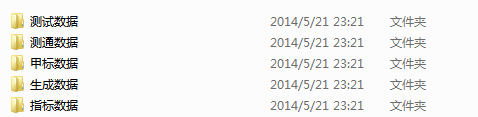
主文件夹下的子文件夹:
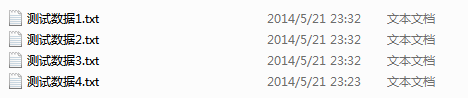
某一子文件夹下的txt数据文件:
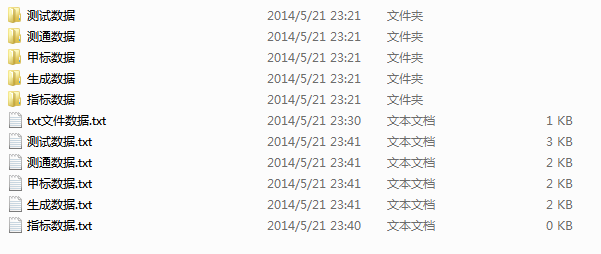
执行合并之后:
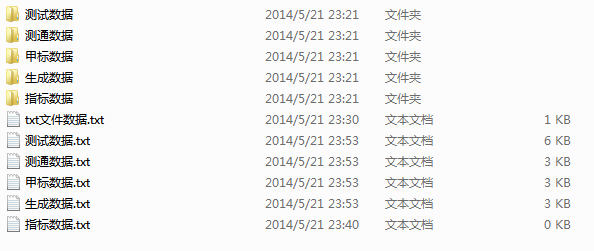
多次执行合并之后从文件大小可知其是子文件夹中txt数据是追加到已合并的子文件夹.txt中的。
<本文实现源码参考源>http://wheartbeating.blog.163.com/blog/static/2044620422013102811336829/
matlab批量合并txt文件的更多相关文章
- matlab批量读取一个文件夹里类似命名的mat文件
参考网址: Matlab读取同一路径下多个txt或mat文件总结 matlab 批量读取数据文件.mat .dat 整理:matlab批量读入数据文件的方法 首先命名方式体现在只是名字里数字有变化,其 ...
- 使用ffmpeg批量合并flv文件
title: 使用ffmpeg批量合并flv文件 toc: false date: 2018-10-14 16:08:19 categories: methods tags: ffmpeg flv 使 ...
- R语言笔记004——R批量读取txt文件
R批量读取txt文件 本文数据,代码都是参考的是大音如霜公众号,只是自己跟着做了一遍. path<-'C:\\Users\\Administrator\\Desktop\\docs' docs& ...
- python批量创建txt文件,以demo.txt内的内容为文件名
#批量创建txt文件import sys,osa=open("demo.txt")n=0aList=[]for line in a.readlines(): aList.appen ...
- matlab之导入txt文件并取其中一列数据
1.我想导入下面这个文件的内容,并且获取这个文件中的两列数据. 2.首先确保Matlab当前所在文件夹为txt文件所在文件夹,然后命令行执行: X = load('2019_03_21_08_59_0 ...
- MATLAB:读取txt文件中物体的三维坐标,显示三维模型
在MATLAB中建立一个脚本show3Dtxt.m文件,编写代码: clear; %%read 3D data fileID= fopen('E:\博士\深度学习与三维重建\代码实现\voxel_gr ...
- python批量读取txt文件为DataFrame
我们有时候会批量处理同一个文件夹下的文件,并且希望读取到一个文件里面便于我们计算操作.比方我有下图一系列的txt文件,我该如何把它们写入一个txt文件中并且读取为DataFrame格式呢? 首先我们要 ...
- 使用Python批量合并PDF文件(带书签功能)
网上找了几个合并pdf的软件,发现不是很好用,一般都没有添加书签的功能. 又去找了下python合并pdf的脚本,发现也没有添加书签的功能的. 于是自己动手编写了一个小工具,使用了PyPDF2. 下面 ...
- MATLAB的SAVE命令动态批量保存TXT文件
1.使用save(): for i=1:6 str=[num2str(i),’.txt’]; m=[1 2; 3 4]; save(str,’m’,’-ascii’);%注意m的单引号,一定记得加上, ...
随机推荐
- iOS之UI--CAGradientLayer
1.CAGradientLayer 简介 如果说CAShapeLayer是用于提供设置形状的,那么CAGradientLayer是用于提供设置颜色的 英语单词:Gradient:梯度,渐变 那么Gra ...
- 多线程基础(七)GCD线程组+栅栏函数
1.GCD队列组 拦截通知和等待所有任务全部结束在继续往下执行|阻塞 需求:下载两张图片,等两张图片都下载完毕之后,合成图片(这个实例,复习的时候一定要凭空敲出代码练习,好记性不如烂键 ...
- saltstack通过salt.client执行命令(转)
利用saltstack的salt.client模块可以在python的命令行下或者python脚本里执行相应的salt命令 master端想要执行类似 salt '*' cmd.run 'uptime ...
- Linux Shell 03 条件测试
条件测试 方式一:在Bash中 test命令和[]是等价的. test命令: if test $n1 -eq $n2 then echo "The two number are equal& ...
- lucene入门
一.lucene简介 Lucene是apache下的一个靠性能的.功能全面的用纯java开发的一个全文搜索引擎库.它几乎适合任何需要全文搜索应用程序,尤其是跨平台.lucene是开源的免费的工程.lu ...
- cocos2d-x之单点触碰初试
bool HelloWorld::init() { if ( !Layer::init() ) { return false; } Size size=Director::getInstance()- ...
- 19 图形用户界面编程 - 《Python 核心编程》
- uva 1606 amphiphilic carbon molecules【把缩写写出来,有惊喜】(滑动窗口)——yhx
Shanghai Hypercomputers, the world's largest computer chip manufacturer, has invented a new classof ...
- hyperstart 容器创建流程分析
hyperstart中运行的pod的核心数据结构如下所示: struct hyper_pod { struct hyper_interface *iface; struct hyper_route * ...
- selenium向富文本框填写内容的几种方式
富文本框如果是iframe,则用下 1.先跳转到irame,dr.switchTo().frame(wtext); 然后用js JavascriptExecutor jsExecutor = (Jav ...