
Top 30 Nmap Command Examples For Sys/Network Admins
Nmap is short for Network Mapper. It is an open source security tool for network exploration, security scanning and auditing. However, nmap command comes with lots of options that can make the utility more robust and difficult to follow for new users.
The purpose of this post is to introduce a user to the nmap command line tool to scan a host and/or network, so to find out the possible vulnerable points in the hosts. You will also learn how to use Nmap for offensive and defensive purposes.
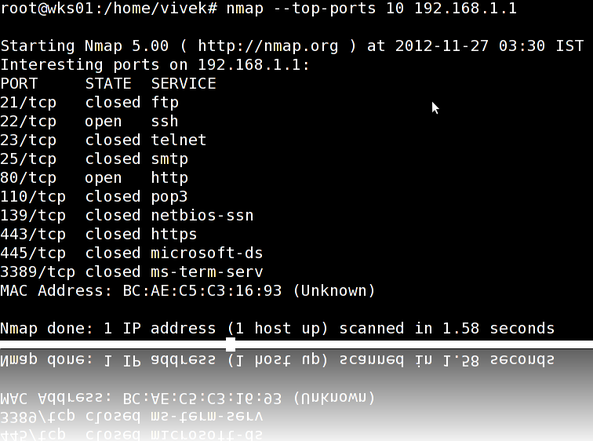
nmap in action
More about nmap
From the man page:
Nmap (“Network Mapper”) is an open source tool for network exploration and security auditing. It was designed to rapidly scan large networks, although it works fine against single hosts. Nmap uses raw IP packets in novel ways to determine what hosts are available on the network, what services (application name and version) those hosts are offering, what operating systems (and OS versions) they are running, what type of packet filters/firewalls are in use, and dozens of other characteristics. While Nmap is commonly used for security audits, many systems and network administrators find it useful for routine tasks such as network inventory, managing service upgrade schedules, and monitoring host or service uptime.
It was originally written by Gordon Lyon and it can answer the following questions easily:
- What computers did you find running on the local network?
- What IP addresses did you find running on the local network?
- What is the operating system of your target machine?
- Find out what ports are open on the machine that you just scanned?
- Find out if the system is infected with malware or virus.
- Search for unauthorized servers or network service on your network.
- Find and remove computers which don’t meet the organization’s minimum level of security.
Sample setup (LAB)
Port scanning may be illegal in some jurisdictions. So setup a lab as follows:
                              +---------+

        +---------+           | Network |         +--------+

        | server1 |-----------+ swtich  +---------|server2 |

        +---------+           | (sw0)   |         +--------+

                              +----+----+

                                   |

                                   |

                         +---------+----------+

                         | wks01 Linux/OSX    |

                         +--------------------+
Where,
- wks01 is your computer either running Linux/OS X or Unix like operating system. It is used for scanning your local network. The nmap command must be installed on this computer.
- server1 can be powered by Linux / Unix / MS-Windows operating systems. This is an unpatched server. Feel free to install a few services such as a web-server, file server and so on.
- server2 can be powered by Linux / Unix / MS-Windows operating systems. This is a fully patched server with firewall. Again, feel free to install few services such as a web-server, file server and so on.
- All three systems are connected via switch.
How do I install nmap?
See:
- Debian / Ubuntu Linux: Install nmap Software For Scanning Network
- CentOS / RHEL: Install nmap Network Security Scanner
- OpenBSD: Install nmap Network Security Scanner
#1: Scan a single host or an IP address (IPv4)
### Scan a single ip address ### |
Sample outputs:
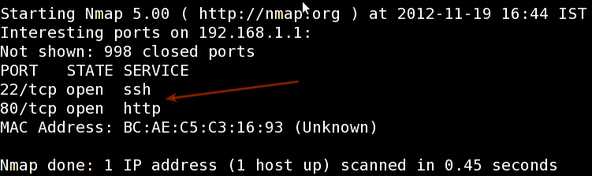
Fig.01: nmap output
#2: Scan multiple IP address or subnet (IPv4)
nmap 192.168.1.1 192.168.1.2 192.168.1.3

## works with same subnet i.e. 192.168.1.0/24

nmap 192.168.1.1,2,3
You can scan a range of IP address too:
nmap 192.168.1.1-20
You can scan a range of IP address using a wildcard:
nmap 192.168.1.*
Finally, you scan an entire subnet:
nmap 192.168.1.0/24
#3: Read list of hosts/networks from a file (IPv4)
The -iL option allows you to read the list of target systems using a text file. This is useful to scan a large number of hosts/networks. Create a text file as follows:
cat > /tmp/test.txt
Sample outputs:
server1.cyberciti.biz

192.168.1.0/24

192.168.1.1/24

10.1.2.3

localhost
The syntax is:
nmap -iL /tmp/test.txt
#4: Excluding hosts/networks (IPv4)
When scanning a large number of hosts/networks you can exclude hosts from a scan:
nmap 192.168.1.0/24 --exclude 192.168.1.5

nmap 192.168.1.0/24 --exclude 192.168.1.5,192.168.1.254
OR exclude list from a file called /tmp/exclude.txt
nmap -iL /tmp/scanlist.txt --excludefile /tmp/exclude.txt
#5: Turn on OS and version detection scanning script (IPv4)
nmap -A 192.168.1.254

nmap -v -A 192.168.1.1

nmap -A -iL /tmp/scanlist.txt
#6: Find out if a host/network is protected by a firewall
nmap -sA 192.168.1.254

nmap -sA server1.cyberciti.biz
#7: Scan a host when protected by the firewall
nmap -PN 192.168.1.1

nmap -PN server1.cyberciti.biz
#8: Scan an IPv6 host/address
The -6 option enable IPv6 scanning. The syntax is:
nmap -6 IPv6-Address-Here

nmap -6 server1.cyberciti.biz

nmap -6 2607:f0d0:1002:51::4

nmap -v A -6 2607:f0d0:1002:51::4
#9: Scan a network and find out which servers and devices are up and running
This is known as host discovery or ping scan:
nmap -sP 192.168.1.0/24
Sample outputs:
Host 192.168.1.1 is up (0.00035s latency).

MAC Address: BC:AE:C5:C3:16:93 (Unknown)

Host 192.168.1.2 is up (0.0038s latency).

MAC Address: 74:44:01:40:57:FB (Unknown)

Host 192.168.1.5 is up.

Host nas03 (192.168.1.12) is up (0.0091s latency).

MAC Address: 00:11:32:11:15:FC (Synology Incorporated)

Nmap done: 256 IP addresses (4 hosts up) scanned in 2.80 second
#10: How do I perform a fast scan?
nmap -F 192.168.1.1
#11: Display the reason a port is in a particular state
nmap --reason 192.168.1.1

nmap --reason server1.cyberciti.biz
#12: Only show open (or possibly open) ports
nmap --open 192.168.1.1

nmap --open server1.cyberciti.biz
#13: Show all packets sent and received
nmap --packet-trace 192.168.1.1

nmap --packet-trace server1.cyberciti.biz
14#: Show host interfaces and routes
This is useful for debugging (ip command or route command or netstat command like output using nmap)
nmap --iflist
Sample outputs:
Starting Nmap 5.00 ( http://nmap.org ) at 2012-11-27 02:01 IST |
#15: How do I scan specific ports?
nmap -p [port] hostName |
Sample outputs:
Starting Nmap 5.00 ( http://nmap.org ) at 2012-11-27 01:23 IST |
#16: The fastest way to scan all your devices/computers for open ports ever
nmap -T5 192.168.1.0/24
#17: How do I detect remote operating system?
You can identify a remote host apps and OS using the -O option:
nmap -O 192.168.1.1 |
Sample outputs:
Starting Nmap 5.00 ( http://nmap.org ) at 2012-11-27 01:29 IST

NSE: Loaded 0 scripts for scanning.

Initiating ARP Ping Scan at 01:29

Scanning 192.168.1.1 [1 port]

Completed ARP Ping Scan at 01:29, 0.01s elapsed (1 total hosts)

Initiating Parallel DNS resolution of 1 host. at 01:29

Completed Parallel DNS resolution of 1 host. at 01:29, 0.22s elapsed

Initiating SYN Stealth Scan at 01:29

Scanning 192.168.1.1 [1000 ports]

Discovered open port 80/tcp on 192.168.1.1

Discovered open port 22/tcp on 192.168.1.1

Completed SYN Stealth Scan at 01:29, 0.16s elapsed (1000 total ports)

Initiating OS detection (try #1) against 192.168.1.1

Retrying OS detection (try #2) against 192.168.1.1

Retrying OS detection (try #3) against 192.168.1.1

Retrying OS detection (try #4) against 192.168.1.1

Retrying OS detection (try #5) against 192.168.1.1

Host 192.168.1.1 is up (0.00049s latency).

Interesting ports on 192.168.1.1:

Not shown: 998 closed ports

PORT   STATE SERVICE

22/tcp open  ssh

80/tcp open  http

MAC Address: BC:AE:C5:C3:16:93 (Unknown)

Device type: WAP|general purpose|router|printer|broadband router

Running (JUST GUESSING) : Linksys Linux 2.4.X (95%), Linux 2.4.X|2.6.X (94%), MikroTik RouterOS 3.X (92%), Lexmark embedded (90%), Enterasys embedded (89%), D-Link Linux 2.4.X (89%), Netgear Linux 2.4.X (89%)

Aggressive OS guesses: OpenWrt White Russian 0.9 (Linux 2.4.30) (95%), OpenWrt 0.9 - 7.09 (Linux 2.4.30 - 2.4.34) (94%), OpenWrt Kamikaze 7.09 (Linux 2.6.22) (94%), Linux 2.4.21 - 2.4.31 (likely embedded) (92%), Linux 2.6.15 - 2.6.23 (embedded) (92%), Linux 2.6.15 - 2.6.24 (92%), MikroTik RouterOS 3.0beta5 (92%), MikroTik RouterOS 3.17 (92%), Linux 2.6.24 (91%), Linux 2.6.22 (90%)

No exact OS matches for host (If you know what OS is running on it, see http://nmap.org/submit/ ).

TCP/IP fingerprint:

OS:SCAN(V=5.00%D=11/27%OT=22%CT=1%CU=30609%PV=Y%DS=1%G=Y%M=BCAEC5%TM=50B3CA

OS:4B%P=x86_64-unknown-linux-gnu)SEQ(SP=C8%GCD=1%ISR=CB%TI=Z%CI=Z%II=I%TS=7

OS:)OPS(O1=M2300ST11NW2%O2=M2300ST11NW2%O3=M2300NNT11NW2%O4=M2300ST11NW2%O5

OS:=M2300ST11NW2%O6=M2300ST11)WIN(W1=45E8%W2=45E8%W3=45E8%W4=45E8%W5=45E8%W

OS:6=45E8)ECN(R=Y%DF=Y%T=40%W=4600%O=M2300NNSNW2%CC=N%Q=)T1(R=Y%DF=Y%T=40%S

OS:=O%A=S+%F=AS%RD=0%Q=)T2(R=N)T3(R=N)T4(R=Y%DF=Y%T=40%W=0%S=A%A=Z%F=R%O=%R

OS:D=0%Q=)T5(R=Y%DF=Y%T=40%W=0%S=Z%A=S+%F=AR%O=%RD=0%Q=)T6(R=Y%DF=Y%T=40%W=

OS:0%S=A%A=Z%F=R%O=%RD=0%Q=)T7(R=N)U1(R=Y%DF=N%T=40%IPL=164%UN=0%RIPL=G%RID

OS:=G%RIPCK=G%RUCK=G%RUD=G)IE(R=Y%DFI=N%T=40%CD=S)

Uptime guess: 12.990 days (since Wed Nov 14 01:44:40 2012)

Network Distance: 1 hop

TCP Sequence Prediction: Difficulty=200 (Good luck!)

IP ID Sequence Generation: All zeros

Read data files from: /usr/share/nmap

OS detection performed. Please report any incorrect results at http://nmap.org/submit/ .

Nmap done: 1 IP address (1 host up) scanned in 12.38 seconds

           Raw packets sent: 1126 (53.832KB) | Rcvd: 1066 (46.100KB)
See also: Fingerprinting a web-server and a dns server command line tools for more information.
#18: How do I detect remote services (server / daemon) version numbers?
nmap -sV 192.168.1.1
Sample outputs:
Starting Nmap 5.00 ( http://nmap.org ) at 2012-11-27 01:34 IST

Interesting ports on 192.168.1.1:

Not shown: 998 closed ports

PORT   STATE SERVICE VERSION

22/tcp open  ssh     Dropbear sshd 0.52 (protocol 2.0)

80/tcp open  http?

1 service unrecognized despite returning data.
#19: Scan a host using TCP ACK (PA) and TCP Syn (PS) ping
If firewall is blocking standard ICMP pings, try the following host discovery methods:
nmap -PS 192.168.1.1

nmap -PS 80,21,443 192.168.1.1

nmap -PA 192.168.1.1

nmap -PA 80,21,200-512 192.168.1.1
#20: Scan a host using IP protocol ping
nmap -PO 192.168.1.1
#21: Scan a host using UDP ping
This scan bypasses firewalls and filters that only screen TCP:
nmap -PU 192.168.1.1

nmap -PU 2000.2001 192.168.1.1
#22: Find out the most commonly used TCP ports using TCP SYN Scan
### Stealthy scan ### |
#23: Scan a host for UDP services (UDP scan)
Most popular services on the Internet run over the TCP protocol. DNS, SNMP, and DHCP are three of the most common UDP services. Use the following syntax to find out UDP services:
nmap -sU nas03

nmap -sU 192.168.1.1
Sample outputs:
Starting Nmap 5.00 ( http://nmap.org ) at 2012-11-27 00:52 IST |
#24: Scan for IP protocol
This type of scan allows you to determine which IP protocols (TCP, ICMP, IGMP, etc.) are supported by target machines:
nmap -sO 192.168.1.1
#25: Scan a firewall for security weakness
The following scan types exploit a subtle loophole in the TCP and good for testing security of common attacks:
## TCP Null Scan to fool a firewall to generate a response ## |
See how to block Xmas packkets, syn-floods and other conman attacks with iptables.
#26: Scan a firewall for packets fragments
The -f option causes the requested scan (including ping scans) to use tiny fragmented IP packets. The idea is to split up the TCP header over
several packets to make it harder for packet filters, intrusion
detection systems, and other annoyances to detect what you are doing.
nmap -f 192.168.1.1

nmap -f fw2.nixcraft.net.in

nmap -f 15 fw2.nixcraft.net.in

## Set your own offset size with the --mtu option ##

nmap --mtu 32 192.168.1.1
#27: Cloak a scan with decoys
The -D option it appear to the remote host that the host(s) you specify as decoys are scanning the target network too. Thus their IDS might report 5-10 port scans from unique IP addresses, but they won’t know which IP was scanning them and which were innocent decoys:
nmap -n -Ddecoy-ip1,decoy-ip2,your-own-ip,decoy-ip3,decoy-ip4 remote-host-ip

nmap -n -D192.168.1.5,10.5.1.2,172.1.2.4,3.4.2.1 192.168.1.5
#28: Scan a firewall for MAC address spoofing
### Spoof your MAC address ## |
#29: How do I save output to a text file?
The syntax is:
nmap 192.168.1.1 > output.txt

nmap -oN /path/to/filename 192.168.1.1

nmap -oN output.txt 192.168.1.1
#30: Not a fan of command line tools?
Try zenmap the official network mapper front end:
Zenmap is the official Nmap Security Scanner GUI. It is a multi-platform (Linux, Windows, Mac OS X, BSD, etc.) free and open source application which aims to make Nmap easy for beginners to use while providing advanced features for experienced Nmap users. Frequently used scans can be saved as profiles to make them easy to run repeatedly. A command creator allows interactive creation of Nmap command lines. Scan results can be saved and viewed later. Saved scan results can be compared with one another to see how they differ. The results of recent scans are stored in a searchable database.
You can install zenmap using the following apt-get command:
$ sudo apt-get install zenmap
Sample outputs:
[sudo] password for vivek:

Reading package lists... Done

Building dependency tree

Reading state information... Done

The following NEW packages will be installed:

  zenmap

0 upgraded, 1 newly installed, 0 to remove and 11 not upgraded.

Need to get 616 kB of archives.

After this operation, 1,827 kB of additional disk space will be used.

Get:1 http://debian.osuosl.org/debian/ squeeze/main zenmap amd64 5.00-3 [616 kB]

Fetched 616 kB in 3s (199 kB/s)

Selecting previously deselected package zenmap.

(Reading database ... 281105 files and directories currently installed.)

Unpacking zenmap (from .../zenmap_5.00-3_amd64.deb) ...

Processing triggers for desktop-file-utils ...

Processing triggers for gnome-menus ...

Processing triggers for man-db ...

Setting up zenmap (5.00-3) ...

Processing triggers for python-central ...
Type the following command to start zenmap:
$ sudo zenmap
Sample outputs
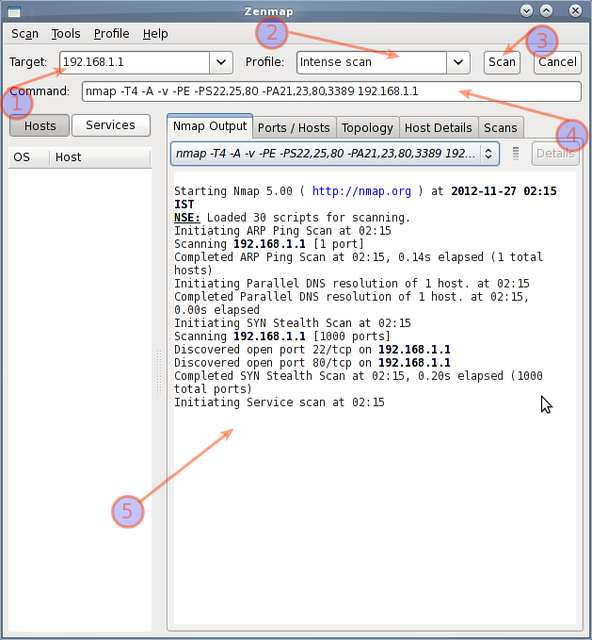
Fig.02: zenmap in action
How do I detect and block port scanning?
Try the following resources:
- How to use psad tool to detect and block port scan attacks in real time.
- Debian / Ubuntu Linux: Install and Configure Shoreline Firewall (Shorewall).
- CentOS / Redhat Iptables Firewall Configuration Tutorial.
- Linux: 20 Iptables Examples For New SysAdmins.
- 20 Linux Server Hardening Security Tips.
References:
- The official Nmap project guide to network discovery and security Scanning.
- The official Nmap project home page.
The
nmap command has many more options, please go through man page or the
documentation for more information. What are some of your favorite nmap
command-line tricks? Share your favorite tips, tricks, and advice in the
comments below.
Top 30 Nmap Command Examples For Sys/Network Admins的更多相关文章
- Learn golang: Top 30 Go Tutorials for Programmers Of All Levels
https://stackify.com/learn-go-tutorials/ What is Go Programming Language? Go, developed by Google in ...
- 18 Tar Command Examples in Linux
FROM: http://www.tecmint.com/18-tar-command-examples-in-linux/ 18 Tar Command Examples in Linux By R ...
- 15 Linux Split and Join Command Examples to Manage Large Files--reference
by HIMANSHU ARORA on OCTOBER 16, 2012 http://www.thegeekstuff.com/2012/10/15-linux-split-and-join-co ...
- 【转】12 TOP Command Examples in Linux
12个top命令 1. # top 2. # top,后输入shift+O,在“Current Sort Field:”中选左边的field对应的字母进行排序. 3. # top -u tecmint ...
- TCPDUMP Command Examples
tcpdump command is also called as packet analyzer. tcpdump command will work on most flavors of unix ...
- 13 Basic Cat Command Examples in Linux(转) Linux中cat命令的13中基本用法
Cat (串联) 命令是Linux/Unix开源系统中比较常用的一个命令.我们可以通过Cat命令创建一个或多个文件,查看文件内容,串联文件并将内容输出到终端设备或新的文件当中,这篇文章我们将会以实例的 ...
- 12 Linux Which Command, Whatis Command, Whereis Command Examples
This Linux tutorial will explain the three "W" commands. The three "W"s are what ...
- 10 Linux DIG Command Examples for DNS Lookup--reference
by RAMESH NATARAJAN on FEBRUARY 29, 2012 http://www.thegeekstuff.com/2012/02/dig-command-examples/ D ...
- 13 Basic Cat Command Examples in Linux
FROM: http://www.tecmint.com/13-basic-cat-command-examples-in-linux/ The cat (short for “concatenate ...
随机推荐
- Making raycast ignore multiple layers
I know how to make the raycast ignore a layer but I want it to ignore layers 9 and 10 but collide wi ...
- clumsy 0.1 测试工具(延迟\掉包\节流\重发\乱序\篡改)
clumsy : http://jagt.github.io/clumsy/可以模拟以下几种场景: 延迟(Lag),把数据包缓存一段时间后再发出,这样能够模拟网络延迟的状况. 掉包(Drop),随机丢 ...
- Cobar_基于MySQL的分布式数据库服务中间件
Cobar是阿里巴巴研发的关系型数据的分布式处理系统,是提供关系型数据库(MySQL)分布式服务的中间件,该产品成功替代了原先基于Oracle的数据存储方案,它可以让传统的数据库得到良好的线性扩展,并 ...
- 微课程--Android--基础控件的使用
view viewgroup是一种特殊的view,里面可以包含其他的view 如何生成view: 1 在代码里动态生成 2 写在XML里面 view的常见属性--宽度 wrap_content 随着内 ...
- PB 简单笔记!
1.总体说明: a) 程序不区分大小写 b) 赋值用= String city=“南京”,country ;Integer person[3]={3,8,9};String s = ' You ...
- Android 通用流行框架大全
1. 缓存 DiskLruCache Java实现基于LRU的磁盘缓存 2.图片加载 Android Universal Image Loader 一个强大的加载,缓存,展示图片的库 Picas ...
- Visual Studio快捷键不能使用解决办法
环境: Visual Studio 2010,windows 7 使用Visual Studio查找变量或方法时常用到[定位到]功能 但该功能的快捷键却不能使用,解决办法如下所示: 1.工具--> ...
- 页面静态化3 --- 使用PHP页面缓存机制来完成页面静态化(下)操作一个案例(新闻管理系统)
案例需求: 使用PHP缓存机制完成新闻管理系统的页面静态化数据库表 ecs_article (新闻表)因为新闻这些信息,并不是对实时性要求高,本身这个新闻比较稳定,内容也比较固定,所以我们考虑: 当第 ...
- Bootstrap页面布局13 - BS按钮
bootstrap中的按钮类 一般可以作为按钮的标签有:<a></a> <button></button> <input type='butt ...
- laravel 取sql语句
\DB::connection()->enableQueryLog(); some sql action... $query = \DB::getQueryLog(); $lastQuery = ...