
jQuery插件实现图片展开效果,jquery.gallery。仿腾讯QQ空间说说图片展示效果。
公司的项目http://www.umfun.com/,有个说说的页面(和腾讯QQ空间说说一样),里面有个发表图片功能,上传完图片,需要点击展开的效果。
当时手里面事情比较多(公司就我一个前端),忙不过来,就用插件来实现了,试了fancyBox、lightbox等jQuery插件。插件都满足不了项目各种奇怪的需求,但是时间有限,只能先凑合了。、
项目上线后,最近时间比较充足,我就想把写个插件封装一下。毕竟人家的插件比较臃肿,修改起来麻烦,同时免得以后又是各种修改,还是根据公司的项目需求写比较好。。。
效果预览,如果下图所示:
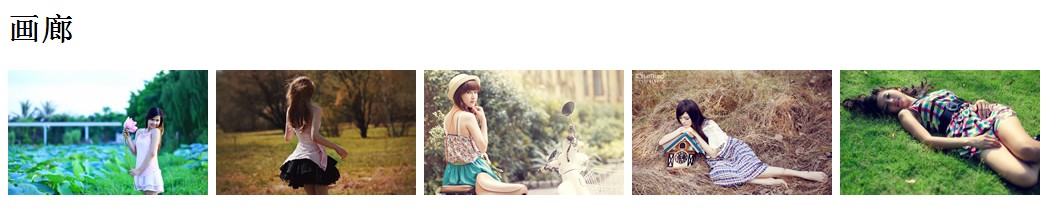
点击图片后,展示:
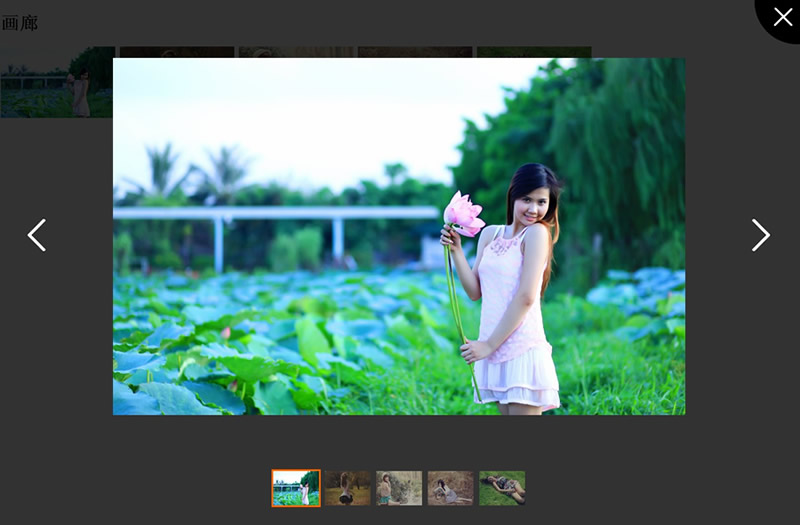
2014-4-18更新
更新内容:1、兼容性问题;
2、点击大图切换到下一张图
<!doctype html>
<html lang="en">
<head>
<meta charset="UTF-8">
<title>画廊</title>
<style>
/*
* jquery gallery CSS
* ZhaoHuanLei - 20140418
*/
.gallery-overlay {width:100%;height:100%;position:fixed;_top:absolute;top:0;left:0;z-index:99;filter:progid:DXImageTransform.Microsoft.gradient(enabled='true',startColorstr='#B2000000', endColorstr='#B2000000');background-color:rgba(0,0,0,.7);}
:root .gallery-overlay {filter:none;}
.gallery-close,
.gallery-prev,
.gallery-next {position:absolute;color:#fff;text-decoration:none;}
.gallery-prev,
.gallery-next {top:40%;font:bold 80px/80px simsun;}
.gallery-prev {left:50px;}
.gallery-next {right:50px;}
.gallery-close {width:82px;height:77px;top:0;right:0;background:url(http://images.cnitblog.com/i/333689/201404/181538254946336.png) no-repeat;text-indent:-9999em;}
.gallery-photo {width:100%;height:100%;position:absolute;top:50px;vertical-align:middle;text-align:center;}
.gallery-photo span {height:100%;display:inline-block;vertical-align:middle;}
.gallery-photo img {max-width:100%;max-height:100%;vertical-align:middle;cursor:pointer;}
.gallery-thumb {width:100%;height:56px;position:absolute;bottom:50px;text-align:center;font-size:0;}
.gallery-thumb a {width:50px;height:50px;overflow:hidden;margin:0 2px;display:inline-block;*zoom:1;border:3px solid transparent;opacity:.6;filter:alpha(opacity:60);}
.gallery-thumb img {max-width:100px;max-height:100px;min-width:50px;min-height:50px;border:none;}
.gallery-thumb .selected {border-color:#f60;opacity:1;filter:alpha(opacity:100);}
</style>
</head>
<body style="height:2000px;"> <h1>画廊</h1>
<p class="img">
<a href="https://images0.cnblogs.com/i/333689/201403/181012241467455.jpg"><img src="https://images0.cnblogs.com/i/333689/201403/181012064744754.jpg" alt=""></a>
<a href="https://images0.cnblogs.com/i/333689/201403/181012428021756.jpg"><img src="https://images0.cnblogs.com/i/333689/201403/181012349904375.jpg" alt=""></a>
<a href="https://images0.cnblogs.com/i/333689/201403/181012573656772.jpg"><img src="https://images0.cnblogs.com/i/333689/201403/181012512096320.jpg" alt=""></a>
<a href="https://images0.cnblogs.com/i/333689/201403/181013163811731.jpg"><img src="https://images0.cnblogs.com/i/333689/201403/181013035524683.jpg" alt=""></a>
<a href="https://images0.cnblogs.com/i/333689/201403/181013442711411.jpg"><img src="https://images0.cnblogs.com/i/333689/201403/181013354124216.jpg" alt=""></a>
</p> <script src="http://code.jquery.com/jquery-1.11.0.min.js"></script>
<script>
/*
* jquery gallery JS
* ZhaoHuanLei - 20140418
*/ ;(function($) {
$.fn.extend({
gallery: function() {
$(this).on("click", function() {
var self = $(this),
link = self.parent().find("a"),
bd = $("body");
html = "\
<div class='gallery-overlay'>\
<div class='gallery-photo'><span></span><img src='"+ self.attr("href") +"'></div>\
<div class='gallery-thumb'></div>\
<a class='gallery-prev' href='javascript:;' title='上一个'><</a>\
<a class='gallery-next' href='javascript:;' title='下一个'>></a>\
<a class='gallery-close' href='javascript:;' title='关闭'>×</a>\
</div>\
";
bd.css("overflow-y", "hidden").append(html);
var overlay = $(".gallery-overlay"),
photo = $(".gallery-photo"),
photoImg = photo.find("img"),
thumb = $(".gallery-thumb"),
prev = $(".gallery-prev"),
next = $(".gallery-next"),
close = $(".gallery-close"),
str = ""; //浏览器缩放时候,重置
function toResize() {
var height = $(window).height();
overlay.height(height);
photo.css({"height": height - 200});
photoImg.css({"max-height": height - 200});//解决safari下bug
}
toResize();
$(window).resize(function() {
toResize();
}); //生成缩略图列表
link.each(function() {
var href = $(this).attr("href"),
src = $(this).find("img").attr("src"),
act = "<a href='"+ href +"'><img src='"+ src +"'/></a>";
str += act;
});
thumb.append(str); //图片切换
var thumbLink = thumb.find("a"),
len = thumbLink.length - 1,
index = link.index(this);
function switchPhoto(index) {
var _this = thumbLink.eq(index);
_this.addClass("selected").siblings().removeClass("selected");
photo.find("img").attr("src", _this.attr("href"));
}
switchPhoto(index); thumb.on("click", "a", function() {
index = thumbLink.index(this);
switchPhoto(index);
return false;
}); //切换下一个
function switchPrev() {
index--;
if (index < 0) {
index = len;
}
switchPhoto(index);
}
//切换上一个
function switchNext() {
index++;
if (index > len) {
index = 0;
}
switchPhoto(index);
} prev.on("click", function() {
switchPrev();
});
next.on("click", function() {
switchNext();
});
photo.on("click", "img", function() {
switchNext();
}); //关闭层
function closeOverlay() {
overlay.remove();
bd.css("overflow-y", "auto");
}
close.on("click", function() {
closeOverlay();
}); return false;
});
}
});
})(jQuery);
</script>
<script>
$(function() {
$('.img a').gallery();
});
</script>
</body>
</html>
20140317上传
JQuery插件代码:
/*
* jquery gallery JS
* ZhaoHuanLei - 20140317
*/ ;(function($) {
$.fn.extend({
gallery: function() {
$(this).on("click", function() {
var self = $(this),
link = self.parent().find("a"),
bd = $("body");
html = "\
<div class='gallery-overlay'>\
<div class='gallery-photo'><span></span><img src='"+ self.attr("href") +"'></div>\
<div class='gallery-thumb'></div>\
<a class='gallery-prev' href='javascript:;' title='上一个'><</a>\
<a class='gallery-next' href='javascript:;' title='下一个'>></a>\
<a class='gallery-close' href='javascript:;' title='关闭'>×</a>\
</div>\
";
bd.css("overflow-y", "hidden").append(html);
var overlay = $(".gallery-overlay"),
photo = $(".gallery-photo"),
thumb = $(".gallery-thumb"),
prev = $(".gallery-prev"),
next = $(".gallery-next"),
close = $(".gallery-close"),
str = ""; //浏览器缩放时候,重置
function toResize() {
var height = $(window).height();
overlay.height(height);
photo.css({"height": height - });
photo.find("img").css({"max-height": height - });//解决safari下bug
}
toResize();
$(window).resize(function() {
toResize();
}); //生成缩略图列表
link.each(function() {
var href = $(this).attr("href"),
src = $(this).find("img").attr("src"),
act = "<a href='"+ href +"'><img src='"+ src +"'/></a>";
str += act;
});
thumb.append(str); //图片切换
var thumbLink = thumb.find("a"),
len = thumbLink.length - ,
index = link.index(this);
function imgSwitch(index) {
var _this = thumbLink.eq(index);
_this.addClass("selected").siblings().removeClass("selected");
photo.find("img").attr("src", _this.attr("href"));
}
imgSwitch(index); thumb.on("click", "a", function() {
index = thumbLink.index(this);
imgSwitch(index);
return false;
});
prev.on("click", function() {
index--;
if (index < ) {
index = len;
}
imgSwitch(index);
});
next.on("click", function() {
index++;
if (index > len) {
index = ;
}
imgSwitch(index);
}); //关闭层
function closeOverlay() {
overlay.remove();
bd.css("overflow-y", "auto");
}
close.on("click", function() {
closeOverlay();
}); return false;
});
}
});
})(jQuery);
HTML:
<!doctype html>

<html lang="en">

<head>

    <meta charset="UTF-8">

    <title>画廊</title>

    <link rel="stylesheet" href="style/jquery.gallery.css">

</head>

<body style="height:2000px;">

<h1>画廊</h1>

<p class="img">

    <a href="https://images0.cnblogs.com/i/333689/201403/181012241467455.jpg"><img src="https://images0.cnblogs.com/i/333689/201403/181012064744754.jpg" alt=""></a>

    <a href="https://images0.cnblogs.com/i/333689/201403/181012428021756.jpg"><img src="https://images0.cnblogs.com/i/333689/201403/181012349904375.jpg" alt=""></a>

    <a href="https://images0.cnblogs.com/i/333689/201403/181012573656772.jpg"><img src="https://images0.cnblogs.com/i/333689/201403/181012512096320.jpg" alt=""></a>

    <a href="https://images0.cnblogs.com/i/333689/201403/181013163811731.jpg"><img src="https://images0.cnblogs.com/i/333689/201403/181013035524683.jpg" alt=""></a>

    <a href="https://images0.cnblogs.com/i/333689/201403/181013442711411.jpg"><img src="https://images0.cnblogs.com/i/333689/201403/181013354124216.jpg" alt=""></a>

</p>

<script src="script/jquery-1.11.0.min.js"></script>

<script src="script/jquery.gallery.js"></script>

<script>

$(function() {

    $('.img a').gallery();

});

</script>

</body>

</html>
CSS:
/*

* jquery gallery CSS

* ZhaoHuanLei - 20140317

*/

.gallery-overlay {width:%;height:%;position:fixed;_top:absolute;top:;left:;z-index:;filter:progid:DXImageTransform.Microsoft.gradient(enabled='true',startColorstr='#CC000000', endColorstr='#CC000000');background-color:rgba(,,,.);}

:root .gallery-overlay {filter:none;}

.gallery-close,

.gallery-prev,

.gallery-next {position:absolute;color:#fff;text-decoration:none;}

.gallery-prev,

.gallery-next {top:%;font:bold 80px/80px simsun;}

.gallery-prev {left:50px;}

.gallery-next {right:50px;}

.gallery-close {width:82px;height:77px;top:;right:;background:url(../images/gallery-close.png) no-repeat;text-indent:-9999em;}

.gallery-photo {width:%;height:%;position:absolute;top:50px;vertical-align:middle;text-align:center;}

.gallery-photo span {height:%;display:inline-block;vertical-align:middle;}

.gallery-photo img {max-width:%;max-height:%;vertical-align:middle;}

.gallery-thumb {width:%;height:56px;position:absolute;bottom:50px;text-align:center;font-size:;}

.gallery-thumb a {width:50px;height:50px;overflow:hidden;margin: 2px;display:inline-block;*zoom:;border:3px solid transparent;opacity:.;filter:alpha(opacity:);}

.gallery-thumb img {max-width:100px;max-height:100px;min-width:50px;min-height:50px;border:none;}

.gallery-thumb .selected {border-color:#f60;opacity:;filter:alpha(opacity:);}
PS:
1、基本功能实现了,没搞什么选项设置,有时间再扩展,现在已经满足需求了。。
2、公司的项目只需要兼容IE7+兼容就可以。so。。。IE6就没考虑了。。











jQuery插件实现图片展开效果,jquery.gallery。仿腾讯QQ空间说说图片展示效果。的更多相关文章
- 不定义JQuery插件,不要说会JQuery[转载]
http://www.cnblogs.com/xcj26/p/3345556.html 不定义JQuery插件,不要说会JQuery 一:导言 有些WEB开发者,会引用一个JQuery类库,然后在网页 ...
- 不定义JQuery插件,不要说会JQuery 分类: JavaScript 2014-11-24 14:18 155人阅读 评论(0) 收藏
一:导言 有些WEB开发者,会引用一个JQuery类库,然后在网页上写一写$("#"),$("."),写了几年就对别人说非常熟悉JQuery.我曾经也是这样的人 ...
- [转]不定义JQuery插件,不要说会JQuery
一:导言 有些WEB开发者,会引用一个JQuery类库,然后在网页上写一写("#"),("."),写了几年就对别人说非常熟悉JQuery.我曾经也是这样的人,直 ...
- 不定义JQuery插件,不要说会JQuery
转自:http://www.cnblogs.com/xcj26/p/3345556.html 一:导言 有些WEB开发者,会引用一个JQuery类库,然后在网页上写一写$("#") ...
- 转:不会定义jQuery插件,不要说会jQuery
一:导言 有些WEB开发者,会引用一个JQuery类库,然后在网页上写一写$("#"),$("."),写了几年就对别人说非常熟悉JQuery.我曾经也是这样的人 ...
- 转载:不定义JQuery插件,不要说会JQuery
转载:http://www.cnblogs.com/xcj26/p/3345556.html 一:导言 有些WEB开发者,会引用一个JQuery类库,然后在网页上写一写$("#") ...
- (转)不定义JQuery插件,不要说会JQuery
原文地址:http://www.cnblogs.com/xcj26/p/3345556.html 一:导言 有些WEB开发者,会引用一个JQuery类库,然后在网页上写一写$("#" ...
- 使用jQuery插件时避免重复引入jquery.js文件
当一个页面使用多个jQuery插件时,需要避免重复引入jquery.js文件,因为后面映入的jQuery.js文件中定义的jQuery对象会覆盖掉前面的jQuery对象,导致之前定义的jQuery插件 ...
- 使用PHP打造QQ空间神奇图片
说明 你一定在qq空间遇到过这样的东西:打开一张图片,上面有你的QQ号和昵称,你觉得很神奇,是不是? 其实原理很简单,那张图片是动态生成的,上面显示的信息是根据你访问的Url获得的,然后用程序动态的画 ...
随机推荐
- ConcurrentDictionary 对决 Dictionary+Locking
在 .NET 4.0 之前,如果我们需要在多线程环境下使用 Dictionary 类,除了自己实现线程同步来保证线程安全之外,我们没有其他选择. 很多开发人员肯定都实现过类似的线程安全方案,可能是通过 ...
- Kali Linux Web 渗透测试视频教程—第十课 w3af
Kali Linux Web 渗透测试视频教程—第十课 w3af 文/玄魂 原文链接:http://www.xuanhun521.com/Blog/2014/10/24/kali-linux-web- ...
- 团队项目--站立会议 DAY4
小组名称:D&M 参会人员:张靖颜,钟灵毓秀,何玥,赵莹,王梓萱 项目进展: 1.张靖颜:筛选完元素后,把昨天优化完的再进行测试,进行进一步的检验.对于钟灵毓秀和赵莹同学编写的代码进行进一步审 ...
- 搭建wordpress开发环境
安装php PHP下载地址:http://windows.php.net/download/ 和MySQL一样,下载包是一个zip压缩包,只需解压缩即可.将它解压缩到 D:\WNMP\php-5.5. ...
- paramiko操作详解(封装好的类,可以直接使用)
#!/usr/bin/env python #encoding:utf8 #author: djoker import paramiko class myParamiko: def __init__( ...
- 通过MSSQL连接服务器连接至Oracle数据库
前言 有很多时候,我们需要MSSQL与Oracle进行跨库查询或数据交互.本篇随笔将阐述如何通过MSSQL的连接服务器连接至Oracle数据库,并且读取数据的示例. 具体步骤 首先需要到Oracle的 ...
- 出现Bad command or the file name的原因
出现Bad command or file name的原因 中文释义:错误的命令或文件名 . 错误原因:不能识别输入的命令 . 方法:检查所输入的指令是否正确,包括拼写和大小写等情况.
- Which Clang Warning Is Generating This Message?
Which Clang Warning Is Generating This Message? 根据前面页面制作的pdf:clangwarninglist.pdf 百度网盘:http://pan.ba ...
- Java Socket网络编程常见异常(转)
1.java.net.SocketTimeoutException 这个异常比较常见,socket超时.一般有2个地方会抛出这个,一个是connect的时候,这个超时参数由connect(Socket ...
- const成员函数
尽管函数名和参数列表都相同,void foo( ) const成员函数是可以与void foo( )并存的,可以形成重载! 我们假设调用语句为obj.foo(),如果obj为non-const对象,则 ...