
android之简易新闻客户端
将一个新闻信息保存到一个XML文件中,并将放在服务器下。通过手机客户端来从服务器下载该文件并解析显示。
news.xml
<?xml version="1.0" encoding="UTF-8" ?>

<newslist>

    <news>

        <title>黑马52期就业快报</title>

        <detail>热烈祝贺黑马52期平均薪水突破13k</detail>

        <comment>15687</comment>

        <image>http://192.168.0.109/images/6.jpg</image>

    </news>

    <news>

        <title>程序员因写代码太乱被杀害</title>

        <detail>凶手是死者同事,维护死者代码时完全看不懂而痛下杀手</detail>

        <comment>16359</comment>

        <image>http://192.168.0.109/images/7.jpg</image>

    </news>

    <news>

        <title>3Q大战宣判: 腾讯获赔500万</title>

        <detail>最高法驳回360上诉, 维持一审宣判.</detail>

        <comment>6427</comment>

        <image>http://192.168.0.109/images/1.jpg</image>

    </news>

    <news>

        <title>今日之声:北大雕塑被戴口罩</title>

        <detail>市民: 因雾霾起诉环保局; 公务员谈"紧日子": 坚决不出去.</detail>

        <comment>681</comment>

        <image>http://192.168.0.109/images/2.jpg</image>

    </news>

    <news>

        <title>轻松一刻: 我要沉迷学习不自拔</title>

        <detail>放假时我醒了不代表我起床了, 如今我起床了不代表我醒了!</detail>

        <comment>11616</comment>

        <image>http://192.168.0.109/images/4.jpg</image>

    </news>

    <news>

        <title>男女那些事儿</title>

        <detail>"妈, 我在东莞被抓, 要2万保释金, 快汇钱到xxx!"</detail>

        <comment>10339</comment>

        <image>http://192.168.0.109/images/5.jpg</image>

    </news>

    <news>

        <title>赵帅哥语录一</title>

        <detail>少壮不努力,老大做IT</detail>

        <comment>14612</comment>

        <image>http://192.168.0.109/images/8.jpg</image>

    </news>

    <news>

        <title>奥巴马见达是装蒜</title>

        <detail>外文局: 国际民众认可中国大国地位;法院: "流量清零"未侵权.</detail>

        <comment>1359</comment>

        <image>http://192.168.0.109/images/3.jpg</image>

    </news>

</newslist>
新闻信息以XML方式进行保存,文件的编码是UTF-8。文件中的IP地址是自己服务器地址,图片需要自己准备。
布局文件
子布局文件item_list.xml
<?xml version="1.0" encoding="utf-8"?>

<RelativeLayout xmlns:android="http://schemas.android.com/apk/res/android"

    xmlns:tools="http://schemas.android.com/tools"

    android:layout_width="match_parent"

    android:layout_height="wrap_content"

    tools:context="xidian.dy.com.chujia.MainActivity">

    <com.loopj.android.image.SmartImageandroid:id="@+id/img"

        android:layout_width="72dp"

        android:layout_height="72dp"

        android:src="@drawable/dog"

        android:layout_centerVertical="true"

        />

    <TextView

        android:id="@+id/title"

        android:layout_width="match_parent"

        android:layout_height="wrap_content"

        android:text="小狗"

        android:textSize="22sp"

        android:layout_toRightOf="@+id/img"

        />

    <TextView

        android:id="@+id/content"

        android:layout_width="wrap_content"

        android:layout_height="wrap_content"

        android:text="这是一条小狗"

        android:layout_below="@+id/title"

        android:layout_alignLeft="@+id/title"

        android:lines="2"

        android:textColor="@android:color/darker_gray"

        android:textSize="15sp"

        />

    <TextView

        android:id="@+id/comment"

        android:layout_width="wrap_content"

        android:layout_below="@+id/content"

        android:layout_height="wrap_content"

        android:text="1223条评论"

        android:textColor="#ff0000"

        android:layout_alignParentRight="true"

        android:layout_alignParentEnd="true" />

</RelativeLayout>

主布局activity_main.xml
<?xml version="1.0" encoding="utf-8"?>

<LinearLayout xmlns:android="http://schemas.android.com/apk/res/android"

    xmlns:tools="http://schemas.android.com/tools"

    android:layout_width="match_parent"

    android:layout_height="match_parent"

    android:orientation="vertical"

    tools:context="xidian.dy.com.chujia.MainActivity">

        <ListView

            android:id="@+id/lv"

            android:layout_width="match_parent"

            android:layout_height="wrap_content">

        </ListView>

</LinearLayout>
java代码
javabean
package xidian.dy.com.chujia;

/**

 * Created by dy on 2016/6/25.

 */

public class NewsBean {

    private String title;

    private String content;

    private String commnets;

    private String imgUrl;

    public String getTitle() {

        return title;

    }

    public void setTitle(String title) {

        this.title = title;

    }

    public String getContent() {

        return content;

    }

    public void setContent(String content) {

        this.content = content;

    }

    public String getCommnets() {

        return commnets;

    }

    public void setCommnets(String commnets) {

        this.commnets = commnets;

    }

    public String getImgUrl() {

        return imgUrl;

    }

    public void setImgUrl(String imgUrl) {

        this.imgUrl = imgUrl;

    }

}
MainActivity.java
package xidian.dy.com.chujia;

import android.os.Bundle;

import android.os.Handler;

import android.os.Message;

import android.support.v7.app.AppCompatActivity;

import android.util.Xml;

import android.view.View;

import android.view.ViewGroup;

import android.widget.BaseAdapter;

import android.widget.ListView;

import android.widget.TextView;

import com.loopj.android.image.SmartImageView;

import org.xmlpull.v1.XmlPullParser;

import java.io.InputStream;

import java.net.HttpURLConnection;

import java.net.URL;

import java.util.ArrayList;

import java.util.List;

public class MainActivity extends AppCompatActivity {

    private List<NewsBean> list;

    Handler handler = new Handler(){

        //主线程从list中获取新闻内容

        @Override

        public void handleMessage(Message msg) {

            if(msg.what == 0){

                ListView lv = (ListView) findViewById(R.id.lv);

                if(lv != null){

                    lv.setAdapter(new MyAdapter());

                }

            }

        }

    };

    @Override

    protected void onCreate(Bundle savedInstanceState) {

        super.onCreate(savedInstanceState);

        setContentView(R.layout.activity_main);

        getNewsFromNet();

    }

    private void getNewsFromNet(){

        list = new ArrayList<>();

        new Thread(new Runnable() {

            NewsBean news;

            @Override

            public void run() {

                try {

                    //从获取新闻内容,传输格式的XML

                    //通过PULL模式解析XML文件并将其封装为javabean保存到List中

                    URL url = new URL("http://192.168.0.109/news.xml");

                    HttpURLConnection conn = (HttpURLConnection) url.openConnection();

                    conn.setRequestMethod("GET");

                    conn.setConnectTimeout(5000);

                    conn.setReadTimeout(5000);

                    conn.connect();

                    if(conn.getResponseCode() == 200){

                        InputStream is = conn.getInputStream();

                        XmlPullParser xmlPull = Xml.newPullParser();

                        xmlPull.setInput(is,"utf-8");

                        while (xmlPull.getEventType() != XmlPullParser.END_DOCUMENT){

                            if(xmlPull.getEventType() == XmlPullParser.START_TAG)

                                if(xmlPull.getName().equals("news"))

                                    news = new NewsBean();

                                else if(xmlPull.getName().equals("title")){

                                    news.setTitle(xmlPull.nextText());}

                                else if(xmlPull.getName().equals("detail"))

                                    news.setContent(xmlPull.nextText());

                                else if(xmlPull.getName().equals("comment"))

                                    news.setCommnets(xmlPull.nextText());

                                else if(xmlPull.getName().equals("image")){

                                    news.setImgUrl(xmlPull.nextText());

                                }

                            if(xmlPull.getEventType() == XmlPullParser.END_TAG && xmlPull.getName().equals("news"))

                                list.add(news);

                            xmlPull.next();

                        }

                    }

                } catch (Exception e) {

                    e.printStackTrace();

                }

                //解析完毕向主线程发送消息

                handler.sendEmptyMessage(0);

            }

        }).start();

    }

    class MyAdapter extends BaseAdapter{

        @Override

        public int getCount() {

            return list.size();

        }

        @Override

        public Object getItem(int position) {

            return null;

        }

        @Override

        public long getItemId(int position) {

            return 0;

        }

        @Override

        public View getView(int position, View convertView, ViewGroup parent) {

            NewsBean news = list.get(position);

            ViewHolder vh;

            View v;

            if(convertView == null){

                //将一个布局文件转为一个View对象

                v = View.inflate(MainActivity.this, R.layout.item_list, null);

                SmartImageView siv = (SmartImageView) v.findViewById(R.id.img);

                TextView tv1 = (TextView) v.findViewById(R.id.title);

                TextView tv2 = (TextView) v.findViewById(R.id.content);

                TextView tv3 = (TextView) v.findViewById(R.id.comment);

                vh = new ViewHolder();

                vh.siv = siv;

                vh.tvTitle = tv1;

                vh.tvContent = tv2;

                vh.tvComment = tv3;

                //为v添加附带信息,方便下次使用

                v.setTag(vh);

            }

            else{

                //使用缓存中的View对象,避免重新创建

                v = convertView;

                vh = (ViewHolder) v.getTag();

            }

            if(vh.siv != null)

                vh.siv.setImageUrl(news.getImgUrl());

            if(vh.tvTitle != null)

                vh.tvTitle.setText(news.getTitle());

            if(vh.tvContent != null)

                vh.tvContent.setText(news.getContent());

            if(vh.tvComment != null)

                vh.tvComment.setText(news.getCommnets());

            return v;

        }

        class ViewHolder{

            public SmartImageView siv;

            public TextView tvTitle;

            public TextView tvContent;

            public TextView tvComment;

        }

    }

}
效果展示
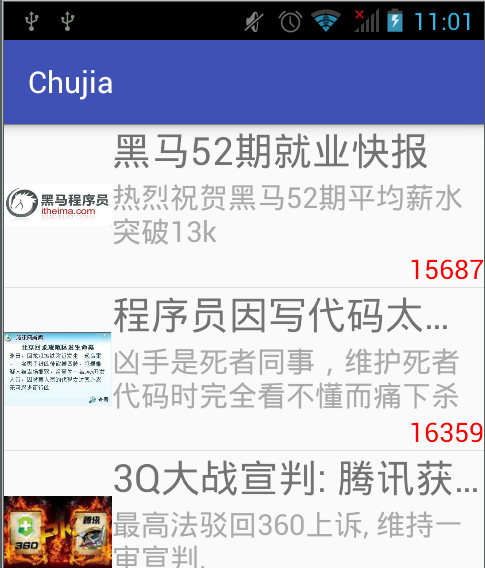
在代码中引入了第三方代码android-smart-image-view
android之简易新闻客户端的更多相关文章
- Android实现网易新闻客户端效果
下面来简单实现一下网易新闻客户端左右切换的效果,当然实际项目上肯定不能这样写,还有很多需要优化的地方. activity_main.xml [html] view plaincopyprint? &l ...
- Android ListView实现新闻客户端的新闻内容图文混排
布局文件: <LinearLayout xmlns:android="<a href="http://schemas.android.com/apk/res/andro ...
- 基于Android的小巫新闻客户端开发系列教程
<ignore_js_op> 141224c6n6x7wmu1aacap7.jpg (27.51 KB, 下载次数: 0) 下载附件 保存到相册 23 秒前 上传 <ignor ...
- Android SlidingMenu 仿网易新闻客户端布局
前面两篇文章中的SlidingMenu都出现在左侧,今天来模仿一下网易新闻客户端左右两边都有SlidingMenu的效果,以下是网易新闻客户端效果: 不扯闲话了,直接进入正题吧 frame_conte ...
- 类似掌盟的Tab页 Android 开源框架ViewPageIndicator 和 ViewPager 仿网易新闻客户端Tab标签 (转)
原博客地址 :http://blog.csdn.net/xiaanming/article/details/10766053 本文转载,记录学习用,如有需要,请到原作者网站查看(上面这个网址) 之前 ...
- android 学习随笔九(网络:简单新闻客户端实现)
1.简单新闻客户端 <RelativeLayout xmlns:android="http://schemas.android.com/apk/res/android" xm ...
- Android 开源框架ActionBarSherlock 和 ViewPager 仿网易新闻客户端
转载请注明出处:http://blog.csdn.net/xiaanming/article/details/9971721 大家都知道Android的ActionBar是在3.0以上才有的,那么在3 ...
- android组件化方案、二维码扫码、Kotlin新闻客户端、动画特效等源码
Android精选源码 CalendarView日历选择器 android下拉刷新动画效果代码 一个非常方便的fragment页面框架 android组件化方案源码 Zxing实现二维码条形码的扫描和 ...
- Android Studio精彩案例(四)《DrawerLayout使用详解仿网易新闻客户端侧边栏 》
转载本专栏文章,请注明出处,尊重原创 .文章博客地址:道龙的博客 为了提高兴趣,咱们开头先看看最终要实现什么样的效果: 侧拉菜单在Android应用中非常常见,它的实现方式太多了,今天我们就说说使用G ...
随机推荐
- R语言Cairo包的使用
Cairo使用起来非常简单,和基础包grDevices中的函数对应. CairoPNG---grDevices:png(). CairoTIFF---grDevices:tiff(). CairoPD ...
- ipc之消息队列
消息队列以链表的方式将消息存储于内核中,调用msgsnd,msgrcv函数往消息队列里面投送,取出指定的消息. 创建一个消息队列 生成一个消息队列或者获取已有消息队列id #include <s ...
- js制作倒计时效果
该程序可以计算任意指定的两个日期中间的差值. 本例子的指定日期是2017年1月1日,当前时间是2016年10月21日:计算它们之间的差值,在网页上显示如图所示: 关键部分代码: var nowtime ...
- POJ 3255 Roadblocks --次短路径
由于次短路一定存在,则可知次短路一定是最短路中某一条边不走,然后回到最短路,而且只是一条边,两条边以上不走的话,就一定不会是次短路了(即以边换边才能使最小).所以可以枚举每一条边,算出从起点到这条边起 ...
- JS中的基本运动逻辑思想总结
总结一下自己今天学习运动的基本思想:‘ [1]对于移动的div,使其在某一个位置停止将其封装成一个函数,仅仅改变speed的正负即可 涉及到问题包括: var time=null; function ...
- Android UI组件----ListView列表控件详解
[声明] 欢迎转载,但请保留文章原始出处→_→ 生命壹号:http://www.cnblogs.com/smyhvae/ 文章来源:http://www.cnblogs.com/smyhvae/p/3 ...
- Jenkins遇到问题二:Jenkins服务器磁盘空间管理策略
Jenkins在帮助我们自动化构建服务的同时也在消耗服务器的磁盘空间,试想如果构建的项目个数很多,而Jenkins 服务器磁盘空间又不是非常大的话,每隔一段时间磁盘空间就会爆满导致Jenkins出现磁 ...
- Linux 删除文件中某一行的方法
如果有一个abc.txt文件,内容是: aaa bbb ccc ddd eee fff 如果要删除aaa,那么脚本可以这样写: sed -i '/aaa/d' abc.txt 如果删除的是一个变量的值 ...
- java 15- 5 List集合
需求 1:List集合存储字符串并遍历.(步骤跟Collection集合一样,只是最初创建集合对象中的集合类改变了,Collection变成List) List集合的特点: 有序(存储和取出的元素一致 ...
- 理解SQL Server中的权限体系(下)----安全对象和权限
原文:http://www.cnblogs.com/CareySon/archive/2012/04/12/SQL-Security-SecurableAndPermission.html 在开始阅读 ...