
Nginx - Windows下Nginx初入门
公司刚使用nginx,预先学习下。鉴于机器没有Linux环境,在Windows熟悉下。
下载
目前(2015-07-11),nginx的稳定版本是1.8.0,在官网下载先,windows版的nginx1.8.0
这是一个zip文件,解压后即可使用
Windows下的安装与启动
绿色文件,无须安装,直接即可启动。
据我所知,3种启动途径,其实都类似:
一、双击nginx.exe图标,可见黑窗口一闪而过,启动完毕。
二、命令行到nginx目录,输入nginx启动。(注,此方式命令行窗口无任何提示,且被锁定)
三、命令行到nginx目录,输入start nginx启动,此方式不锁定
启动后,默认情况下(无修改配置),可见到有两个nginx的进程,1个是master process,1个是worker processes。
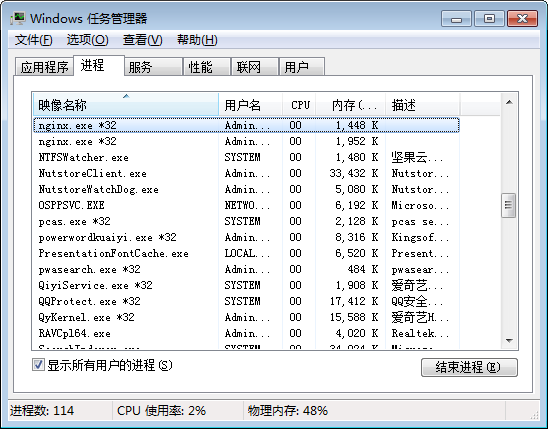
如果你在配置中配置2个worker_processes,进程中就可以看到1个是master process,2个是worker processes。
测试
默认nginx部署了些静态内容,我们可通过它测试nginx是否在工作。
默认的配置文件(NGINX_HOME/conf/nginx.conf)如下:
#user  nobody;

worker_processes  1;

#error_log  logs/error.log;

#error_log  logs/error.log  notice;

#error_log  logs/error.log  info;

#pid        logs/nginx.pid;

events {

    worker_connections  1024;

}

http {

    include       mime.types;

    default_type  application/octet-stream;

    #log_format  main  '$remote_addr - $remote_user [$time_local] "$request" '

    #                  '$status $body_bytes_sent "$http_referer" '

    #                  '"$http_user_agent" "$http_x_forwarded_for"';

    #access_log  logs/access.log  main;

    sendfile        on;

    #tcp_nopush     on;

    #keepalive_timeout  0;

    keepalive_timeout  65;

    #gzip  on;

    server {

        listen       80;

        server_name  localhost;

        #charset koi8-r;

        #access_log  logs/host.access.log  main;

        location / {

            root   html;

            index  index.html index.htm;

        }

        #error_page  404              /404.html;

        # redirect server error pages to the static page /50x.html

        #

        error_page   500 502 503 504  /50x.html;

        location = /50x.html {

            root   html;

        }

        # proxy the PHP scripts to Apache listening on 127.0.0.1:80

        #

        #location ~ \.php$ {

        #    proxy_pass   http://127.0.0.1;

        #}

        # pass the PHP scripts to FastCGI server listening on 127.0.0.1:9000

        #

        #location ~ \.php$ {

        #    root           html;

        #    fastcgi_pass   127.0.0.1:9000;

        #    fastcgi_index  index.php;

        #    fastcgi_param  SCRIPT_FILENAME  /scripts$fastcgi_script_name;

        #    include        fastcgi_params;

        #}

        # deny access to .htaccess files, if Apache's document root

        # concurs with nginx's one

        #

        #location ~ /\.ht {

        #    deny  all;

        #}

    }

    # another virtual host using mix of IP-, name-, and port-based configuration

    #

    #server {

    #    listen       8000;

    #    listen       somename:8080;

    #    server_name  somename  alias  another.alias;

    #    location / {

    #        root   html;

    #        index  index.html index.htm;

    #    }

    #}

    # HTTPS server

    #

    #server {

    #    listen       443 ssl;

    #    server_name  localhost;

    #    ssl_certificate      cert.pem;

    #    ssl_certificate_key  cert.key;

    #    ssl_session_cache    shared:SSL:1m;

    #    ssl_session_timeout  5m;

    #    ssl_ciphers  HIGH:!aNULL:!MD5;

    #    ssl_prefer_server_ciphers  on;

    #    location / {

    #        root   html;

    #        index  index.html index.htm;

    #    }

    #}

}
通过观察配置文件的非注释项(参考Nginx配置文件nginx.conf中文详解),大概可知:
1、启动了1个worker processes
2、worker_connections,最大并发数为1024
3、include mime.types,引入mime.types文件所声明的文件扩展名与文件类型映射
4、application/octet-stream,默认使用application/octet-stream
5、sendfile,开启高效文件传输模式
6、监听本机“localhost”的80端口
7、映射目录为“当前目录的html目录”
8、出现500、502、503、504错误,则映射到50x.html
浏览地址http://localhost,即可访问其默认页面,即映射到NGINX_HOME/html/index.html
其他静态内容,如html、图片,可自行添加测试。
日志
日志默认位于NGINX_HOME/logs/,可见:
1、access.log,访问日志
2、error.log,异常日志
3、nginx.pid,进程(仅在启动nginx后才有此日志)
CentOS下Nginx的安装与启动
tar -zxvf nginx-1.8..tar.gz

cd nginx-1.8.

./configure

make

make install

/usr/local/nginx/sbin/nginx -c /usr/local/nginx/conf/nginx.conf
安装完毕,查看进程及相关日志:
ps -ef | grep nginx

less /usr/local/nginx/logs/error.log

less /usr/local/nginx/logs/nginx.pid

less /usr/local/nginx/logs/access.log
较详细的Nginx在Linux的博文见《【Nginx】Nginx在Linux下的入门介绍》。
Nginx - Windows下Nginx初入门的更多相关文章
- Nginx - Windows下Nginx初入门,附CentOS下Nginx的安装
公司刚使用nginx,预先学习下.鉴于机器没有Linux环境,在Windows熟悉下. 下载 目前(2015-07-11),nginx的稳定版本是1.8.0,在官网下载先,windows版的nginx ...
- Nginx - Windows下Nginx基本安装和配置
Nginx 是一个轻量级的高性能 Http WebServer,以事件驱动方式编写,因此相比 Apache 而言,Nginx 更加稳定.性能更好,而且配置简单,资源占用较低. 1. 安装 Nginx ...
- Nginx - Windows下nginx定时分割日志
1.建立批处理脚本,c:\soft\demo.bat @echo off taskkill /F /IM nginx.exe > nul cd C:\soft\nginx-1.11.3 rem ...
- Windows下Nginx配置SSL实现Https访问(包含证书生成)
Vincent.李 Windows下Nginx配置SSL实现Https访问(包含证书生成) Windows下Nginx配置SSL实现Https访问(包含证书生成) 首先要说明为什么要实现https ...
- Windows下Nginx Virtual Host多站点配置详解
Windows下Nginx Virtual Host多站点配置详解 此教程适用于Windows系统已经配置好Nginx+Php+Mysql环境的同学. 如果您还未搭建WNMP环境,请查看 window ...
- windows下nginx的启动关闭
Windows下Nginx的启动.停止等命令 在Windows下使用Nginx,我们需要掌握一些基本的操作命令,比如:启动.停止Nginx服务,重新载入Nginx等,下面我就进行一些简单的介绍. .启 ...
- Windows下Nginx的启动、停止等命令
Windows下Nginx的启动.停止等命令 在Windows下使用Nginx,我们需要掌握一些基本的操作命令,比如:启动.停止Nginx服务,重新载入Nginx等,下面我就进行一些简单的介绍.1.启 ...
- Windows下Nginx的启动、停止等命令(转)
Windows下Nginx的启动.停止等命令 在Windows下使用Nginx,我们需要掌握一些基本的操作命令,比如:启动.停止Nginx服务,重新载入Nginx等,下面我就进行一些简单的介绍.1.启 ...
- windows下nginx+fastcgi不能使用file_get_contents/curl/fopen的原因
这两天一直在搞windows下nginx+fastcgi的file_get_contents请求.我想,很多同学都遇到当file_get_contents请求外网的http/https的php文件时毫 ...
随机推荐
- Scanner键盘录入(欢迎交流)
一:练习 判断一个字符串是否是对称字符串,例如"abc"不是对称字符串,"aba"."abba"."aaa"." ...
- jQuery数组处理汇总
jQuery数组处理汇总 有段时间没写什么了, 打算把jquery中的比较常用的数组处理方法汇总一下 $.each(array, [callback])遍历,很常用 1 2 3 4 5 6 7 8 ...
- Bootstrap 栅格系统(转载)
源地址:http://www.cnblogs.com/linjiqin/p/3559800.html Bootstrap 栅格系统 目录1.简介2.栅格选项3.列偏移4.嵌套列5.列排序 1.简介Bo ...
- ios SourceTree中添加git项目工程文件
1.创建远程git仓库 2.复制远程仓库地址,最好选择http的地址. 3.在自己的电脑上下载一个SourceTree,然后在自己的电脑上建立链接. 点击左上角的+号桶开始添加,弄好点击Clone 4 ...
- 在Linux下安装配置phpMyAdmin步骤
本文于CentOS 6.5下测试可行,欢迎转载和指正. phpMyAdmin是一种基于Web的免费MySQL管理工具.phpMyAdmin是用PHP编写的,因此只有支持PHP的服务器才能使用phpMy ...
- jQuery Mobile 过渡效果
jQuery Mobile 包含了允许您选择页面打开方式的 CSS 效果. jQuery Mobile 过渡效果 jQuery Mobile 拥有一系列关于如何从一页过渡到下一页的效果. 注释:如需实 ...
- servlet实现的三种方式对比(servlet 和GenericServlet和HttpServlet)
第一种: 实现Servlet 接口 第二种: 继承GenericServlet 第三种 继承HttpServlet (开发中使用) 通过查看api文档发现他们三个(servlet 和GenericSe ...
- 选择合适的String拼接方法(这篇博客是我抄的)
package com.test; public class FreeFile { public static void main(String[] args) { // 加号拼接 String st ...
- 11 个 Linux 上最佳的图形化 Git 客户端
Git是软件开发和若干其他版本控制任务免费和开源的分布式版本控制系统.它被设计用来以应付一切从小到非常大的项目,基于速度,效率和数据完整性. Linux用户主要通过命令行管理Git,不过,一些图形用户 ...
- Uber从Postgres切换到MySQL
Uber工程师在官方博客上描述了他们为什么要从 Postgres 切换到 MySQL 数据库.Uber的早期架构是由 Python编写的后端应用构成,使用了 Postgres 数据库.但此后,Uber ...