
Ceres 四重奏 之 入门简介
Ceres 翻译为谷神星,是太阳系中的一颗矮行星,于1801年被意大利神父 Piazzi 首次观测到,但随后 Piazzi 因为生病,跟丢了它的运行轨迹。
几个月后,德国数学家 Gauss,利用最小二乘法,仅仅依靠 Piazzi 之前观测到的12个数据,便成功的预测了谷神星的运行轨迹。
两百多年后,为了解决一些复杂的最优化问题 (如:带边界约束的非线性最小二乘、一般的无约束最优化等),谷歌开发了一个 C++ 库 Ceres Solver
之所以取名 Ceres Solver,是为了纪念 Gauss 利用最小二乘法,成功的预测了谷神星轨迹,这个在最优化、统计学、天文学历史上,都具有重要意义的事件
1 Ceres 简介
1.1 特点
1) 模型接口简洁
- 求导简单;鲁棒的损失函数;局部参数化
2) 求解方法多
- 信赖域法:Lenberg-Marquardt, Powell’s Dogleg, Subspace dogleg
- 线搜索法:Non-linear Conjugate Gradients, BFGS, LBFGS
3) 求解质量高
- 在 NIST 数据集下,按照 Mondragon 和 Borchers 的测试标准,Ceres 的准确度最高

1.2 应用
在谷歌内部,Ceres 已经被应用于多个产品中,如:谷歌街景中汽车、飞行器的位姿估计;PhotoTours 中 3D 模型的建立;SLAM 算法 Cartographer 等
此外,一些公司和研究所也在使用 Ceres,像是 Southwest Research Institute 的机器人视觉系统标定,OpenMVG 的光束平差 (BA) 问题,Willow Garage 的 SLAM 问题等
1.3 非线性最小二乘
带边界约束的非线性最小二乘形式,如下:
$\quad \begin{split} \min_x &\quad \frac{1}{2}\sum_{i} \rho_i\left(\left\|f_i\left(x_{i_1}, x_{i_2}, ... ,x_{i_k}\right)\right\|^2\right) \\\text{s.t.} &\quad l_j \le x_j \le u_j \end{split}$
其中,1) s.t. = "subject to",限定了 $x_j$ 的取值范围
2) $ \rho_i\left(\left\|f_i\left(x_{i_1},x_{i_2},...,x_{i_k}\right)\right\|^2\right) $ 为残差块
3) $f_i(\cdot)$ 为代价函数,取决于参数块 $\left[x_{i_1},x_{i_2},... , x_{i_k}\right]$
4) $\rho_i$ 为损失函数,是一个标量函数,主要用来消除异常点对求解过程的影响
如果令损失函数 $\rho_i = x$ 为恒等函数,且放宽边界约束条件为 $[-\infty, \infty]$
则非线性最小二乘问题,可简化为如下形式:
$\quad \begin{split}\frac{1}{2}\sum_{i} \left\|f_i\left(x_{i_1}, ... ,x_{i_k}\right)\right\|^2 \end{split}$
上面的最小二乘形式,在科学和工程领域有着广泛的应用,例如,统计学中的曲线拟合,计算机视觉的三维重建等
2 编译配置
Win10 64-bit ;VS 2019 社区版,下载地址 ;CMake 解压版,下载地址
2.1 源文件
- Ceres Solver 源文件,下载地址,从 2.0 开始,需要支持 C++14 的编译器
- eigen 源文件,必须,>=3.3,下载地址
- glog 源文件,推荐,>=0.3.1,下载地址,及其依赖库 gflags,下载地址
2.2 配置生成
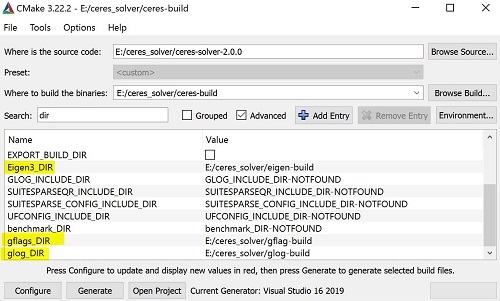
1) 将源文件 ceres、eigen、glog 和 gflags 解压,运行 cmake-gui.exe,配置生成 eigen (先点 "Configure",再点 "Generate" 即可)
2) 编译 gflags,先点 "Configure",再点 "Generate",然后点 "Open Project",在 VS 中打开工程,最后在 debug 和 release 模式下分别编译
3) 编译 glog,操作同 3),其中 cmake 配置不再赘述,如:CMAKE_CONFGURATION_TYPES 只保留 Debug 和 Release,gflags_DIR 指向含 gflags-config.cmake 的目录等
4) 编译 ceres,操作同 3),注意配置 eigen、glog 和 gflags 的 _DIR 目录,并勾上 BUILD_SHARED_LIBS 以便生成 dll 库
2.3 VS 配置
将生成的 .lib 和 .dll 文件放在特定目录下,并新建 include 文件夹,汇总对应的 .h 文件
1)环境变量
计算机 -> 属性 -> 高级系统设置 -> 环境变量,编辑系统变量里的 path 变量
D:\3rdparty\gflags\bin\Debug

D:\3rdparty\glog\bin\Debug

D:\3rdparty\ceres\bin\Debug
2) 头文件和库文件
在 VS 中配置 ceres, eigen, glog 和 gflags 的 头文件目录,以及 库文件目录
注:在编译时,若出现头文件缺失,则在源文件中找到对应的 .h,拷贝到 include 目录中即可

3) 依赖库
添加对应的 .lib 依赖库,如下:
ceres-debug.lib

gflags_debug.lib

glogd.lib
4) 错误处理
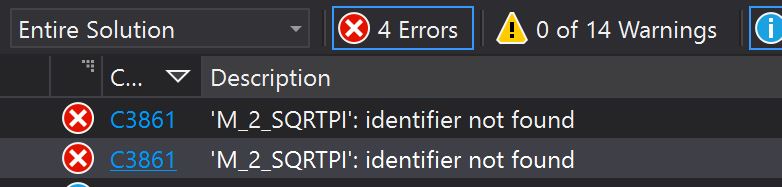
运行程序,如出现如下错误,则在 "项目属性 - 预处理器定义" 中,定义 _USE_MATH_DEFINES 宏可解决
3 代码实例
给定一个目标函数 $\begin{split} \frac{1}{2}(10 -x)^2 \end{split}$,求其取最小值时,对应的 $x$ 为多少
3.1 求解步骤
1) 构建代价函数
Ceres 中利用仿函数,通过重载 operator() 运算符,来实现代价函数的定义,本例中的代价函数为 $f(x) = 10 -x $
// A templated cost functor that implements the residual r = x - 10

struct CostFunctor {

    template <typename T> bool operator()(const T* const x, T* residual) const {

        residual[0] = x[0] - 10.0;

        return true;

    }

};
2) 构建残差块
   // Build the problem

    Problem problem;

    // Set up the cost function (also known as residual)

    CostFunction* cost_function = new AutoDiffCostFunction<CostFunctor, 1, 1>(new CostFunctor);

    problem.AddResidualBlock(cost_function, NULL, &x);
3) 配置求解器
    // The options structure, which controls how the solver operates

    Solver::Options options;

    options.linear_solver_type = ceres::DENSE_QR;

    options.minimizer_progress_to_stdout = true;
4) 求解
    // Run the solver

    Solver::Summary summary;

    Solve(options, &problem, &summary);
3.2 完整代码
#include "ceres/ceres.h"

using ceres::AutoDiffCostFunction;

using ceres::CostFunction;

using ceres::Problem;

using ceres::Solver;

using ceres::Solve;

// A templated cost functor that implements the residual r = x - 10.

struct CostFunctor {

    template <typename T> bool operator()(const T* const x, T* residual) const {

        residual[0] = 10.0 - x[0];

        return true;

    }

};

int main()

{

    // The variable to solve for with its initial value

    double x = 0.5;

    const double initial_x = x;

    // Build the problem.

    Problem problem;

    // Set up the cost function (also known as residual)

    CostFunction* cost_function = new AutoDiffCostFunction<CostFunctor, 1, 1>(new CostFunctor);

    problem.AddResidualBlock(cost_function, NULL, &x);

    // The options structure, which controls how the solver operates

    Solver::Options options;

    options.linear_solver_type = ceres::DENSE_QR;

    options.minimizer_progress_to_stdout = true;

    // Run solver

    Solver::Summary summary;

    Solve(options, &problem, &summary);

    std::cout << summary.BriefReport() << "\n";

    std::cout << "x : " << initial_x << " -> " << x << "\n";

}
运行结果如下:

参考资料
Ceres 四重奏 之 入门简介的更多相关文章
- 掌握 Ajax,第 1 部分: Ajax 入门简介
转:http://www.ibm.com/developerworks/cn/xml/wa-ajaxintro1.html 掌握 Ajax,第 1 部分: Ajax 入门简介 理解 Ajax 及其工作 ...
- MongoDB入门简介
MongoDB入门简介 http://blog.csdn.net/lolinzhang/article/details/4353699 有关于MongoDB的资料现在较少,且大多为英文网站,以上内容大 ...
- (转)Web Service入门简介(一个简单的WebService示例)
Web Service入门简介 一.Web Service简介 1.1.Web Service基本概念 Web Service也叫XML Web Service WebService是一种可以接收从I ...
- NodeJS入门简介
NodeJS入门简介 二.模块 在Node.js中,以模块为单位划分所有功能,并且提供了一个完整的模块加载机制,这时的我们可以将应用程序划分为各个不同的部分. const http = require ...
- ASP.NET Core学习之一 入门简介
一.入门简介 在学习之前,要先了解ASP.NET Core是什么?为什么?很多人学习新技术功利心很重,恨不得立马就学会了. 其实,那样做很不好,马马虎虎,联系过程中又花费非常多的时间去解决所遇到的“问 ...
- webservice入门简介
为了梦想,努力奋斗! 追求卓越,成功就会在不经意间追上你 webservice入门简介 1.什么是webservice? webservice是一种跨编程语言和跨操作系统平台的远程调用技术. 所谓的远 ...
- Web Service入门简介(一个简单的WebService示例)
Web Service入门简介 一.Web Service简介 1.1.Web Service基本概念 Web Service也叫XML Web Service WebService是一种可以接收从I ...
- Android精通教程-第一节Android入门简介
前言 大家好,给大家带来Android精通教程-第一节Android入门简介的概述,希望你们喜欢 每日一句 If life were predictable it would cease to be ...
- Nginx入门简介
Nginx入门简介 Nginx 介绍 Nginx (engine x) 是一个高性能的HTTP和反向代理服务,也是一个IMAP/POP3/SMTP服务.Nginx是由伊戈尔·赛索耶夫为俄罗斯访问量第二 ...
随机推荐
- spring-aop(一)学习笔记
AOP(Aspect-Oriented Programming) 面向切面编程 将复杂的需求分解出不同方面,将散布在系统中的公共功能集中解决 面向切面编程,是一种通过预编译方式和运行期动态代理实现在不 ...
- Centos7 安装 brctl 工具
[root@docker-node1 ~]# brctl show -bash: brctl: command not found [root@docker-node1 ~]# yum -y inst ...
- Linux shc 命令手册
shc Generic shell script compiler. https://www.linux-man.cn/command/shc/ #Compile a shell script: sh ...
- 通过js触发onPageView和event事件获取页面信息
注:图片如果损坏,点击文章链接:https://www.toutiao.com/i6814814715022148100/ 承接上一篇文档<js页面触发launch事件编写> pageVi ...
- JSP页面中最常使用的脚本元素
注:图片如果损坏,点击文章链接:https://www.toutiao.com/i6513082449755374093/ 前面简单说了一个<JSP页面实际上就是Servlet>,接下来说 ...
- 学习Layui笔记-父窗口获取子窗口的radio
最近学习layui,使用radio做单项选择的时候,发现layui无论怎么取值,都是默认取到第一个radio的值. 百度下找解决方法. html页面部分 <div class="lay ...
- 谈谈Raft
本文主要参考 极客时间-etcd 实战课 GitChat-分布式锁的最佳实践之:基于 Etcd 的分布式锁 谈到分布式协调组件,我们第一个想到的应该是大名鼎鼎的Zookeeper,像我们常用的Kafk ...
- powershell基础知识
基本命令 我们先从最基本的命令入手,Windows Powershell命令中get类命令是很庞大的一个命令工具集合,而且get类命令也是Powershell中占比最大的. 1.Get-Alias G ...
- 开启mysql外部访问(root外连)
MySQL外部访问 mysql 默认是禁止远程连接的,你在安装mysql的系统行运行mysql -u root -p 后进入mysql 输入如下: mysql>use mysql; mysql& ...
- python2.7发送邮件失败之——SMTPAuthenticationError问题
使用python2.7发送邮件,代码如下: from email.header import Headerfrom email.mime.text import MIMETextimport smtp ...