
JpaRepository 增删改查
Jpa查询
JpaRepository简单查询
基本查询也分为两种,一种是spring data默认已经实现,一种是根据查询的方法来自动解析成SQL。
预先生成方法
spring data jpa 默认预先生成了一些基本的CURD的方法,例如:增、删、改等等
继承JpaRepository
public interface UserRepository extends JpaRepository<User, Long> {

}
使用默认方法
@Test

public void testBaseQuery() throws Exception {

    User user=new User();

    userRepository.findAll();

    userRepository.findOne(1l);

    userRepository.save(user);

    userRepository.delete(user);

    userRepository.count();

    userRepository.exists(1l);

    // ...

}
自定义的简单查询就是根据方法名来自动生成SQL,主要的语法是findXXBy,readAXXBy,queryXXBy,countXXBy, getXXBy后面跟属性名称:
具体的关键字,使用方法和生产成SQL如下表所示
Keyword Sample JPQL snippet And findByLastnameAndFirstname … where x.lastname = ?1 and x.firstname = ?2 Or findByLastnameOrFirstname … where x.lastname = ?1 or x.firstname = ?2 Is,Equals findByFirstnameIs,findByFirstnameEquals … where x.firstname = ?1 Between findByStartDateBetween … where x.startDate between ?1 and ?2 LessThan findByAgeLessThan … where x.age < ?1 LessThanEqual findByAgeLessThanEqual … where x.age ⇐ ?1 GreaterThan findByAgeGreaterThan … where x.age > ?1 GreaterThanEqual findByAgeGreaterThanEqual … where x.age >= ?1 After findByStartDateAfter … where x.startDate > ?1 Before findByStartDateBefore … where x.startDate < ?1 IsNull findByAgeIsNull … where x.age is null IsNotNull,NotNull findByAge(Is)NotNull … where x.age not null Like findByFirstnameLike … where x.firstname like ?1 NotLike findByFirstnameNotLike … where x.firstname not like ?1 StartingWith findByFirstnameStartingWith … where x.firstname like ?1 (parameter bound with appended %) EndingWith findByFirstnameEndingWith … where x.firstname like ?1 (parameter bound with prepended %) Containing findByFirstnameContaining … where x.firstname like ?1 (parameter bound wrapped in %) OrderBy findByAgeOrderByLastnameDesc … where x.age = ?1 order by x.lastname desc Not findByLastnameNot … where x.lastname <> ?1 In findByAgeIn(Collection ages) … where x.age in ?1 NotIn findByAgeNotIn(Collection age) … where x.age not in ?1 TRUE findByActiveTrue() … where x.active = true FALSE findByActiveFalse() … where x.active = false IgnoreCase findByFirstnameIgnoreCase … where UPPER(x.firstame) = UPPER(?1)
按照Spring Data的规范,查询方法以find | read | get 开头,涉及查询条件时,条件的属性用条件关键字连接,
要注意的是:条件属性以首字母大写。
示例:
例如:定义一个Entity实体类:
class People{

       private String firstName;

       private String lastName;

}
以上使用and条件查询时,应这样写:
findByLastNameAndFirstName(String lastName,String firstName);
注意:条件的属性名称与个数要与参数的位置与个数一一对应
JpaRepository查询方法解析流程
JPA方法名解析流程
Spring Data JPA框架在进行方法名解析时,会先把方法名多余的前缀截取掉,比如find、findBy、read、readBy、get、getBy,然后对剩下部分进行解析。
假如创建如下的查询:findByUserDepUuid(),框架在解析该方法时,首先剔除findBy,然后对剩下的属性进行解析,假设查询实体为Doc。
-- 1.先判断userDepUuid (根据POJO(Plain Ordinary Java Object简单java对象,实际就是普通java bean)规范,首字母变为小写。)是否是查询实体的一个属性,
如果根据该属性进行查询;如果没有该属性,继续第二步。
-- 2.从右往左截取第一个大写字母开头的字符串(此处为Uuid),然后检查剩下的字符串是否为查询实体的一个属性,如果是,则表示根据该属性进行查询;如果没有该属性,则重复第二步,继续从右往左截取;最后假设 user为查询实体的一个属性。
-- 3.接着处理剩下部分(DepUuid),先判断 user 所对应的类型是否有depUuid属性,如果有,则表示该方法最终是根据 “ Doc.user.depUuid” 的取值进行查询;否则继续按照步骤 2 的规则从右往左截取,最终表示根据 “Doc.user.dep.uuid” 的值进行查询。
-- 4.可能会存在一种特殊情况,比如 Doc包含一个 user 的属性,也有一个 userDep 属性,此时会存在混淆。可以明确在属性之间加上 "_" 以显式表达意图,比如 "findByUser_DepUuid()" 或者 "findByUserDep_uuid()"。
特殊的参数(分页或排序):
还可以直接在方法的参数上加入分页或排序的参数,比如:
Page<UserModel> findByName(String name, Pageable pageable);

List<UserModel> findByName(String name, Sort sort);
Pageable是spring封装的分页实现类,使用的时候需要传入页数、每页条数和排序规则
@Test

public void testPageQuery() throws Exception {

    int page=1,size=10;

    Sort sort = new Sort(Direction.DESC, "id");

    Pageable pageable = new PageRequest(page, size, sort);

    userRepository.findALL(pageable);

    userRepository.findByUserName("testName", pageable);

}
使用JPA的NamedQueries
方法如下:
1:在实体类上使用@NamedQuery,示例如下:
@NamedQuery(name = "UserModel.findByAge",query = "select o from UserModel o where o.age >= ?1")
2:在自己实现的DAO的Repository接口里面定义一个同名的方法,示例如下:
public List<UserModel> findByAge(int age);
3:然后就可以使用了,Spring会先找是否有同名的NamedQuery,如果有,那么就不会按照接口定义的方法来解析。
使用@Query来指定本地查询
只要设置nativeQuery为true,比如:
@Query(value="select * from tbl_user where name like %?1" ,nativeQuery=true)

public List<UserModel> findByUuidOrAge(String name);
注意:当前版本的本地查询不支持翻页和动态的排序
使用命名化参数
使用@Param即可,比如:
@Query(value="select o from UserModel o where o.name like %:nn")

public List<UserModel> findByUuidOrAge(@Param("nn") String name);
创建查询的顺序
Spring Data JPA 在为接口创建代理对象时,如果发现同时存在多种上述情况可用,它该优先采用哪种策略呢?
<jpa:repositories> 提供了query-lookup-strategy 属性,用以指定查找的顺序。它有如下三个取值:
1:create-if-not-found:
如果方法通过@Query指定了查询语句,则使用该语句实现查询;
如果没有,则查找是否定义了符合条件的命名查询,如果找到,则使用该命名查询;
如果两者都没有找到,则通过解析方法名字来创建查询。
这是querylookup-strategy 属性的默认值
2:create:通过解析方法名字来创建查询。
即使有符合的命名查询,或者方法通过@Query指定的查询语句,都将会被忽略
3:use-declared-query:
如果方法通过@Query指定了查询语句,则使用该语句实现查询;
如果没有,则查找是否定义了符合条件的命名查询,如果找到,则使用该
命名查询;如果两者都没有找到,则抛出异常
JpaRepository限制查询
有时候我们只需要查询前N个元素,或者支取前一个实体。
User findFirstByOrderByLastnameAsc();

User findTopByOrderByAgeDesc();

Page<User> queryFirst10ByLastname(String lastname, Pageable pageable);

List<User> findFirst10ByLastname(String lastname, Sort sort);

List<User> findTop10ByLastname(String lastname, Pageable pageable);
JpaRepository多表查询
多表查询在spring data jpa中有两种实现方式,第一种是利用hibernate的级联查询来实现,第二种是创建一个结果集的接口来接收连表查询后的结果,这里主要第二种方式。
- 首先需要定义一个结果集的接口类。
public interface HotelSummary {

    City getCity();

    String getName();

    Double getAverageRating();

    default Integer getAverageRatingRounded() {

        return getAverageRating() == null ? null : (int) Math.round(getAverageRating());

    }

}
- 查询的方法返回类型设置为新创建的接口
@Query("select h.city as city, h.name as name, avg(r.rating) as averageRating "

        + "from Hotel h left outer join h.reviews r where h.city = ?1 group by h")

Page<HotelSummary> findByCity(City city, Pageable pageable);

@Query("select h.name as name, avg(r.rating) as averageRating "

        + "from Hotel h left outer join h.reviews r  group by h")

Page<HotelSummary> findByCity(Pageable pageable);
- 使用
Page<HotelSummary> hotels = this.hotelRepository.findByCity(new PageRequest(0, 10, Direction.ASC, "name"));

for(HotelSummary summay:hotels){

  System.out.println("Name" +summay.getName());

}
在运行中Spring会给接口(HotelSummary)自动生产一个代理类来接收返回的结果,代码汇总使用getXX的形式来获取
JPA更新
支持更新类的Query语句
添加@Modifying即可,比如:
@Modifying

@Query(value="update UserModel o set o.name=:newName where o.name like %:nn")

public int findByUuidOrAge(@Param("nn") String name,@Param("newName") String newName);
注意:
1:方法的返回值应该是int,表示更新语句所影响的行数
2:在调用的地方必须加事务,没有事务不能正常执行
JPA删除
SQL方式-删除
@Query(value = "delete from r_upa where user_id= ?1 and point_indecs_id in (?2)", nativeQuery = true)

@Modifying

void deleteByUserAndPointIndecs(Long uid, List<Long> hids);
注意:
执行delete和update语句一样,需要添加@Modifying注解,使用时在Repository或者更上层需要@Transactional注解。
函数(delete)方式-删除
直接可以使用delete(id),依据id来删除一条数据
也可以使用deleteByName(String name)时,需要添加@Transactional注解,才能使用
Spring Data JPA的deleteByXXXX,是先select,在整个Transaction完了之后才执行delete
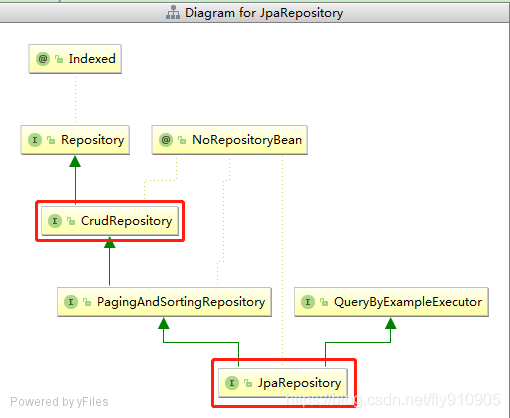
JpaRepository
@NoRepositoryBean

public interface JpaRepository<T, ID> extends PagingAndSortingRepository<T, ID>, QueryByExampleExecutor<T> {

    /**

	 * Deletes the given entities in a batch which means it will create a single {@link Query}. Assume that we will clear

	 * the {@link javax.persistence.EntityManager} after the call.

	 *

	 * @param entities

     * 批量解绑多个,优势:只会形成一个SQL语句

	 */

	void deleteInBatch(Iterable<T> entities);

	/**

	 * Deletes all entities in a batch call.

	 */

	void deleteAllInBatch();

}
CrudRepository
@NoRepositoryBean

public interface CrudRepository<T, ID> extends Repository<T, ID> {

    /**

     * Deletes the entity with the given id.

     *

     * @param id must not be {@literal null}.

     * @throws IllegalArgumentException in case the given {@code id} is {@literal null}

     */

    void deleteById(ID id);

    /**

     * Deletes a given entity.

     *

     * @param entity

     * @throws IllegalArgumentException in case the given entity is {@literal null}.

     */

    void delete(T entity);

    /**

     * Deletes the given entities.

     *

     * @param entities

     * @throws IllegalArgumentException in case the given {@link Iterable} is {@literal null}.

     */

    void deleteAll(Iterable<? extends T> entities);

    /**

     * Deletes all entities managed by the repository.

     */

    void deleteAll();

}
JPA添加
利用JpaRepository和CrudRepository中的 save操作
JpaRepository
@NoRepositoryBean

public interface JpaRepository<T, ID> extends PagingAndSortingRepository<T, ID>, QueryByExampleExecutor<T> {

	/*

	 * (non-Javadoc)

	 * @see org.springframework.data.repository.CrudRepository#save(java.lang.Iterable)

	 */

	<S extends T> List<S> saveAll(Iterable<S> entities);

	/**

	 * Flushes all pending changes to the database.

	 */

	void flush();

	/**

	 * Saves an entity and flushes changes instantly.

	 *

	 * @param entity

	 * @return the saved entity

	 */

	<S extends T> S saveAndFlush(S entity);

}
CrudRepository
@NoRepositoryBean

public interface CrudRepository<T, ID> extends Repository<T, ID> {

	/**

	 * Saves a given entity. Use the returned instance for further operations as the save operation might have changed the

	 * entity instance completely.

	 *

	 * @param entity must not be {@literal null}.

	 * @return the saved entity will never be {@literal null}.

	 */

	<S extends T> S save(S entity);

	/**

	 * Saves all given entities.

	 *

	 * @param entities must not be {@literal null}.

	 * @return the saved entities will never be {@literal null}.

	 * @throws IllegalArgumentException in case the given entity is {@literal null}.

	 */

	<S extends T> Iterable<S> saveAll(Iterable<S> entities);

}
JpaRepository和CrudRepository 的区别
JpaRepository 中的save方法实现源码:
@Transactional

public <S extends T> List<S> save(Iterable<S> entities) {

        List<S> result = new ArrayList<S>();

        if (entities == null) {

            return result;

        }

        for (S entity : entities) {

            result.add(save(entity));

        }

        return result;

}
CrudRepository 中的save方法源代码
@Transactional

public <S extends T> S save(S entity) {

  if (entityInformation.isNew(entity)) {

    em.persist(entity);//是新的就插入

    return entity;

  } else {

    return em.merge(entity); //不是新的merge

  }

}
由源码可知CrudRepository 中的save方法是相当于merge+save ,它会先判断记录是否存在,如果存在则更新,不存在则插入记录
JpaRepository 增删改查的更多相关文章
- springboot(十五):springboot+jpa+thymeleaf增删改查示例
这篇文章介绍如何使用jpa和thymeleaf做一个增删改查的示例. 先和大家聊聊我为什么喜欢写这种脚手架的项目,在我学习一门新技术的时候,总是想快速的搭建起一个demo来试试它的效果,越简单越容易上 ...
- springboot+jpa+thymeleaf增删改查的示例(转)
这篇文章介绍如何使用jpa和thymeleaf做一个增删改查的示例. 先和大家聊聊我为什么喜欢写这种脚手架的项目,在我学习一门新技术的时候,总是想快速的搭建起一个demo来试试它的效果,越简单越容易上 ...
- sssp-springmvc+spring+spring-data-jpa增删改查
环境:IDE:eclipse.jdk1.7.mysql5.7.maven 项目结构图 上面目录结构你可以自己创建 搭建框架 首先加入maven依赖包以及相关插件 <dependencies> ...
- spring-data-rest的魔力 10分钟实现增删改查
目录 创建项目 启动项目 添加person 查看person 及 person 列表 条件查询 分页查询 controller 去哪里了 自定义 spring-data-rest 魔力之外的contr ...
- (转)Spring Boot (十五): Spring Boot + Jpa + Thymeleaf 增删改查示例
http://www.ityouknow.com/springboot/2017/09/23/spring-boot-jpa-thymeleaf-curd.html 这篇文章介绍如何使用 Jpa 和 ...
- spring boot2+jpa+thymeleaf增删改查例子
参考这遍文章做了一个例子,稍微不同之处,原文是spring boot.mysql,这里改成了spring boot 2.Oracle. 一.pom.xml引入相关模块web.jpa.thymeleaf ...
- Spring Boot + Jpa + Thymeleaf 增删改查示例
快速上手 配置文件 pom 包配置 pom 包里面添加 Jpa 和 Thymeleaf 的相关包引用 <dependency> <groupId>org.springframe ...
- SpringBoot JPA + H2增删改查示例
下面的例子是基于SpringBoot JPA以及H2数据库来实现的,下面就开始搭建项目吧. 首先看下项目的整体结构: 具体操作步骤: 打开IDEA,创建一个新的Spring Initializr项目, ...
- Spring Boot(十五):spring boot+jpa+thymeleaf增删改查示例
Spring Boot(十五):spring boot+jpa+thymeleaf增删改查示例 一.快速上手 1,配置文件 (1)pom包配置 pom包里面添加jpa和thymeleaf的相关包引用 ...
随机推荐
- java中使用Process执行linux命令
代码如下 BufferedReader reader = null; String cmd = "netstat -anp|grep :8080";//命令中有管道符 | 需要如下 ...
- .net工程师学习vue的心路历程(一)
实习一年后,想做一个属于自己的博客网站,准备用core api去搭建服务端接口,前端准备采用vue这样的一个框架.本身时一个服务端程序员,所以来学习记录一些vue的知识点,有什么不足的希望大家指正,谢 ...
- [atAGC052F]Tree Vertices XOR
结论 注意到如果$x$周围有偶数个1,对$x$操作显然不会改变$a_{x}$,因此不妨强制操作的点周围要有奇数个1,不难发现此时恰好会改变该点,即令$a_{x}=a_{x}\oplus 1$ 称$\{ ...
- [hdu6316]Odd shops
记$m=10$,即商品的种类 记$g(x)=1+\sum_{i=1}^{m}a_{i}x_{i}$,问题即求$f_{n}(x)=g^{n}(x)$非0项数(模2意义下) 注意到$f^{2}(x)\eq ...
- 【Cloud Computing】Hadoop环境安装、基本命令及MapReduce字数统计程序
[Cloud Computing]Hadoop环境安装.基本命令及MapReduce字数统计程序 1.虚拟机准备 1.1 模板机器配置 1.1.1 主机配置 IP地址:在学校校园网Wifi下连接下 V ...
- Codeforces 258E - Little Elephant and Tree(根号暴力/线段树+标记永久化/主席树+标记永久化/普通线段树/可撤销线段树,hot tea)
Codeforces 题目传送门 & 洛谷题目传送门 yyq:"hot tea 不常有,做过了就不能再错过了" 似乎这是半年前某场 hb 模拟赛的 T2?当时 ycx.ym ...
- DP 优化方法大杂烩 & 做题记录 I.
标 * 的是推荐阅读的部分 / 做的题目. 1. 动态 DP(DDP)算法简介 动态动态规划. 以 P4719 为例讲一讲 ddp: 1.1. 树剖解法 如果没有修改操作,那么可以设计出 DP 方案 ...
- DirectX12 3D 游戏开发与实战第九章内容(下)
仅供个人学习使用,请勿转载.谢谢! 9.纹理贴图 学习目标 学习如何将局部纹理映射到网格三角形中 探究如何创建和启用纹理 学会如何通过纹理过滤来创建更加平滑的图像 探索如何使用寻址模式来进行多次贴图 ...
- 根据VCF构建进化树
VCF2Dis,是一款计算根据vcf文件计算距离矩阵的小工具 1 安装 下载后 tar -zxvf VCF2DisXXX.tar.gz cd VCF2DisXXX make # 添加环境变量即可 2 ...
- mGWAS研究思路
mGWAS(metabolome-based genome-wide association studies)的研究方法和GWAS类似,只是将代谢物含量作为表型性状来与基因位点进行关联.但同时它也有自 ...