
【svn】Centos搭建svn服务器环境
1.需求描述
在Centos系统中搭建svn服务器环境
2.搭建过程
2.1 yum安装svn
2.2 新建目录存储svn目录
[root@localhost /]# mkdir /usr/svn
2.3 新建测试仓库pro
[root@localhost /]# svnadmin create /usr/svn/pro
进入到目录/usr/svn/pro展开目录
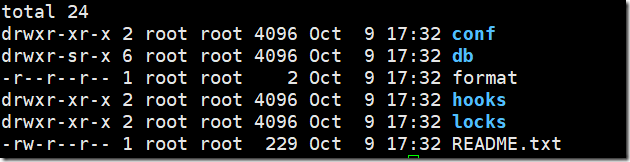
说明:
hooks目录:放置hook脚步文件的目录
locks目录:用来放置subversion的db锁文件和db_logs锁文件的目录,用来追踪存取文件库的客户端
format目录:是一个文本文件,里边只放了一个整数,表示当前文件库配置的版本号
conf目录:是这个仓库配置文件(仓库用户访问账户,权限)
2.4 进入到文件夹conf,配置相关信息
展开文件夹conf,有以下文件

对上述三个文件配置内容如下:(粉红色标记部分为修改)
vi passwd
### This file is an example password file for svnserve.
### Its format is similar to that of svnserve.conf. As shown in the
### example below it contains one section labelled [users].
### The name and password for each user follow, one account per line.
[users]
# harry = harryssecret
# sally = sallyssecret
admin =admin1
qinys = 123456
vi authz
### This file is an example authorization file for svnserve.
### Its format is identical to that of mod_authz_svn authorization
### files.
### As shown below each section defines authorizations for the path and
### (optional) repository specified by the section name.
### The authorizations follow. An authorization line can refer to:
### - a single user,
### - a group of users defined in a special [groups] section,
### - an alias defined in a special [aliases] section,
### - all authenticated users, using the '$authenticated' token,
### - only anonymous users, using the '$anonymous' token,
### - anyone, using the '*' wildcard.
###
### A match can be inverted by prefixing the rule with '~'. Rules can
### grant read ('r') access, read-write ('rw') access, or no access
### ('').
[aliases]
# joe = /C=XZ/ST=Dessert/L=Snake City/O=Snake Oil, Ltd./OU=Research Institute/CN=Joe Average
[groups]
# harry_and_sally = harry,sally
# harry_sally_and_joe = harry,sally,&joe
# [/foo/bar]
# harry = rw
# &joe = r
# * =
# [repository:/baz/fuz]
# @harry_and_sally = rw
# * = r
admin = admin1
user = qinys
[/]
@admin = rw
@user = rw
*=
以下是说明:
admin = admin1 创建admin组,组成员为:admin1
user = qinys 创建用户组,用户成员:qinys
[/] 赋予根权限,为了便于管理和权限的控制,可以把权限细化到版本库中相应的目录
@admin = rw admin组有读写的权限
@user = r user组只有读的权限
*= 表示除了上面设置的权限用户组以外,其他所有用户都设置空权限,空权限表示禁止访问本目录,这很重要一定要加上。
vi svnserve.conf
### The anon-access and auth-access options control access to the
### repository for unauthenticated (a.k.a. anonymous) users and
### authenticated users, respectively.
### Valid values are "write", "read", and "none".
### Setting the value to "none" prohibits both reading and writing;
### "read" allows read-only access, and "write" allows complete
### read/write access to the repository.
### The sample settings below are the defaults and specify that anonymous
### users have read-only access to the repository, while authenticated
### users have read and write access to the repository.
anon-access = none #注意前边不要有空格,要顶齐 .匿名访问权限,可以是read,write,none,默认是read
auth-access = write #注意前边不要有空格,要顶齐 使授权用户有写的权限
### The password-db option controls the location of the password
### database file. Unless you specify a path starting with a /,
### the file's location is relative to the directory containing
### this configuration file.
### If SASL is enabled (see below), this file will NOT be used.
### Uncomment the line below to use the default password file.
password-db = passwd #密码数据库的路径
### The authz-db option controls the location of the authorization
### rules for path-based access control. Unless you specify a path
### starting with a /, the file's location is relative to the the
### directory containing this file. If you don't specify an
### authz-db, no path-based access control is done.
### Uncomment the line below to use the default authorization file.
authz-db = authz #访问控制文件
### This option specifies the authentication realm of the repository.
### If two repositories have the same authentication realm, they should
### have the same password database, and vice versa. The default realm
### is repository's uuid.
realm = My First Repository #认证命名空间,会在认证提示中显示
### The force-username-case option causes svnserve to case-normalize
### usernames before comparing them against the authorization rules in the
### authz-db file configured above. Valid values are "upper" (to upper-
### case the usernames), "lower" (to lowercase the usernames), and
### "none" (to compare usernames as-is without case conversion, which
### is the default behavior).
# force-username-case = none
[sasl]
### This option specifies whether you want to use the Cyrus SASL
### library for authentication. Default is false.
### This section will be ignored if svnserve is not built with Cyrus
### SASL support; to check, run 'svnserve --version' and look for a line
### reading 'Cyrus SASL authentication is available.'
# use-sasl = true
### These options specify the desired strength of the security layer
### that you want SASL to provide. 0 means no encryption, 1 means
### integrity-checking only, values larger than 1 are correlated
### to the effective key length for encryption (e.g. 128 means 128-bit
### encryption). The values below are the defaults.
# min-encryption = 0
# max-encryption = 256
2.5 启动svn
[root@localhost /]# svnserve -d -r /usr/svn/
2.6查看启动情况
ps -ef | grep svn

停止svn,使用命令:kill –9 20181 即可20181为进程ID
2.7 windows客户端连接
客户端下载地址:https://tortoisesvn.net/downloads.html
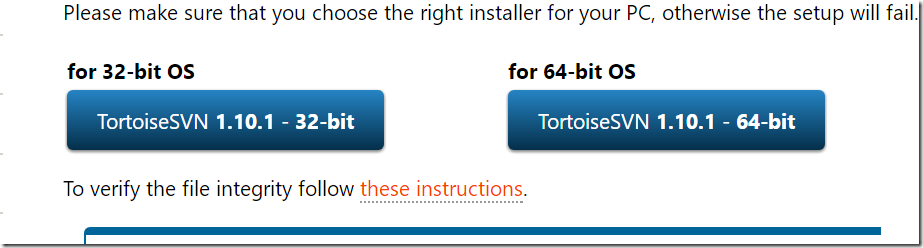
根据本地系统选择版本下载即可
下载完成后安装,安装完成后到D盘根目录下右键

点击【OK】
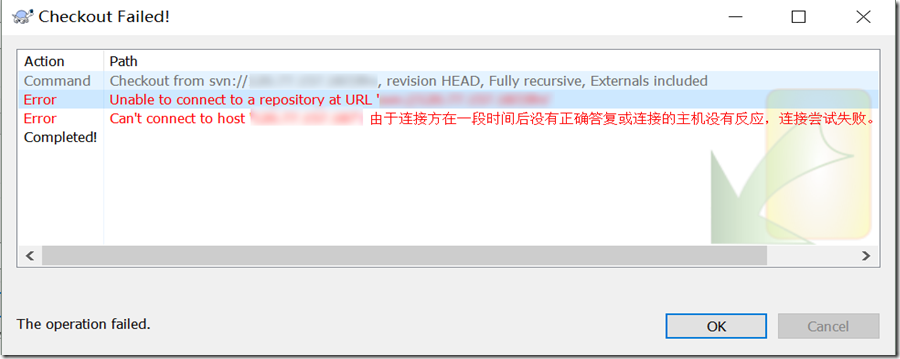
出现这个问题的原因是由于防火请问题造成
那么我们如何处理呢?我们为svn指定端口,然后在指定区域开放此端口
执行以下命令
firewall-cmd --permanent --zone=public --add-port=3690/tcp

接着就打开防火请并查看状态
systemctl start firewalld
systemctl status firewalld
再添加3690端口
firewall-cmd --permanent --zone=public --add-port=3690/tcp
接着重启防火墙
firewall-cmd --reload
【svn】Centos搭建svn服务器环境的更多相关文章
- CentOS搭建PHP服务器环境(LAMP)
安装httpd mysql mysql-server php: yum install -y httpd mysql mysql-server php php-devel 安装php的扩展 yum i ...
- [记录]CentOS搭建SVN服务器(主从同步)
CentOS搭建SVN服务器(主从同步)1.安装步骤如下: 1)安装: #yum install subversion 2)查看安装位置: #rpm -ql subversion 3)查看版本: #/ ...
- CentOS下Web服务器环境搭建LNMP一键安装包
CentOS下Web服务器环境搭建LNMP一键安装包 时间:2014-09-04 00:50来源:osyunwei.com 作者:osyunwei.com 举报 点击:3797次 最新版本:lnmp- ...
- centos 7.3 服务器环境搭建——MySQL 安装和配置
centos 7.3 服务器环境搭建——MySQL 安装和配置服务器信息如下:服务器:阿里云系统 centos 7.3 (阿里云该版本最新系统)mysql版本:5.7.18 (当前时间最新版本)连接服 ...
- CentOS 搭建LNMP服务器和LAMP服务器
CentOS 搭建LNMP服务器 方法一:yum安装 1.更新YUM源 wget http://www.atomicorp.com/installers/atomic #下载atomic自动更新Y ...
- 在CentOS搭建Git服务器 转
在CentOS搭建Git服务器 来自 :http://www.jianshu.com/p/69ea5ded3ede 前言 我们可以GitHub发布一些开源代码的公共仓库,但对于私密仓库就需要收费了.公 ...
- CentOS搭建Git服务器及权限管理
声明:本教程,仅作为配置的记录,细节不展开,需要您有一点linux的命令基础,仅作为配置参考. 1. 系统环境 系统: Linux:CentOS 7.2 64位 由于CentOS已经内置了OpenSS ...
- pm2命令,端口查询,mongodb服务启动,nginx服务启动,n模块的使用,搭建nodejs服务器环境,搭建oracledb服务器环境 linux的环境搭建
pm2命令 pm2 ls //查询pm2 启动的列表 pm2 start app.js //启动文件 pm2 restart app //重启项目 pm2 logs app //监控项目执行日志打印 ...
- 在centos搭建git服务器时,不小心把/home/git目录删除了,我是怎么恢复的
在centos搭建git服务器时,不小心把/home/git目录删除了,我是怎么恢复的 在删除掉/home/git目录后,每次 git push提交时,都让填写密码,烦 第一步:在本地找到id_rsa ...
随机推荐
- C/C++服务器开发的必备利器–libconfig
http://www.leoox.com/?p=311 程序肯定需要一份配置文件,要不然,自己的程序不是“可配置”的,自己都不好意思往“高大上”靠拢.言归正传,以前自己写代码,配置文件的读写都是各式各 ...
- Centos6.5下Oracle 11g R2安装过程
1准备 CentOS-6.5-x86_64-bin-DVD1 linux_11gR2_database_1of2 linux_11gR2_database_2of2 VMware Workstatio ...
- 如何使用C#关键字const,readonly,static
如果有一个值不太会变化,我们经常使用const和readonly,这2者有何不同呢?有时候,我们也会在readonly之前加上关键字static,这又意味着什么呢? const ● const默认是静 ...
- java int类型转换成String , 不足10位 在前面补0
String.format("%010d", 25); 0代表前面要补的字符 10代表字符串长度 d表示参数为整数类型 String s = "Hello World!& ...
- java操作mongodb时,对象bean和DBObject相互转换的方法
package com.iqbon.spider.util; import java.lang.reflect.Field; import java.lang.reflect.InvocationTa ...
- Derby设置密码教程
方法一: 配置derby.propertites文件: 文件内容: derby.connection.requireAuthentication=truederby.authentication ...
- Android中RelativeLayout和LinearLayout性能分析
先看一些现象吧:用eclipse或者Android studio,新建一个Activity自动生成的布局文件都是RelativeLayout,或许你会认为这是IDE的默认设置问题,其实不然,这是由 a ...
- iOS: 音效和音乐的播放,封装的工具类
在iOS中音频播放从形式上可以分为音效播放和音乐播放.前者主要指的是一些短音频播放,通常作为点缀音频,对于这类音频不需要进行进度.循环等控制.后者指的是一些较长的音频,通常是主音频,对于这些音频的播放 ...
- 【STL学习】堆相关算法详解与C++编程实现(Heap)
转自:https://blog.csdn.net/xiajun07061225/article/details/8553808 堆简介 堆并不是STL的组件,但是经常充当着底层实现结构.比如优先级 ...
- 处理MySQL更新表时Error Code: 1175. You are using safe update mode and you tried to update a table……
Error: 1175 SQLSTATE: HY000 (ER_UPDATE_WITHOUT_KEY_IN_SAFE_MODE) Message: You are using safe update ...