
OpenGL学习--03--矩阵
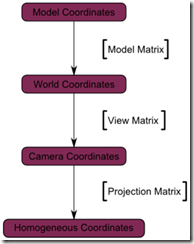
Model--View--Projection
1.tutorial03.cpp
// Include standard headers

#include <stdio.h>

#include <stdlib.h>

// Include GLEW

#include <GL/glew.h>

// Include GLFW

#include <glfw3.h>

GLFWwindow* window;

// Include GLM

#include <glm/glm.hpp>

#include <glm/gtc/matrix_transform.hpp>

using namespace glm;

#include <common/shader.hpp>

int main( void )

{

    // Initialise GLFW

    if( !glfwInit() )

    {

        fprintf( stderr, "Failed to initialize GLFW\n" );

        getchar();

        return -1;

    }

    glfwWindowHint(GLFW_SAMPLES, 4);

    glfwWindowHint(GLFW_CONTEXT_VERSION_MAJOR, 3);

    glfwWindowHint(GLFW_CONTEXT_VERSION_MINOR, 3);

    glfwWindowHint(GLFW_OPENGL_FORWARD_COMPAT, GL_TRUE); // To make MacOS happy; should not be needed

    glfwWindowHint(GLFW_OPENGL_PROFILE, GLFW_OPENGL_CORE_PROFILE); //We don't want the old OpenGL

    // Open a window and create its OpenGL context

    window = glfwCreateWindow( 1024, 768, "Tutorial 03 - Matrices", NULL, NULL);

    if( window == NULL ){

        fprintf( stderr, "Failed to open GLFW window. If you have an Intel GPU, they are not 3.3 compatible. Try the 2.1 version of the tutorials.\n" );

        getchar();

        glfwTerminate();

        return -1;

    }

    glfwMakeContextCurrent(window);

    // Initialize GLEW

    glewExperimental = true; // Needed for core profile

    if (glewInit() != GLEW_OK) {

        fprintf(stderr, "Failed to initialize GLEW\n");

        getchar();

        glfwTerminate();

        return -1;

    }

    // Ensure we can capture the escape key being pressed below

    glfwSetInputMode(window, GLFW_STICKY_KEYS, GL_TRUE);

    // Dark blue background

    glClearColor(0.0f, 0.0f, 0.4f, 0.0f);

    GLuint VertexArrayID;

    glGenVertexArrays(1, &VertexArrayID);

    glBindVertexArray(VertexArrayID);

    // Create and compile our GLSL program from the shaders

    GLuint programID = LoadShaders( "SimpleTransform.vertexshader", "SingleColor.fragmentshader" );

    // Get a handle for our "MVP" uniform

    GLuint MatrixID = glGetUniformLocation(programID, "MVP");

    // Projection matrix : 45?Field of View, 4:3 ratio, display range : 0.1 unit <-> 100 units

    glm::mat4 Projection = glm::perspective(45.0f, 4.0f / 3.0f, 0.1f, 100.0f);

    // Or, for an ortho camera :

    //glm::mat4 Projection = glm::ortho(-10.0f,10.0f,-10.0f,10.0f,0.0f,100.0f); // In world coordinates

    // Camera matrix

    glm::mat4 View       = glm::lookAt(

                                glm::vec3(4,3,3), // Camera is at (4,3,3), in World Space

                                glm::vec3(0,0,0), // and looks at the origin

                                glm::vec3(0,1,0)  // Head is up (set to 0,-1,0 to look upside-down)

                           );

    // Model matrix : an identity matrix (model will be at the origin)

    glm::mat4 Model      = glm::mat4(1.0f);

    // Our ModelViewProjection : multiplication of our 3 matrices

    glm::mat4 MVP        = Projection * View * Model; // Remember, matrix multiplication is the other way around

    static const GLfloat g_vertex_buffer_data[] = {

        -1.0f, -1.0f, 0.0f,

         1.0f, -1.0f, 0.0f,

         0.0f,  1.0f, 0.0f,

    };

    static const GLushort g_element_buffer_data[] = { 0, 1, 2 };

    GLuint vertexbuffer;

    glGenBuffers(1, &vertexbuffer);

    glBindBuffer(GL_ARRAY_BUFFER, vertexbuffer);

    glBufferData(GL_ARRAY_BUFFER, sizeof(g_vertex_buffer_data), g_vertex_buffer_data, GL_STATIC_DRAW);

    do{

        // Clear the screen

        glClear( GL_COLOR_BUFFER_BIT );

        // Use our shader

        glUseProgram(programID);

        // Send our transformation to the currently bound shader,

        // in the "MVP" uniform

        glUniformMatrix4fv(MatrixID, 1, GL_FALSE, &MVP[0][0]);

        // 1rst attribute buffer : vertices

        glEnableVertexAttribArray(0);

        glBindBuffer(GL_ARRAY_BUFFER, vertexbuffer);

        glVertexAttribPointer(

            0,                  // attribute. No particular reason for 0, but must match the layout in the shader.

            3,                  // size

            GL_FLOAT,           // type

            GL_FALSE,           // normalized?

            0,                  // stride

            (void*)0            // array buffer offset

        );

        // Draw the triangle !

        glDrawArrays(GL_TRIANGLES, 0, 3); // 3 indices starting at 0 -> 1 triangle

        glDisableVertexAttribArray(0);

        // Swap buffers

        glfwSwapBuffers(window);

        glfwPollEvents();

    } // Check if the ESC key was pressed or the window was closed

    while( glfwGetKey(window, GLFW_KEY_ESCAPE ) != GLFW_PRESS &&

           glfwWindowShouldClose(window) == 0 );

    // Cleanup VBO and shader

    glDeleteBuffers(1, &vertexbuffer);

    glDeleteProgram(programID);

    glDeleteVertexArrays(1, &VertexArrayID);

    // Close OpenGL window and terminate GLFW

    glfwTerminate();

    return 0;

}
2. common/shader.cpp
#include <stdio.h>

#include <string>

#include <vector>

#include <iostream>

#include <fstream>

#include <algorithm>

using namespace std;

#include <stdlib.h>

#include <string.h>

#include <GL/glew.h>

#include "shader.hpp"

GLuint LoadShaders(const char * vertex_file_path,const char * fragment_file_path){

    // Create the shaders

    GLuint VertexShaderID = glCreateShader(GL_VERTEX_SHADER);

    GLuint FragmentShaderID = glCreateShader(GL_FRAGMENT_SHADER);

    // Read the Vertex Shader code from the file

    std::string VertexShaderCode;

    std::ifstream VertexShaderStream(vertex_file_path, std::ios::in);

    if(VertexShaderStream.is_open()){

        std::string Line = "";

        while(getline(VertexShaderStream, Line))

            VertexShaderCode += "\n" + Line;

        VertexShaderStream.close();

    }else{

        printf("Impossible to open %s. Are you in the right directory ? Don't forget to read the FAQ !\n", vertex_file_path);

        getchar();

        return 0;

    }

    // Read the Fragment Shader code from the file

    std::string FragmentShaderCode;

    std::ifstream FragmentShaderStream(fragment_file_path, std::ios::in);

    if(FragmentShaderStream.is_open()){

        std::string Line = "";

        while(getline(FragmentShaderStream, Line))

            FragmentShaderCode += "\n" + Line;

        FragmentShaderStream.close();

    }

    GLint Result = GL_FALSE;

    int InfoLogLength;

    // Compile Vertex Shader

    printf("Compiling shader : %s\n", vertex_file_path);

    char const * VertexSourcePointer = VertexShaderCode.c_str();

    glShaderSource(VertexShaderID, 1, &VertexSourcePointer , NULL);

    glCompileShader(VertexShaderID);

    // Check Vertex Shader

    glGetShaderiv(VertexShaderID, GL_COMPILE_STATUS, &Result);

    glGetShaderiv(VertexShaderID, GL_INFO_LOG_LENGTH, &InfoLogLength);

    if ( InfoLogLength > 0 ){

        std::vector<char> VertexShaderErrorMessage(InfoLogLength+1);

        glGetShaderInfoLog(VertexShaderID, InfoLogLength, NULL, &VertexShaderErrorMessage[0]);

        printf("%s\n", &VertexShaderErrorMessage[0]);

    }

    // Compile Fragment Shader

    printf("Compiling shader : %s\n", fragment_file_path);

    char const * FragmentSourcePointer = FragmentShaderCode.c_str();

    glShaderSource(FragmentShaderID, 1, &FragmentSourcePointer , NULL);

    glCompileShader(FragmentShaderID);

    // Check Fragment Shader

    glGetShaderiv(FragmentShaderID, GL_COMPILE_STATUS, &Result);

    glGetShaderiv(FragmentShaderID, GL_INFO_LOG_LENGTH, &InfoLogLength);

    if ( InfoLogLength > 0 ){

        std::vector<char> FragmentShaderErrorMessage(InfoLogLength+1);

        glGetShaderInfoLog(FragmentShaderID, InfoLogLength, NULL, &FragmentShaderErrorMessage[0]);

        printf("%s\n", &FragmentShaderErrorMessage[0]);

    }

    // Link the program

    printf("Linking program\n");

    GLuint ProgramID = glCreateProgram();

    glAttachShader(ProgramID, VertexShaderID);

    glAttachShader(ProgramID, FragmentShaderID);

    glLinkProgram(ProgramID);

    // Check the program

    glGetProgramiv(ProgramID, GL_LINK_STATUS, &Result);

    glGetProgramiv(ProgramID, GL_INFO_LOG_LENGTH, &InfoLogLength);

    if ( InfoLogLength > 0 ){

        std::vector<char> ProgramErrorMessage(InfoLogLength+1);

        glGetProgramInfoLog(ProgramID, InfoLogLength, NULL, &ProgramErrorMessage[0]);

        printf("%s\n", &ProgramErrorMessage[0]);

    }

    glDetachShader(ProgramID, VertexShaderID);

    glDetachShader(ProgramID, FragmentShaderID);

    glDeleteShader(VertexShaderID);

    glDeleteShader(FragmentShaderID);

    return ProgramID;

}
3.common/shader.hpp
#ifndef SHADER_HPP

#define SHADER_HPP

GLuint LoadShaders(const char * vertex_file_path,const char * fragment_file_path);

#endif
4.shaders/SimpleTransform.vertexshader
#version 330 core

// Input vertex data, different for all executions of this shader.

layout(location = 0) in vec3 vertexPosition_modelspace;

// Values that stay constant for the whole mesh.

uniform mat4 MVP;

void main(){

    // Output position of the vertex, in clip space : MVP * position

    gl_Position =  MVP * vec4(vertexPosition_modelspace,1);

}
5.shaders/SingleColor.fragmentshader
#version 330 core

// Ouput data

out vec3 color;

void main()

{

    // Output color = red

    color = vec3(1,0,0);

}
OpenGL学习--03--矩阵的更多相关文章
- OpenGL学习进程(12)第九课:矩阵乘法实现3D变换
本节是OpenGL学习的第九个课时,下面将详细介绍OpenGL的多种3D变换和如何操作矩阵堆栈. (1)3D变换: OpenGL中绘制3D世界的空间变换包括:模型变换.视图变换.投影变换和视口 ...
- OpenGL学习笔记3——缓冲区对象
在GL中特别提出了缓冲区对象这一概念,是针对提高绘图效率的一个手段.由于GL的架构是基于客户——服务器模型建立的,因此默认所有的绘图数据均是存储在本地客户端,通过GL内核渲染处理以后再将数据发往GPU ...
- OpenGL学习进程(11)第八课:颜色绘制的详解
本节是OpenGL学习的第八个课时,下面将详细介绍OpenGL的颜色模式,颜色混合以及抗锯齿. (1)颜色模式: OpenGL支持两种颜色模式:一种是RGBA,一种是颜色索引模式. R ...
- OpenGL学习笔记:拾取与选择
转自:OpenGL学习笔记:拾取与选择 在开发OpenGL程序时,一个重要的问题就是互动,假设一个场景里面有很多元素,当用鼠标点击不同元素时,期待作出不同的反应,那么在OpenGL里面,是怎么知道我当 ...
- [OpenGL ES 03]3D变换:模型,视图,投影与Viewport
[OpenGL ES 03]3D变换:模型,视图,投影与Viewport 罗朝辉 (http://blog.csdn.net/kesalin) 本文遵循“署名-非商业用途-保持一致”创作公用协议 系列 ...
- OpenGL学习之路(一)
1 引子 虽然是计算机科班出身,但从小对几何方面的东西就不太感冒,空间想象能力也较差,所以从本科到研究生,基本没接触过<计算机图形学>.为什么说基本没学过呢?因为好奇(尤其是惊叹于三维游戏 ...
- OpenGL学习之路(三)
1 引子 这些天公司一次次的软件发布节点忙的博主不可开交,另外还有其它的一些事也占用了很多时间.现在坐在电脑前,在很安静的环境下,与大家分享自己的OpenGL学习笔记和理解心得,感到格外舒服.这让我回 ...
- OpenGL学习之路(四)
1 引子 上次读书笔记主要是学习了应用三维坐标变换矩阵对二维的图形进行变换,并附带介绍了GLSL语言的编译.链接相关的知识,之后介绍了GLSL中变量的修饰符,着重介绍了uniform修饰符,来向着色器 ...
- OpenGL学习之路(五)
1 引子 不知不觉我们已经进入到读书笔记(五)了,我们先对前四次读书笔记做一个总结.前四次读书笔记主要是学习了如何使用OpenGL来绘制几何图形(包括二维几何体和三维几何体),并学习了平移.旋转.缩放 ...
- OpenGL学习进程(10)第七课:四边形绘制与动画基础
本节是OpenGL学习的第七个课时,下面以四边形为例介绍绘制OpenGL动画的相关知识: (1)绘制几种不同的四边形: 1)四边形(GL_QUADS) OpenGL的GL_QUADS图 ...
随机推荐
- POJ 1160
#include <iostream> #define MAXN 305 #define inf 123456789 using namespace std; int _m[MAXN][M ...
- js获取url地址的参数的方法
js获取url参数值 今天说一下如何获取url参数值. 思路 通过location的search就可以获取到url中问号后面的值. 字符串过滤到问号 通过split方法分割参数集合 循环赋值 匹配对应 ...
- 【DB2】How to resolve SQL20249N the statement was not processed with error
相关链接 https://vinaysdb2blog.blogspot.com/2017/11/how-to-resolve-sql20249n-statement-was-not-processed ...
- [转]你真的了解 console 吗
原文:https://segmentfault.com/a/1190000000481884 对于前端开发者来说,在开发过程中需要监控某些表达式或变量的值的时候,用 debugger 会显得过于笨重, ...
- 【原】Ubuntu13.04安装、卸载Gnome3.8
添加 GNOME 3 PPA(Personal Package Archives) 我们先给Ubuntu的Software Sources增加GNOME 3 PPA.这可以不用命令行就做到,但出于简单 ...
- Python -- Gui编程 -- Qt库的使用 -- 布局与基本控件
1.垂直布局,水平布局和网格布局 import sys from PyQt4 import QtCore, QtGui class MyWindow(QtGui.QWidget): def __ini ...
- zookeeper基础知识
Zookeeper简介 ZooKeeper设计目的 最终一致性client不论连接到哪个Server,展示给它都是同一个视图,这是zookeeper最重要的性能. 可靠性具有简单.健壮.良好的性能,如 ...
- Go语言学习笔记九: 指针
Go语言学习笔记九: 指针 指针的概念是当时学C语言时了解的.Go语言的指针感觉与C语言的没啥不同. 指针定义与使用 指针变量是保存内存地址的变量.其他变量保存的是数值,而指针变量保存的是内存地址.这 ...
- 亿级别记录的mongodb批量导入Es的java代码完整实现
针对mongodb亿级别或者十亿级别的模糊查询,效率不高,解决方式是使用Es查询,这样就需要把数据导入的ES中 完整的代码实现如下所示:(仅供参考) import java.io.IOExceptio ...
- nginx 学习笔记(2) nginx新手入门
这篇手册简单介绍了nginx,并提供了一些可以操作的简单的工作.前提是nginx已经被安装到你的服务器上.如果没有安装,请阅读上篇:nginx 学习笔记(1) nginx安装.这篇手册主要内容:1. ...