
Windows access Linux / Ubuntu via Remote Desktop via xrdp
Follow these steps :
Step 1 – Install xRDP
Open Terminal (Crtl+Alt+T) and execute the following commands:
sudo apt-get update

sudo apt-get install xrdp
Step 2 – Install XFCE4 ( Unity doesn't seem to support xRDP in Ubuntu 14.04; although, in Ubuntu 12.04 it was supported ). That's why we install Xfce4.
sudo apt-get install xfce4
Step 3 – Configure xRDP
In this step, we modify two files to make sure xRDP uses Xfce4. First we need to create, or edit, our
.xsessionfile in our home directory. We can either use nano or simply redirect an echo statement (easier):echo xfce4-session > ~/.xsession
The second file we need to edit is the startup file for xRDP, so it will start Xfce4.
sudo nano /etc/xrdp/startwm.sh
The content should look like this (pay attention to the last line and ignore
. /etc/X11/Xsession):#!/bin/sh if [ -r /etc/default/locale ]; then
. /etc/default/locale
export LANG LANGUAGE
fi startxfce4
Step 4 – Restart xRDP
To make all these changes effective, restart xRDP as such:
sudo service xrdp restart
Testing your xRDP connection
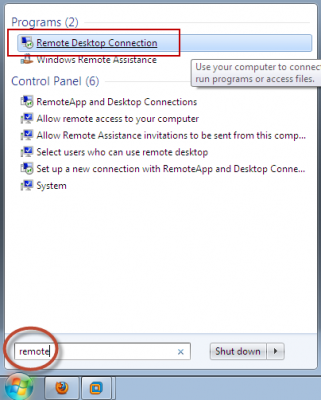
On the computer that will remotely control your Ubuntu machine, start you RDP client. Windows comes standard with a Remote Desktop client (mstsc.exe – you can start it from a command prompt, or find the shortcut to Remote Desktop under Accessories). Or Search 'remote' in start (Windows 7) Or 'remote' in search box in Windows 8.
Whichever client you use, most will work with either the computer network name or IP address of your Ubuntu machine.
To find the IP address on your Ubuntu box, type:
hostname -I
(note: this is a capital “i”)
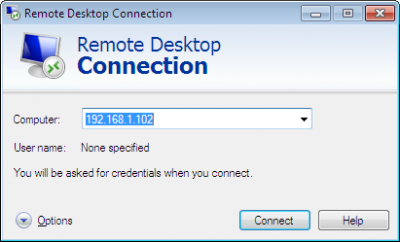
Enter IP address of your Ubuntu machine. For example:
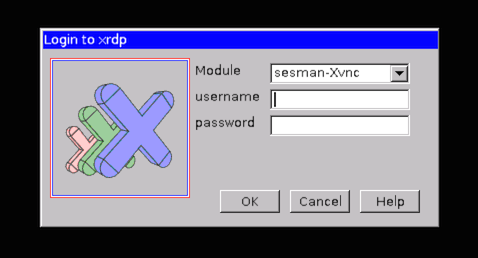
Depending on your RDP client capabilities and settings (for example: Microsoft RDP Client allows automatic login), you might or might not see the login screen. Here we enter our Ubuntu username and password and click “OK”
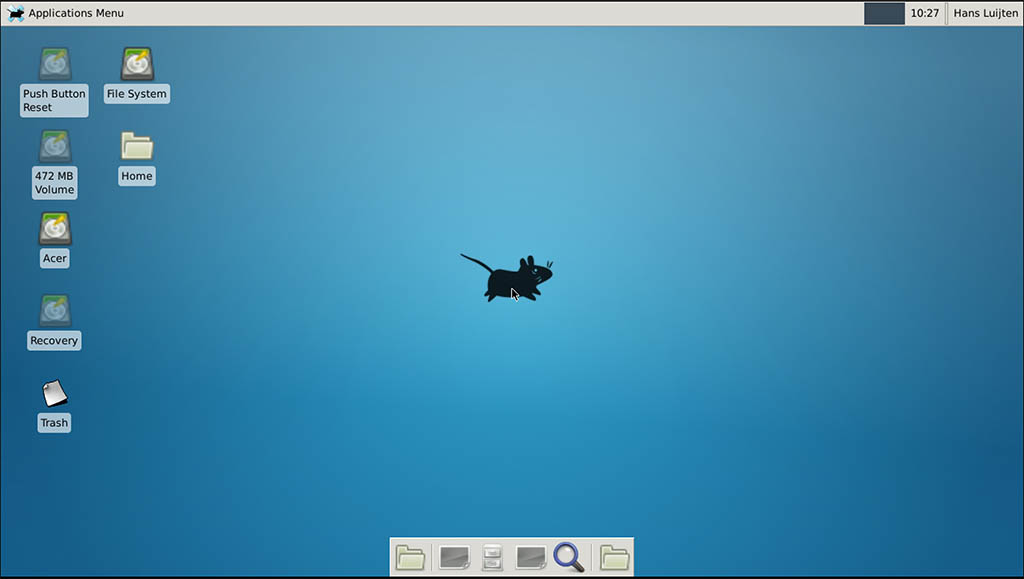
You are done,enjoy
PS: There are some good points mentioned in comments, so I thought to sum them up.
If you want to access Ubuntu from outside network, you'll need your Ubuntu at work to have it's own, proper, internet IP address - a fairly unlikely scenario. To work it otherwise, you need the externally visible address of work, AND have port forwarding set to direct incoming RDP requests to your work computer on the router. (Mark Williams)
To use the Ubuntu MATE desktop
meta-session, replace last linestartxfce4instartwm.shwithmate-session. (Frank N)You can use your actual machine name (by typing
hostname) rather than your IP as it might be more stable on dynamic IPs in future sessions. (Frank N)
Windows access Linux / Ubuntu via Remote Desktop via xrdp的更多相关文章
- Connect to a Windows PC from Ubuntu via Remote Desktop Connection
http://www.7tutorials.com/connecting-windows-remote-desktop-ubuntu A useful feature of Windows is be ...
- 使用ubuntu远程连接windows, Connect to a Windows PC from Ubuntu via Remote Desktop Connection
from: https://www.digitalcitizen.life/connecting-windows-remote-desktop-ubuntu NOTE: This tutorial w ...
- golang 跨平台编译——go 在windows上编译Linux平台的程序(Cross Compilation from Windows to Linux/Ubuntu)
Go Cross Compilation from Windows to Linux/Ubuntu I have GO 1.7 installed on my Windows 10. I create ...
- Windows和linux(ubuntu)互传文件简便快捷的方法
现在很多开发和测试的工作环境都是Linux,但测试后期报告的处理一般都是在Windows下完成的,所以需要把结果拿到Windows下. 如果是同一台PC还好些(windows下安装linux的虚拟机, ...
- Mac 10.12安装Windows远程桌面工具Microsoft Remote Desktop
说明:之前Office自带的Windows远程桌面工具虽然简便,但是保存的服务器列表有限.而这个微软推出的自家工具可以完美解决这些问题. 下载: (链接:https://pan.baidu.com/s ...
- remote desktop connect btw Mac, Windows, Linux(Ubuntu) Mac,Windows,Linux之间的远程桌面连接
目录 I. 预备 II. Mac连接Windows III. Windows连接Mac IV. Windows连接Ubuntu V. Mac连接Ubuntu VI. Ubuntu连接Mac VII, ...
- Windows组件:打开MSDTC,恢复Windows TaskBar,查看windows日志,打开Remote Desktop,打开Services,资源监控
一,Win10 打开 MSDTC 1,Win+R 打开运行窗口,输入 dcomcnfg,打开组件服务窗口 2,在组件服务 catalog下找到 Distributed Transaction Coor ...
- Running a Remote Desktop on a Windows Azure Linux VM (远程桌面到Windows Azure Linux )-摘自网络(试了,没成功 - -!)
A complete click-by-click, step-by-step video of this article is available ...
- Remote Desktop Connection from Windows 7 to Ubuntu 12.04
$sudo apt-get install xrdp $cd ~ $sudo vim .xsession gnome-session --session=ubuntu-2d 在windows下进行远程 ...
随机推荐
- 【NOIP2017】列队 splay
当年太菜了啊,连$60$分的暴力都没拿满,只打了一个$30$分的. 考虑到这题最多只会询问到$30W$个点,且整个矩阵会去到$30W\times 30W$,显然不能将所有的点存下来. 对于每一行(除最 ...
- OS之内存管理 ---基本的内存管理策略(二)
分段 基本方法 分段就是基于用户视图的内存管理方案.逻辑地址空间是由一组段构成的,每个段都有名称和长度.地址指定了段名称和段内偏移.因此用户通过两个量来指定地址:段名称和段偏移. 为了简单,进行对段的 ...
- web.xml详细配置
1.启动一个WEB项目的时候,WEB容器会去读取它的配置文件web.xml,读取<listener>和<context-param>两个结点. 2.紧急着,容创建一个Servl ...
- Spring Security构建Rest服务-1001-spring social开发第三方登录之spring social基本原理
OAuth协议是一个授权协议,目的是让用户在不将服务提供商的用户名密码交给第三方应用的条件下,让第三方应用可以有权限访问用户存在服务提供商上的资源. 接着上一篇说的,在第三方应用获取到用户资源后,如果 ...
- 过虑器应用之1-设置request编码
一:设置Post编码 post请求接收中文,需要在Servlet里写上 request.setCharacterEncoding("UTF-8"); 否则默认以iso-8859-1 ...
- 详解XMLHttpRequest的跨域资源共享
0x00 背景 在Browser Security-同源策略.伪URL的域这篇文章中提到了浏览器的同源策略,其中提到了XMLHttpRequest严格遵守同源策略,非同源不可请求.但是,在实践当中,经 ...
- 【广州.NET社区推荐】.NETCore 平台上的日志集成组件 TomatoLog
TomatoLog简介 TomatoLog 是一套在 .NETCore 平台上最简单易用的日志集成组件,具有高度灵活的使用方式,完全可定义配置的可扩展性,使用异步写入,业务完全解耦,客户端的一键安装. ...
- javascript快速入门1--JavaScript前世今生,HelloWorld与开发环境
JavaScript历史 大概在1992年,一家称作Nombas的公司开始开发一种叫做C--(C-minus-minus,简称Cmm)的嵌入式脚本语言. Cmm背后的理念很简单:一个足够强大可以替代宏 ...
- Ubuntu系统下OpenDaylight源码编译安装
操作系统:Linux x64 / Ubuntu 14.04 研究领域:软件定义网络SDN (Software-defined Networking) 开发组件:OpenDaylight 声明:转载请注 ...
- T-SQL 片段收藏
存储过程 CREATE PROCEDURE spInsertOrUpdateProduct --有则更新,否则插入 ) , ) , @StdCost MONEY AS IF EXISTS ( SELE ...