
springboot 前后端分离开发 从零到整(三、登录以及登录状态的持续)
今天来写一下怎么登录和维持登录状态。
相信登录验证大家都比较熟悉,在Javaweb中一般保持登录状态都会用session。但如果是前后端分离的话,session的作用就没有那么明显了。对于前后端分离的项目目前比较流行的是jwt验证。参考文章:https://blog.csdn.net/qq_27828675/article/details/80923678
其实,作为开发一整个项目来说,以我一年多开发经验来,建议大家先做个需求开发文档,把项目的业务大致构思一下。然后再统一把数据库设计好,把用到的表和字段都建好,可以增加开发速率的。
好了,废话少说,开始讲解一下怎么做登录验证过程吧。
首先,先创建token生成工具类。token可以设置过期时间,我项目中设置的是10个小时后过期。
添加依赖环境。
<!--JJWT-->
<dependency>
    <groupId>io.jsonwebtoken</groupId>
    <artifactId>jjwt</artifactId>
    <version>0.9.0</version>
</dependency>
工具类。在生成token的时候我把用户邮箱注入token中,方便根据用户邮箱查询用户信息。秘钥暂时用的是后台写死,也可以用用户密码作为每一个token的秘钥。
package com.liao.tdoor.util;

import io.jsonwebtoken.Claims;

import io.jsonwebtoken.JwtBuilder;

import io.jsonwebtoken.Jwts;

import io.jsonwebtoken.SignatureAlgorithm;

import javax.crypto.spec.SecretKeySpec;

import javax.xml.bind.DatatypeConverter;

import java.security.Key;

import java.util.Date;

/**

 * 生成token的工具类

 */

public class tokenUtil {

    /**

     * 签名秘钥(唯一秘钥,可以用密码做为秘钥)

     */

    public static final String SECRET="admin";

    /**

     * 生成token

     * @param username

     * @return

     */

    public static String createJwtToken(String username){

        String issuer="tdoor";

        String subject="liao";

        long ttlMillis=36000000;//10个小时后过期

        return createJwtToken(username,issuer,subject,ttlMillis);

    }

    /**

     * 生成token

     * @param username 用户名

     * @param issuer 改JWT的签发者,是否使用可以选

     * @param subject 改JWT所面向的用户,是否使用可选

     * @param ttlMillis 签发时间(有效时间,过期会报错)

     * @return token string

     */

    public static String createJwtToken(String username,String issuer,String subject,long ttlMillis){

        //签名算法,将token进行签名

        SignatureAlgorithm signatureAlgorithm=SignatureAlgorithm.HS256;

        //生成签发时间

        long nowMills=System.currentTimeMillis();

        Date now=new Date(nowMills);

        //通过秘钥签名JWT

        byte[] apiKeySecretBytes= DatatypeConverter.parseBase64Binary(SECRET);

        Key signingKey=new SecretKeySpec(apiKeySecretBytes,signatureAlgorithm.getJcaName());

        //创建token

        JwtBuilder builder=Jwts.builder().setId(username)

                                .setIssuedAt(now)

                                .signWith(signatureAlgorithm,signingKey);

        //添加过期时间

        if(ttlMillis>=0){

            long expMillis=nowMills+ttlMillis;

            Date exp=new Date(expMillis);

            builder.setExpiration(exp);

        }

        return builder.compact();

    }

    //验证和读取JWT的示例方法

    public static Claims parseJWT(String jwt){

        Claims claims=Jwts.parser()

                        .setSigningKey(DatatypeConverter.parseBase64Binary(SECRET))

                        .parseClaimsJws(jwt).getBody();

        return claims;

    }

    public static void main(String[] args){

        System.out.println(tokenUtil.createJwtToken("liao180@vip.qq.com"));

    }

}
然后是用户登录验证。
package com.liao.tdoor.dao;

import com.liao.tdoor.model.User;

import com.liao.tdoor.model.UserSign;

import org.apache.ibatis.annotations.Insert;

import org.apache.ibatis.annotations.Select;

import org.apache.ibatis.annotations.SelectKey;

import org.apache.ibatis.annotations.Update;

import org.springframework.stereotype.Repository;

import java.util.Date;

@Repository

public interface UserDao {

    /**

     * @desc 查询改邮箱是否被注册

     * @param email

     * @return

     */

    @Select("select * from user where email=#{email}")

    public User isExistUser(String email);

    /**

     * 用户注册

     * @param user

     */

    @Insert("insert into user(id,email,password,nickname) values (#{id},#{email},#{password},#{nickname})")

    @SelectKey(keyProperty = "id", resultType = String.class, before = true, statement = "select replace(uuid(), '-', '') as id from dual")

    public void addUser(User user);

    /**

     * 用户登录

     * @param email

     * @param password

     * @return

     */

    @Select("select * from user where email=#{email} and password=#{password}")

    public User login(String email,String password);

    /**

     * 通过ID查询用户信息

     * @param user_id

     * @return

     */

    @Select("select * from user where id=#{user_id}")

    public User QueryInfoById(String user_id);

}
用户登录成功后生成token,把token返回给客户端。
package com.liao.tdoor.service;

import com.liao.tdoor.dao.CodeDao;

import com.liao.tdoor.dao.PostingDao;

import com.liao.tdoor.dao.UserDao;

import com.liao.tdoor.model.Posting;

import com.liao.tdoor.model.User;

import com.liao.tdoor.model.UserSign;

import com.liao.tdoor.model.VerificationCode;

import com.liao.tdoor.responseMsg.PersonalEntity;

import com.liao.tdoor.responseMsg.RespCode;

import com.liao.tdoor.responseMsg.RespEntity;

import com.liao.tdoor.util.DateUtils;

import com.liao.tdoor.util.RandomTools;

import com.liao.tdoor.util.SendEmailUtils;

import com.liao.tdoor.util.tokenUtil;

import org.springframework.beans.factory.annotation.Autowired;

import org.springframework.stereotype.Repository;

import org.springframework.stereotype.Service;

import java.text.SimpleDateFormat;

import java.util.ArrayList;

import java.util.Date;

import java.util.List;

/**

 * 用户服务层

 * @author 廖某某

 * @date 2019/02/17

 */

@Service

public class UserService {

    @Autowired

    UserDao userDao;

    @Autowired

    CodeDao codeDao;

    @Autowired

    SendEmailUtils sendEmailUtils;

    @Autowired

    PostingDao pDao;

    private RespEntity respEntity=new RespEntity();

    private User user=new User();

    private VerificationCode verificationCode=new VerificationCode();

    private PersonalEntity infoEntity=new PersonalEntity();

    /**

     * 发送验证码

     * @param email

     * @return

     */

    public RespEntity sendCode(String email){

        try{

            String code= RandomTools.randomCode();//产生随机的验证码

            User user=new User();

            user=userDao.isExistUser(email);

            if(user==null){

                System.out.println("邮箱:"+email+"--验证码为:"+code);

                //修改数据库中的验证码

                verificationCode=codeDao.checkCode(email);

                if(verificationCode!=null){

                    codeDao.changeCode(email,code);

                }

                //发送邮件开始 发送验证码

                sendEmailUtils.sendRegisterCode(email,code);

                //保存验证码信息到数据库

                codeDao.saveCode(email,code,new Date());

                respEntity=new RespEntity(RespCode.REGISTER_SEND);

            }else {

                respEntity= new RespEntity(RespCode.REGISTER_NOTS);

            }

        }catch (Exception e){

            e.printStackTrace();

        }

        return respEntity;

    }

    /**

     * 注册信息提交

     * @param email

     * @param nickName

     * @param password

     * @param registerCode

     * @return

     */

    public RespEntity RegisterInfo(String email,String nickName,String password,String registerCode){

        verificationCode=codeDao.checkCode(email);

        if(verificationCode!=null){

            if(registerCode.equals(verificationCode.getCode())){

                //时间校验--暂略

                User user=new User(email,password,nickName);

                userDao.addUser(user);

                //删除验证码信息

                codeDao.deleteCode(email);

                respEntity=new RespEntity(RespCode.REGISTER_SUCCESS);

            }else {

                respEntity=new RespEntity(RespCode.CODE_EXPIRED);

            }

        }else {

            respEntity=new RespEntity(RespCode.REGISTER_FAILED);

        }

        return respEntity;

    }

    /**

     * 登录验证

     * @param email

     * @param password

     * @return

     */

    public RespEntity Login(String email,String password){

        user=userDao.login(email,password);

        String token="";

        if(user!=null){

            token= tokenUtil.createJwtToken(email);

            respEntity=new RespEntity(RespCode.LOGIN_SUCCESS,token);

        }else {

            respEntity=new RespEntity(RespCode.LOGIN_FAILED);

        }

        return respEntity;

    }

    /**

     * 根据旧密码更改密码

     * @param usedPassword

     * @return

     */

    public RespEntity ChangePassword(String email,String usedPassword,String newPassword){

        user=userDao.login(email,usedPassword);

        if(user==null){

            respEntity=new RespEntity(RespCode.PASSWORD_FAILED);

        }else {

            userDao.ChangePassword(email,newPassword);

            respEntity=new RespEntity(RespCode.SUCCESS);

        }

        return respEntity;

    }

}
controller。
package com.liao.tdoor.controller;

import com.liao.tdoor.annotation.CurrentUser;

import com.liao.tdoor.annotation.PassToken;

import com.liao.tdoor.annotation.UserLoginToken;

import com.liao.tdoor.model.User;

import com.liao.tdoor.responseMsg.PersonalEntity;

import com.liao.tdoor.responseMsg.RespEntity;

import com.liao.tdoor.service.UserService;

import org.springframework.beans.factory.annotation.Autowired;

import org.springframework.web.bind.annotation.RequestBody;

import org.springframework.web.bind.annotation.RequestMapping;

import org.springframework.web.bind.annotation.RestController;

import java.util.Map;

/**

 * @author 廖某某

 * 用户控制层

 */

@RestController

public class userController {

    @Autowired

    UserService userService;

    private RespEntity respEntity=new RespEntity();

    private PersonalEntity pEntity=new PersonalEntity();

    @RequestMapping("register")

    public RespEntity register(@RequestBody Map<String,Object> map){

        String e_mail=(String)map.get("email");

        String nickName=(String)map.get("nickName");

        String password=(String)map.get("password");

        String registerCode=(String)map.get("code");

        respEntity=userService.RegisterInfo(e_mail,nickName,password,registerCode);

        return respEntity;

    }

    @RequestMapping("sendCode")

    public RespEntity sendPollCode(@RequestBody Map<String,Object> map){

        String email=(String)map.get("email");

        RespEntity respEntity=userService.sendCode(email);

        return respEntity;

    }

    @RequestMapping("/login")

    public RespEntity testData(@RequestBody Map<String,Object> map){

        String email=(String)map.get("email");

        String password=(String)map.get("password");

        respEntity=userService.Login(email,password);

        return respEntity;

    }

}
登录操作完成后,客户端根据token来进行请求操作。前端是ajax请求,一般在请求头部携带token,然后服务端拦截请求,获取token并进行验证,判断有无和是否过期,如果token不过期,则放行。
三个注解
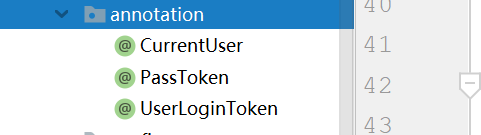
注入当前登录用户注解
package com.liao.tdoor.annotation;

import java.lang.annotation.ElementType;

import java.lang.annotation.Retention;

import java.lang.annotation.RetentionPolicy;

import java.lang.annotation.Target;

/**

 * 注入当前用户

 * @author 廖某某

 * @date 2019/02/18

 * 在Controller的方法参数中使用此注解,该方法在映射时会注入当前登录的User对象

 */

@Target(ElementType.PARAMETER)

@Retention(RetentionPolicy.RUNTIME)

public @interface CurrentUser {

}
需要登录的标记注解
package com.liao.tdoor.annotation;

import java.lang.annotation.ElementType;

import java.lang.annotation.Retention;

import java.lang.annotation.RetentionPolicy;

import java.lang.annotation.Target;

/**

 * 需要进行登录才能进行操作的注解

 * @author 廖某某

 * @date 2019/02/8

 */

@Target({ElementType.METHOD,ElementType.TYPE})

@Retention(RetentionPolicy.RUNTIME)

public @interface UserLoginToken {

    boolean required() default true;

}
不需要登录的标记注解
package com.liao.tdoor.annotation;

import java.lang.annotation.ElementType;

import java.lang.annotation.Retention;

import java.lang.annotation.RetentionPolicy;

import java.lang.annotation.Target;

/**

 * 跳过验证

 * @author 廖某某

 * @date 2019/02/18

 */

@Target({ElementType.METHOD,ElementType.TYPE})

@Retention(RetentionPolicy.RUNTIME)

public @interface PassToken {

    boolean required() default true;

}
创建拦截器。拦截器拦截token并解析token中的用户邮箱,查询用户信息并注入到CurrentUser 中。
package com.liao.tdoor.interceptor;

import com.liao.tdoor.annotation.PassToken;

import com.liao.tdoor.annotation.UserLoginToken;

import com.liao.tdoor.dao.UserDao;

import com.liao.tdoor.model.User;

import com.liao.tdoor.responseMsg.CurrentUserConstants;

import com.liao.tdoor.util.tokenUtil;

import io.jsonwebtoken.Claims;

import io.jsonwebtoken.ExpiredJwtException;

import io.jsonwebtoken.Jwt;

import org.springframework.beans.factory.annotation.Autowired;

import org.springframework.web.method.HandlerMethod;

import org.springframework.web.servlet.HandlerInterceptor;

import org.springframework.web.servlet.ModelAndView;

import javax.servlet.http.HttpServletRequest;

import javax.servlet.http.HttpServletResponse;

import java.lang.reflect.Method;

/**

 * 拦截器,拦截token

 * @author 廖某某

 * @date 2019/02/18

 */

public class AuthenticationInterceptor implements HandlerInterceptor {

    @Autowired

    UserDao userDao;

    @Override

    public boolean preHandle(HttpServletRequest httpServletRequest,

                             HttpServletResponse httpServletResponse,

                             Object object){

        //设置允许哪些域名应用进行ajax访问

        httpServletResponse.setHeader("Access-Control-Allow-Origin", "*");

        httpServletResponse.setHeader("Access-Control-Allow-Methods", "GET,PUT,POST,DELETE");

        httpServletResponse.setHeader("Access-Control-Allow-Headers", " Origin, X-Requested-With, content-Type, Accept, Authorization");

        httpServletResponse.setHeader("Access-Control-Max-Age","3600");

        //获取请求头的token

        String token=httpServletRequest.getHeader("Authorization");

        //如果不是映射到方法直接通过

        if(!(object instanceof HandlerMethod)){

            return true;

        }

        HandlerMethod handlerMethod=(HandlerMethod) object;

        Method method=handlerMethod.getMethod();

        //检查是否有passToken注释,有则跳过验证

        if(method.isAnnotationPresent(PassToken.class)){

            PassToken passToken=method.getAnnotation(PassToken.class);

            if(passToken.required()){

                return true;

            }

        }

        //检查是否有需要用户权限的注解

        if(method.isAnnotationPresent(UserLoginToken.class)){

            UserLoginToken userLoginToken=method.getAnnotation(UserLoginToken.class);

            if(userLoginToken.required()){

                //执行认证

                if(token==null){

                    throw new RuntimeException("无token,请重新登录");

                }else {

                    //获取token中的用户信息

                    Claims claims;

                    try{

                        claims= tokenUtil.parseJWT(token);

                    }catch (ExpiredJwtException e){

                        throw new RuntimeException("401,token失效");

                    }

                    String email=claims.getId();

                    User user=userDao.isExistUser(email);

                    if(user==null){

                        throw new RuntimeException("用户不存在,请重新登录");

                    }

                    httpServletRequest.setAttribute(CurrentUserConstants.CURRENT_USER,user);

                }

            }

        }

        return true;

    }

    // 请求处理之后进行调用,但是在视图被渲染之前(Controller方法调用之后)

    @Override

    public void postHandle(HttpServletRequest httpServletRequest, HttpServletResponse httpServletResponse, Object o, ModelAndView modelAndView) throws Exception {

    }

    // 在整个请求结束之后被调用,也就是在DispatcherServlet 渲染了对应的视图之后执行(主要是用于进行资源清理工作)

    @Override

    public void afterCompletion(HttpServletRequest httpServletRequest,

                                HttpServletResponse httpServletResponse,

                                Object o, Exception e)throws Exception{

    }

}
配置拦截器
package com.liao.tdoor.config;

import com.liao.tdoor.interceptor.AuthenticationInterceptor;

import org.springframework.context.annotation.Bean;

import org.springframework.context.annotation.Configuration;

import org.springframework.web.method.support.HandlerMethodArgumentResolver;

import org.springframework.web.servlet.config.annotation.InterceptorRegistry;

import org.springframework.web.servlet.config.annotation.WebMvcConfigurerAdapter;

import java.util.List;

/**

 * 配置拦截器

 * @author 廖某某

 * @date 2019/02/18

 */

@Configuration

public class InterceptorConfig extends WebMvcConfigurerAdapter {

    @Override

    public void addInterceptors(InterceptorRegistry registry){

        //拦截所有请求,判断是否有@UserLogin注解,决定是否需要重新登录

        registry.addInterceptor(authenticationInterceptor()).addPathPatterns("/**");

        super.addInterceptors(registry);

    }

    @Override

    public void addArgumentResolvers(List<HandlerMethodArgumentResolver> argumentResolvers){

        argumentResolvers.add(currentUserMethodArgumentResolver());

        super.addArgumentResolvers(argumentResolvers);

    }

    @Bean

    public CurrentUserMethodArgumentResolver currentUserMethodArgumentResolver(){

        return new CurrentUserMethodArgumentResolver();

    }

    @Bean

    public AuthenticationInterceptor authenticationInterceptor(){

        return new AuthenticationInterceptor();

    }

}
自定义参数解析器解析token中包含的用户信息。
package com.liao.tdoor.config;

import com.liao.tdoor.annotation.CurrentUser;

import com.liao.tdoor.model.User;

import com.liao.tdoor.responseMsg.CurrentUserConstants;

import org.springframework.core.MethodParameter;

import org.springframework.web.bind.support.WebDataBinderFactory;

import org.springframework.web.context.request.NativeWebRequest;

import org.springframework.web.context.request.RequestAttributes;

import org.springframework.web.method.support.HandlerMethodArgumentResolver;

import org.springframework.web.method.support.ModelAndViewContainer;

import org.springframework.web.multipart.support.MissingServletRequestPartException;

/**

 * 自定义参数解析器(解析user)

 * @author 廖某某

 * @date 2019/02/18

 * 增加方法注入,将含有 @CurrentUser 注解的方法参数注入当前登录用户

 */

public class CurrentUserMethodArgumentResolver implements HandlerMethodArgumentResolver {

    @Override

    public boolean supportsParameter(MethodParameter parameter){

        return parameter.getParameterType().isAssignableFrom(User.class) //判断是否能转换成User类型

                && parameter.hasParameterAnnotation(CurrentUser.class); //是否有CurrentUser注解

    }

    @Override

    public Object resolveArgument(MethodParameter parameter, ModelAndViewContainer mavContainer,

                                  NativeWebRequest webRequest, WebDataBinderFactory binderFactory) throws Exception {

        User user = (User) webRequest.getAttribute(CurrentUserConstants.CURRENT_USER, RequestAttributes.SCOPE_REQUEST);

        if (user != null) {

            return user;

        }

        throw new MissingServletRequestPartException(CurrentUserConstants.CURRENT_USER);

    }

}
这章就大概先说这么多吧,好像记得也就这么多了。
思想总结:用户登录传递邮箱密码(缺点:没有做到密码加密传输)到服务端验证,通过就返回token给前台,前台获取token保存到本地客户端。在HTML中我用的是localStorage保存,然后每次发起请求会根据是否需要登录操作而向后台传递token。服务端根据请求头的token,进行用户验证,验证通过就放行,不通过就返回登录失败信息返回前台,前台根据服务端返回的消息作出相应处理。
下一章说一下关于验证通过放行操作。如果这章有什么问题请大家见谅,并留言指正,O(∩_∩)O哈哈~。
springboot 前后端分离开发 从零到整(三、登录以及登录状态的持续)的更多相关文章
- springboot 前后端分离开发 从零到整(一、环境的搭建)
第一次写文章,有什么错误地方请大家指正,也请大家见谅. 这次为大家分享我做毕业设计的一个过程,之前没有接触过springboot,一直做的都是Javaweb和前端,做了几个前后端分离的项目.现在听说s ...
- springboot 前后端分离开发 从零到整(二、邮箱注册)
spring: datasource: driver-class-name: com.mysql.cj.jdbc.Driver username: root password: 123456 url: ...
- springboot 前后端分离开发 从零到整(四、更改密码操作)
前端发送更改密码请求,头部携带token,服务端拦截器拦截头部token并解析,根据token中的信息来查询用户信息.需要登录才能进行的操作是由自己定的,有些操作可以直接放行.具体实现是: 上一章写到 ...
- Springboot前后端分离开发
.1.springboot前后端分离开发之前要配置好很多东西,这周会详细补充博客内容和遇到的问题的解析 2,按照下面流程走一遍 此时会加载稍等一下 pom.xml显示中加上阿里云镜像可以加速下载配置文 ...
- springboot 前后端分离开发解决跨域访问
最近新学习了Java EE开发框架springboot,我在使用springboot前后台分离开发的过程中遇到了跨域求问题.在网上寻找答案的过程中发现网上的解决方案大多比较零散,我在这里整理一个解决方 ...
- SpringBoot,Vue前后端分离开发首秀
需求:读取数据库的数据展现到前端页面 技术栈:后端有主要有SpringBoot,lombok,SpringData JPA,Swagger,跨域,前端有Vue和axios 不了解这些技术的可以去入门一 ...
- vue+springboot前后端分离实现单点登录跨域问题处理
最近在做一个后台管理系统,前端是用时下火热的vue.js,后台是基于springboot的.因为后台系统没有登录功能,但是公司要求统一登录,登录认证统一使用.net项目组的认证系统.那就意味着做单点登 ...
- 基于SpringBoot前后端分离的点餐系统
基于SpringBoot前后端分离的点餐系统 开发环境:主要采用Spring boot框架和小程序开发 项目简介:点餐系统,分成卖家端和买家端.买家端使用微信小程序开发,实现扫码点餐.浏览菜单.下单. ...
- vue+mockjs 模拟数据,实现前后端分离开发
在项目中尝试了mockjs,mock数据,实现前后端分离开发. 关于mockjs,官网描述的是 1.前后端分离 2.不需要修改既有代码,就可以拦截 Ajax 请求,返回模拟的响应数据. 3.数据类型丰 ...
随机推荐
- codeforces 933D A Creative Cutout
题目链接 正解:组合数学. 充满套路与细节的一道题.. 首先我们显然要考虑每个点的贡献(我就不信你能把$f$给筛出来 那么对于一个点$(x,y)$,我们设$L=x^{2}+y^{2}$,那么它的贡献就 ...
- DIV+CSS:如何编写代码才能更有效率
如何编写CSS代码才能更有效率?这是许多网页制作者与开发者都关心的问题.大概没有什么魔法,可以保证一下就把你的样式表缩小到百分之多少,但合理的 CSS 编码与组织技巧,的确能够帮助你的更有效率地写出更 ...
- 【模板】.bat对拍
对拍是个很有用的东西,比如在验证贪心策略是否正确时,可以写上个暴力然后和贪心程序对拍上几个小时. 在c++里用system写对拍总是会出现一些莫名其妙的问题.. 比如my.out明明是1 fc的时候却 ...
- 【转】 Android xml中 @和?区别,style和attr小结
引用资源时,使用@还是?的区别,例如在设置style的时候既可以使用@也可以使用? style="?android:attr/progressBarStyleHorizontal" ...
- 一般处理程序中用到session时
一般处理程序ashx文件使用session 1.先引用System.Web.SessionState这个命名空间, 2.如果是要在HttpHandler中读取Session的内容,就要在实现IHttp ...
- java web开发环境配置系列(二)安装tomcat
在今天,读书有时是件“麻烦”事.它需要你付出时间,付出精力,还要付出一份心境.--仅以<java web开发环境配置系列>来祭奠那逝去的…… 1.下载tomcat压缩包,进入官网http: ...
- 一个简单好用的http服务器
http-server 是一个简单的零配置命令行HTTP服务器, 基于 nodeJs. 如果你不想重复的写 nodeJs 的 web-server.js, 则可以使用这个. 安装 (全局安装加 -g) ...
- Python学习笔记系列——数据结构相关
Python有4种数据结构:列表(list).字典(dictionary).元组(Tuple).集合(set).从最直接的感官上来说,这四种数据结构的区别是:列表中的元素使用方括号括起来,字典和集合是 ...
- 【vue】vue依赖安装如vue-router、vue-resource、vuex等
方式一: 最直接的方式为在 package.json中添加如图依赖配置,然后项目 cnpm install即可 方式二: 根据vue项目的搭建教程,接下来记录下如何在Vue-cli创建的项目中安装vu ...
- UNIX网络编程 卷2 源代码使用
1. 下载源码,W. Richard Stevens的主页:http://www.kohala.com/start/ wget http://www.kohala.com/start/unpv22e/ ...